
TL;DR
- Scrape vs. crawl. Crawling discovers and maps the pages on a site, while scraping extracts specific data from pages you already have.
- Different outputs. A crawl hands back a list of URLs or a site map. A scrape hands back structured records in JSON, CSV, or a database row.
- Two-step pipeline. Many real jobs do both, crawling to find the URLs and then scraping each one to pull the data.
- Where Browserless fits. One API call covers scraping a page, mapping a site, or searching from a query, so you skip standing up Selenium, a browser pool, and proxy rotation yourself. Crawling a whole site runs as an async job you start and then poll for results.
Introduction
Scrape vs. crawl is the kind of distinction that sounds academic until your crawler returns 5,000 URLs and you still have zero data, or your scraper hits one page and never finds the other 4,999. The two jobs are related but genuinely different. One finds pages; the other pulls the data out of them. Treat them as interchangeable and you end up building the wrong tool. Crawling is a link-following loop. Scraping is a field-extraction script. The job in front of you usually needs one of them, or a pipeline that chains both. This guide covers how each one works, what it outputs, and how to combine them, all the way down to the managed endpoint for each move.
Scrape vs. crawl: what's the difference?
The confusion comes from the overlap. Crawling and scraping hit the same pages, and you often run them together, yet the jobs are sequential rather than interchangeable. The crawler builds the target list; the scraper works through it.
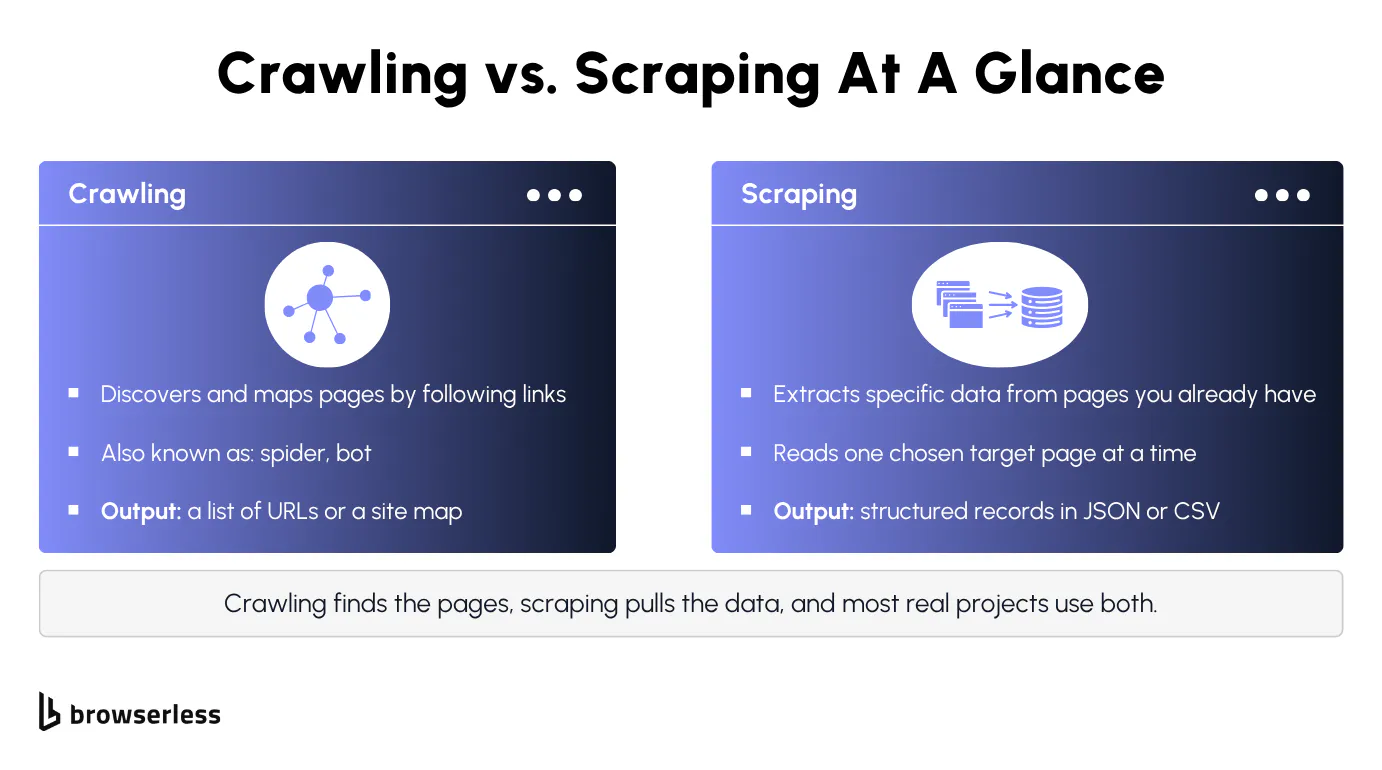
People blur crawling and web scraping because the two so often run together, and the words get thrown around loosely. A web crawler gets called a spider or a bot because it roams a site the way Google builds its search engine index. Keep the reconnaissance job separate from the extraction job, and the rest of this comparison falls out naturally.
Different outputs and data quality
The main difference shows up in what each one produces. A crawl gives you a list of URLs or a site map, a catalogue of where things live. A scrape gives you structured records in JSON, CSV, or straight into a database. The output follows the job, so discovery gets you an inventory and extraction gets you data.
A crawl hands you "here are the 5,000 product pages on this site," while a scrape hands you "here is the title, price, and stock status for this one product page."
Because the outputs differ, you measure success differently too. You judge a scrape on data quality, how accurate and complete the fields it pulled actually are, while a crawl has its own measures that the next section covers. That data-quality bar is the first thing to break the moment a site changes its markup.
How a web crawler works
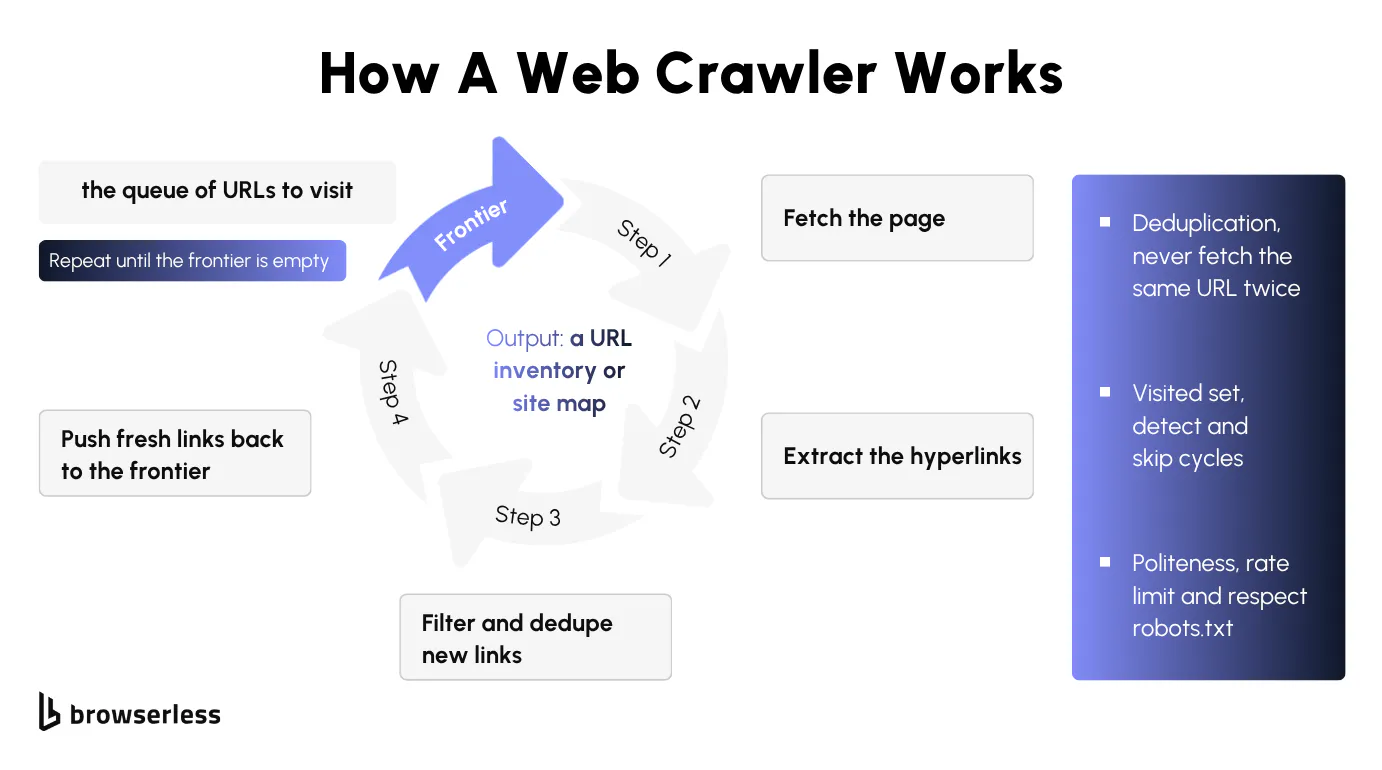
Rather than firing off a single fetch, a crawl runs as a loop that starts from one or more seed URLs and follows links from page to page, collecting every new URL it finds until it runs out of pages to visit. The output is a URL inventory: every discoverable page on the site, with no extracted content.
Following links from seed URLs
A crawler keeps a queue of URLs waiting to be visited, often called the frontier. It starts from one or more seed URLs, fetches each page, extracts the hyperlinks, and pushes the new ones back onto the queue. The loop repeats until the queue empties or a budget runs out.
A few mechanics keep that loop from spiraling out of control. Deduplication stops the same URL being fetched twice, a visited set detects cycles so the crawler doesn't circle back on itself forever, and politeness, meaning rate limiting and respecting robots.txt, keeps the crawl from hammering the target. It's the same loop search engines run at web scale to build their search index.
Short as it is, the loop is worth seeing in full. This version seeds on books.toscrape.com and caps itself at a few listing pages to stay polite.
from collections import deque
from urllib.parse import urljoin, urlparse

import requests
from bs4 import BeautifulSoup

SEED = "https://books.toscrape.com/"
MAX_LISTING_PAGES = 3
SAME_HOST = urlparse(SEED).netloc


def is_product_url(url: str) -> bool:
    """A books.toscrape product page lives under /catalogue/<slug>/index.html."""
    path = urlparse(url).path
    return "/catalogue/" in path and path.endswith("index.html") and "category" not in path


def crawl(seed: str) -> list[str]:
    frontier = deque([seed])      # queue of URLs waiting to be visited
    visited: set[str] = set()     # cycle detection + dedup
    discovered: set[str] = set()  # product URLs found along the way
    listing_pages_fetched = 0

    while frontier and listing_pages_fetched < MAX_LISTING_PAGES:
        url = frontier.popleft()
        if url in visited:
            continue              # dedup: never fetch the same URL twice
        visited.add(url)

        resp = requests.get(url, timeout=15)
        resp.raise_for_status()
        listing_pages_fetched += 1
        soup = BeautifulSoup(resp.text, "html.parser")

        for a in soup.select("a[href]"):
            link = urljoin(url, a["href"])
            if urlparse(link).netloc != SAME_HOST:
                continue

            if is_product_url(link):
                discovered.add(link)
            elif "page" in link and link not in visited:
                frontier.append(link)  # follow pagination to find more products

    return sorted(discovered)


products = crawl(SEED)
print(f"Discovered {len(products)} product URLs from {SEED}")
Pointed at the live site, it walks three listing pages and hands back 40 product URLs.
This crawler never spins up a browser, and it doesn't need to. Discovering links in server-rendered HTML rarely needs a headless browser. The anchors are already sitting in the markup that arrives, so plain requests is enough.
What data crawling produces
What you get back is a map of where things live, not the contents of any page, which is why crawls feed site and SEO audits as well as the input list for a later scrape. The crawl tells you which pages exist, and a later scrape tells you what is actually on them.
You measure a crawl differently from a scrape. Coverage asks whether you found all the pages you should have, and freshness asks whether the URL set still matches the live site. You can run a crawl broad, walking the whole site, or scoped, touching only the product pages under one path, and that choice is the one that comes back later when you decide how to attack the job.
All of this rests on one assumption, that what you want is already sitting in the static markup. That holds while you're only collecting links. It stops holding the moment you start pulling real data off the page, and that is where scraping takes over.
How a web scraper works
Scraping is the half that turns the pages a crawl found into data you can actually use. You hand a web scraper a page you already have, it pulls out the values you care about, and writes them out as structured records. It is a short pipeline, and it breaks in two predictable places.
How to extract data from a page
Under the hood it does five things in order. It fetches the page, selects elements with CSS selectors or XPath, pulls the values out, validates them against the shape you expect, and writes the output. That is more than a one-liner because every one of those steps can fail on its own.
Say you want three fields off a product page, the title, the price, and the availability. The job is to turn raw HTML into clean JSON or CSV that something downstream can trust, and that is why the validate step matters. On a single book page, it refuses to write a record unless the price actually parses as a number.
import json
import re
import sys

import requests
from bs4 import BeautifulSoup

TARGET = "https://books.toscrape.com/catalogue/a-light-in-the-attic_1000/index.html"


def extract(url: str) -> dict:
    # fetch
    resp = requests.get(url, timeout=15)
    resp.raise_for_status()
    resp.encoding = resp.apparent_encoding  # page is UTF-8; don't trust the HTTP default
    soup = BeautifulSoup(resp.text, "html.parser")

    # select: locate each field with a CSS selector
    title_el = soup.select_one(".product_main h1")
    price_el = soup.select_one("p.price_color")
    avail_el = soup.select_one("p.availability")

    # extract: pull the raw values out
    title = title_el.get_text(strip=True) if title_el else None
    price_raw = price_el.get_text(strip=True) if price_el else ""
    availability = avail_el.get_text(strip=True) if avail_el else None

    # validate: the price must parse as a number before we trust the row
    match = re.search(r"[\d.]+", price_raw)
    if not match:
        sys.exit(f"price selector returned {price_raw!r}: markup likely changed")
    price = float(match.group())

    # output
    return {"url": url, "title": title, "price": price, "availability": availability}


print(json.dumps(extract(TARGET), indent=2))
The result is a clean record, with the title, a price of 51.77 parsed off £51.77, and In stock (22 available). The catch is that those same selectors are also the most fragile part of the job.
Where scrapers break on dynamic pages
Broken scrapers almost always fail one of two ways, and the first is schema drift, where the site changes its markup and the selectors that used to match start returning nothing while your scraper keeps running like nothing happened. It's the kind of bug that doesn't look like one. Nothing throws, nothing logs, and the rows look fine until someone checks them a week later and finds a column full of nulls. That validate step you just wrote is the cheap insurance against it. Rename price_color and the parse fails loudly instead of quietly poisoning your data.
The other one is dynamic pages. A plain HTTP fetch only sees the static HTML in the response body, so anything rendered by JavaScript after the page loads is just not there when your request-and-parse stack goes looking for it. You request the page, you get a shell, your selectors match nothing. The fix is a headless browser that runs the page's JavaScript before you extract.
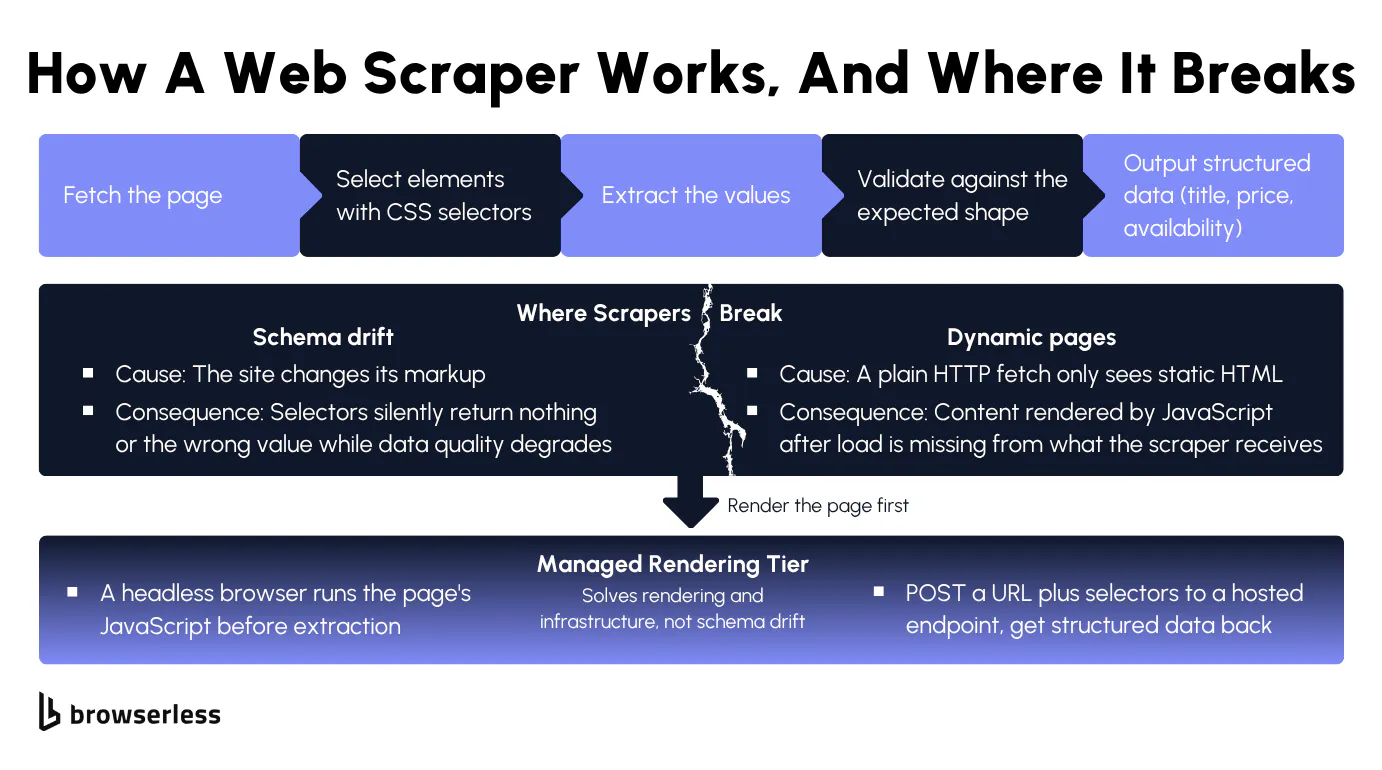
Rather than running and scaling browsers yourself, you can hand the rendering off to a managed tier, posting a URL and a set of selectors to a hosted endpoint and getting structured data back from a page a static fetch would miss. The target here, quotes.toscrape.com/js, builds its quotes in the browser, so a plain HTTP request returns none of them while the rendered call below returns all ten.
curl -s -X POST "https://production-sfo.browserless.io/scrape?token=${BROWSERLESS_TOKEN}" \
  -H "Content-Type: application/json" \
  -d '{
        "url": "https://quotes.toscrape.com/js",
        "elements": [
          { "selector": ".quote .text" },
          { "selector": ".quote .author" }
        ]
      }' \
| jq -r '.data[]
         | "selector \(.selector):",
           (.results[] | "  - \(.text | gsub("^\\s+|\\s+$";""))"),
           ""'
The /scrape REST API renders the page in a real browser and hands back the elements, which is the part you'd otherwise build and babysit yourself, a headless Chrome pool kept patched and scaled. It won't save you from schema drift, though. A managed browser runs the JavaScript and returns the elements, but if the site renames a class, your selectors still need updating by hand.
Routine customization sits on the query string. blockAds=true, for one, runs an ad blocker that cuts page noise and speeds up rendering. The full set of flags is documented in the launch parameters reference, and they are opt-in, enabled by setting the flag rather than applied for you. Not every flag is valid on every endpoint, so check the reference before adding one.
When to crawl, scrape, or combine them
Which approach a job needs comes down to one thing: how much you already know when you start. The richest case is the one where you do both, crawling to discover the URLs and then scraping each one for its data, so start there.
The two-step pipeline: crawl, then scrape
A lot of real work runs in two stages. First you crawl to discover the URLs, then you scrape each one to extract the data. The handoff is the part nobody explains when they talk about either half on its own, and it's dead simple once you see it. The list of URLs the crawl produced becomes the queue the scrape works through, one extraction per URL.
The glue that joins them is barely any code. The loop below walks that queue, calling /scrape on each page with a short pause between requests so you stay polite.
const TOKEN = process.env.BROWSERLESS_TOKEN;
const ENDPOINT = `https://production-sfo.browserless.io/scrape?token=${TOKEN}`;

// Stage 1 output: the URLs a crawler discovered (see the frontier crawler).
const discoveredUrls = [
  "https://books.toscrape.com/catalogue/a-light-in-the-attic_1000/index.html",
  "https://books.toscrape.com/catalogue/tipping-the-velvet_999/index.html",
  "https://books.toscrape.com/catalogue/soumission_998/index.html",
];

const sleep = (ms) => new Promise((resolve) => setTimeout(resolve, ms));

async function scrape(url) {
  const res = await fetch(ENDPOINT, {
    method: "POST",
    headers: { "Content-Type": "application/json" },
    body: JSON.stringify({
      url,
      elements: [{ selector: ".product_main h1" }, { selector: "p.price_color" }],
    }),
  });
  if (!res.ok) throw new Error(`${url} -> HTTP ${res.status}`);

  const { data } = await res.json();
  const value = (sel) =>
    data.find((d) => d.selector === sel)?.results[0]?.text.trim() ?? null;
  return { url, title: value(".product_main h1"), price: value("p.price_color") };
}

const records = [];
for (const url of discoveredUrls) {
  records.push(await scrape(url)); // crawl output -> scrape input queue
  await sleep(300);
}
console.log(JSON.stringify(records, null, 2));
Run it and three URLs come back as three records, each with its title and price, the crawl's inventory turned into rows of data. That same pattern backs price monitoring, lead generation, and plenty of other jobs where the crawl finds the listings and the scrape pulls the fields off each one.
None of this is hard on a practice site like books.toscrape.com. Point the same pipeline at a real e-commerce target and it gets hard fast. You start running into IP blocks, content hides behind JavaScript rendering, rate limits kick in, and CAPTCHAs start showing up. Past that point you're maintaining queue management, retry logic, rotating residential proxies, fingerprint evasion, and challenge solving on top of the code you actually wanted to write, which is where running the browsers yourself costs more than handing them off.
Four ways to approach a data job
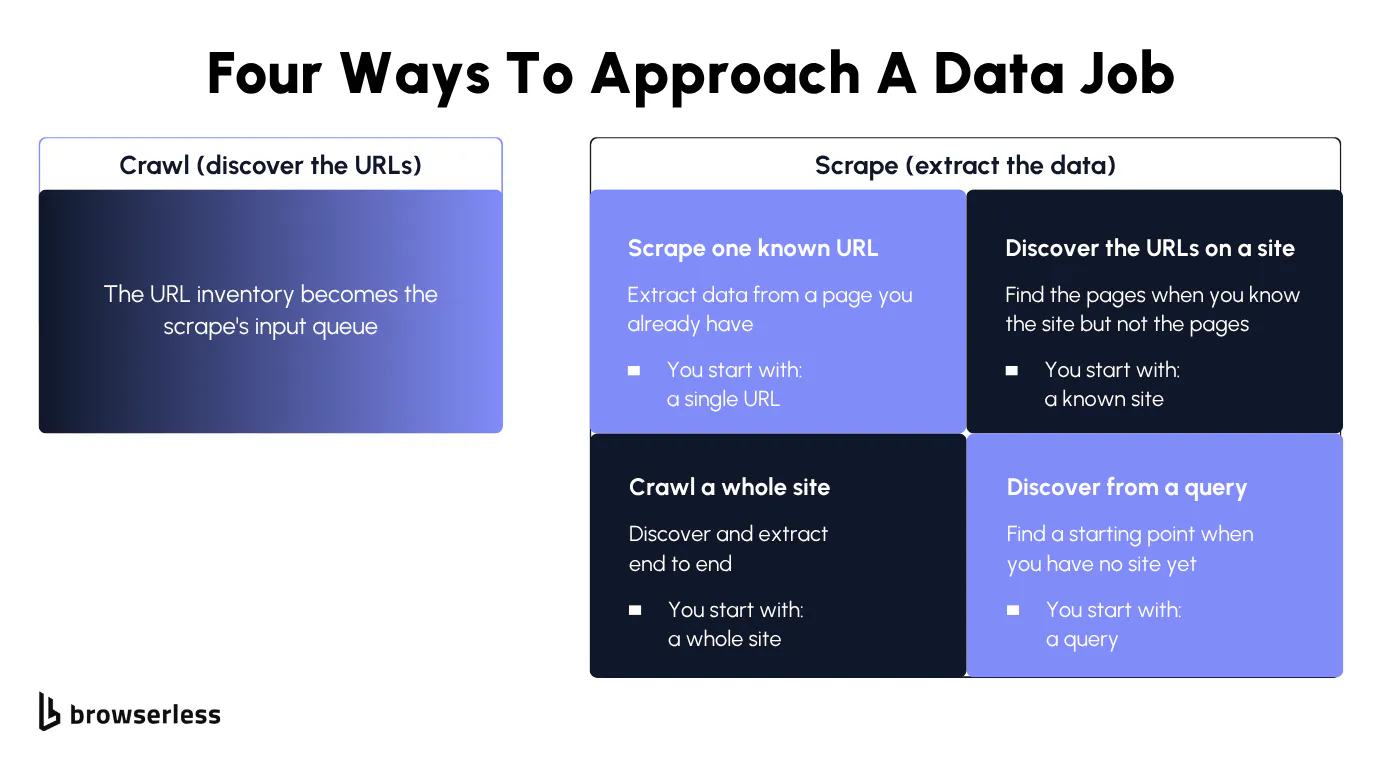
That two-stage pipeline is the richest case, but not every job needs both stages. In practice a job lands in one of four buckets depending on how much you already know going in, and each one starts somewhere different.
- Scrape one known URL. You already have the target page and only need its data, which is the single-URL case.
- Discover the URLs on a site. You know the site but not the specific pages, so you map it first to get the URL set.
- Crawl a whole site. You want discovery and extraction end to end, walking the site and pulling data as you go.
- Discover from a query. You don't even have a starting site, so you begin from search results and work back to the pages.
None of these is exclusive. A query-first job often feeds a crawl, which feeds a scrape, so it's the same crawl-then-scrape pipeline with one extra stage bolted on the front. Which one you pick just comes down to where you jump into that chain, and that depends on what you already have in hand.
Mapping the four approaches to managed endpoints
Each of those four approaches has a managed endpoint behind it, so you can pick your entry point without standing up your own crawler or browser pool. It's the same work you just saw by hand, only someone else runs the browsers.
The mapping is one endpoint per job, so you pick by what you already have in hand:
| You're starting with | Reach for | What it hands back |
|---|---|---|
| One URL you already have | /scrape | The fields you select from that page |
| A site, but not its page list | /map | Every URL it can find on the site |
| A whole site to walk and pull data from | /crawl | Every page it discovers, scraped, in one job |
| Nothing but a search query | /search | Pages found from the query, ready to scrape |
/scrape is the workhorse and the one to start with. When a page actively blocks you, reach for /smart-scrape, where you request output formats like HTML, markdown, or links instead of passing CSS selectors. It climbs only as far as the page forces it, a plain HTTP fetch first, a proxied fetch if that gets blocked, then a headless render, and finally a render with CAPTCHA solving for the locked-down stuff. You get the page content back without hand-writing that fallback ladder, and the response tells you which strategy cleared the page.
/map, /crawl, and /search are Cloud-only, so if you need a path that runs on the free tier, start with /scrape. Most of these are single-request REST endpoints that handle navigation and extraction in one shot. /crawl is the exception, since it runs as an async job, so you kick it off, get back an ID, and poll for results as the pages finish.
When a job needs more than one request, holding a session across steps, routing through managed proxies, or solving a challenge inline, you move up to the connection-based tools. Browsers as a Service (BaaS) connects your existing Puppeteer or Playwright code to a managed browser over WebSocket, so you keep your scripts and drop the infrastructure. BrowserQL goes a step further, a stealth-first language where you write scraping flows as declarative mutations built to slip past bot detection. One API token works across all of them.
Conclusion
So the next time a job lands on your desk, the only question worth asking is what you already have. If it's one page, scrape it, and if it's a whole site you haven't mapped yet, crawl or map it first and then scrape what you find. Get that call right and the rest mostly follows: the library and the endpoint are decisions you can make quickly once you know which job you're doing. Browserless gives you one endpoint for each of those moves, so you can start with a single /scrape call and reach for crawling and discovery when the job outgrows it. Sign up for a free account and start with the page in front of you.
FAQs
Is web scraping legal?
Scraping publicly available data is permitted in many jurisdictions, but whether web scraping is legal depends on the site's terms of service, the kind of data involved, and local law. Personal data carries extra obligations under regimes like GDPR, and bypassing a login or paywall changes the picture entirely. Check the target's terms, respect robots.txt, honor opt-out signals, and avoid collecting personal information you don't have a basis to process.
Can you crawl a site without scraping it?
Yes. A crawl that only maps URLs, for a site audit, a sitemap, or a broken-link check, never has to extract any page content. Crawling and scraping are independent stages, so you run the scrape step only when you actually need the data behind the URLs the crawl found.
Can a scraper read data from tables and HTML attributes?
Yes. Scraping isn't limited to visible text. A selector can target a table cell, an HTML attribute like data-id, href, or alt, or a value embedded in a script tag's JSON. The selector locates the node, and whether you read its text or one of its attributes is just how you choose to pull the value out.
Can a crawler get stuck on a JavaScript-only site?
Yes. If a site builds its navigation links with JavaScript, a plain HTTP crawler receives an empty shell with no anchors to follow, so it never gets past the seed URL and the crawl dead-ends. Rendering each page in a headless browser before extracting links is what unsticks it, since the links only exist in the rendered DOM.
Can crawling and web scraping feed an LLM?
Yes, and a lot of web data extraction for natural language and large language model (LLM) work starts exactly here. You crawl to discover pages, scrape to collect the data, and feed the cleaned output into your data pipelines, where it becomes the dataset a model trains on or retrieves from. Rendering matters more than usual, because JavaScript-heavy pages won't hand their content to a plain fetch, and a model is only as good as the data sets behind it.