
TL;DR
- Self-hosted automation. Open source workflow automation tools run trigger-based, multi-step workflows on infrastructure you control, and their licenses range from fully open (MIT, Apache 2.0, AGPL) to source-available.
- Six real options. n8n is the usual default, Activepieces is the MIT-licensed alternative, Node-RED suits IoT, Windmill suits script-first teams, Automatisch is the smallest, and Temporal handles durable, long-running processes.
- No managed browser. Their HTTP nodes fetch raw responses, so a step that needs a rendered page, a login, or bot handling needs a real browser behind the workflow.
Introduction
Search for open source workflow automation tools you can run on your own servers, and you'll get app-to-app builders mixed in with data orchestrators like Apache Airflow, business process management (BPM) suites like Camunda, and low-code app builders. Even among real workflow builders, "open source" ranges from a permissive MIT license to terms that stop you from reselling the tool.
The six tools here all build and run workflows, and you can self-host every one. For each, you'll see what it's built for, how it's licensed, and what it costs your team in time to keep running. You'll also see how to handle steps that need a real browser, since none of these tools ships a managed one.
What counts as open source workflow automation?
Workflow automation boils down to a trigger and a chain of steps across different tools. For example, a form submission updates your CRM, or a scheduled job copies rows into a database and sends notifications when it's done.
You build these automated workflows so nobody has to do repetitive tasks by hand, whether that's routing tickets for customer support teams or syncing leads for marketing teams. Most builders let you lay out multi-step processes on drag-and-drop interfaces with conditional logic. When a prebuilt connector can't handle the data transformation you need, you can extend the workflow with code.
Comparisons get murky once you look at the licenses behind the open source label. MIT, Apache 2.0, and the GNU Affero General Public License (AGPL) are approved by the Open Source Initiative (OSI), so you can view, modify, and redistribute the code. AGPL adds one condition, which is that if you modify the code and offer it to users over a network, you have to share your changes.
Fair-code and source-available licenses, such as n8n's Sustainable Use License, let you read and self-host the code but limit commercial use. That rarely matters if you're automating internal work, but if you plan to resell something built on top of the tool, it decides your shortlist.
Data orchestrators, CI pipelines, and BPM suites solve different problems, and the broader guide to open source automation covers them.
How to choose an open source workflow automation tool
A few questions about your own setup will narrow the field faster than any feature table.
- License terms. Check that the license allows what you actually plan to do, especially if you want to resell the tool or host it for several customers.
- Self-hosting overhead. Server cost is small next to the hours spent on setup, monitoring, backups, security patches, and upgrades.
- Integration depth. When an upstream API evolves, a community-maintained connector for a less popular app can break without telling you. Identify your must-have integrations and check when each one was last updated.
- Builder vs. engine. Visual no-code tools let you create a workflow fast. A durable-execution engine keeps that workflow alive through a crash or a multi-day wait, and you can't swap one for the other.
- Browser steps. List any step that needs data from a page with no API, such as a supplier portal or a JavaScript-rendered dashboard, because their HTTP steps don't render pages.
- AI support. If language models are part of the plan, check whether the tool treats them as a first-class step or leaves you calling a model API yourself.
License and build style do most of the sorting. Grouped by those two questions alone, the six tools in this guide fall into four clear buckets.
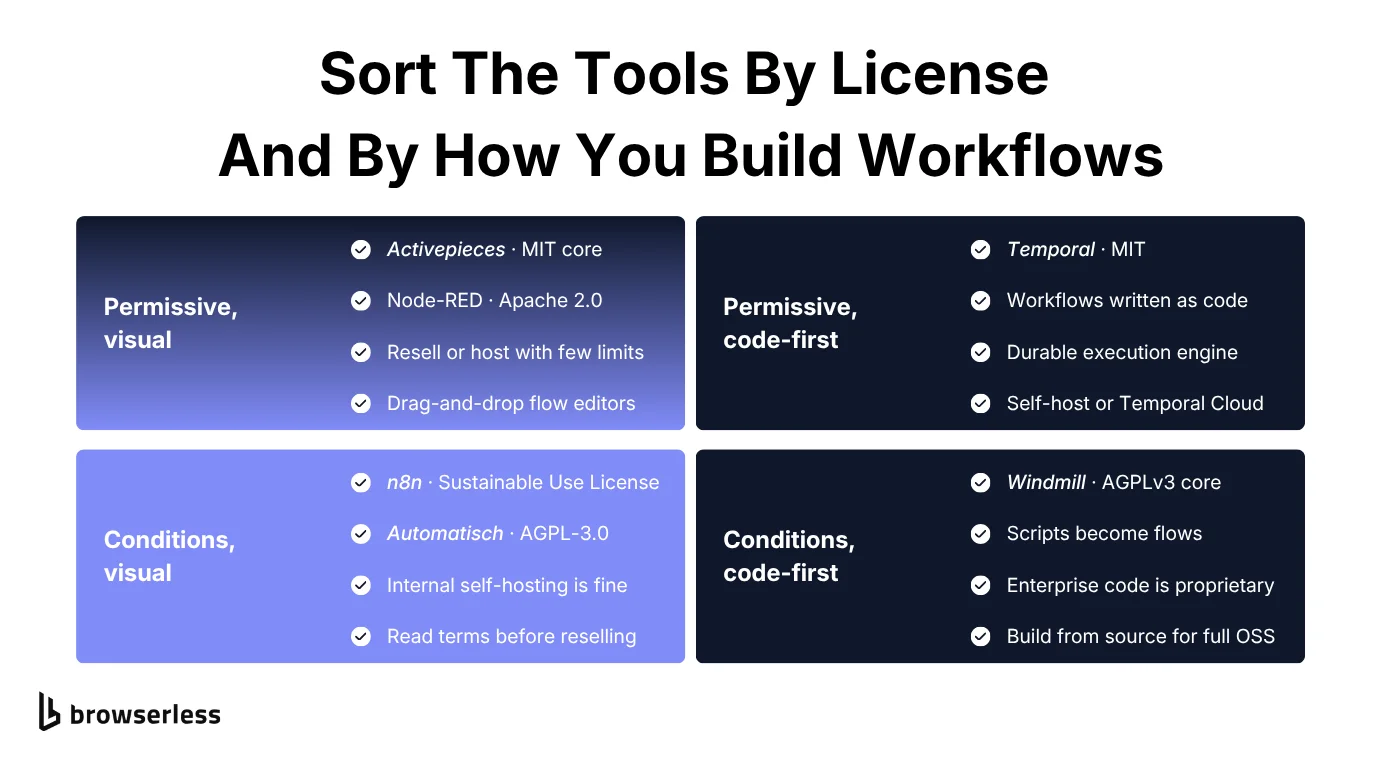
The best open source workflow automation tools in 2026
You won't find a numbered ranking of the best workflow automation tools here, because each of these six fits a different job. The GitHub star counts (checked October 2026) tell you how big a community is, not whether the tool fits your use case.
Since you'll be the one running whichever tool you pick, here's how the six compare side by side.
| Tool | License | Best for | What you run | Biggest self-hosting catch |
|---|---|---|---|---|
| n8n | Fair-code (Sustainable Use) | Business and AI workflows | 1 container, plus PostgreSQL and Redis to scale | SSO and Git environments need an enterprise license |
| Activepieces | MIT core | Permissive-license teams | App, PostgreSQL, Redis | Roles and audit logs are enterprise-only |
| Node-RED | Apache 2.0 | IoT and device events | 1 Node.js process | No built-in clustering |
| Windmill | AGPLv3 and Apache 2.0 core | Code-first developer teams | Server, workers, PostgreSQL | Prebuilt images include proprietary code |
| Automatisch | AGPL-3.0 core | Small, simple workflows | Main, worker, PostgreSQL, Redis | Slow release cadence |
| Temporal | MIT | Long-running, critical processes | Several services plus a database | Shard count fixed at creation |
If you just want a shortlist, start with the tool that matches your situation.
- Pick n8n if you want the biggest integration catalog and AI agent support, and you'll only use it internally.
- Pick Activepieces if you need a visual builder you can host for clients or resell.
- Pick Node-RED if your triggers come from devices, sensors, or MQTT.
- Pick Windmill if your team would rather write scripts than drag nodes.
- Pick Automatisch only for a few simple workflows you're prepared to fix yourself.
- Pick Temporal if a workflow can't afford to lose progress and you have engineers to run a cluster.
Each profile then ends with the same self-hosting scorecard, rating setup effort, infrastructure, scaling, security defaults, and upkeep, plus the tool's strongest point.
n8n
n8n is the tool everything else on this list gets compared to. Its node-based editor ships with more than 1,500 integrations, and its AI Agent node gives a language model the ability to pick which tools to call mid-workflow. You can spin up the free, self-hosted Community Edition with a single Docker command, and there's no per-execution pricing.
The catch is the license, since n8n is fair-code under the Sustainable Use License and files marked .ee need a separate enterprise license. You can self-host and modify it for internal use, but you can't sell it as a hosted service.
Community nodes need watching too, because a node for a less mainstream app can go stale the moment that app changes its authentication. On the plus side, the n8n repository has passed 200,000 GitHub stars, the largest community on this list.
Here's how n8n scores on self-hosting.
| Self-hosting factor | Rating | Why |
|---|---|---|
| Setup effort | Low | One Docker command |
| Infrastructure | Light | SQLite to start, PostgreSQL and Redis to scale |
| Scaling | Built in | Queue mode with Redis and workers |
| Security defaults | Good | Owner account on first launch, encrypted credentials |
| Upkeep | Medium | Keep the encryption key, back up the database |
| Strongest point | Integrations | 1,500+ nodes plus the AI Agent node |
Activepieces
If you like n8n's visual builder but want a properly permissive license, Activepieces is the closest match. Everything outside its enterprise directories is MIT licensed, so there's no fair-code limit on reselling or hosting it.
The trade-off is a smaller catalog of about 765 pieces, roughly half of n8n's count, so confirm your must-have integrations exist and are maintained. Pieces are written in TypeScript, and each one is also exposed as a Model Context Protocol (MCP) server, so AI clients like Claude Desktop or Cursor can integrate with the same apps.
On the same self-hosting factors, Activepieces asks for a bit more setup than n8n.
| Self-hosting factor | Rating | Why |
|---|---|---|
| Setup effort | Low | Docker Compose or a Helm chart |
| Infrastructure | Moderate | App, PostgreSQL, and Redis |
| Scaling | Built in | Separate worker containers, 5 jobs each by default |
| Security defaults | Needs work | Code steps run unsandboxed until you change AP_EXECUTION_MODE |
| Upkeep | Medium | Two required secrets to generate and back up |
| Strongest point | License | MIT core you can host for clients or resell |
Node-RED
Node-RED is the oldest tool here, built at IBM by the Emerging Technology Services team to wire up Internet of Things (IoT) devices and event streams. It now lives under the OpenJS Foundation with an Apache 2.0 license and about 24,000 GitHub stars.
You can still see those roots in its core nodes, which speak MQTT, TCP, and WebSockets out of the box. That makes it the strongest pick here for sensors, devices, and event-driven automation.
It's a weaker fit for app-to-app business workflows, since non-technical users will find the editor a less user-friendly interface than n8n's or Activepieces's, and its CRM and marketing integrations are thinner. On the other hand, it's the lightest of the six to self-host, since it needs no database and keeps its flows as a JSON file in ~/.node-red.
| Self-hosting factor | Rating | Why |
|---|---|---|
| Setup effort | Low | npm or one Docker container |
| Infrastructure | Light | No database, runs on a Raspberry Pi |
| Scaling | Manual | No clustering, so you run separate instances |
| Security defaults | Open | Editor unsecured until you set adminAuth |
| Upkeep | Low | Flows are one JSON file, easy to back up |
| Strongest point | Devices | Built-in MQTT, TCP, and WebSocket nodes |
Windmill
Windmill is the developer-first option, and it starts from code. You write scripts in Python, TypeScript, Go, Bash, SQL, or several other languages, and Windmill turns each one into a webhook, a scheduled job, or a step in a larger flow, with a UI generated from its parameters.
If your team prefers writing code to dragging nodes around, that model works well for batch jobs, data pipelines, and internal tools, not just event-driven flows. Windmill publishes benchmarks against Airflow, Prefect, and Temporal that put it first, so run your own performance testing before you trust them.
Its source is AGPLv3 or Apache 2.0 depending on the directory, but the prebuilt images include proprietary code, so a fully open build means compiling from source without the enterprise feature flag. The scorecard reflects the code-first design, with most of the operational work going into its workers.
| Self-hosting factor | Rating | Why |
|---|---|---|
| Setup effort | Low | Docker Compose on one host |
| Infrastructure | Moderate | Server, workers, and PostgreSQL, which also holds the job queue |
| Scaling | Built in | Add workers, about one per vCPU |
| Security defaults | Good | Secrets encrypted with a per-workspace key |
| Upkeep | Low | Script dependencies pinned in lockfiles on deploy |
| Strongest point | Code | Scripts in TypeScript, Python, Go, and more become flows |
Automatisch
Automatisch bills itself as an open source Zapier alternative, and its scope matches. It's AGPL-3.0 licensed except for files marked .ee, and its focus is a small feature set you can pick up quickly. At about 14,000 GitHub stars, it has the smallest community here.
Check its pulse before you adopt it, because the latest release, v0.15.0, shipped in August 2025 and the last commit landed in January 2026. If a connector breaks when you add new systems, you may wait longer for a fix, so it suits a small team running simple, mainstream workflows.
| Self-hosting factor | Rating | Why |
|---|---|---|
| Setup effort | Low | docker compose up from the repository |
| Infrastructure | Moderate | Main, worker, PostgreSQL, and Redis |
| Scaling | Built in | Add worker containers from the same image |
| Security defaults | Needs work | Default user@automatisch.io login to change |
| Upkeep | High | Slow releases, and changing keys breaks flows |
| Strongest point | Simplicity | Small feature set you can learn fast |
Temporal
Temporal isn't a builder at all but a durable-execution engine, so you write workflows as code, and Temporal records each step's result in an event history. If a worker crashes, another one replays that history and picks up where the workflow stopped, so it can still complete after a multi-day wait.
Reach for it when you have business-critical workflows that run long, like payment processing, order fulfillment, or a multi-step AI agent loop that can't afford to lose its progress. The event history also gives you better visibility into where each run stopped and why.
Temporal is MIT licensed, so the real cost is operations, and its scorecard shows where that cost lands. Without platform engineers to run a cluster, Temporal Cloud offers a scalable managed one.
| Self-hosting factor | Rating | Why |
|---|---|---|
| Setup effort | High | Several services to deploy and tune |
| Infrastructure | Heavy | PostgreSQL, MySQL, or Cassandra, plus Elasticsearch at volume |
| Scaling | Built in | Services scale separately, but shard count is fixed |
| Security defaults | Open | Any client can call any API until you set an authorizer |
| Upkeep | High | Worker code must replay in-flight histories |
| Strongest point | Durability | Workflows survive crashes and multi-day waits |
Open source AI workflow automation tools
Each of these tools now advertises artificial intelligence (AI) features, but AI workflow automation really means one of two patterns, and each fails in its own way.
In the first, the language model works inside a fixed pipeline. A workflow pulls a record, the model classifies it or drafts a reply, and the next step sends it. n8n's AI Agent node and Activepieces's AI pieces fit here, with the workflow around the model staying fixed and easy to inspect.
In the second, the model is the orchestrator and decides what happens next. Now reliable execution matters more than any AI feature, because the failure that hurts is a crash or a stalled tool call halfway through a long agent loop. Temporal fits this pattern, and its OpenAI Agents SDK integration routes every model call through a durable Activity, and you can wrap tool calls as Activities too.
Whichever pattern you pick, cap the number of steps an agent can take, and check the accuracy of structured outputs against a schema before the workflow writes anything.
Which open source workflow automation tools can automate browser-based tasks?
All six tools talk to other systems through APIs and webhooks, and none of them ships a managed browser. Their HTTP nodes fetch the raw response and never run the page's JavaScript.
Say you build an n8n workflow that pulls a supplier's prices every night, and the supplier's catalog page renders its product list with JavaScript. The HTTP Request node gets back the page shell with an empty list, so any extraction step after it finds nothing. The same challenge shows up when a step has to log in to a dashboard with no API or get past bot detection.
You can run Puppeteer or Playwright on the workflow host, through a Node-RED or n8n community node, a Windmill script on its Chromium-equipped reports workers, or a Temporal activity. It works, but now your team owns the implementation, plus browser versions, memory leaks, session handling, and scaling, all on the same machines that run your workflows. That puts a browser on the same patch-and-monitor list that makes up the real cost of self-hosting.
It also widens the security exposure the scorecards flag. A browser runs whatever JavaScript the target page serves, and on the workflow host it runs next to every credential your workflows hold.
Browserless takes the browser off the workflow host and runs it in the cloud. You configure it as a plain HTTP request in a step your workflow already has, and Browserless sends back extracted data, a screenshot, a PDF, or rendered HTML through its REST API. For sites that actively push back on automation, BrowserQL adds stealth handling and CAPTCHA solving.
The harder browser steps go through the same HTTP call. Session persistence saves cookies, localStorage, and cache between runs, so a nightly workflow can skip the login flow it would otherwise repeat every time. When a step needs more than extraction, like clicking through a multi-page form, the /function endpoint runs your own Puppeteer code without any browser library on the workflow host.
Scored on the same factors as the tools, the two approaches look like this.
| Factor | Browser on your workflow host | Browserless |
|---|---|---|
| Setup | Chromium plus Puppeteer or Playwright on every worker | One HTTP request from an existing step |
| Upkeep | You patch Chrome and the library, and chase memory leaks | Browserless runs and updates the browsers |
| Scaling | Browsers compete with workflows for the same CPU and RAM | Browser sessions run on Browserless's cloud |
| Security | Untrusted pages run beside your workflow credentials | Pages run off the workflow host |
| Bot detection | Your own stealth setup and CAPTCHA handling | BrowserQL stealth and CAPTCHA solving |
| Logins | You store and reuse cookies yourself | Session persistence keeps cookies and localStorage between runs |
For the nightly price check, the HTTP Request node sends one POST to the /scrape endpoint with the page URL and a CSS selector for each field you want. Here's that request as curl, pointed at a public demo page that renders its content with JavaScript.
curl -X POST "https://production-sfo.browserless.io/scrape?token=YOUR_API_TOKEN" \
  -H "Content-Type: application/json" \
  -d '{
    "url": "https://quotes.toscrape.com/js/",
    "elements": [{ "selector": ".quote .text" }]
  }'
A plain fetch of that page returns no quotes. Browserless renders the page first, so the response comes back as JSON with one entry per selector, trimmed here to the first match.
{
  "data": [
    {
      "selector": ".quote .text",
      "results": [
        {
          "text": "“The world as we have created it is a process of our thinking. It cannot be changed without changing our thinking.”"
        }
      ]
    }
  ]
}
Each match also carries its html and attributes, so the next node can map fields straight into a sheet or database. In n8n, the same URL and body go into the HTTP Request node, with the token kept in n8n's credentials rather than hardcoded in the workflow.
Whichever tool runs the workflow, the request path looks the same, with plain HTTP out and finished results back.
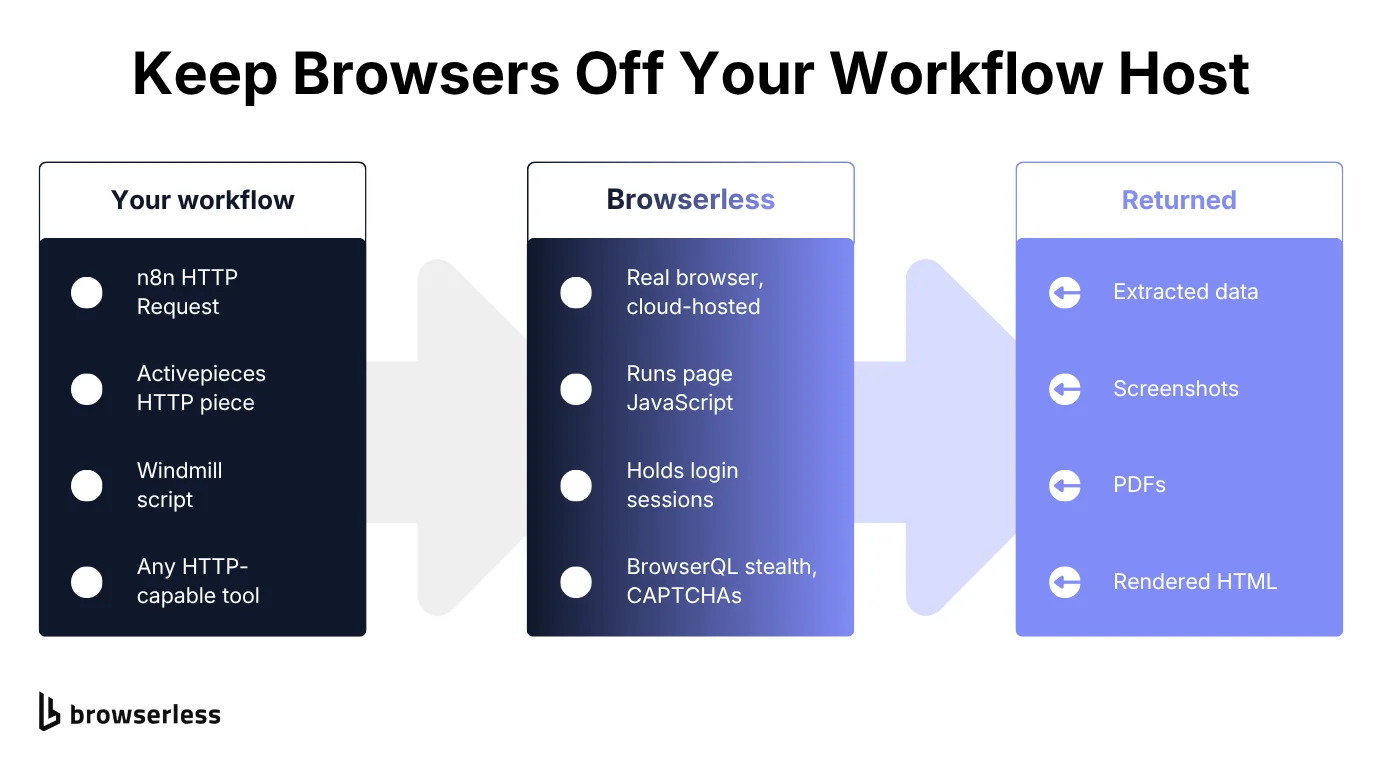
For n8n specifically, Browserless publishes n8n templates for the HTTP Request node, and the n8n use cases guide walks through five workflows built on that node. Agent workflows can also connect through the Browserless MCP server, so an agent's next action can be a click on a live page.
Conclusion
Start with one workflow that already costs your team time, run it on the tool whose license and build style fit, and track the hours it takes to keep running for a month. That number tells you more about self-hosting than any comparison table, and you'll have it before anything business-critical moves over.
When one of those workflows needs a page with no API, like a supplier portal or a JavaScript-rendered dashboard, keep the browser off your workflow host. Browserless runs it in the cloud and returns data, screenshots, or PDFs to the HTTP step your workflow already has, so your team has one less system to patch. To try it on that workflow, sign up for Browserless.
Open source workflow automation tools FAQs
Is n8n actually open source?
Not by the OSI definition, since n8n is fair-code. You can self-host and modify it for internal use, but you can't sell it as a hosted service. If you need an OSI-approved license with a similar visual builder, start with Activepieces.
How do BPMN engines like Imixs Workflow differ from workflow automation tools?
Workflow automation tools connect apps through triggers and steps. A Business Process Model and Notation (BPMN) engine, such as Camunda or Imixs-Workflow, runs process models drawn in that standard, with human tasks, approval chains for stakeholders, and audit trails built in.
Go with a BPMN engine when your business process automation needs formal modeling and sign-off, as it often does in a regulated industry. If the job is moving data between apps, a workflow tool is the better fit.
What does self-hosting workflow automation tools really cost?
The servers are usually the cheap part, and the real cost is engineering time for setup, monitoring, backups, security patches, and major-version upgrades. Unlike hosted platforms, none of that shows up on a pricing page, so budget it in hours.
Can open source workflow automation tools run AI agents?
n8n's AI Agent node and Activepieces's AI pieces run an agent inside a workflow, and Temporal makes long agent loops durable. The two patterns differ mainly in whether the model works inside a fixed pipeline or decides what happens next.