
TL;DR
- The panic had substance. A November 2 X post told developers to delete Playwright over a Playwright vulnerability in its pinned Chromium build. The CVEs were real, but deleting Playwright doesn't fix them, and Playwright 1.65.0 pins a newer Chromium 158.
- Configuration is the risk. Playwright's own two CVEs (CVE-2025-59288, and CVE-2025-9611 in Playwright MCP) are fixed in 1.55.1 and 0.0.40. PostHog's May 2026 incident came from an outdated, unsandboxed Chromium, not Playwright's code.
- Sandbox and isolate. For pages you don't control, launch Chrome with
channel: 'chrome'andchromiumSandbox: true, patch the browser on its own schedule, and give every job its own isolated session.
Introduction
In May 2026, a researcher turned a known Chromium bug into a shell on one of PostHog's servers, through a browser PostHog drove with Playwright. So when a post on X told developers to delete Playwright over a Playwright vulnerability five months later, it was pointing at the same kind of risk, an old and unsandboxed browser rather than a flaw in Playwright's code.
Deleting the framework wouldn't have stopped that attack, while an up-to-date browser with the sandbox on would have. You pick both when you launch Playwright, whether you run it yourself or hand it to an AI agent over Model Context Protocol (MCP).
The X post that said to delete Playwright
On November 2, 2026, developer nisten told anyone running AI coding agents without containers to delete Playwright. According to the post, even the latest release at the time, Playwright 1.64.1, bundled an early Chromium 156 build with four known CVEs, and Playwright's sandbox is off by default.
Those CVEs are real, and they're the four Critical fixes in Chrome's October 27, 2026 stable update to 156.0.8078.73, out of 52 security fixes in that release. One of them, CVE-2026-118306, is a use-after-free in Chromium's FileSystem component that NVD says lets a crafted HTML page run code outside the sandbox.
A Playwright GitHub issue asking for a newer pinned Chromium, which reported 245 Chrome CVEs flagged on the 1.64.1 Docker image, went up on October 27, the same day Chrome shipped those fixes and six days before the post. A change closed it on October 30 by making Playwright's Docker images pull the latest stable Chrome for Testing, and no 1.64.x npm patch followed. The fix for npm users arrived on November 5 with Playwright 1.65.0, which moves the pinned build to Chromium 158.0.8127.18.
I always like a good backport, but Chrome tends to ship security fixes in new builds rather than patching old ones, so the fix was always going to mean moving forward. Playwright did that, and I think it was the right call. When the room is on fire, you get everyone out first.
So the post got the risk right. If you'd installed Playwright's browsers, you had a Chromium with known Critical holes on your machine, sometimes wired into an agentic browser setup with access to your filesystem and terminal. Where it went wrong was the fix, since deleting Playwright doesn't patch that browser or switch its sandbox on. The advice also misreads how Playwright decides which browser to launch.
Playwright's response, and what it changes
Playwright's account replied on November 3 and corrected the post's starting point. No Playwright package bundles a browser, and which one you get depends on how you run Playwright.
If you run an AI coding agent through Playwright MCP or the Playwright CLI, it drives the stable Chrome you already have installed, which updates itself and runs with the sandbox on.
If you use the test runner, npx playwright install downloads a separate build called Chrome for Testing, plus a matching headless shell for headless runs, pinned to the Chromium version that Playwright release was tested against. Playwright pins it on purpose so your test suite doesn't fail overnight because Chrome shipped an update, and you get a newer browser when you upgrade Playwright.
The catch is that the pinned build can lag behind Chrome's security fixes until the next Playwright release, and chromium.launch() starts it with the sandbox off by default. When the post went up, Playwright 1.64.1 still pinned Chromium 156.0.8078.4, while stable Chrome had moved to 156.0.8078.73 with the Critical fixes on October 27.
That setup is fine for end-to-end tests that walk through your own app's user flows, where you control every page, and that's where Playwright recommends it. For a scraper or agent that visits pages you don't control, Playwright's advice is to change the launch call and pass two options to chromium.launch().
const browser = await chromium.launch({
  channel: "chrome",
  chromiumSandbox: true,
});
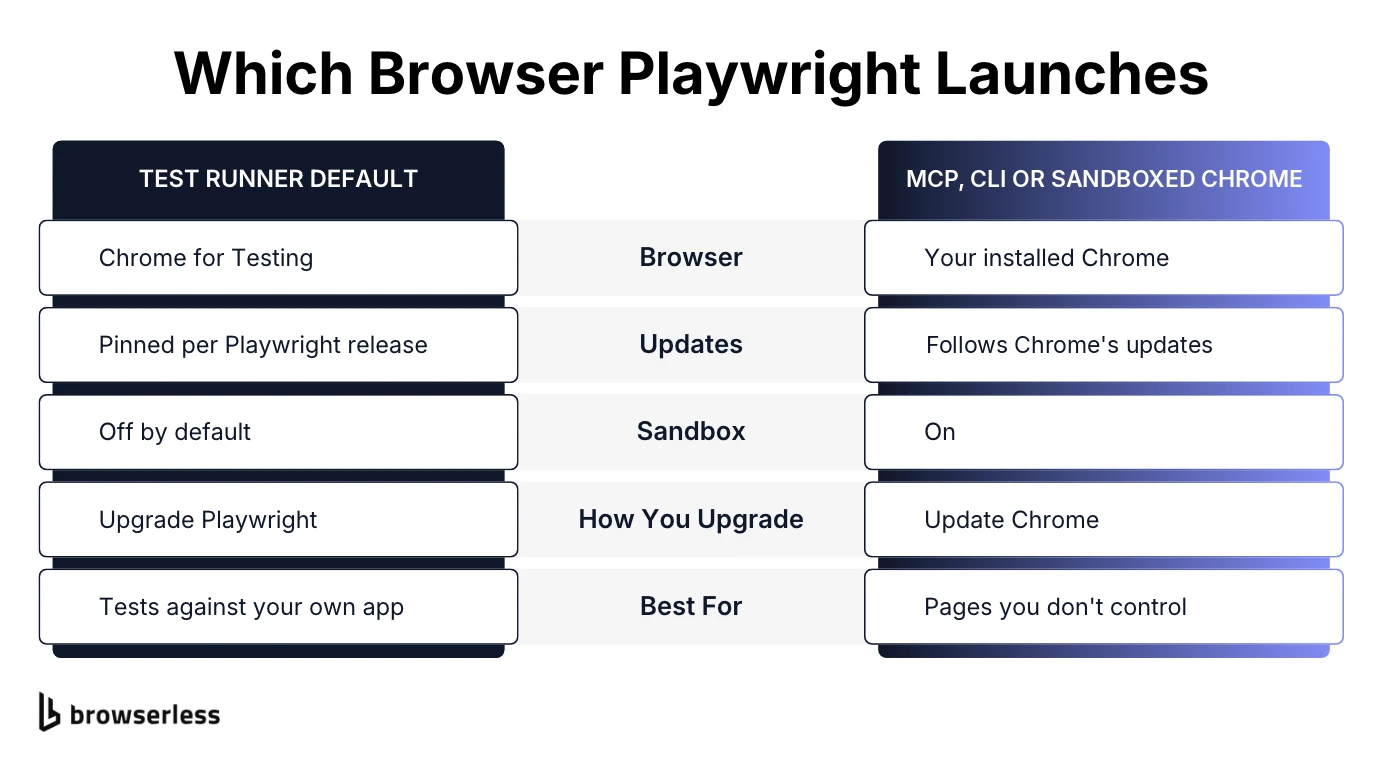
channel: 'chrome' starts the stable Chrome installed on the machine instead of Playwright's pinned Chromium builds, and chromiumSandbox: true turns the sandbox back on. You end up with the same sandboxed Chrome you browse with, patched on Chrome's schedule rather than Playwright's. If Chrome isn't installed yet, npx playwright install chrome adds it.
What are the most common security vulnerabilities when using Playwright for browser automation?
Playwright's open-source packages have two published CVEs, and both are patched. The other two problems on this list don't have CVE numbers, but PostHog's incident came from one of them.
CVE-2025-59288 in the macOS install scripts
Before 1.55.1, Playwright's macOS browser-reinstall scripts downloaded installer packages with a TLS option that skipped certificate verification. An attacker on your network could swap in a malicious installer mid-download, a flaw tracked as CVE-2025-59288 and fixed in Playwright 1.55.1.
CVE-2025-9611 in Playwright MCP
Before 0.0.40, the Playwright MCP server didn't check the Origin header on incoming requests. That left it open to DNS rebinding, where a malicious website tricks your browser into treating the attacker's domain as a local address and uses it to reach the MCP server running on your machine. From there, the site could call the server's tools without your authorization, a flaw tracked as CVE-2025-9611 and fixed in @playwright/mcp 0.0.40.
Stale pinned browsers
Upgrading to 1.65.0 fixes the gap the X post found, but the pinned build falls behind again whenever Chrome ships a security fix before Playwright's next release, and the sandbox stays off unless you've configured it on.
Teams usually stay on a stale browser for legacy reasons. The infrastructure is set up and running, and touching it feels like fixing something that isn't broken, but software doesn't work that way. A published exploit against your browser is a breakage, so treat it like one and don't wait for the next convenient upgrade.
Over-privileged AI agents and prompt injection
Playwright MCP gives an agent full browser interaction, and that agent often holds credentials and filesystem access in the same process. Its AI model reads page text as natural language, so a page can carry prompt injection, text hidden in content or ads that's written to talk the agent into misusing its tools. Once a tab is compromised, it can reach anything the agent can reach, so the blast radius depends less on the browser than on what surrounds it.
How you isolate an agent's browser depends on the vulnerability and the agent, so there's no single recipe. Keep your LLM stack up to date, and past that you're relying on the frontier model providers' diligence. Agents are still pretty hesitant to exploit an open vulnerability, but that's changing fast.
An upgrade closes both CVEs, and the two launch options sandbox and stabilize the channel, but channel: "chrome" selects the Chrome installation on the machine. Keeping it current is a separate step. No Playwright version or flag fixes an over-privileged agent, though, so that exposure comes down to what you let the agent hold.
A real incident at PostHog
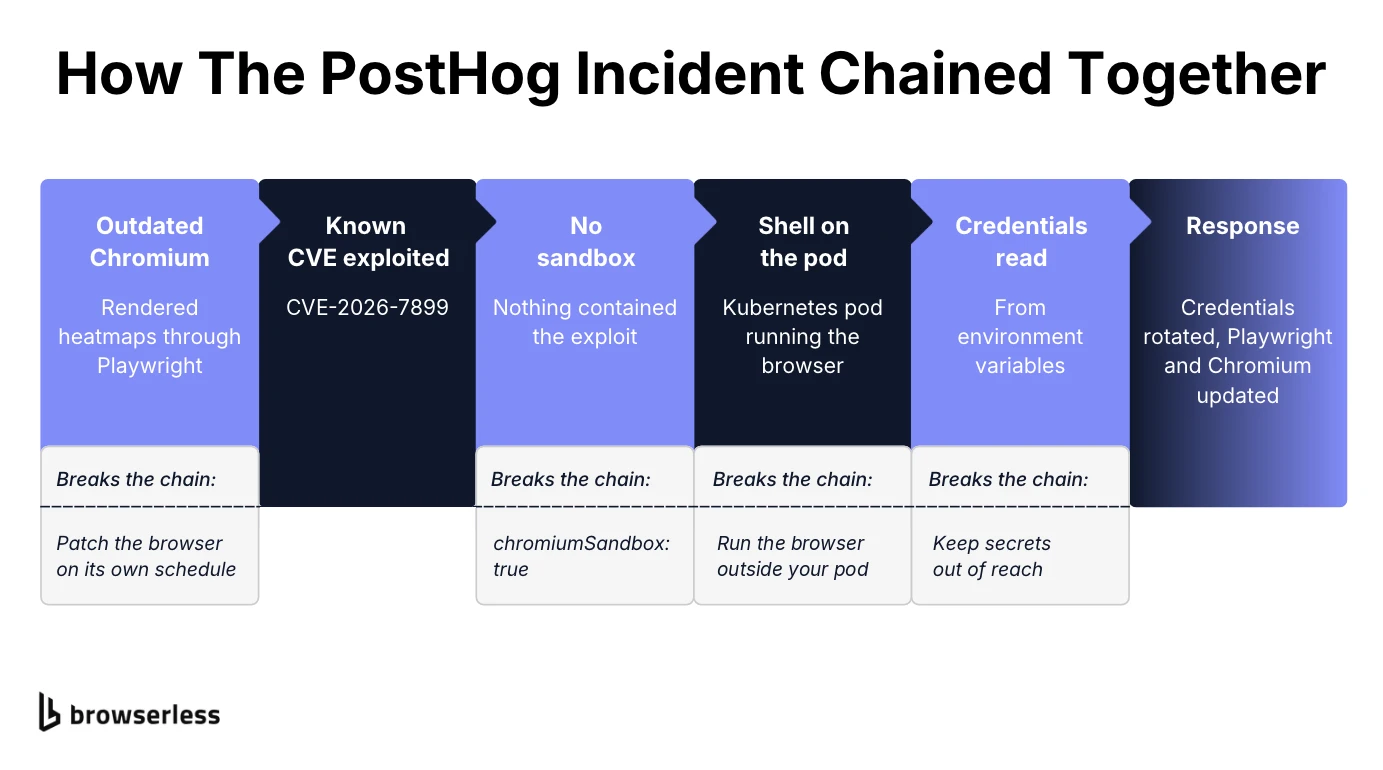
PostHog's security advisory, published June 2, 2026, shows what this looks like in production. In late May, a researcher exploited a known vulnerability, CVE-2026-7899, in an outdated, unsandboxed Chromium instance that PostHog ran through Playwright to generate heatmaps. With an old version and no sandbox in the way, the researcher got a shell on the Kubernetes pod and could read the credentials stored in its environment variables.
Per the advisory, the exposure was limited to PostHog's US Cloud environment, no customer data was accessed, and there's no evidence of exploitation beyond the researchers who reported it. PostHog rotated the exposed production credentials, updated Playwright and Chromium to the latest version, and began moving heatmap generation to an external service so it no longer runs Chromium in its own containers.
None of it came from a flaw in Playwright's own code, and fixing any one gap would have broken the chain. A current Chromium would have blocked the exploit, the sandbox would have contained it, and with credentials kept outside the pod, the shell would have had nothing to read.
How can I securely run Playwright against untrusted pages in a cloud environment?
Start with the two launch options from earlier, so every page loads in a sandboxed stable Chrome instead of a pinned test build.
In containers, Playwright's own Docker image is meant for testing and development, and its docs advise against using it to visit untrusted websites. It also runs browsers as root by default, and running as root disables the Chromium sandbox, so if you run Playwright in Docker to scrape or crawl, Playwright recommends a separate non-root user plus its seccomp profile. On a server, Chrome won't update itself, so it only moves forward when you update the package or rebuild the image.
After that, lock down what sits around the browser.
- Patch the browser on its own schedule. Make updating Chrome or Edge its own recurring task, not something that only happens when you bump Playwright.
- Isolate every job. A new browser context per job keeps cookies and storage apart inside one browser, and giving each run its own ephemeral, isolated session goes a step further, so a compromised session can't read state another one left behind.
- Keep secrets out of reach. Admin tokens and API keys in environment variables or files on the same pod are readable by anything that breaches the page's sandbox. Keep them in a service the browser process can't reach.
- Scope Playwright MCP. Limit tool usage to what the task needs and keep unrelated credentials out of the agent's process. If you need to restrict where the browser can go, enforce it at a proxy you route it through with
--proxy-server, since the--allowed-originsflag isn't a security boundary and doesn't cover redirects. Chromium bypasses the proxy for localhost, loopback, and link-local addresses by default, so the proxy alone isn't a full egress boundary. Enforce network-level restrictions alongside it and configure the proxy to reject policy-forbidden destinations. - Check your MCP version. Run
@playwright/mcp0.0.40 or later, which validates the Origin header that DNS rebinding relies on, and never expose a local MCP server to the internet.
Doing all of this on your own infrastructure means owning browser patching and per-job isolation on every machine you run. Browserless runs Playwright in the cloud on a managed fleet, keeps the browser runtime up to date, and gives each connection its own isolated browser. You keep your script and swap the launch call for a connection to its stable Chrome endpoint.
const browser = await chromium.connectOverCDP(
  `wss://production-sfo.browserless.io/chrome?token=${process.env.BROWSERLESS_TOKEN}`,
);
Use Playwright to check your own site's security headers
Once Chrome is sandboxed and up to date, the same launch gives you a cheap way to evaluate the security headers your own site serves to visitors, the ones that blunt injected scripts and framing. Four of them cover the basics.
HTTP strict transport security
Strict-Transport-Security tells browsers to use HTTPS for every future visit to your domain. Without it, a visitor's first attempt to reach your site can go over plain HTTP, which leaves room for a downgrade attack.
Content security policy
Content-Security-Policy controls which scripts and other resources a page can load. With a strict policy, injected scripts usually won't run, even if an attacker gets markup onto the page.
X content type options and X frame options
X-Content-Type-Options: nosniff stops the browser from guessing a file's type, so an uploaded file can't be reinterpreted as script and executed. X-Frame-Options stops other sites from loading your pages in a frame, which is a standard protection against clickjacking alongside the newer CSP frame-ancestors directive.
Check the headers with a script
A short JavaScript file can run those four specific checks in one pass. It launches Chrome with the same two options, navigates to TARGET_URL, and displays each header's value, or MISSING if the response doesn't send it. page.goto() follows redirects, so you're reading the headers from the final page.
Run it on a supported Node.js runtime (22.x, 24.x or 26.x) and set TARGET_URL to your own site.
import { chromium } from "playwright";

const TARGET = process.env.TARGET_URL ?? "https://github.com";
const REQUIRED_HEADERS = [
  "strict-transport-security",
  "content-security-policy",
  "x-content-type-options",
  "x-frame-options",
];

const browser = await chromium.launch({ channel: "chrome", chromiumSandbox: true });

try {
  const page = await browser.newPage();
  const response = await page.goto(TARGET);
  if (!response) throw new Error(`No response from ${TARGET}`);
  if (!response.ok())
    throw new Error(`HTTP ${response.status()} from ${response.url()}`);

  const headers = response.headers();
  const missing = REQUIRED_HEADERS.filter((name) => !headers[name]);

  for (const name of REQUIRED_HEADERS) {
    console.log(
      `${name}: ${headers[name] ? headers[name].slice(0, 60) : "MISSING"}`,
    );
  }
  if (missing.length > 0) process.exitCode = 1;
} finally {
  await browser.close();
}
The finally block closes the browser even if the page fails to load, so scheduled runs don't leave orphaned Chrome processes behind. Against github.com as of publication, all four headers come back and the script exits with status 0.
If any header appears as MISSING, the exit code is 1, so you can automate the scan from cron or CI across your production pages and catch a header that disappears after a deploy.
If you take payments, that scheduled check also helps with Payment Card Industry Data Security Standard (PCI DSS) v4.0.1 requirement 11.6.1, which asks for a mechanism that detects and alerts on unauthorized changes to the security-impacting HTTP headers on your payment pages. This script checks header presence only. To fully satisfy 11.6.1 you also need to compare against a stored baseline and alert on any difference. It's aimed at the page tampering behind card-skimming fraud, and a failing exit code can feed those alerts.
Conclusion
PostHog's incident and the X post point at the same lesson, which is that a framework rarely gets you breached on its own. An old browser, a disabled sandbox and credentials within reach do, and the habit that heads off most of it is staying current on your dependencies. Put a policy in place that updates them often and check that it's actually running, and the tests it forces you to keep make every update cheaper. You'll sleep better, trust me.
If you'd rather not own those settings yourself, keep your Playwright code, swap your local launch for a connection to a Browserless endpoint, and get started when you sign up for Browserless.
Playwright vulnerability FAQs
Is Playwright owned by Microsoft?
Yes, Microsoft created and maintains Playwright as an open-source project in the microsoft/playwright repository on GitHub.
How does Playwright handle authentication?
Playwright reuses an authenticated session by saving the browser's storage state, including cookies and local storage, to a file after you log in once. Later runs load that file and skip the login. Treat that file like a password and keep it out of version control.
What are the most recent Playwright-related CVEs?
As of November 2026, the two tied directly to Playwright's open-source packages are CVE-2025-59288, patched in version 1.55.1, and CVE-2025-9611, patched in @playwright/mcp 0.0.40. The Chromium CVEs from the November 2026 X post belong to the browser Playwright can launch, not to Playwright itself. Each release's notes list the browser versions it ships with.
Is Playwright MCP safe to use?
Yes, if you're on version 0.0.40 or later and you control what else lives in the agent's environment. Playwright MCP hands a real browser to an artificial intelligence agent, so anything that agent can reach is in scope, and keeping it secure means limiting that reach. Running the agent and its browser in a container keeps a compromised page away from your laptop's files and keys.
Is Playwright a security risk?
The short answer is no, since its own code has a short, patched CVE history. It does load whatever page you point it at, though, so treat it like any software that handles untrusted input and decide what the browser process can reach before you hand it to an AI agent.