
TL;DR
- Browsers that act. An agentic browser takes a goal in plain language, then reads each page, acts, and checks the result until the task is done, inside your logged-in session.
- Builders own execution. Agents still drive a real browser underneath, so if you build your own, concurrency, memory leaks, and bot detection become your problems.
- Two risks first. Prompt injection hidden in page content and agents carrying your full session access are the security issues to plan for.
Introduction
Ask an agentic browser to pull last month's invoices from three vendor portals, and it opens each one, finds the files, and drops the totals into a spreadsheet while you get on with something else. It does all of that inside your logged-in session, with your accounts and cookies, so a wrong click costs more than it would in a normal browser.
You'll see how agents read and act on a page, where they break under real traffic, what prompt injection and broad session access put at risk, and what you need underneath if you're building agents of your own.
What is an agentic browser?
An agentic browser is a browser, or an AI agent running inside one, that you give a goal in plain language and then mostly leave alone. You stop clicking through checkout flows and copying data between open tabs. You describe the outcome, and the browser works through the steps the way a personal assistant would.
It works best on web tasks with a clear goal and several steps, like booking tickets, comparing prices across stores, filling forms for an expense report, or adding a confirmed booking to your Google Calendar.
The terms AI browser and agentic browser get used interchangeably, but they describe different levels of autonomy. A browser with AI features makes you faster, while an agentic browser does part of the work for you.
How agentic browsers work
Under the interface, an agentic browser runs one loop over and over. It works out what you want and plans the steps, then reads the live page and acts, checking the result before it moves on. How well it handles each stage decides whether the task actually finishes.
The observe, decide, act loop
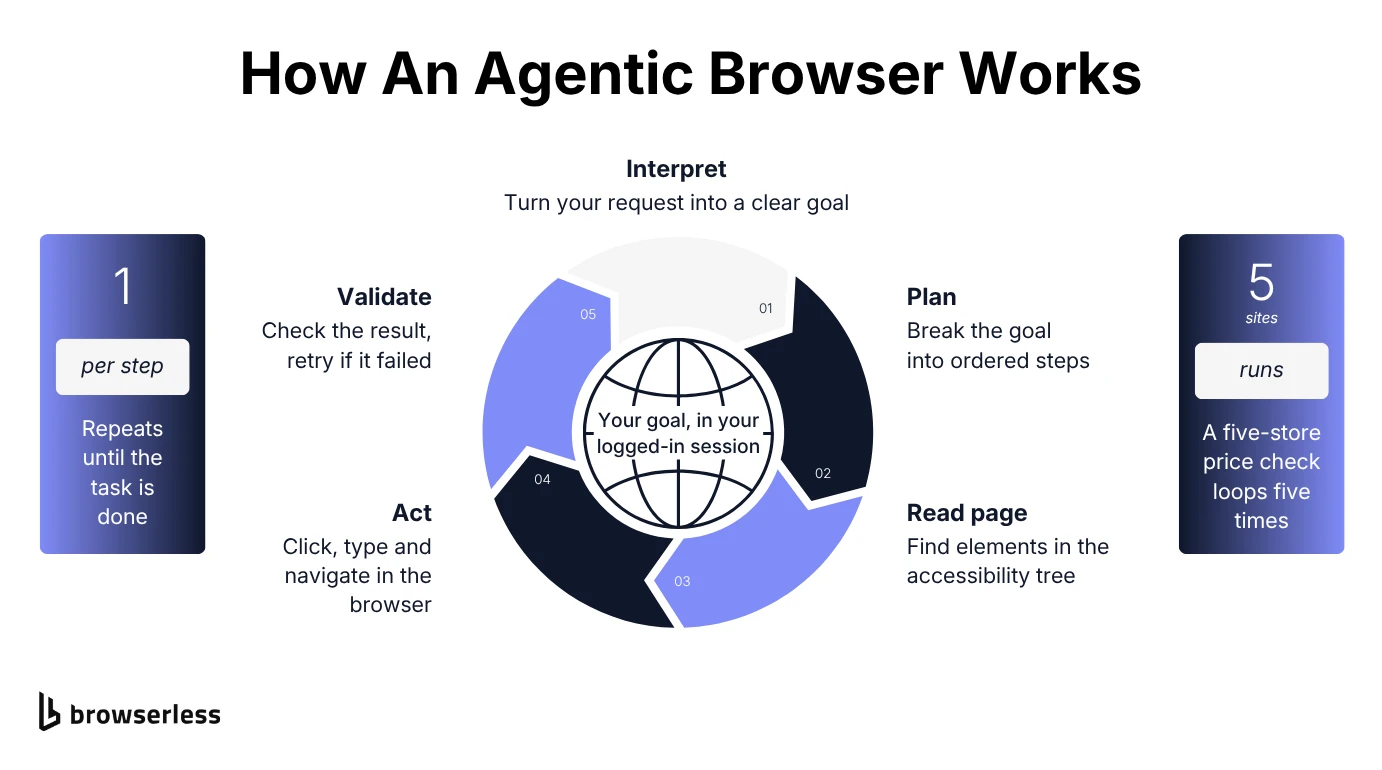
Say you ask for a table for four at 7pm on Saturday. The agent turns that into a party size and a time window, then plans a route through a reservation site to a matching slot. Then it gets to work. It clicks into the search bar and types the restaurant name, then reads the search results to pick a slot.
Before moving on, it checks its work, and a confirmation screen tells it the step is done. If the form rejects the booking because 7pm is gone, the agent picks a nearby time from its plan and tries again.
That loop repeats for every step, so a price comparison across five retailers runs it dozens of times, several per site.
How agents keep state and find elements
Multi-step tasks need memory, and that's the browser session's job. A persistent browser session carries cookies, logins, and progress from one step to the next, so the agent doesn't start over and log in again every time. Depending on the setup, that state lasts for a short reconnect window or lives in a saved profile the agent reuses across runs.
To find elements, an agent can read the page's accessibility tree instead of raw HTML or screenshot coordinates. The accessibility tree is the structured map of interactive elements, built for screen readers, that tells software a button is a button regardless of styling.
That's why agents survive redesigns better than scripts built on fixed CSS selectors. The catch is predictability. You're trusting a call the agent makes in the moment, not a plan you reviewed in advance.
Agentic browsers vs. traditional browsers and AI assistance
AI has reached the web browsing experience in stages. Traditional browsers enhance browsing with conveniences like ad blocking and password autofill, but you still navigate and submit every form yourself.
AI browsers add an AI assistant that takes natural language commands. It can summarize pages, offer quick answers about webpage content, or draft a reply, but you still finish the job, and that last step is what agentic browsers take over.
| Browser type | What it does | Who acts |
|---|---|---|
| Traditional browser | Displays pages, waits for input | You, for every click |
| AI browser (assistant only) | Summarizes, drafts, advises | You, with AI suggestions |
| Agentic browser | Plans and executes multi-step tasks | The agent, under your identity |
How agentic browsers improve productivity
Agentic browsers earn their keep on bounded, repetitive online tasks with a clear "done" condition, like filling out the same vendor form fifty times or watching a product page for a price drop. Task automation that once meant maintaining a script now starts from a single prompt, and the agent handles the form filling and repeated checks across multiple sites.
Agents handle long, complex tasks well when the end state is clear, but they struggle with nuance, like judging whether a contract clause is worth flagging. For research, organizing information from multiple sources into one table takes a single request, and unlike a deep research report, the agent can sign in and click through filters. The real learning curve is writing a bounded brief the agent can check its own work against.
AI browsers with agentic capabilities you can use today
Here's what's out there as of October 2026, in no particular order, and each one draws the line between suggesting and acting in a different place. For a feature-by-feature comparison, see the roundup of the best AI browsers.
Perplexity Comet
Perplexity's AI browser has an assistant that reads your open tabs and runs multi-step tasks across them, from sorting an inbox to comparing products before you buy. Perplexity opened Comet to everyone in October 2025, and it now runs on Mac, Windows, iOS, and Android. Its Background Assistants feature can run several of those tasks in parallel and collect the confirmations they need on one page.
ChatGPT Atlas
OpenAI launched Atlas on macOS in October 2025 and retired it on August 9, 2026. OpenAI moved its agent mode into the ChatGPT desktop app, which has its own built-in browser and a ChatGPT Work agent for multi-step tasks, and a ChatGPT extension covers people who'd rather stay in Chrome. Atlas lasted less than a year, which is worth remembering before you build a workflow on any consumer agentic browser.
Microsoft Edge
Edge's agent, Browse with Copilot, clicks, types, and moves between tabs in your window, with visual cues whenever it's taking an action. Microsoft is rolling it out to Microsoft 365 Premium subscribers in the US first. In May 2026 it also retired the separate Copilot Mode, so multi-tab reasoning, where Copilot pulls context from your open tabs, is now part of standard Edge.
Dia
Dia, from Atlassian-owned The Browser Company, started on macOS and added Windows in October 2026. It's built for knowledge work across SaaS apps more than for clicking through checkout flows. Its assistant pulls context from your tabs and connected tools like Google Workspace, Slack, and Teams to answer questions or draft a report, and Skills save prompts you reuse on whatever page you're on.
All four solve the problem for one person at a desk. Giving your own product or internal tool the same ability is a different job. The browsers have to run on servers, for many users at once.
What runs under the hood of an agentic browser
Strip away the branding on any agentic browser and the same thing runs underneath. It's a real or headless browser that someone has to open and keep open. Large language models decide what to do next, and a browser automation layer clicks the button, types into the field, and loads the next page.
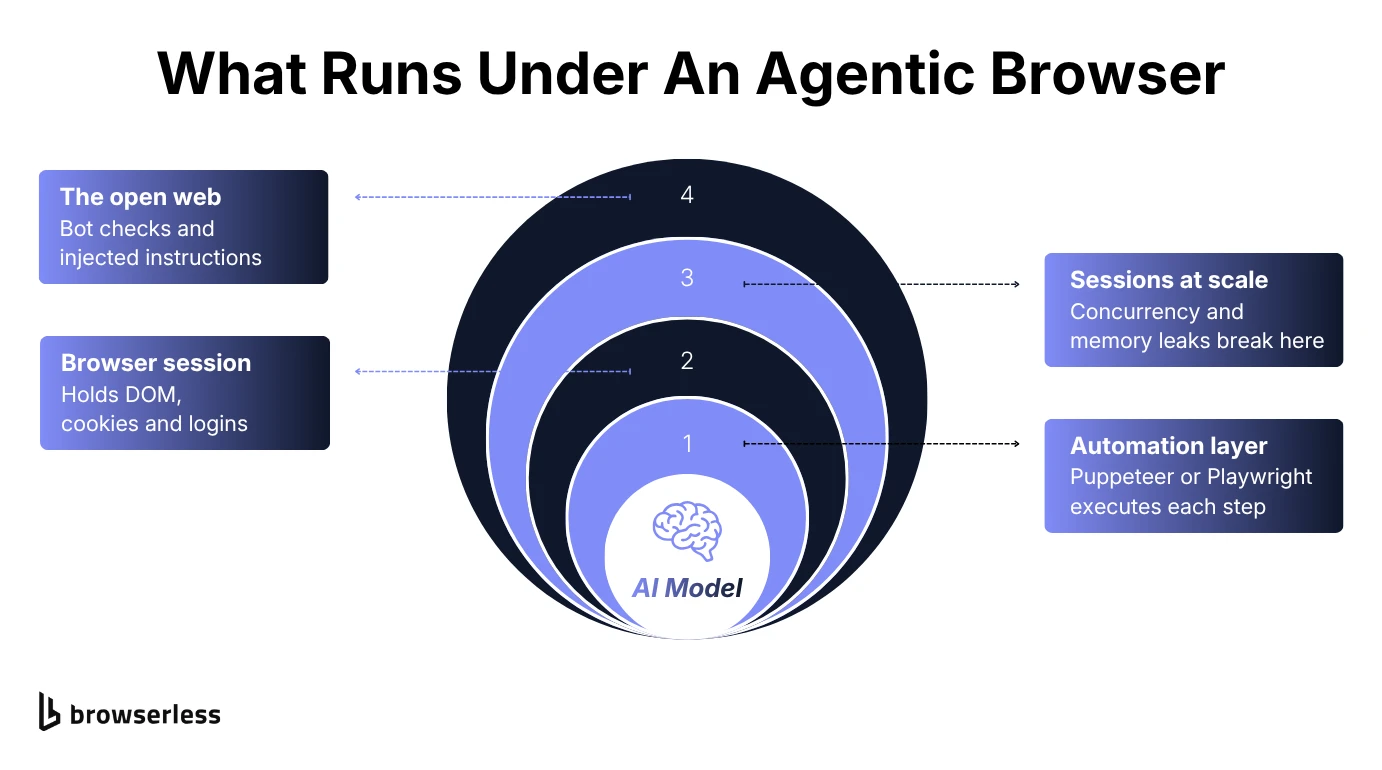
A plan is just text until something runs it in a real rendering engine, with real cookies and a real Document Object Model (DOM) to query. Each of the websites in a task adds another page load, more dynamic content to wait on, and another round of clicks and self-checks, and a cloud-hosted agent with millions of users repeats that across thousands of concurrent sessions.
That browser layer is what Browserless runs, as managed browsers your agent connects to over WebSocket, with the same Puppeteer or Playwright calls it would use against a local browser.
Where agentic browsing breaks down at scale
Two problems show up the moment an agentic workload leaves the demo for production. Neither one is a reasoning problem, and both get worse with every session you add.
Concurrency and memory leaks
One agent session on a laptop looks nothing like hundreds of concurrent sessions, each holding state open for minutes. A normal page load finishes in a second or two and releases its memory. An agent task keeps a tab open, with its full DOM and JavaScript context, for as long as the task runs.
Multiply that across hundreds of users and the memory math gets ugly fast, especially when architecture built for a handful of sessions has to hold thousands. Browser processes that aren't cleaned up between sessions leak memory until the host runs out of RAM.
Browserless takes this layer off your hands, running each session in its own isolated browser process and scaling sessions without a fleet to manage, with memory leaks, crash recovery, and Chrome updates handled by the platform.
The anti-bot arms race
Agents also run into bot detection. A server has no easy way to tell legitimate autonomous AI agents from a scraper acting in bad faith. Both look like a browser making requests without the signals human users leave behind.
In its 2026 benchmark report, HUMAN Security found that traffic from AI agents and agentic browsers grew 7,851% year over year, with a growing number of agents reaching user accounts and checkout, not just public pages.
Your agent can plan a flawless task and still fail at step one if its browser can't get past a CAPTCHA or a bot challenge. CAPTCHA handling, fingerprinting, and stealth all live on the browser side of the stack, not the model side, which is where Browserless adds stealth routes, residential proxies, and in-session CAPTCHA solving that work inside the session your agent already has open.
Security risks of agentic browsers
Prompt injection and over-privileged execution are the two to worry about first. Both come from the same setup, an agent reading untrusted pages while holding your full access. For fixes, the guide to browser agent security risk goes into detail.
Prompt injection and indirect instructions
Prompt injection hides an instruction inside web content the agent reads, not in the command you gave it. An attacker plants text on a page, in white-on-white font, an image's alt text, or a product review, telling the agent to submit different data, go somewhere else, or hand over sensitive information it has gathered.
Malicious instructions like these are harder to catch than a SQL injection, which stands out in a log as malformed input. A prompt injection can read like a normal sentence, and the agent has no reliable way to tell a real instruction from page content pretending to be one.
Over-privileged execution and session blind spots
An agentic browser often works inside your full logged-in session, with your cookies and active accounts, and applies that access at every step. One run can touch your email and your bank with all the access you have.
Some vendors add security features to narrow this, and Microsoft says Browse with Copilot can't access your saved passwords or wallet information and pauses to ask before sensitive actions.
Persistent state makes it worse. A bad decision early in a task can surface steps later, inside an action that looks routine. That doesn't make AI browsing unsafe outright, but if you're rolling out agents, you'll want monitoring of browsing activity and more control over which sites and accounts an agent can reach.
Running agents in isolated cloud browsers, away from your personal profile, is the practical way to get both. On Browserless, the /agent/run API can limit a run to an allowedDomains list, and the 1Password integration types a stored credential into the login form without exposing it to the model.
For oversight, Session Replay records a run's DOM changes, console logs, and network events with replay=true on the connection. Hybrid Automations hand a login or two-factor authentication (2FA) step to a person through a live URL, so the agent gets the logged-in session without ever seeing the password.
What features to look for in an agentic browser
If you're picking an agentic browser for your team, these checks separate reliable options from fragile ones. Most of the advanced features that matter are about the browser layer rather than the model, since that's where the failure points above actually live.
- Intent interpretation. It should ask for clarification when your instruction is ambiguous instead of guessing.
- Session persistence. It should carry progress across a multi-minute task without losing its place.
- Bot handling. The underlying browser should get through CAPTCHAs and fingerprint-based detection instead of getting blocked.
- Framework compatibility. It should be built on Puppeteer, Playwright, or another standard protocol, not a closed stack.
- Scale headroom. It should run more than a handful of sessions at once without degrading.
- Data transparency. It should be clear whether your browsing data trains a model, and you should be able to set preferences for what the agent may access.
How to build agentic browsing into your own AI tools
If you're a developer, the useful question isn't which agentic browser to use, but how to build that capability into your own product. That comes down to the automation framework your agent drives and who runs the browsers underneath it.
Framework compatibility: Puppeteer, Playwright, and AI agent frameworks
Underneath the AI layer, agent tooling still drives the browser through a standard automation protocol. LangChain-style agents, Playwright's Model Context Protocol (MCP) server, and custom in-house agents all call down into a real browser to click, type, and navigate, and most browser agents use Puppeteer or Playwright for that layer.
If your agent already speaks MCP, the Browserless MCP server gives it a hosted browser it can keep across tool calls, from clients like Claude, Cursor, or VS Code. Its Browser Agent tool, browserless_agent, runs the same snapshot, plan, act loop described above, with your assistant planning each step. The /agent/run API, currently in beta, goes further and takes a plain-English task, browsing with a model Browserless manages so you don't supply a model key.
If you're writing the agent yourself, what your code adds is the step between the model's decision and the click.
That step is the "act" in the observe, decide, act loop. The model names a target by its accessibility role and name, and this function finds the element, clicks it, and reports whether the click went through. To run it against a Browserless cloud browser, install playwright-core, set BROWSERLESS_TOKEN, and save the file as .mjs.
import { chromium } from "playwright-core";

// Executes one planned agent step. The target is described by its
// accessibility role and name, not a CSS selector, so a restyled page
// doesn't break the lookup.
async function executeAgentStep(page, step) {
  const target = page.getByRole(step.role, { name: step.name, exact: true });
  const matches = await target.count();

  if (matches === 0) {
    return { success: false, reason: "element not found" };
  }
  if (matches > 1) {
    return { success: false, reason: "more than one element matches" };
  }

  await target.click();
  await page.waitForLoadState("domcontentloaded");
  return { success: true, url: page.url() };
}

// The /stealth route and solveCaptchas=true put fingerprint
// mitigations and CAPTCHA solving on the browser side
const browser = await chromium.connectOverCDP(
  `wss://production-sfo.browserless.io/stealth?token=${process.env.BROWSERLESS_TOKEN}&solveCaptchas=true&timeout=300000`,
);

try {
  // Reuse the session's existing page so CAPTCHA solving applies to it
  const page = browser.contexts()[0].pages()[0];
  await page.goto("https://books.toscrape.com/");

  // In a real agent, the model produces this step after reading the page
  const result = await executeAgentStep(page, { role: "link", name: "next" });
  console.log(result);
} finally {
  await browser.close();
}
When the click lands, the script prints { success: true, url: 'https://books.toscrape.com/catalogue/page-2.html' }, and a step that names a missing or ambiguous element returns success: false instead of throwing or clicking the wrong control. success: true only means the click happened, so the model still reads the new page, starting with that URL, to decide whether the step did what it wanted before it retries or moves on. The connection string keeps bot handling out of the agent code.
The hard part is running hundreds of these sessions at once, and that's what decides build or buy.
Build vs. buy: a packaged browser or your own agent browser stack
With a consumer agentic browser, someone else owns the execution layer, which is convenient until you need a capability it doesn't offer. Build your own and you get control, along with every scaling problem covered above.
If you're building, Browserless runs that browser layer for you. Its AI agent browser automation connects the Puppeteer and Playwright code you already have to managed browsers. For long tasks, the Session API keeps cookies and logins alive between connections for the ttl you set, so a reconnecting agent is still logged in. The new connection opens on a blank page, though, so the agent has to navigate back and resume from the task position it saved itself.
The same API runs self-hosted when compliance rules out a managed cloud. Payroll platform Atomic scaled to tens of thousands of daily browser sessions on self-hosted Browserless.
It won't get past every block on every site, but it takes running a browser fleet off your plate.
Conclusion
Agentic browsers are worth using now if you supervise them like a capable new hire. Start agentic browsing with bounded tasks that end in a state you can check, like a submitted form or a confirmed booking, and give the agent only the access the task needs. That keeps a wrong click recoverable while you learn where your agents fail, whether it's a bot challenge, a leaked session, or an instruction someone planted on a page.
Once your agents run at volume, the browser layer is where the hard problems show up. Browserless supplies those browsers and takes on the scaling and session isolation you'd otherwise build yourself. To see how it handles your own agent's workload, sign up.
Agentic browser FAQs
Which agentic browsers can complete multi-step tasks today?
For personal tasks, Perplexity Comet and Edge's Browse with Copilot can both complete tasks on pages for you. If you're automating tasks inside your own product, a consumer browser is the wrong tool, and an automation framework on managed browsers like Browserless fits better.
How do I use an agentic browser for research workflows?
Give it a bounded brief that names the sites to check, the fields to collect, and the format you want back, such as one table row per product. Ask it to note the page each value came from so you can spot-check the results before acting on them.
Are agentic browsers safe to use?
They're reasonable for low-stakes tasks if you limit what they can reach. Use a separate browser profile without banking or work logins, and review any action that submits data or spends money.
What's the difference between an AI browser and an agentic browser?
An AI browser is any browser with AI built in, including ones that only summarize content or handle answering questions. An agentic browser is the subset that can also execute actions, clicking, typing, and submitting for you.