
TL;DR
- Public data only. To scrape public Instagram data without the Graph API, which only covers Business and Creator accounts, you read what Instagram already shows a logged-out visitor: profile counts and bios, post likes, comments and captions, and hashtag totals.
- Read the preview tags. Instagram server-renders a description tag on every public profile and post so links preview properly, and parsing it holds up better than the internal profile API, which now demands a login.
- Know the hard limits. Follower lists need a logged-in account you can lose, emails aren't in public profile data, and Explore differs per account. At volume, rate limits are the main problem, which is where a residential-proxied browser helps.
Introduction
You can scrape Instagram for follower counts, bios, post likes, captions, and hashtag totals with a short Python script and no account. The profile and post data come from a description tag Instagram writes into every public page so that shared links preview properly in Slack or iMessage.
In this guide, you'll build that scraper one function at a time, see where it stops working (follower lists, emails, and the Explore feed), and learn what to change when a script that ran fine for ten profiles starts failing at a thousand.
What Instagram data can you actually scrape?
Web scraping Instagram means reading the same pages instagram.com serves your browser, rather than going through the official Instagram Graph API. The official API does have a Business Discovery endpoint that returns follower counts and recent media for other Business and Creator accounts, but you can only call it from your own Business or Creator account linked to a Facebook Page.
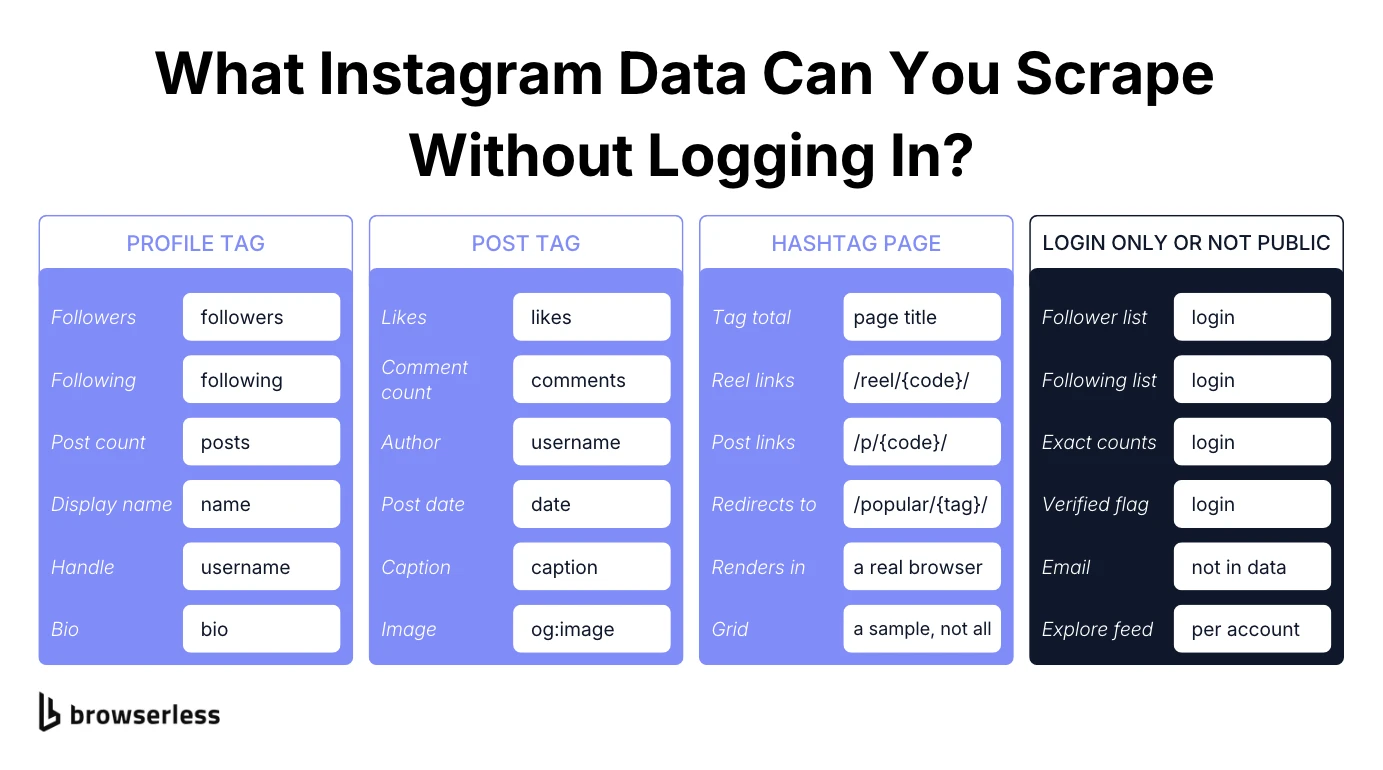
Skip the API and the publicly available Instagram data you can reach is whatever Instagram shows a logged-out visitor. For a profile, that's the bio plus the follower, following, and posts count. For a post, it's the caption, hashtags, likes, and comment count, and for a hashtag page, it's the total. The scraper in this guide returns each one in a structured format you can write to a database or Google Sheets, whether you're checking one profile URL or a list of competitor accounts.
Is it legal to scrape Instagram?
Scraping publicly available data, meaning anything a website shows to anyone, is unlikely to break US anti-hacking law on its own. In hiQ Labs v. LinkedIn, the Ninth Circuit found a serious question whether scraping public pages counts as access "without authorization" under the Computer Fraud and Abuse Act, but hiQ still lost on breach of contract.
That contract risk applies here too, since Instagram's Terms of Use prohibit collecting information "in an automated way without our express permission," logged in or not.
Privacy law is the harder part. Under the EU's General Data Protection Regulation (GDPR), publicly visible data like a bio, username, or post can still be personal data, and the European Data Protection Board's 2026 draft guidelines on web scraping note that a public page "does not mean that the data subjects gave their consent" to having it scraped. If you're planning web data collection at volume, run it past counsel first.
How Instagram blocks scrapers
Expect to hit three mechanisms, and the first is rate limiting on repeated requests from the same IP address. During testing for this guide, Instagram's internal API answered with "Please wait a few minutes before you try again." The second is a login or sign-up wall in place of the content, which a logged-out browser on a datacenter IP ran into.
The third only kicks in once you log in. Instagram flags and restricts accounts it detects scraping, and its terms let it disable them, throwaway or not. Slowing down delays all three but doesn't switch any of them off.
Setting up your environment and API key
The scraper uses two libraries, requests and Playwright, and current releases of both need Python 3.10 or newer. Create a project folder, set up a virtual environment, and install them:
python3 -m venv venv
source venv/bin/activate
pip install requests playwright
playwright install chromium
You'll use requests for the plain HTTP calls that fetch posts, and Playwright for the browser automation on profiles and hashtag pages, which need a real browser. Later steps read your Browserless API key, found in your account dashboard, from the BROWSERLESS_TOKEN environment variable.
How to scrape Instagram profiles
Instagram's web app is a React single-page application, so most of a profile page shows up as JavaScript and renders later. The useful exception is the description tag in the page head. Instagram fills it in on the server for link previews, and it packs the profile's follower, following, and post counts, display name, handle, and bio into one line:
104M Followers, 94 Following, 4,967 Posts - NASA (@nasa) on Instagram: "Making the seemingly impossible, possible. ✨"
Since that tag is in the HTML the server sends, there's no need to wait for React to render. get_instagram_profile() loads the profile in Playwright, grabs the tag as soon as the document arrives, and splits it into fields with a regular expression:
import asyncio
import re
from playwright.async_api import async_playwright

PROFILE_PATTERN = re.compile(
    r'([\d.,]+[KMB]?) Followers?, ([\d.,]+[KMB]?) Following, ([\d.,]+[KMB]?) Posts? - '
    r'(?:See Instagram photos and videos from )?(.*?) \(@([\w.]+)\)(?: on Instagram: "(.*)")?',
    re.DOTALL,
)

async def get_instagram_profile(username):
    async with async_playwright() as p:
        browser = await p.chromium.launch()
        try:
            page = await browser.new_page()
            await page.goto(f"https://www.instagram.com/{username}/", wait_until="domcontentloaded")
            meta = await page.query_selector('meta[name="description"]')
            description = await meta.get_attribute("content") if meta else None
        finally:
            await browser.close()

    match = PROFILE_PATTERN.search(description or "")
    if not match:
        return {"raw": description}
    followers, following, posts, name, handle, bio = match.groups()
    return {
        "username": handle,
        "name": name,
        "followers": followers,
        "following": following,
        "posts": posts,
        "bio": bio,
    }

print(asyncio.run(get_instagram_profile("nasa")))
The finally block closes the browser even if navigation throws. query_selector also returns immediately, so a missing username comes back as {'raw': None} instead of hanging until a timeout. Instagram occasionally serves a page without the tag too, so retry a None once before treating the account as missing.
Reading the result, and its limits
Run it against nasa and you get {'username': 'nasa', 'name': 'NASA', 'followers': '104M', 'following': '94', 'posts': '4,967', 'bio': 'Making the seemingly impossible, possible. ✨'}. Notice the counts are strings, rounded the way Instagram displays them, so 104M is as precise as this route gets.
Older tutorials often call Instagram's internal web_profile_info endpoint for exact counts and verification status. Instagram treats that endpoint as login-only now. Call it from a logged-out session and you get a 401 with "require_login": true, and switching to a residential IP doesn't change that.
How to scrape Instagram posts and hashtags
Post pages have the same kind of preview text. Every public post and Reel gets a server-rendered Open Graph description in the form X likes, Y comments - username on date: "caption text". Because it's in the raw HTML, a plain HTTP request is enough, so you can scrape posts from a list of post URLs without starting a browser at all:
import html
import re
import requests

OG_DESCRIPTION_PATTERN = re.compile(
    r'([\d.,]+[KMB]?) likes?, ([\d.,]+[KMB]?) comments? - (.+?) on (.+?): "(.*)"',
    re.DOTALL,
)

def get_post_summary(post_url):
    # post_url is a single post's URL, e.g. https://www.instagram.com/p/{shortcode}/
    response = requests.get(post_url, headers={"User-Agent": "Mozilla/5.0"}, timeout=20)
    response.raise_for_status()
    match = re.search(r'<meta property="og:description" content="([^"]+)"', response.text)
    if not match:
        return None

    description = html.unescape(match.group(1))
    parsed = OG_DESCRIPTION_PATTERN.search(description)
    if not parsed:
        return {"raw": description}

    likes, comments, username, date, caption = parsed.groups()
    return {"username": username, "date": date, "likes": likes, "comments": comments, "caption": caption}

print(get_post_summary("https://www.instagram.com/p/DeAYvsnn4la/"))
Two gotchas hide in that description. Instagram HTML-escapes the quotation marks ("), and multi-line captions contain literal newlines. Leave out html.unescape() and the pattern never matches. Leave out re.DOTALL and it silently fails on any caption longer than one line.
The user agent is the third gotcha, and it's counterintuitive. Send a full desktop Chrome user agent and Instagram serves the JavaScript shell with no description tag, so the function returns None. The bare Mozilla/5.0 string gets the server-rendered page instead. The same response's og:image tag holds the post's image, if you want media URLs alongside the numbers.
Feed get_post_summary() the post URLs the hashtag scraper in the next step returns. Likes and comments give you engagement metrics, and the dates and captions build a post history you can run sentiment analysis on. You can't scrape comments this way, since the tag carries the comment count but never the comment text, and it doesn't list tagged users.
Hashtag pages for brand monitoring
Open a hashtag URL while logged out and Instagram redirects you to a topic page. Its title carries the total, such as Spacex • 20M reels on Instagram, and its grid links to a batch of public Reels. That grid depends on JavaScript rendering, so this is the one place the scraper has to wait. get_hashtag() waits for the first post link to attach, then collects the page title and every Reel or post URL in the grid:
import asyncio
from playwright.async_api import async_playwright

async def get_hashtag(tag):
    async with async_playwright() as p:
        browser = await p.chromium.launch()
        try:
            page = await browser.new_page()
            await page.goto(f"https://www.instagram.com/explore/tags/{tag}/", wait_until="domcontentloaded")
            await page.wait_for_selector('a[href*="/reel/"], a[href*="/p/"]', state="attached", timeout=15000)
            title = await page.title()
            hrefs = await page.eval_on_selector_all(
                'a[href*="/reel/"], a[href*="/p/"]',
                "links => links.map(link => link.href.split('?')[0])",
            )
        finally:
            await browser.close()
    return {"title": title, "post_urls": list(dict.fromkeys(hrefs))}

print(asyncio.run(get_hashtag("spacex")))
In three test runs against spacex, it returned the title and 12 Reel URLs each time, and every URL parsed cleanly through get_post_summary(). It's a good way to discover posts for brand monitoring or market research, but the grid is a sample, not every post carrying the tag, and it has no date filters.
What you can't scrape without logging in
Three common requests sit outside what a logged-out scraper can read.
How to scrape Instagram followers
A follower count is one field in the profile tag. A follower list, meaning the usernames behind that number, is a different problem.
Instagram only shows follower and following lists to a logged-in session, and the Graph API doesn't document an endpoint for them, not even for your own account. The open-source tools that pull them want a real session cookie, which ties every request to an account Instagram can flag and restrict. Private profiles are out of reach unless that account follows them.
If you really need follower lists, assume you'll lose the account you use, and keep the volume well below anything that looks automated.
Can you scrape emails from Instagram?
Not reliably, since the profile tag has counts, a name, a handle, and a bio, and no email field. The only address you'll find is one the owner typed into their own bio.
Some business and creator accounts add a Contact button, but it isn't part of the public profile data. Collecting the addresses of identifiable people in bulk is a GDPR question before it's an engineering one.
Can you scrape the Instagram Explore page?
There's no single Explore page to scrape. Explore is a feed Instagram's recommendation system builds for each logged-in account from its likes, follows, and viewing history, so two people opening it see different posts. The closest thing a logged-out scraper can read is a hashtag's topic page.
How to scrape Instagram without getting blocked
Since the scraper never logs in, account flags aren't your problem. Rate limits and the login wall are, and both depend heavily on the IP address your requests come from. Spreading that traffic across residential IPs won't make you invisible, but it makes you less obvious.
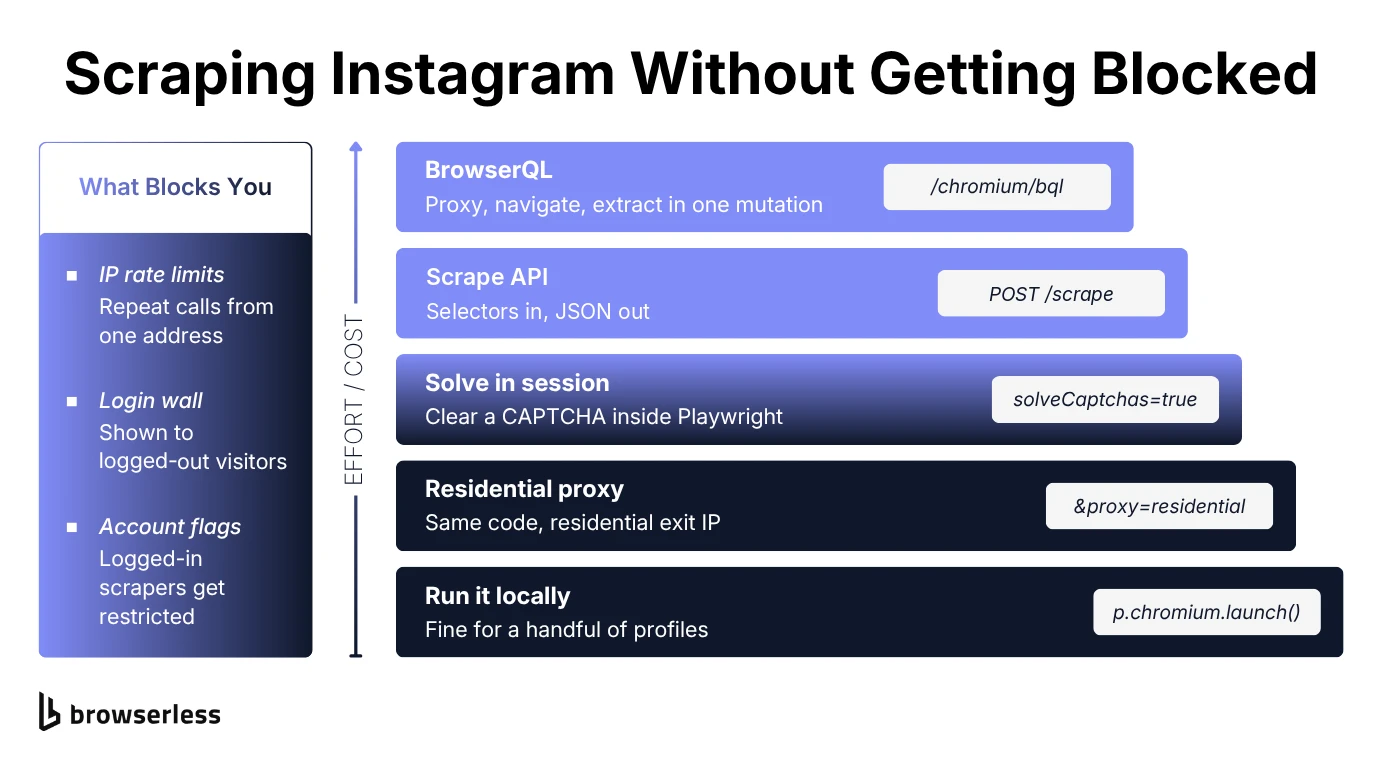
The smallest change is to keep your Playwright code and just run the browser somewhere else. Point it at Browserless with residential proxies switched on, and proxySticky=true keeps each session on one residential IP instead of your server's:
import os

async def open_browser(p):
    token = os.environ.get("BROWSERLESS_TOKEN")
    if token:
        return await p.chromium.connect_over_cdp(
            f"wss://production-sfo.browserless.io/chromium?token={token}&proxy=residential&proxySticky=true"
        )
    return await p.chromium.launch()

async def new_page(browser):
    # Browserless applies the proxy to its default context, so open pages there
    if browser.contexts:
        return await browser.contexts[0].new_page()
    return await browser.new_page()
In get_instagram_profile(), swap p.chromium.launch() for await open_browser(p) and browser.new_page() for await new_page(browser), and that's the whole change. A page from browser.new_page() would open in a fresh context that skips the proxy. If Instagram starts flagging the browser itself rather than the IP, change /chromium to /stealth in that URL for Browserless's stealth browser, which hides the fingerprints a stock Chromium gives away. If even that gets detected, the /unblock API is the next step up.
For profiles and posts, you can scrape Instagram data without Playwright at all. The /scrape API loads a page in a Browserless browser, behind a residential proxy, and returns the attributes of any CSS selector as structured JSON, so data extraction is one HTTP call:
import os
import requests

def scrape_meta(url, selector):
    response = requests.post(
        "https://production-sfo.browserless.io/scrape",
        params={"token": os.environ["BROWSERLESS_TOKEN"], "proxy": "residential"},
        json={"url": url, "elements": [{"selector": selector}]},
        timeout=60,
    )
    response.raise_for_status()
    results = response.json()["data"][0]["results"]
    if not results:
        return None
    attributes = {a["name"]: a["value"] for a in results[0]["attributes"]}
    return attributes.get("content")

print(scrape_meta("https://www.instagram.com/nasa/", 'meta[name="description"]'))
Pass a profile URL with meta[name="description"] and PROFILE_PATTERN parses what comes back. Pass a post or Reel URL with meta[property="og:description"] and OG_DESCRIPTION_PATTERN does. The value arrives already unescaped, so there's no html.unescape() step and no user-agent trick.
A username that doesn't exist has no tag to wait for, and raise_for_status() turns the resulting 408 into an exception. If the value starts with "Create an account or log in", you got the login wall instead, so retry on a fresh session.
The hashtag grid has to render before you can collect anything, so it's the one page where BrowserQL pays off. One GraphQL mutation, posted to /chromium/bql (or /stealth/bql if Instagram starts flagging the browser), sets the proxy, waits for the grid, and maps every post link:
mutation ScrapeInstagramHashtag {
  proxy(network: residential, url: ["*"]) {
    time
  }
  goto(
    url: "https://www.instagram.com/explore/tags/spacex/"
    waitUntil: networkIdle
  ) {
    status
  }
  title: evaluate(content: "document.title") {
    value
  }
  posts: mapSelector(selector: "a[href*='/reel/'], a[href*='/p/']") {
    href: attribute(name: "href") {
      value
    }
  }
}
proxy with url: ["*"] sends every request in the session through a residential IP. The JSON carries the topic title in data.title.value and one relative href per post in data.posts. Strip the ?utm_source=… query and prefix https://www.instagram.com to get the URLs get_hashtag() returns. In testing, it returned the title and 12 Reel links.
None of the test runs for this guide hit a CAPTCHA on a logged-out page. If one does show up, BrowserQL's solve mutation detects and solves CAPTCHAs including reCAPTCHA, Cloudflare challenges, GeeTest, and DataDome, and a Playwright session can do the same by adding solveCaptchas=true to the connection URL.
Scraping Instagram profiles in parallel
Going from ten profile URLs to a thousand is a concurrency problem. Scraping is I/O-bound, so the limits are how many browsers you can run and how fast Instagram answers, not your CPU.
Each Browserless session is its own browser, and your plan sets how many run at once. Requests over that limit can queue briefly, but once the queue is full you get a 429. Cap your side with a semaphore and let asyncio.gather work through the list:
async def scrape_profiles(usernames, max_concurrent=3):
    semaphore = asyncio.Semaphore(max_concurrent)

    async def scrape_one(username):
        async with semaphore:
            return await get_instagram_profile(username)

    return await asyncio.gather(*(scrape_one(u) for u in usernames), return_exceptions=True)
Set max_concurrent at or below your plan's concurrency limit. return_exceptions=True keeps one failed profile from cancelling the rest, so you can retry the failures later.
The complete code
Here are the profile, hashtag, post, and parallel functions in one file, with the browser launch and page creation routed through open_browser() and new_page(). Set BROWSERLESS_TOKEN and the browser work runs through Browserless with a residential proxy. Leave it unset and Chromium runs locally:
import asyncio
import html
import os
import re
import requests
from playwright.async_api import async_playwright

OG_DESCRIPTION_PATTERN = re.compile(
    r'([\d.,]+[KMB]?) likes?, ([\d.,]+[KMB]?) comments? - (.+?) on (.+?): "(.*)"',
    re.DOTALL,
)

PROFILE_PATTERN = re.compile(
    r'([\d.,]+[KMB]?) Followers?, ([\d.,]+[KMB]?) Following, ([\d.,]+[KMB]?) Posts? - '
    r'(?:See Instagram photos and videos from )?(.*?) \(@([\w.]+)\)(?: on Instagram: "(.*)")?',
    re.DOTALL,
)

async def open_browser(p):
    token = os.environ.get("BROWSERLESS_TOKEN")
    if token:
        return await p.chromium.connect_over_cdp(
            f"wss://production-sfo.browserless.io/chromium?token={token}&proxy=residential&proxySticky=true"
        )
    return await p.chromium.launch()

async def new_page(browser):
    # Browserless applies the proxy to its default context, so open pages there
    if browser.contexts:
        return await browser.contexts[0].new_page()
    return await browser.new_page()

async def get_instagram_profile(username):
    async with async_playwright() as p:
        browser = await open_browser(p)
        try:
            page = await new_page(browser)
            await page.goto(f"https://www.instagram.com/{username}/", wait_until="domcontentloaded")
            meta = await page.query_selector('meta[name="description"]')
            description = await meta.get_attribute("content") if meta else None
        finally:
            await browser.close()

    match = PROFILE_PATTERN.search(description or "")
    if not match:
        return {"raw": description}
    followers, following, posts, name, handle, bio = match.groups()
    return {
        "username": handle,
        "name": name,
        "followers": followers,
        "following": following,
        "posts": posts,
        "bio": bio,
    }

async def get_hashtag(tag):
    async with async_playwright() as p:
        browser = await open_browser(p)
        try:
            page = await new_page(browser)
            await page.goto(f"https://www.instagram.com/explore/tags/{tag}/", wait_until="domcontentloaded")
            await page.wait_for_selector('a[href*="/reel/"], a[href*="/p/"]', state="attached", timeout=15000)
            title = await page.title()
            hrefs = await page.eval_on_selector_all(
                'a[href*="/reel/"], a[href*="/p/"]',
                "links => links.map(link => link.href.split('?')[0])",
            )
        finally:
            await browser.close()
    return {"title": title, "post_urls": list(dict.fromkeys(hrefs))}

def get_post_summary(post_url):
    response = requests.get(post_url, headers={"User-Agent": "Mozilla/5.0"}, timeout=20)
    response.raise_for_status()
    match = re.search(r'<meta property="og:description" content="([^"]+)"', response.text)
    if not match:
        return None
    description = html.unescape(match.group(1))
    parsed = OG_DESCRIPTION_PATTERN.search(description)
    if not parsed:
        return {"raw": description}
    likes, comments, username, date, caption = parsed.groups()
    return {"username": username, "date": date, "likes": likes, "comments": comments, "caption": caption}

async def scrape_profiles(usernames, max_concurrent=3):
    semaphore = asyncio.Semaphore(max_concurrent)

    async def scrape_one(username):
        async with semaphore:
            return await get_instagram_profile(username)

    return await asyncio.gather(*(scrape_one(u) for u in usernames), return_exceptions=True)

if __name__ == "__main__":
    for profile in asyncio.run(scrape_profiles(["nasa", "natgeo", "spacex"])):
        print(profile)
    hashtag = asyncio.run(get_hashtag("spacex"))
    print(hashtag["title"])
    for url in hashtag["post_urls"][:3]:
        print(get_post_summary(url))
Run the file and it prints three profiles scraped in parallel, the spacex topic page title, and the likes, comments, and captions of the first three Reels from that hashtag's grid.
When to use an Instagram scraper API instead of DIY browser automation
Hosted Instagram scrapers and dataset APIs turn the whole job into one API integration. Proxies and parsing become someone else's problem, and you pay with per-result pricing and less control over what gets extracted. If you need specific Instagram data from a known list of Instagram URLs on a schedule, a ready-made Instagram scraper often pays for itself.
Writing your own keeps that control and costs less at a few requests per profile. The flip side is that when Instagram updates a tag, you're the one who fixes it.
Browserless sits in the middle, as browser infrastructure for scraping you call directly. You keep the scraping logic from this guide, and the browser and proxy layer becomes a set of API calls. That's how Ace Influence runs its creator-sourcing pipeline, pulling profile-level data on creators across social platforms after its self-hosted Puppeteer setup stopped scaling.
Automating Instagram scraping with an AI agent
If you'd rather have an agent scrape data for you, Browserless publishes site-specific Skills. A Skill is a documented recipe an agent follows on a given site, so it doesn't have to plan its own steps, and an agent connected to the Browserless MCP server loads them with its browserless_skill tool. Ask the /skills endpoint for Instagram and you get the current set:
curl "https://production-sfo.browserless.io/skills?token=$BROWSERLESS_TOKEN&domain=instagram.com"
The logged-out ones, such as inspect-public-instagram-post and inspect-instagram-profile-metrics, match this guide, and the rest need a logged-in account. Add &task=inspect-public-instagram-post to fetch one recipe, which reads the same tags get_post_summary() parses.
Conclusion
Scraping Instagram is mostly a maintenance problem. Parsing preview tags keeps that problem small, since every app that renders an Instagram link depends on the same format, while Instagram-specific endpoints and scroll-loaded grids move whenever the app ships a change. Run the patterns against a few known accounts each week and you'll catch a break before your data does.
The other half is infrastructure, from proxies to CAPTCHA handling. Browserless runs that layer behind the same Playwright connection, so you can keep your extraction code and sign up for Browserless.
Scrape Instagram FAQs
How many requests can you make before Instagram blocks you?
Instagram doesn't publish a number, and the threshold shifts with IP reputation. Space out requests from any one address, spread volume across residential IPs, and back off when you see "Please wait a few minutes before you try again."
What are the best Instagram scrapers?
Pick by who maintains the code. For a fixed list of accounts on a schedule, a hosted scraper is the simpler choice. For anything custom, your own code on Browserless wins, since you pick the target data and how often to collect it.