
TL;DR
- Web crawler. A bot that discovers and indexes web pages by following links from a starting list of URLs, the same way search engines build their results.
- The mechanics. A crawler pulls a URL off a queue called the crawl frontier, renders it in a headless browser, extracts the links, and pushes the new ones back onto the queue. There's a working Node.js implementation below.
- The limits. Roughly 90% of internet content sits behind a login or a paywall, so no crawler reaches it without being granted access. Bot detection is the second wall, and it stops crawlers that are otherwise welcome.
- The tools. The main categories of web crawler tools, from open-source frameworks to managed browser infrastructure and hosted crawl APIs.
Introduction
A web crawler already did the work behind that Google search, that AI assistant's answer, and the price-tracking app that updated overnight. It visits pages, follows their links, and hands off what it finds, usually to a search index, sometimes to a dataset training a model.
A spider icon and a few arrows between pages, with a passing mention of robots.txt, is where most explanations of web crawling stop. The guide below goes further. You'll get the actual mechanics behind how a crawler decides what to visit, plus a real code example instead of a flowchart. Then a clear-eyed look at where crawling breaks: the deep web, and the wall every crawler hits at scale.
What is a web crawler?
A web crawler is a program that automatically visits web pages and reads their content, then follows the links on them to find more.
Search engines run crawlers, also called spiders since they crawl the World Wide Web the way a spider moves across a web, to build the index they search against when you type a query.
The crawler itself doesn't rank anything. It just discovers pages and hands off what it finds: the text, the links, and whatever metadata the page carries. A separate indexing and ranking system uses that to index pages and make them searchable.
Without a crawler feeding it fresh data, a search engine has no idea a page exists at all.
How does a web crawler work?
A web crawler starts with a list of known pages and downloads each one. Any new links it finds get added to a queue for later.
Starting from a seed list and the crawl frontier
A crawler begins with seed URLs, a starting set of pages it already knows about. It downloads each one and extracts every link on the page. Any link it hasn't seen before gets added to a running queue called the crawl frontier.
From there, the process repeats. Pull a URL off the frontier, fetch it, extract its links, and add the new ones back to the queue.
The loop never really finishes. The web keeps growing and changing, so a crawler just works through whatever's next in line.
Rendering and indexing a page
Fetching a page isn't the same as reading it. Older, simpler crawlers just downloaded the raw HTML, which works fine for static text but misses anything a page builds with JavaScript after it loads. A modern crawler needs to render the page in a headless browser instead, executing the same JavaScript a real visitor's browser would, so it sees the final content rather than an empty shell.
Once a page renders, the crawler pulls out the text, title, meta description, structured data, and often images, and stores it in an index.
Some crawlers also keep local copies of the rendered page as a lightweight cache, so a repeat crawl can compare against what changed instead of re-downloading everything.
How crawl policies decide what gets crawled, and how often
A crawler can't visit every page on the internet in any order it likes, so it follows a few policies to stay useful and polite.
- Selection policy. It decides which pages to prioritize, usually weighted by how many other pages link to them and how much traffic they get. A page with lots of inbound links and visitors is treated as more likely to be worth indexing.
- Revisit policy. It decides how often to re-crawl a page that's already indexed. Content changes, and a stale index serves outdated results.
- Politeness policy. It decides how many requests to send a given site per second, and whether to honor the crawl-delay directive in that site's robots.txt file, so the crawler doesn't overload the server it's visiting.
A site's robots.txt file is the first thing most crawlers check before visiting it at all. That file tells bots which pages they're allowed to visit and which to skip, and well-behaved crawlers, including every major search engine's, respect it. Bad bots often don't.
What's the difference between a web crawler and a web scraper?
Crawling and scraping get used interchangeably, but they solve different jobs. A web crawler is built for broad discovery, starting somewhere and following every link, expanding outward.
A web scraper is built for targeted extraction, going to a specific page, or a known set of them, and pulling out a specific piece of data, whether that's a price, a review score, or a full product description.
In practice the two often run together. A tool might crawl a site to discover every product page, then scrape each one for price and stock data. Crawling finds the pages. Scraping pulls the data off them. Browserless splits them the same way: /crawl walks a site from a seed URL, /scrape extracts fields from a page you already know, and /smart-scrape returns that page's content as markdown, HTML, text, or a screenshot.
Types of web crawlers
Not every crawler works the same way, and different web crawlers fall into a few common types.
- Focused web crawlers. They follow only the links likely to be relevant to a specific topic, instead of chasing every hyperlink on a page. Useful when you want depth on one subject rather than breadth across the whole web.
- Incremental crawlers. They revisit pages already in the index to catch changes and refresh stale entries, rather than starting a crawl from scratch each time.
- Parallel crawlers. They run several crawling processes at once against different parts of the frontier, to raise the download rate without waiting on one process at a time.
- Distributed crawlers. They split the job across multiple crawlers running on different machines, each covering a different slice of the web, which is closer to how a search engine's crawler actually operates at that volume.
Parallel and distributed crawling both run into the same wall eventually: too many sessions competing for the same resources. Browserless handles that with a built-in queueing system rather than a hard failure: bursts up to twice your concurrency limit wait their turn instead of crashing the process, and anything beyond that returns an HTTP 429 to retry.
Examples of web crawlers
Each major search engine runs its own crawler under a distinct name.
- Googlebot. Google's crawler, split into separate desktop and mobile versions.
- Bingbot. Microsoft's crawler for Bing.
- DuckDuckBot. DuckDuckGo's crawler.
- YandexBot. Yandex's crawler.
- Baiduspider. Baidu's crawler, used mainly for the Chinese market.
- Yahoo Slurp. Yahoo's own crawler from its search engine days, though Yahoo Search results now largely run on Bing's infrastructure.
A newer category has grown up alongside them, AI crawlers like GPTBot, which gather content for model training or for live retrieval when an AI agent answers a question using web content. They follow the same crawl-and-index logic as a search bot, just with a different destination for the data.
Malicious web crawlers vs. good bots
Not every crawler that hits your web server is there to help. Good bots, the Googlebots and Bingbots of the world, identify themselves honestly, respect robots.txt, and crawl pages so they can send you traffic. Malicious web crawlers do the opposite.
They spoof a browser's User-Agent, ignore robots.txt entirely, and hit a web server hard enough that the traffic looks less like routine indexing and more like an attack.
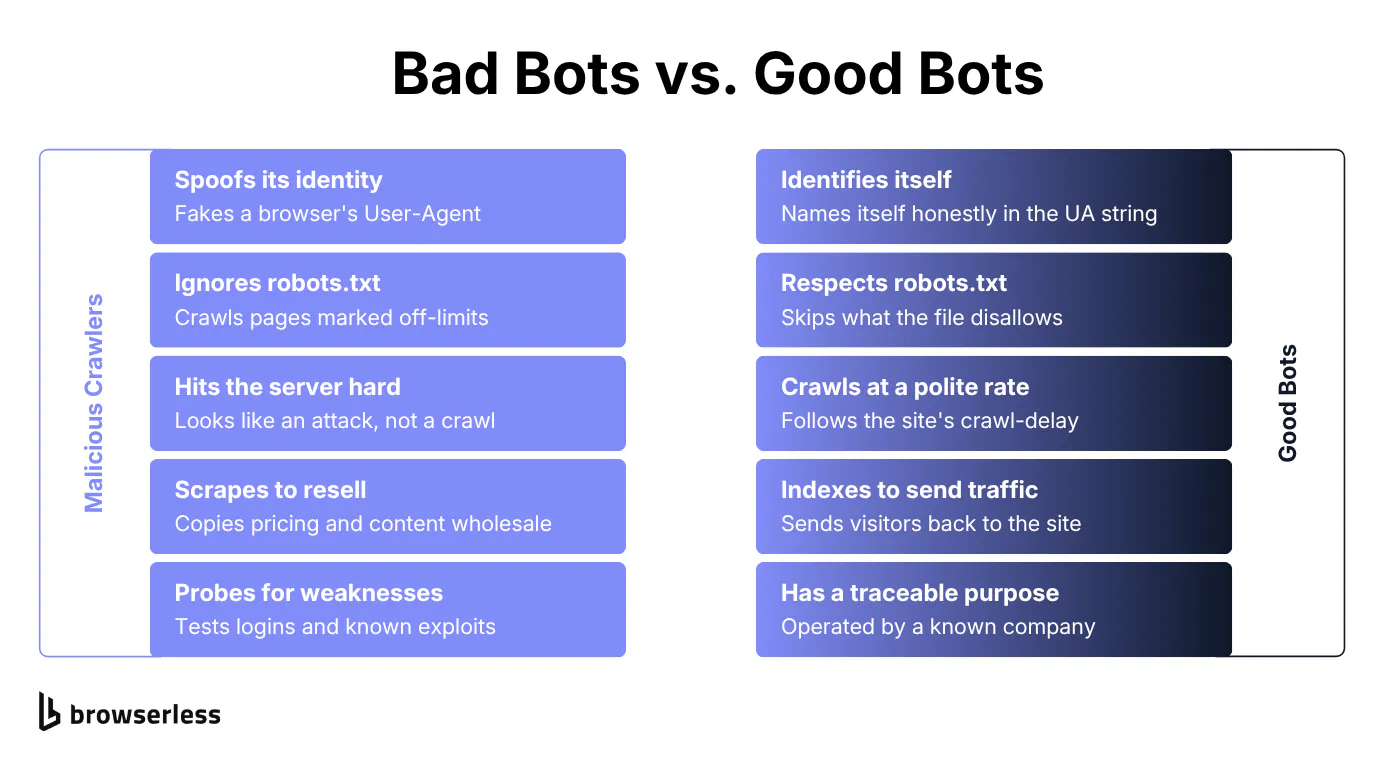
Bad bots aren't running the same software as legitimate robots, and the tasks they run aren't the same either: scraping content and pricing wholesale to resell, probing for outdated software and known vulnerabilities, or testing stolen credentials against a login form. None of that takes many server resources on the bot's side, which keeps the barrier to entry low.
How to build a simple web crawler
The Node.js crawler below fetches each page with a real browser, then applies that site's robots.txt rules before it queues anything new. Most of its length is the robots.txt parser, and that's the part worth reading closely: user-agent grouping and case-sensitive paths both change which URLs you're allowed to touch.
The same logic ports to Python or Java without much thought. What doesn't port is the hard part: reading robots.txt the way the site meant it, and pacing your requests when the site doesn't tell you how. The example uses Puppeteer to launch a local Chromium instance against scrapethissite.com, a sandbox with a real robots.txt, so you can watch two paths get skipped on the first run.
import puppeteer from "puppeteer";

const USER_AGENT = "ExampleCrawler/1.0 (+https://example.com/bot)";
const DEFAULT_DELAY_MS = 1000; // politeness floor when robots.txt is silent
const MAX_DELAY_MS = 30_000; // never park longer than this on a huge crawl-delay
const robotsCache = new Map();

// Keep only the rule group addressed to us: our product token (the part before
// the "/") if the file names it, otherwise the "*" fallback. A "Disallow: /"
// meant for another bot must never apply to us. Lowercase the directive name
// but never the path (robots.txt paths are case-sensitive).
function parseRobots(text) {
  const groups = [];
  let group = null;
  let sawAgent = false;
  for (const raw of text.split("\n")) {
    const line = raw.split("#")[0].trim(); // strip comments
    const i = line.indexOf(":"); // split on the first colon only
    if (i === -1) continue;
    const field = line.slice(0, i).trim().toLowerCase();
    const value = line.slice(i + 1).trim();
    if (field === "user-agent") {
      if (!group || !sawAgent) {
        groups.push((group = { agents: [], disallow: [], delay: 0 }));
      }
      group.agents.push(value.toLowerCase());
      sawAgent = true;
    } else if (group) {
      sawAgent = false;
      if (field === "disallow" && value) group.disallow.push(value);
      else if (field === "crawl-delay") group.delay = Number(value);
    }
  }
  const token = USER_AGENT.split("/")[0].toLowerCase();
  const g =
    groups.find((x) => x.agents.some((a) => a.split("/")[0] === token)) ??
    groups.find((x) => x.agents.includes("*"));
  const secs = Number(g?.delay);
  const delayMs =
    Number.isFinite(secs) && secs > 0
      ? Math.min(secs * 1000, MAX_DELAY_MS)
      : DEFAULT_DELAY_MS;
  return { disallow: g?.disallow ?? [], delayMs };
}

async function getRules(origin) {
  if (robotsCache.has(origin)) return robotsCache.get(origin);
  let rules = { disallow: [], delayMs: DEFAULT_DELAY_MS };
  try {
    // Bound the fetch: a hanging /robots.txt shouldn't stall the whole crawl.
    const res = await fetch(new URL("/robots.txt", origin), {
      signal: AbortSignal.timeout(10_000),
    });
    if (res.ok) rules = parseRobots(await res.text());
  } catch {} // unreachable host or timeout: fall back to no restrictions
  robotsCache.set(origin, rules);
  return rules;
}

const isAllowed = (disallow, path) =>
  !disallow.some((rule) => path.startsWith(rule));

// Drop the fragment so "/a" and "/a#top" aren't crawled as two pages; keep the
// query string. Returns null on a malformed href so the caller can skip it.
function normalize(link) {
  const url = URL.parse(link);
  if (!url) return null;
  url.hash = "";
  return url.href;
}

async function crawl(seedUrl, maxPages = 10) {
  const browser = await puppeteer.launch();
  const visited = new Set();
  const seen = new Set([normalize(seedUrl)]);
  const queue = [normalize(seedUrl)];

  try {
    const page = await browser.newPage();
    await page.setUserAgent(USER_AGENT);

    while (queue.length && visited.size < maxPages) {
      const url = queue.shift();
      const { origin, pathname } = new URL(url);

      try {
        const { disallow, delayMs } = await getRules(origin);
        if (!isAllowed(disallow, pathname)) {
          console.log(`Skipping ${url}, disallowed by robots.txt`);
          continue;
        }

        await new Promise((r) => setTimeout(r, delayMs));
        await page.goto(url, { waitUntil: "networkidle2", timeout: 30_000 });
        visited.add(url);

        const links = await page.$$eval("a[href]", (as) => as.map((a) => a.href));
        for (const link of links) {
          // Compare parsed origins, not string prefixes. startsWith() would
          // accept https://example.com.attacker.test/ as same-site.
          const next = normalize(link);
          if (!next || URL.parse(next)?.origin !== origin || seen.has(next))
            continue;
          seen.add(next);
          queue.push(next);
        }

        console.log(`Crawled ${url}, ${queue.length} queued`);
      } catch (err) {
        // One dead page or timeout shouldn't end the crawl. Log it, move on.
        console.warn(`Failed ${url}: ${err.message}`);
      }
    }
  } finally {
    await browser.close(); // runs even if the loop throws, so no leaked Chromium
  }

  return [...visited];
}

crawl("https://www.scrapethissite.com/", 5).then(console.log);
This covers the robots.txt rules that decide most crawls: user-agent groups, Disallow, and crawl-delay. Production crawlers layer on Allow: exceptions, wildcard matching, and status-code handling, which is where a maintained parser earns its keep. One requirement to note: URL.parse needs Node 22.1 or newer.
The script above runs fine locally for a handful of pages. It won't survive a real crawl. Here's where it breaks first.
Why web crawlers break at scale
A crawler that works on ten pages doesn't automatically work on ten million, and a few things get harder fast.
Bot detection is the first wall. Sites increasingly fingerprint the browser making the request, not just the request itself, checking things like navigator.webdriver, canvas rendering quirks, and TLS handshake signatures that give away an automated client even when the User-Agent header looks normal.
A crawler that ran fine against a handful of test pages can get blocked outright once it hits a site that checks for this.
Rate limits and politeness policies also get harder to hold consistently once you're running many sessions in parallel instead of one script on a laptop. Running a headless browser for hours or days at a time surfaces problems a five-minute test run never catches.
- Memory creeps up gradually across a long-running session until a page, or the whole process, falls over.
- Tabs crash under real page load in ways synthetic tests rarely reproduce.
- A Chrome instance can quietly stop responding altogether after enough cycles, with no crash log to explain why.
None of this makes a DIY crawler a dead end. The fix is the same headless browser approach shown earlier, running on infrastructure built for load, and when a site fingerprints you, on a stealth route with a residential proxy rather than a hand-patched local Chrome. Browserless also meters usage in units, 1 unit per 30 seconds of browser time, so a session that idles instead of closing has a visible cost.
That's the specific problem Browserless exists to solve, and the swap from the crawler above is one line, replacing puppeteer.launch() with a connection to a managed browser. In production, swap the puppeteer import for the lighter puppeteer-core package too, since you no longer need the bundled Chromium.
const browser = await puppeteer.connect({
  browserWSEndpoint: `wss://production-sfo.browserless.io?token=${process.env.BROWSERLESS_TOKEN}`,
});
Everything else in the crawl function stays the same, letting you point your existing Puppeteer or Playwright code at managed browsers instead of patching memory leaks yourself.
How to choose a web crawler tool
Once you're past a handful of pages, hand-rolled scripts stop being the main decision, and the choice comes down to which category of web crawler tool fits your project.
- Open-source frameworks, like Scrapy or Apache Nutch, are free crawler software released under permissive terms, Nutch under the Apache License, and give you full control at the price of managing your own infrastructure, proxies, and retries yourself.
- No-code visual tools let non-developers point, click, and create a crawl workflow from a template without writing anything, but they're harder to customize once a site's structure gets unusual.
- API-first crawling services hand customers a single endpoint that returns structured data, trading some flexibility for a much shorter setup time.
- Headless browser infrastructure runs your own Puppeteer or Playwright code against managed, scalable browsers instead of a local Chromium instance.
- Managed crawl endpoints skip the frontier code entirely. Browserless's Crawl API takes a seed URL plus
limit,maxDepth,includePaths, anddelay, and returns the scraped content of every page it finds (beta, Cloud plans).
None of these is universally better. A small internal tool crawling a handful of known pages doesn't need managed infrastructure.
A crawler that has to run continuously against sites that actively resist bots usually does. If you're comparing specific products rather than categories, Browserless has a broader roundup of web scraping tools worth a look.
What deep web crawler search engines can and can't reach
Standard web crawlers only reach what's reachable: pages with inbound links, no login wall, and no robots.txt rule telling them to stay out. Reaching the rest means carrying credentials on purpose. With Browserless that's an authenticated profile replayed into each session.
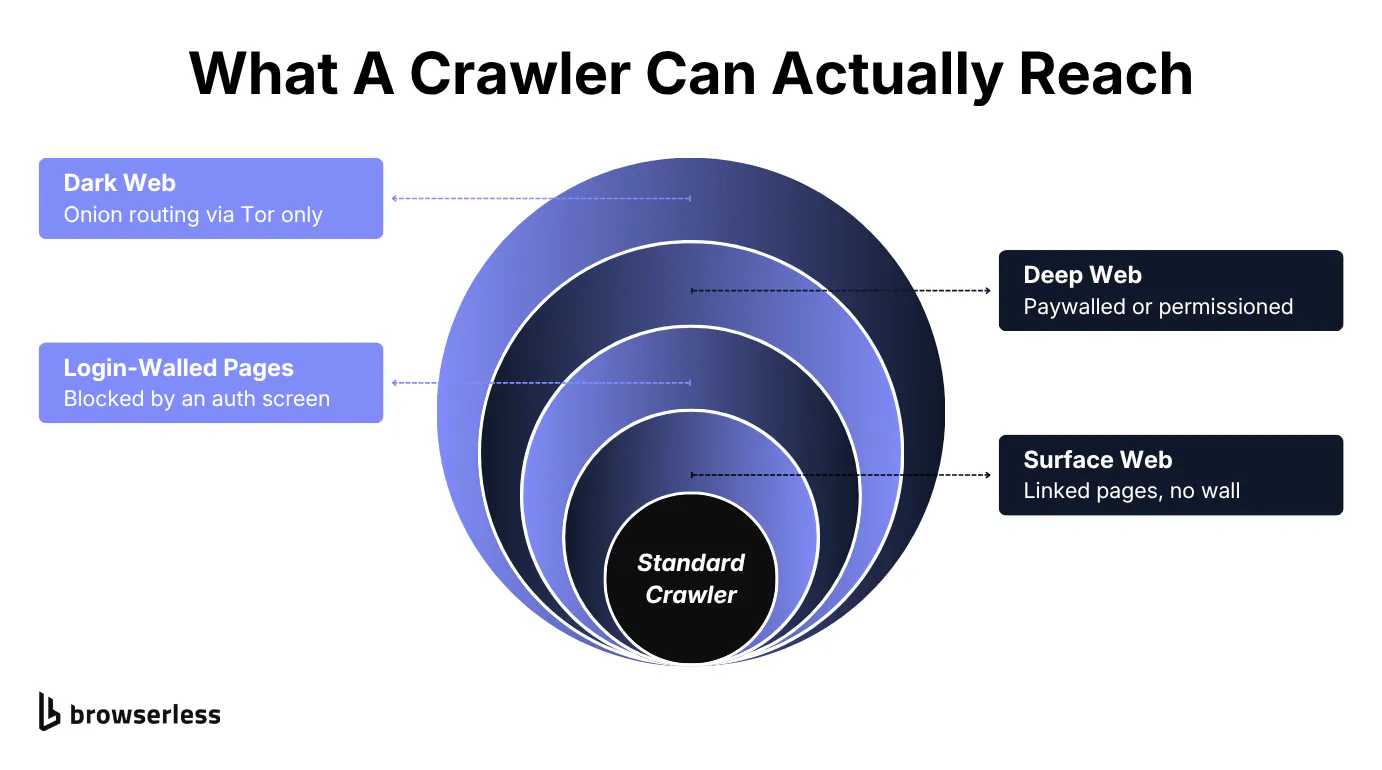
A huge share of the internet doesn't meet that bar. CrowdStrike puts the deep web, content that's password-protected, paywalled, or blocked from crawling, at roughly 90% of the internet's total content, if not more.
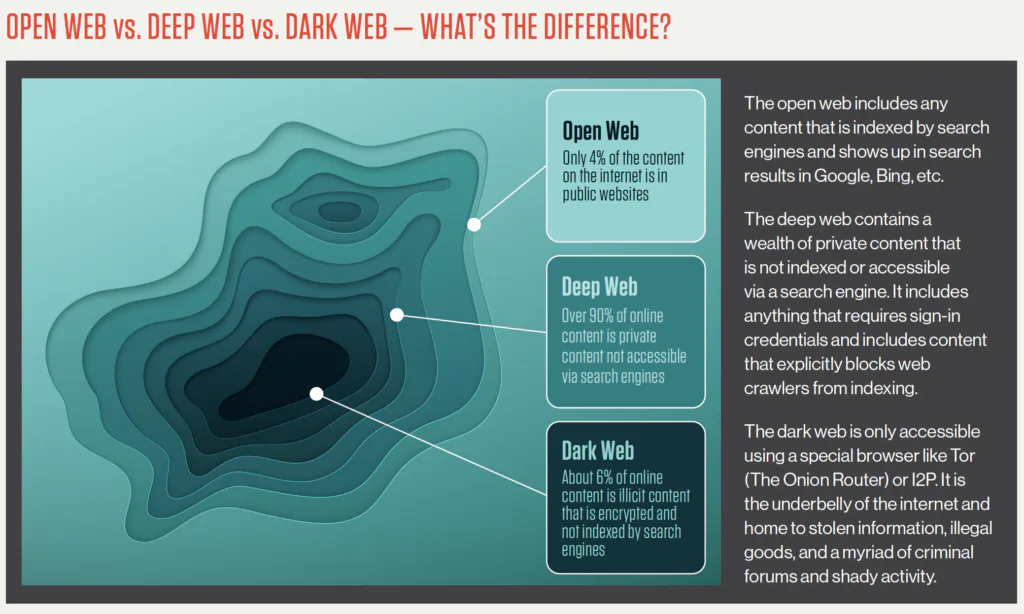
A deep web crawler search engine is built specifically to get past some of those barriers, within whatever access it's actually been granted. Academic search tools, for instance, can index paywalled journal content because publishers grant them access, not because they found some clever way around the paywall.
The dark web, a small, deliberately hidden slice of the deep web, runs on .onion addressing through Tor instead, and dedicated tools like Ahmia index what's been submitted or discovered through that network specifically, since standard crawlers have no route in at all.
A "deep web search engine" isn't a more powerful crawler. It's a crawler pointed at a narrower, permissioned, or differently-addressed slice of content that a standard one was never going to reach in the first place.
Web crawlers and SEO
Everything above assumes you're the one running the crawler. Flip the perspective to running a website, and the same mechanics turn into a search engine optimization (SEO) problem: getting crawled at all.
If a crawler can't reach your pages, they don't get indexed, and pages that aren't indexed don't show up in search results at all. That's the practical reason SEO and crawlability are tied together so closely.
If you run the site, that cuts both ways. You want Googlebot and Bingbot to reach every page worth ranking, while keeping crawlers out of admin pages, duplicate content, or thin auto-generated pages that add nothing to your search presence.
A robots.txt file and noindex meta tags handle most of that split. Google Search Console shows you which pages actually got crawled and indexed, and which keywords they're ranking for, the fastest way to catch a blocked page before it costs you traffic. If you want that same reachability check from your own side, Browserless's Map API returns every URL it can discover on your site from its sitemap or on-page links, a fast way to see what a crawler sees before Search Console does.
Crawlability is step one, and it's the only step on this list you can fix with a config change.
Conclusion
A web crawler is a straightforward idea underneath all the terminology. Start with a few known pages and follow every link outward. Then hand off what you find. The mechanics get more interesting once you look at what a crawler actually does at each step, where that process runs into real limits, from content it structurally can't reach to sites built to detect and block it outright, and on the flip side, whether your own site is even reachable to begin with.
Build it yourself and the crawl logic won't be what costs you time. Keeping browsers alive will. Sign up for a free account instead, and point your existing Puppeteer or Playwright code at managed browsers built to hold up under exactly that load.
Web crawler FAQs
Is web crawling legal?
Crawling publicly accessible pages that don't sit behind a login is generally accepted practice, and it's how every search engine operates. Trouble usually starts with how a crawler behaves, ignoring robots.txt, hammering a server with requests, or crawling content specifically blocked from automated access, not with crawling itself.
Is crawling a site the same legal question as scraping it?
Mostly, yes: the legality hinges more on what you do with the data than on the act of automated access itself. Browserless has a dedicated breakdown of web scraping and the law if you want the fuller picture on the scraping side specifically.
Is ChatGPT a web crawler?
ChatGPT itself isn't a crawler. OpenAI operates a separate bot, GPTBot, that crawls the web to gather training data and to support live retrieval when the assistant needs current information from a page.
Are web crawlers still relevant?
Crawler traffic hasn't gone anywhere. AI crawlers have been added on top of the search bots. AI tools depend on crawled content too, for training data and for live answers, so crawling hasn't been replaced. It's been joined by a second major category of bot doing largely the same job for a different purpose.
Is Google search a web crawler?
Not exactly. Googlebot is the crawler. Google Search is the product built on top of the index that crawler feeds. The crawler discovers and downloads pages, and a separate ranking system decides what to show for a given query.
How can a website owner tell bad bots from good bots?
A website owner can usually determine the difference from the details in server logs, a User-Agent that doesn't match its claimed browser, request patterns too fast or too regular for a human, or traffic hitting URLs no legitimate crawler would ever request. Companies running public-facing websites monitor this with a web application firewall or a dedicated bot-management service, since blocking by IP address alone rarely scales efficiently once the traffic is spread across a botnet.
Do I need to build my own crawler, or can I use an existing tool?
Most teams start with an existing tool rather than writing one from scratch, and building your own rarely pays off unless your crawl logic is genuinely unusual. If you're unsure which category fits, work backward from your constraints: how much customization you actually need, and how much bot detection or scale you're likely to hit.