
TL;DR
- A proxy browser routes your web traffic through an intermediary server, masking your real IP address and letting you control how requests appear to target websites.
- Proxy browsers are widely used for web scraping, competitor research, ad verification, and bypassing geo-restrictions.
- Browser extension proxies offer a lightweight, per-browser approach to routing traffic, but they have meaningful limits compared to headless and dedicated proxy browser setups.
- Choosing the right proxy browser setup depends on your use case, whether you need residential IPs, rotating proxies, or a full headless browser environment like Browserless.
Most people understand a proxy as a server that masks their IP address. A proxy browser goes further. Instead of simply sending traffic through a proxy server, the browsing environment itself is built or configured around proxy infrastructure, which is useful when you need web browsing to look realistic, repeatable, and location-aware.
Developers, data engineers, security researchers, and growth teams increasingly need more than a proxy. They need a browser that behaves like a real user while routing traffic through intermediary servers.
This article explains what a proxy browser is, how it works, how it differs from a browser proxy and a browser extension proxy, what teams use it for, and how to choose the best proxy browser setup for your workflow.
What is a proxy browser?
A proxy browser is a browser, or browser-like environment, that routes HTTP and HTTPS web requests through one or more proxy servers before reaching a target website. The proxy sits between the browser session and the open web. As a result, the target web server typically sees the proxy's IP address rather than the user's real IP address. Routing through a proxy alone doesn't guarantee anonymity, since intermediaries can add forwarding headers such as X-Forwarded-For that carry the original IP.
In practice, the term proxy browser covers two overlapping meanings:
- A dedicated browser built with proxy support as a core feature.
- A standard browser configured through proxy settings to route traffic through a proxy server.
Both setups can mask a real IP address, but are not equal in control, scale, or reliability.
A basic proxy server acts as an intermediary. The browser sends a request to the proxy server, the proxy forwards requests to the target website, and the website sends the response back through the same path.
For simple IP masking, that might be enough, but modern proxy browser traffic often requires more. JavaScript rendering, cookies, session state, screen resolution, browser headers, TLS behavior, and other fingerprinting signals all influence whether traffic looks like it came from real users.
Websites are looking at more than just IP addresses. They also look at browser behavior, device signals, request patterns, and signs of automation.
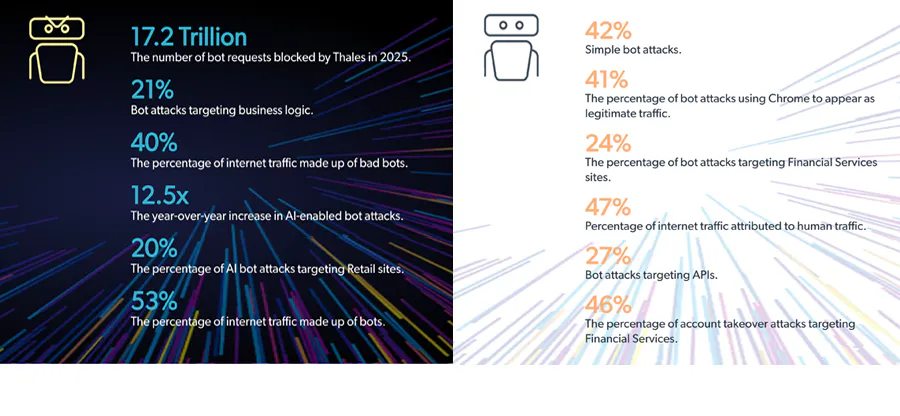
Thales' 2026 Bad Bot Report found that bots made up 53% of all internet traffic in 2025, while bad bots alone accounted for 40%. That context explains why IP masking and browser emulation are vital at scale. A proxy hides one part of the digital footprint, while a proxy browser helps manage the full browser session.
How a proxy browser works
Once you understand where a proxy browser sits in the stack, the request flow makes a lot of sense.
- The browser sends a request for a page, asset, API endpoint, or other resource.
- The proxy server intercepts that request.
- The proxy server forwards the request using the proxy's IP address.
- The target web server responds to the proxy.
- The proxy passes the response back to the browser.
- The browser renders the page, runs JavaScript, stores cookies, and continues the session.
Most proxy browsers use forward proxies. A forward proxy represents the client and sends outgoing requests on behalf of the browser, which is why the target website sees the proxy's IP address instead of the user's real IP.
A reverse proxy works in the opposite direction, sitting in front of a web server and managing incoming requests from external users. Reverse proxy infrastructure is common for load balancing, caching, DDoS protection, and enforcing security rules, but it's not what most people mean when they ask what a proxy browser is.
HTTP proxies handle standard web requests, while HTTPS proxying adds secure connections into the mix.
With HTTPS, the browser and target site establish encrypted communication. Depending on the setup, the proxy may simply tunnel the encrypted traffic, or it may perform SSL termination in controlled enterprise proxies where a network administrator needs to inspect traffic on an internal network. That kind of inspection is common in managed corporate environments, but it is different from the scraping and automation use cases most developers have in mind.
IP rotation is another core concept. Instead of sending every request from the same proxy IP, rotating proxies cycle traffic through a pool of IP addresses. Rotation can happen per request, per session, or according to custom rules. Sticky sessions do the opposite, which is covered in more detail below.
Automation libraries such as Puppeteer and Playwright drive headless browsers, and can route them through a proxy at the launch or context level.
Browserless also works as a headless browser solution for browser automation: developers connect to managed browsers through Puppeteer or Playwright over Chrome DevTools Protocol, then control sessions remotely rather than running browsers locally.
With Browserless's hosted browsers, you set proxy configuration at the connection URL level – simply add parameters like proxy=residential and proxyCountry=us to your WebSocket endpoint. Every page in that session automatically routes through the proxy without additional per-context configuration. Self-hosted and Enterprise deployments don't take those parameters, and instead use Chromium proxy flags such as --proxy-server or an external proxy configuration.
Proxy browser vs. browser proxy
A browser proxy usually refers to the proxy configuration used by an existing browser. In this setup, the browser stays the same, but its web traffic is routed through a proxy server before it reaches the target website. For example, configuring Chrome to use a SOCKS5 proxy, HTTP proxy, or system-level proxy settings is a browser proxy setup. The proxy changes how traffic leaves the browser, so the target web server sees the proxy's IP address instead of the user's real IP address.
A proxy browser is a broader term. It describes a browser environment that routes traffic through proxies as part of how it operates. That environment could be a standard browser with proxy settings, a browser extension proxy, an anti-detect browser, or a managed headless browser setup.
The distinction is about how the terms are commonly used in practice:
| Browser proxy | Proxy browser | |
|---|---|---|
| What it usually means | A proxy setting or proxy configuration used by an existing browser. | A broader browser environment built around proxy use. |
| Practical implication | The browser routes traffic through a proxy server, but the setup may not include session isolation, fingerprint control, IP rotation, or automation support. | The setup may include proxy routing, session management, cookie isolation, rotating proxies, fingerprint controls, and automation support. |
| Simple distinction | Usually a setting. | The broader setup built around that setting. |
When developers are building scrapers, automated tests, monitoring jobs, or data collection pipelines, routing traffic through a proxy server is only one part of the problem.
A browser proxy can help with basic IP masking, location spoofing, or accessing geo-blocked content during manual testing, but it doesn't automatically handle session isolation, cookie management, fingerprint spoofing, IP rotation, or automation at scale.
A purpose-configured proxy browser setup gives teams more control over the full session. For example, a headless browser service can:
- Apply proxy credentials per session.
- Isolate cookies and storage between runs.
- Rotate IPs across jobs.
- Integrate directly with Puppeteer or Playwright.
It's better suited to scraping data, ad verification, market research, and automated testing than a standard browser with a proxy setting applied.
What is a browser extension proxy?
A browser extension proxy is an add-on installed in a standard desktop browser such as Chrome, Firefox, or Edge. It routes some or all browser traffic through a proxy server without changing system-level network settings on the operating system.
The appeal is obvious:
- Browser extensions are easy to toggle on and off.
- They usually require little technical setup.
- They work per browser rather than device-wide, so a user can route proxy traffic in Chrome while leaving other applications on the normal internet connection.
For simple manual web browsing, checking content restrictions, or testing access to websites from another location, browser extension proxies can be convenient, but they have their limitations:
- Extensions only proxy traffic from that browser tab, window, or profile.
- They don't automatically proxy traffic from headless environments, backend jobs, Playwright scripts, Puppeteer scripts, server-side HTTP clients, or other automated tasks.
- They also depend on the browser extension APIs available in standard browsers, which means they may not control every request type in the way a data team expects.
Browser extensions can also increase fingerprinting risk. A website may not see your real IP address, but it can still inspect browser characteristics such as installed fonts, canvas behavior, screen resolution, WebGL signals, user agent, timezone, and extension-related indicators.
The Electronic Frontier Foundation's Cover Your Tracks project shows how trackers can view unique browser characteristics and use fingerprinting techniques even when users take protective measures.
Extension proxies also tend to have limited rotation controls. Many cannot rotate IPs dynamically per request, bind a proxy to a browser context, or coordinate IP behavior with cookies and session state. That makes them a poor fit for scraping at scale, competitor monitoring, automated testing, or cases where proxy misuse can trigger blocks, legal consequences, or third-party risk.
A browser extension proxy is useful as a lightweight tool, but as soon as the goal shifts from manual browsing to reliable automation, the use cases start to require a more complete proxy browser system.
What proxy browsers are used for
Because proxy browsers combine browser behavior with proxy infrastructure, they are useful whenever the same website needs to be accessed from controlled locations, IPs, sessions, or browser states. The commonality across these use cases is that the target site sees not just an IP address, but a full browsing session.
Web scraping and data collection
Web scraping at scale often requires more than basic proxies. Many modern sites render content with JavaScript, load data dynamically, and enforce rate limits against repeated requests from the same IP address. A plain proxy server can change where traffic appears to come from, but it cannot render the page, click elements, wait for network requests, or preserve session state.
A proxy browser solves that by combining JavaScript rendering with proxy routing. Teams can send thousands of requests across different IP addresses while still interacting with sites like a browser. This use case is great for price monitoring, travel fare aggregation, product availability tracking, SERP monitoring, and other workflows that depend on structured data from public web pages.
Ad verification
Ad verification teams use proxy browsers to check how ads appear across different regions, devices, and markets. A campaign may show one creative in London, another in New York, and a different landing page in Germany. Proxy browsers let advertisers and agencies confirm that the right creative, copy, and destination are being served without physically being in each location.
The proxy browser also helps avoid tipping off ad networks or fraud systems that the verification request is coming from a known corporate IP. For legitimate ad verification, the goal is not to evade accountability, it's to see the ad experience as a normal user in that region would see it.
Geo-restricted content and localization testing
Developers and QA teams use proxy browsers to test geo-restricted content, localized pricing, language settings, and region-specific access rules. A streaming platform, e-commerce site, or SaaS application may behave differently depending on where the request appears to originate.
A proxy browser can simulate users in different countries by routing browser traffic through local IPs. This helps teams confirm whether localized content renders correctly, whether taxes and currencies display as expected, and whether access restrictions work as designed.
Competitor and market research
Competitor research often involves repeated requests to the same website. Price intelligence tools, SEO monitoring workflows, marketplace crawlers, and market research scripts all need to access pages repeatedly without creating a pattern that looks abnormal.
Proxy browsers help make those requests look more organic. They can rotate IPs, preserve realistic session behavior, manage cookies, and render the same JavaScript-heavy interfaces real users see.
Many websites apply stricter controls when the same IP repeatedly requests the same website, especially when the pattern looks like automated scraping rather than normal browsing.
Security research and penetration testing
Security teams use proxy browsers to understand how applications respond to traffic from different IPs, countries, and browser states. They simulate bot traffic, test rate limits, validate access controls, or identify exposure to scraping, enumeration, credential stuffing attacks, and other security threats.
Proxy browser abuse becomes relevant here. The same techniques used for legitimate research can be misused by cyber attackers to evade detection, steal data, operate multiple accounts, or bypass content restrictions. Responsible teams should use proxy browsers within legal, contractual, and ethical boundaries, while monitoring their own applications for proxy misuse, suspicious automation, and traffic patterns that do not match real users.
The types of proxies used in proxy browsers
The browser layer and proxy layer are separate. Browserless, for example, handles the browser side, while teams can route traffic through built-in residential proxies or their own proxy provider.
Browserless's BrowserQL proxy mutation enables you to route requests through Browserless's built-in residential proxy or through your own external proxy, and apply proxying only to requests that match specified URL patterns, so you can proxy page navigations while letting images and scripts load directly.
The proxy type you choose affects speed, cost, block rate, and trust.
- Datacenter proxies come from cloud providers or datacenter networks. They're fast, cheap, and easy to scale, but easier to detect as many websites know which IP ranges belong to hosting providers. Datacenter proxies work well for permissive sites, internal testing, and high-throughput jobs where detection risk is low.
- Residential proxies use IPs assigned by internet service providers to real residential connections. They look closer to normal consumer traffic so are harder to block than datacenter proxies. They're common for scraping, ad verification, localization testing, and market research, where IP reputation matters.
- Mobile proxies use IPs from mobile devices and carrier networks. They often have the highest trust because mobile carrier IPs are shared by many real users. They're also more expensive and can be slower or less predictable than other proxy types. Mobile proxies are usually reserved for when mobile-specific behavior or carrier-level location is required.
- Rotating proxies change IP addresses across requests or sessions, which helps distribute request volume and reduce rate limiting. Rotation is useful for broad crawling, SERP monitoring, and workloads that touch many pages.
- Sticky sessions keep the same IP address for a defined window – useful for when the same session needs continuity, such as logging in, preserving a cart, navigating a checkout flow in QA, or testing a localized experience across multiple pages.
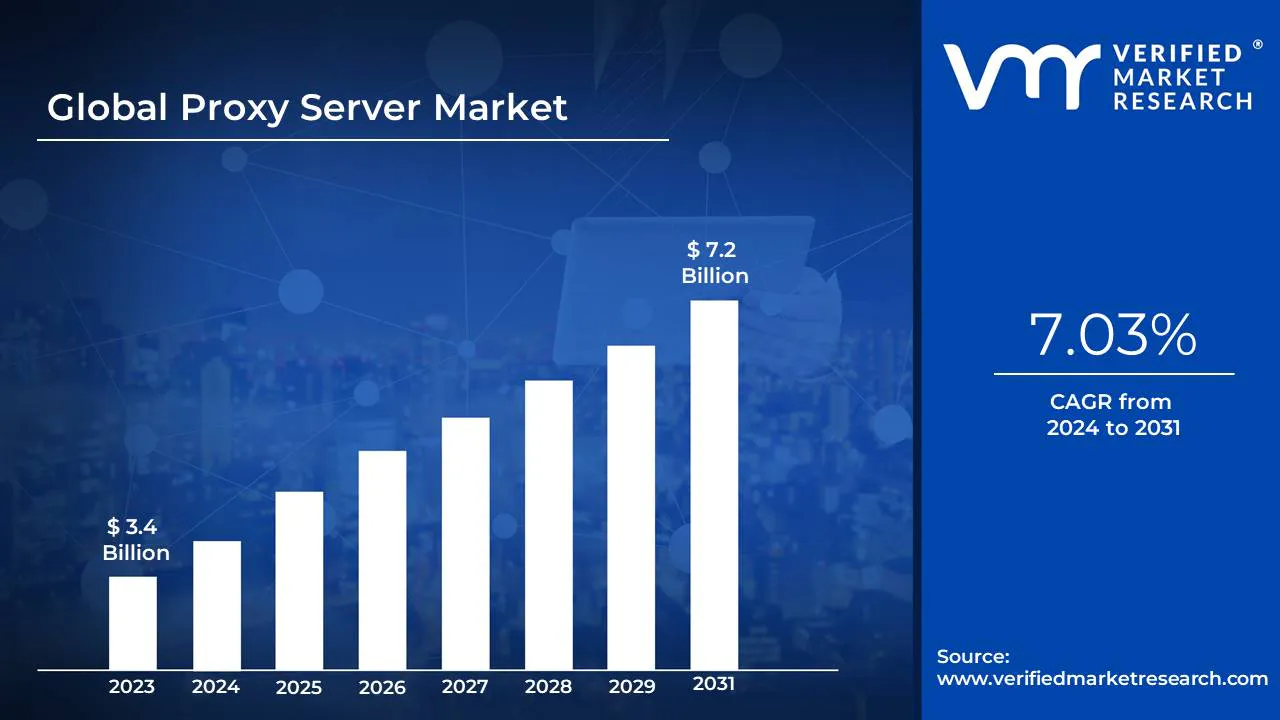
These patterns are now central to web automation, cybersecurity, privacy, and access control, so it's no wonder the market has grown. One market estimate valued the proxy server market at USD 3.4 billion in 2023 and projected it to reach USD 7.2 billion by 2031.
What is the best proxy browser?
The best proxy browser depends on what you need it to do. A desktop user checking a geo-restricted page has different requirements from a data team running thousands of automated browser sessions per day.
Here's a step-by-step guide to deciding what's best for you:
1. Start with the browsing model.
If you need manual browsing, a desktop browser with proxy settings, or a trusted browser extension proxy may be enough. If you need automation, scraping, monitoring, or testing, a headless browser platform with proxy support is usually a better fit.
Headless setups can run in the cloud, scale across many sessions, expose API access, and integrate directly with Puppeteer, Playwright, and other automation tooling.
2. Evaluate IP pool quality.
A large pool of cheap datacenter IPs may be fine for low-risk targets. Residential proxies or mobile proxies may be necessary when websites enforce stricter bot detection.
Also, check whether the provider supports rotating proxies, sticky sessions, country targeting, city targeting, and authenticated proxy credentials. City-level targeting is often gated behind higher plans – on Browserless, for example, proxyCity requires a Scale plan.
3. Consider session management requirements.
Session management is just as important as IP routing.
A strong proxy browser setup should isolate cookies, storage, browser contexts, user agents, and fingerprinting signals between sessions. Otherwise, rotating IP addresses won't help much. A target site can still connect sessions through browser fingerprinting, repeated behavior, or shared state.
4. Scalability and API access.
Rather than a desktop anti-detect browser, the best proxy browser for developers is usually a headless browser environment that enables engineers to create, control, and close sessions programmatically.
Browserless fits this category: it's built for developers who need scalable browser automation, Puppeteer and Playwright support, session control, and proxy integration without managing browser infrastructure themselves.
Browserless also offers BrowserQL for sites that resist automation, with capabilities such as CAPTCHA handling, fingerprint mitigation, and routing traffic through built-in residential proxies or a team's own proxy provider.
For sites with aggressive bot detection, Browserless provides stealth routes – managed browser endpoints that apply fingerprint evasion, entropy injection, and realistic browser behavior automatically.
5. Cost.
Extension proxies are cheap but limited. Desktop anti-detect browsers are useful for manual workflows but harder to scale. Full cloud headless browser platforms cost more than basic proxies, but they reduce operational work by handling browser versions, concurrency, infrastructure, and automation reliability.
So, what is the best proxy browser? For manual browsing, use the simplest safe tool that meets your needs. For scraping, testing, monitoring, and automating repetitive tasks, choose a headless browser platform with first-class proxy support, session isolation, and developer-friendly APIs.
Conclusion
A proxy browser is more than a proxy server. It's a browser or browser-like environment that routes traffic through intermediary servers while managing the session, rendering pages, handling cookies, and controlling how requests appear to target websites.
Take note of the distinction between proxy browsers, browser proxies, and browser extension proxies. A browser proxy is a setting. A browser extension proxy is a convenient add-on. A proxy browser is a fuller system for routing traffic, managing browser state, and scaling web automation – a system that becomes important when IP masking alone is not enough.
For lightweight manual tasks, standard browsers with proxy settings may work, but for serious scraping, ad verification, localization testing, security research, and developer automation, you need a more powerful setup.
Browserless is a natural fit for developers and data teams that need headless browsing at scale with proxy support built in, especially when Puppeteer, Playwright, BrowserQL, and managed browser infrastructure are already part of the workflow.
On Browserless's hosted browsers, the connection URL exposes parameters like:
proxyCountryfor geographic targeting.proxyCityfor city-level precision, on Scale plans.proxyStickyfor session continuity.proxyLocaleMatchto automatically align the browser language with the proxy's location.
Sign up for a Browserless free plan and start routing browser sessions through residential proxies in minutes.
Proxy browser FAQs
What is the difference between a proxy browser and a VPN?
A proxy browser routes browser traffic through a proxy server. A VPN routes more of the device's internet connection through an encrypted tunnel at the operating system level.
A VPN is often used for general privacy and secure connections, whereas a proxy browser is usually used when you need browser-specific control over IP address, session state, location spoofing, and automation behavior.
Can I use a proxy browser for web scraping?
Yes. Proxy browsers are commonly used for web scraping because they can combine rotating IPs with real browser rendering. With a proxy browser, teams can access JavaScript-heavy pages, manage cookies, avoid simple rate limits, and run automated tasks through Puppeteer, Playwright, or a managed browser platform.
Is a browser extension proxy safe?
A browser extension proxy can be safe if it comes from a trusted provider, uses secure proxy servers, and has clear privacy practices.
However, it can pose a risk if the provider logs browsing history, injects ads, intercepts secure connections, or routes traffic through unknown intermediary servers. Extension proxies are convenient, but aren't ideal for headless automation or sensitive workflows.
What is a residential proxy and what's the connection to proxy browsers?
A residential proxy uses an IP address assigned by an internet service provider to a real residential connection. Many websites trust residential IPs more than datacenter IPs, so, for proxy browsers, residential proxies can reduce block rates and make traffic look closer to normal web browsing by real users.
Can headless browsers like Puppeteer use a proxy?
Yes, though the three common setups configure it in different places. Puppeteer takes a proxy at launch through the --proxy-server argument. Native Playwright sets one per context with browser.newContext({ proxy }), or globally at launch. With a hosted Browserless browser, you put the proxy on the connection URL – for example proxy=residential&proxyCountry=us – and it applies to the session's default context. One gotcha over the Chrome DevTools Protocol: calling browser.newContext() opens a separate context that doesn't inherit those launch-level proxy settings, so stay on the default context when you need the connection-URL proxy to take effect, as Browserless's Playwright configuration docs explain.
What is the best proxy browser for developers?
For most developer use cases – scraping, testing, monitoring, or automation – a headless browser platform beats a desktop browser or extension proxy. Look for one with API access, session isolation, and native Puppeteer or Playwright support. See the full breakdown above.