
TL;DR
- DataDome bypass means working around a layered bot-detection system, not switching it off, but bypassing it at scale isn't realistic.
- DataDome scores every visitor using browser fingerprints, behavioral signals, and a running trust score before serving a JavaScript challenge or a CAPTCHA.
- Proxy rotation, fingerprint matching, behavioral simulation, and handling DataDome's JavaScript challenges are the core DIY techniques, each with working code below.
- DIY stealth setups degrade as DataDome ships detection updates, which is why a maintained stealth layer tends to hold up longer than a one-time script.
Introduction
Your scraper requests a DataDome-protected page and gets back a JavaScript challenge, a CAPTCHA, or a blunt block instead of the HTML you needed. That's DataDome doing its job: it's one of the more sophisticated bot-management vendors in production today, sitting in front of e-commerce, retail, travel, and ticketing sites and scoring every request before deciding what to let through.
This guide covers what DataDome actually checks, the detection layers it uses to tell a script from a person, and the techniques developers use to bypass DataDome CAPTCHA and bot-detection challenges, each with working code.
It also covers where those techniques hold up and where they don't, as no bypass method survives a system that updates as often as DataDome does.
What is DataDome?
DataDome is a bot-management and cyberfraud-protection vendor. It sits between visitors and a website, usually through a CDN or reverse-proxy integration, and scores every request for signs of automation before deciding whether to let it through, challenge it, or block it outright.
Sites lean on DataDome's bot protection to guard login forms, checkout flows, and API endpoints across various websites – anywhere automated traffic could scrape prices, buy up inventory, or hammer an API past its intended rate.
If you've hit a CAPTCHA or a blank challenge page on a site that's otherwise working fine, there's a decent chance DataDome's bot detection is the layer that stopped you.
The detection layers behind DataDome bot protection
DataDome layers client-side and server-side signals into a single decision, so bypassing just one layer rarely gets you all the way through.
Here's what each layer actually looks at.
Browser fingerprints and device signals
DataDome's JavaScript tag collects a browser fingerprint on every visit: canvas and WebGL rendering quirks, the navigator.webdriver flag, installed plugins, screen resolution, and timezone.
Automated browsers often leave a mismatch somewhere in that set: e.g., a navigator.webdriver value stuck at true, an empty plugin list, a timezone that doesn't match the IP's geography, or a font set that doesn't match the claimed operating system. Any one of those is enough to get the action flagged by DataDome.
Behavioral analysis and mouse movements
Alongside the static fingerprint, DataDome watches how you interact with the page: click cadence, scroll speed, mouse movements between actions, and how long you linger before acting.
A script that jumps straight from page load to form submission with no movement in between looks nothing like a person reading the page.
IP reputation and trust score
Every visitor also accumulates a trust score, DataDome's running reputation for that IP or session rather than a single pass-or-fail check.
Datacenter IPs start with a lower baseline trust score than residential or mobile ones, since legitimate traffic is less likely to come from a hosting provider's range. A trust score can degrade further if the same IP hits many pages too quickly.
JavaScript challenges and DataDome CAPTCHA
When the earlier signals don't clear the bar, DataDome's tag runs an active check: a JavaScript challenge that has to execute correctly to set a valid session cookie.
If that's still not enough, DataDome escalates to its own CAPTCHA, distinct from reCAPTCHA or Turnstile, which blocks the request until it's solved.
Can you actually bypass DataDome?
Individual requests can get through, but bypassing DataDome in the sense of disabling it isn't realistic.
According to DataDome, bypassing it at scale isn't possible, as it has a detection system built on thousands of proprietary machine learning models that process signals continuously and adapt to new bypass attempts as they surface.
The techniques below reduce your detection surface and lower the odds that any single layer flags you, but they don't add up to a permanent, guaranteed way around a system this actively maintained.
You're not invisible, just less obvious, and that's about as far as you can get.
How to bypass DataDome CAPTCHA and bot detection
A DataDome CAPTCHA bypass usually starts well before the CAPTCHA itself, especially as most sessions get flagged and challenged long before that point.
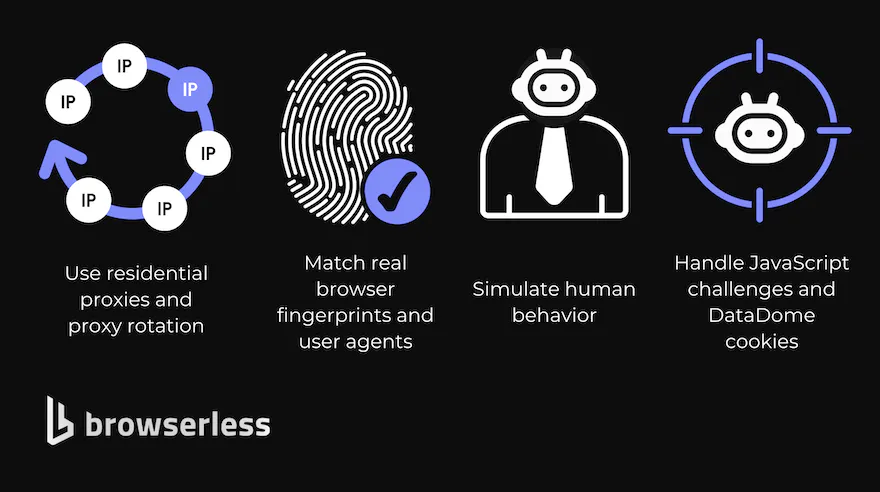
The four techniques below each target one of the detection layers above. None of them works in isolation for long (DataDome's own updates make sure of that), but combined, they're the standard anti-bot toolkit for reducing how often you get challenged.
Use residential proxies and proxy rotation
Datacenter IPs are the easiest signal DataDome has, so most DIY setups start with a residential proxy: an IP address that routes through a real home internet connection instead of a hosting provider's range.
Proxy rotation should follow session behavior rather than firing a new IP on every single request, since a visitor who changes location every few seconds is its own red flag.
A more realistic pattern rotates IP addresses per session, holding one IP for the length of a browsing session the way a real visitor's connection would.
Match real browser fingerprints and user agents
A user agent is just the text string your browser sends to identify itself, and it needs to line up with everything else in the request.
If your user agent claims to be a recent Chrome release, but your Accept-Language header, your client hints, or your TLS handshake look like something else, that mismatch is a signal DataDome can pick up on.
Keep the user agent, headers, and the browser fingerprint your automation presents internally consistent, and update them as browser versions move on – a stale user agent stops looking normal fast.
A stealth browser plugin can patch several of these tells automatically, though it still needs to be kept current.
Simulate human behavior
Randomized delays between actions, natural scroll patterns, and mouse movements between clicks all help a script look less like a script.
The catch with behavioral simulation is that over-scripted "human-like" behavior has its own tell – real human behavior isn't as evenly randomized as a single random.uniform() call tends to produce. Varying the timing distribution itself, not just adding a flat delay, gets closer to how people actually behave.
Handle JavaScript challenges and DataDome cookies
DataDome's JavaScript challenge has to actually execute inside a real browser engine to produce a valid DataDome cookie.
Copying a cookie value from one session into another doesn't work, since the cookie is tied to the fingerprint and behavior that produced it. As a result, headless browsers with a real Chromium or Firefox engine, not raw HTTP clients, are the baseline for anything past the simplest DataDome-protected pages.
Diagnosing a DataDome block in Python
To bypass a DataDome block, you need to know what you're actually looking at, which is where a Python diagnosis comes in.
A 403 with a short error body is a different problem than a 200 that returns a challenge page instead of content, and the fix depends on which one you're hitting.
import requests
import random
import time
from fake_useragent import UserAgent
# Pull a current, real-world Chrome desktop user agent from a maintained list
# instead of hard-coding one that goes stale (a stale UA is itself a signal).
ua = UserAgent(os=["Windows", "Mac OS X"], browsers=["Chrome"])
session = requests.Session()
session.headers.update({
    "User-Agent": ua.random,
    "Accept-Language": "en-US,en;q=0.9",
    "Accept": "text/html,application/xhtml+xml,application/xml;q=0.9,*/*;q=0.8",
})
proxies = {
    "http": "http://USER:PASS@residential-proxy-host:PORT",
    "https": "http://USER:PASS@residential-proxy-host:PORT",
}
response = session.get(
    "https://example-datadome-protected-site.com/",
    proxies=proxies,
    timeout=15,
)
if response.status_code == 200 and "datadome" in response.text.lower():
    print("Likely served a DataDome challenge page instead of real content.")
elif response.status_code == 403:
    print("Blocked outright. Check the response headers for a DataDome-specific cookie or header.")
else:
    print(f"Got status {response.status_code}; response looks like normal content.")
time.sleep(random.uniform(1.5, 4.0))
What this does:
- Uses a current, real-world user agent pulled from a maintained list (via
fake-useragent) rather than a hard-coded string that goes stale or Python's defaultrequestsuser agent. - Routes the request through a residential proxy instead of a datacenter IP address.
- Checks both the status code and the response body, as DataDome sometimes returns a
200with a challenge page rather than an outright403. - Adds a randomized delay before the next request instead of firing immediately.
This process handles the request layer, but it doesn't run the JavaScript challenge itself. requests has no JavaScript engine, so anything gated behind DataDome's JS challenge needs a real browser instance, not just a well-disguised HTTP client.
A working bypass in Python
To actually clear the challenge, connect Playwright to a real browser on Browserless's stealth route instead of using requests. The stealth route applies the fingerprint mitigations, proxy=residential gives you a real-user IP, and solveCaptchas=true handles any DataDome CAPTCHA that still appears:
import asyncio
from playwright.async_api import async_playwright
# Stealth route + residential proxy + automatic CAPTCHA solving (DataDome included)
STEALTH_URL = (
    "wss://production-sfo.browserless.io/stealth"
    "?token=YOUR_API_TOKEN"
    "&proxy=residential"
    "&solveCaptchas=true"
    "&timeout=120000"
)
async def main():
    async with async_playwright() as p:
        browser = await p.chromium.connect_over_cdp(STEALTH_URL)
        page = await browser.new_page()
        response = await page.goto(
            "https://www.example-real-datadome-site.com/",
            wait_until="domcontentloaded",
            timeout=90000,
        )
        print("status:", response.status)
        html = await page.content()
        print(f"Retrieved {len(html)} chars of page HTML")
        await browser.close()
asyncio.run(main())
Why DIY DataDome bypasses break over time
DataDome updates its JavaScript tag, its fingerprinting checks, and its machine learning models on an ongoing basis, and its own team actively monitors bot-developer communities and bot-as-a-service platforms to catch new bypass techniques early.
A user agent rotation or a stealth patch that gets through today can start failing next month with zero changes on your end, simply because DataDome shipped an update to what it's checking for.
That's the maintenance burden nobody selling a one-time "bypass DataDome" script mentions. A DIY setup is a snapshot of what worked against one version of DataDome's detection. Keeping it working means re-testing regularly, watching for new challenge types, and rebuilding your fingerprint and behavioral logic every time something changes.
A more reliable way to scrape DataDome-protected sites
If you're maintaining your own stealth setup against DataDome-protected sites, the techniques above are the same ones a managed stealth layer applies. The difference is who keeps them updated.
Browserless's stealth route applies fingerprint mitigations and entropy injection to every request through a single API call, so you're not hand-rolling canvas and WebGL spoofing yourself.
Residential proxies are built in and can be pinned to a country or kept sticky across a session, and BrowserQL's solve mutation detects and solves whatever CAPTCHA it encounters, DataDome included, without you writing separate handling for each challenge type.
Browserless lists DataDome by name as one of the bot-detection systems it targets.
mutation BypassDataDome {
  goto(url: "https://example-datadome-protected-site.com/", waitUntil: networkIdle) {
    status
  }
  solve {
    found
    solved
    time
  }
  text(selector: "body") {
    text
  }
}
Run against https://production-sfo.browserless.io/stealth/bql?token=YOUR_API_TOKEN&proxy=residential.
What this does:
- Hits the stealth route (
/stealth/bql), which applies fingerprint mitigations before the request is even sent. - Adds
proxy=residentialso the request routes through a residential IP address instead of a datacenter one. - Runs
solve, which detects and solves whatever captcha is present without you specifying the type. - Extracts the resulting page text once the challenge clears.
None of that is a guarantee of a bypass. It's the same fingerprint matching, proxy rotation, and challenge handling described above, maintained continuously against DataDome's changes instead of left to go stale in a script you wrote once.
For teams that need reliable scraping at real volume, that combination is usually what it takes to maintain uninterrupted access to a site that keeps changing what it's looking for, and it's a better trade than re-patching a DIY stack every time DataDome ships an update.
If you'd rather not write BQL, you could use the Unblock API: a single REST endpoint built for exactly this use case. It's designed to get past bot-detection systems like DataDome and passive CAPTCHAs, and returns the unblocked page in one call.
Point it at the target URL with proxy=residential, and it handles the fingerprinting and challenge-clearing for you, no WebSocket session required.
DataDome vs. Cloudflare: how bot protection compares
DataDome and Cloudflare solve a similar problem in different ways. Both sit in front of a website and score requests before they reach the origin server, and both can escalate to a JavaScript challenge or a CAPTCHA when a request looks automated.
Cloudflare pairs its challenge platform with the reach of its CDN, so a large share of the web already routes through it in some form. DataDome leans more heavily on a proprietary JavaScript tag and a running trust score per visitor, with its own CAPTCHA rather than reusing an existing one.
For anyone scraping across many targets, the practical difference is that you can't build one bypass and reuse it against both.
A Cloudflare bypass leans on TLS fingerprint matching and the Cloudflare Turnstile CAPTCHA specifically, while a DataDome bypass leans on DataDome's own fingerprint and trust-score model.
The underlying techniques, proxies, real browser engines, consistent headers, and realistic timing all overlap heavily; the specific challenge each vendor throws at you doesn't.
Conclusion
DataDome bypass techniques come down to reducing your detection surface across the layers above: fingerprints, behavior, IP reputation, and the JavaScript challenge itself.
The DIY toolkit of residential proxies, matched fingerprints, behavioral simulation, and a real browser engine works, but it needs upkeep and updating every time DataDome changes what it checks for.
If you'd rather not own that maintenance yourself, sign up for a free Browserless plan and run the same techniques through a stealth layer that gets updated for you.
DataDome bypass FAQs
What is a DataDome ban?
A DataDome ban is what happens when a session's trust score drops far enough that DataDome blocks it outright instead of issuing another challenge. It's usually tied to an IP address or a fingerprint rather than a permanent, unappealable block, so switching proxies or resetting the session's fingerprint often clears it, at least until the same pattern triggers another ban.