
TL;DR
- Read the rendered cards. Booking scraping means loading a Booking.com search results page in a real browser and reading each property card for the hotel name, address, price, review score, and review count.
- No dates, no prices. Search without check-in and checkout dates and you'll get hotels with every price empty, so put the dates and occupancy in the search URL and store them next to each rate.
- Local browsers stall. Puppeteer and Selenium are fine for a few searches from your laptop. When the results stop loading, move the same search to Browserless's Browser Automation Protocol (BAP) or BrowserQL on the stealth route.
Introduction
The first time you scrape Booking.com, you'll probably end up with a CSV full of hotel names and an empty price column. Booking.com doesn't show stay prices until the search carries check-in and checkout dates, and a script that types a city and hits Enter never sends them.
In this guide, you'll scrape Booking search results with a scraper that sets those values up front and collects property names, addresses, prices, review scores, and review counts. You'll run it locally with Puppeteer or Selenium first, then move the same search to Browserless with BAP or BrowserQL once local runs stop getting results.
What a booking scraper collects from Booking.com
Before you write any web scraping code, know where the data lives. Booking.com spreads it across the three pages you move through when booking hotels, and the search results usually have everything you need, which saves you from opening thousands of property pages.
Home page and search bar
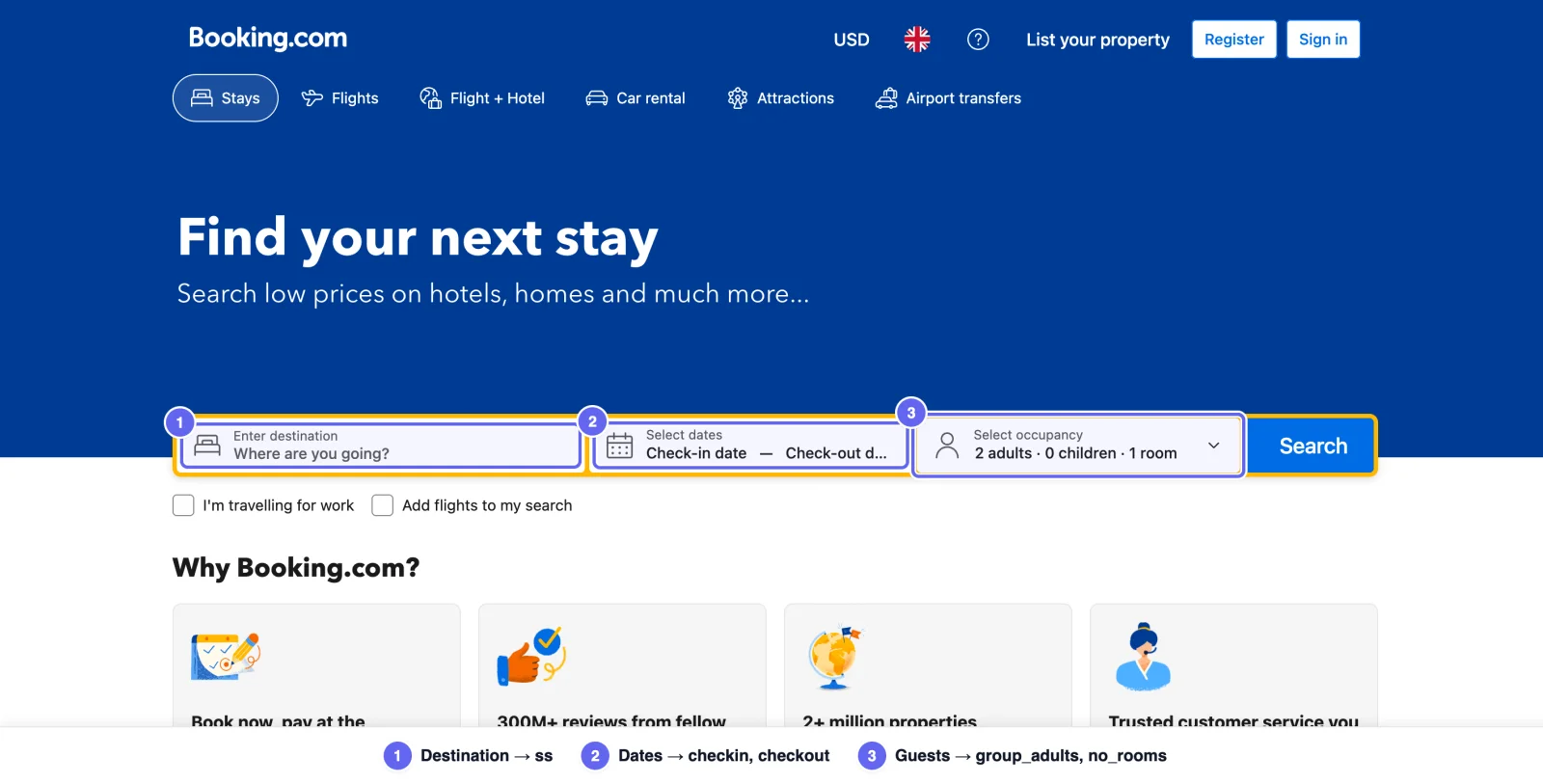
The home page search bar takes a destination, check-in and checkout dates, and a guest count, but you don't need to automate it. Run one search by hand in your web browser and watch the address bar, or the request in your DevTools network tab. You'll see the same values sitting in the results page URL, which is what your code will load.
Search results with property name, hotel prices, and review count
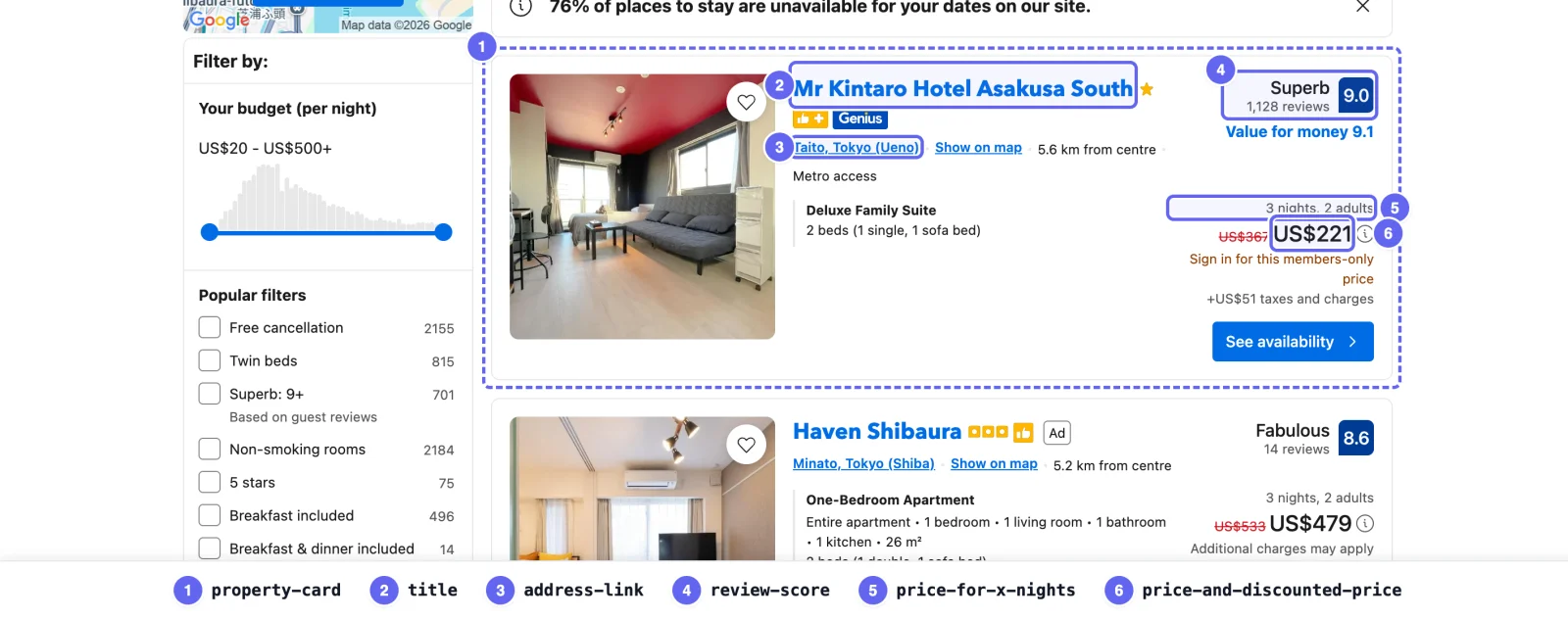
Each property listing is wrapped in a data-testid="property-card" element. Each field inside the card has its own data-testid too, and that's what you'll select on.
- Property name. The hotel name lives in
[data-testid="title"]. - Property address. The property's location, its district and city, lives in
[data-testid="address-link"]. - Price.
[data-testid="price-and-discounted-price"]holds the displayed rate, and[data-testid="price-for-x-nights"]says what it covers, such as "3 nights, 2 adults". - Review score and review count. Both arrive together in
[data-testid="review-score"]. - Property link and property images. The title links to the property page, and the card carries its lead photo.
A single results page gives you 15 to 25 properties, which makes it the most efficient source for market research on pricing information across a city. It's also where you'd start when extracting travel data at scale.
Property details page and property address
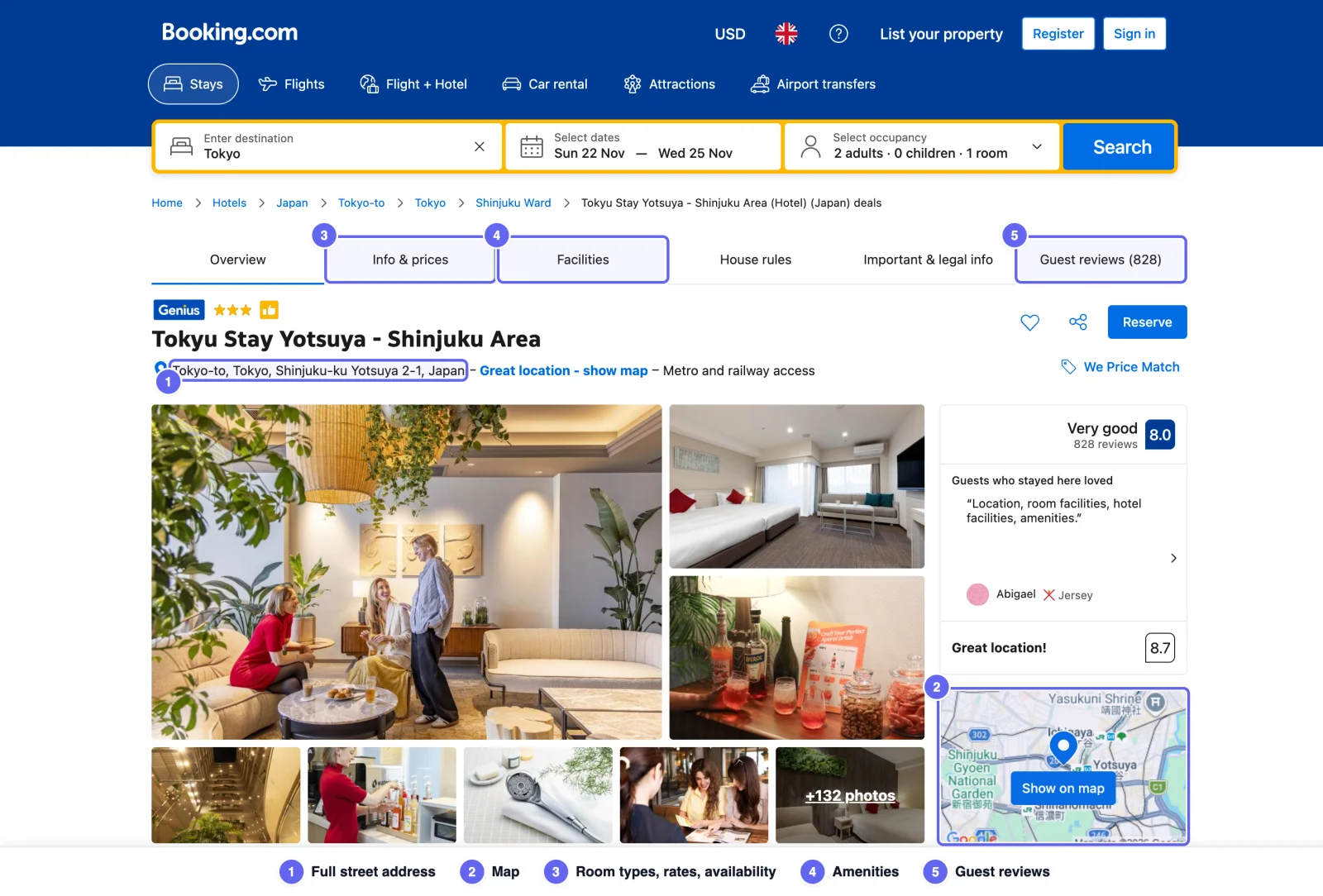
The property page opens with a tab bar that works like a table of contents, and adds the full street address and a map, room types with their rates and availability, amenities, guest reviews, and booking options such as free cancellation. Every one costs another page load, so only open the properties you need detail on.
If all you need is a list of property URLs, skip the searches and read the sitemaps Booking.com lists in its robots.txt, such as sitembk-hotel-index.xml for hotel pages. You'll still need the results page for live prices.
Check the rules before you scrape public data
Before you point a scraper at the site, read Booking.com's terms and its robots.txt with your use case in mind. Being able to access public data isn't the same as permission, especially if you plan to republish guest reviews or photos.
Is web scraping legal? covers the general picture. Where you land depends on the data and your jurisdiction, and European Union rules come into play if you collect anything about individual guests.
Whatever you collect, keep the request rate low, cache anything that doesn't change so you only request new data, and limit data extraction to the fields you need.
Small-scale booking scraping with Puppeteer or Selenium
Puppeteer is a quick way to extract hotel data from Booking.com for a small project, and to learn how the page behaves before you scale. The code examples search Tokyo for two adults over three nights and save the results to a CSV file.
1. Project setup and installing Puppeteer
You'll need Node.js 22.12 or later for current Puppeteer releases. Create a project folder and install Puppeteer plus @json2csv/plainjs, which handles the CSV output.
mkdir booking-scraper && cd booking-scraper
npm init -y
npm install puppeteer @json2csv/plainjs
Puppeteer pulls down its own build of Chrome during the install. If your package manager blocks install scripts, run npx puppeteer browsers install chrome afterwards.
2. Write the booking scraper
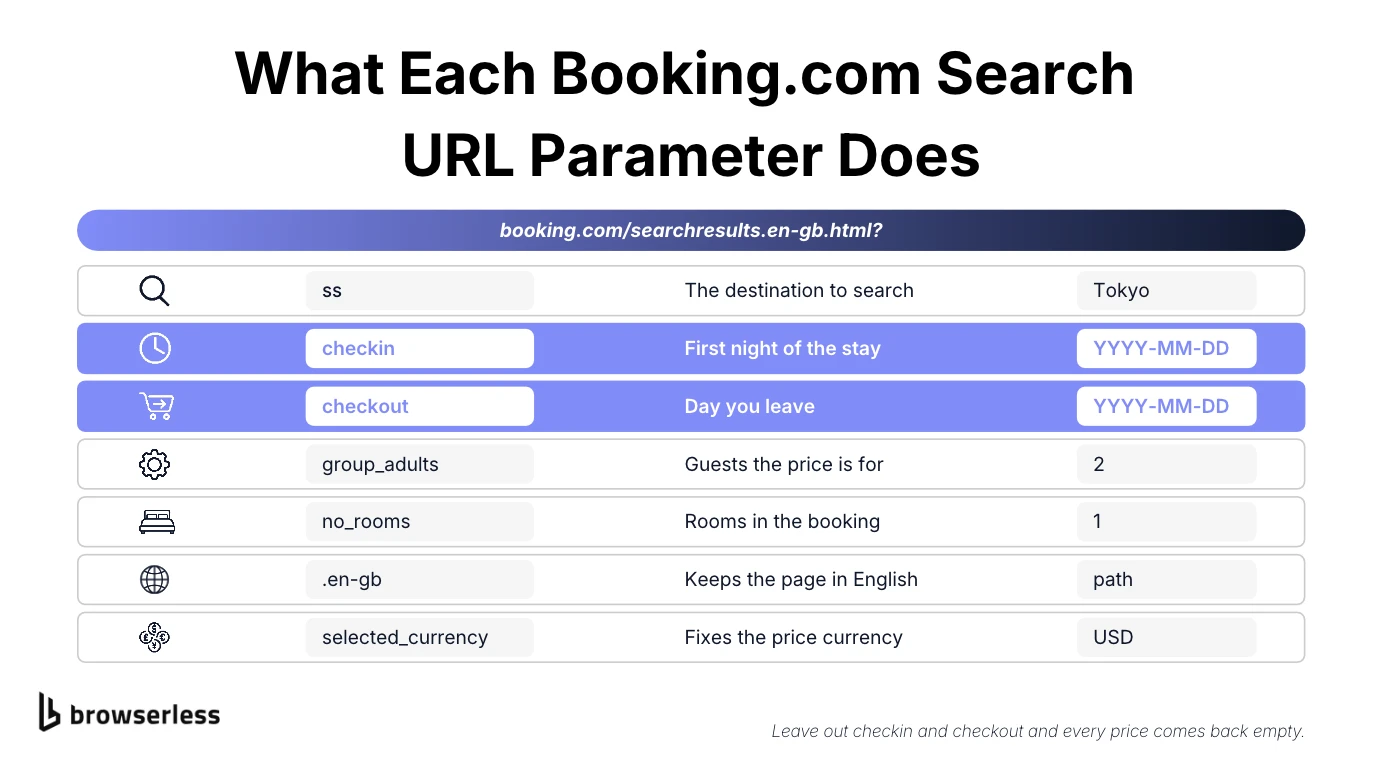
Build the results URL with the search data already in it. Each parameter pins one part of the search.
ss. The destination.checkinandcheckout. The stay dates, generated by a smallfutureDatehelper.group_adults=2andno_rooms=1. The occupancy..en-gbandselected_currency. The page language and the currency.
function futureDate(daysFromNow) {
  const date = new Date();
  date.setUTCDate(date.getUTCDate() + daysFromNow);
  return date.toISOString().slice(0, 10);
}

const checkIn = futureDate(30);
const checkOut = futureDate(33);
const searchUrl =
  "https://www.booking.com/searchresults.en-gb.html?ss=Tokyo" +
  `&checkin=${checkIn}&checkout=${checkOut}` +
  "&group_adults=2&no_rooms=1&group_children=0&selected_currency=USD";
The dates are always 30 and 33 days out, so the search never goes stale. Drop checkin and checkout and you'll get the same hotels with every price field empty.
Next, launch Chrome with headless: false, open the page, and wait for the property cards. Run it headless and you'll likely get a results page with no cards at all. Booking.com checks closely enough to tell headless and real browsers apart.
// A visible browser. Headless Chrome gets an empty results page back.
const browser = await puppeteer.launch({ headless: false });
const page = await browser.newPage();
await page.goto(searchUrl, { waitUntil: "domcontentloaded", timeout: 60000 });
await closePopups(page);
await page.waitForSelector('[data-testid="property-card"]', { timeout: 30000 });
closePopups runs before the wait because Booking.com likes to drop a sign-in modal or a cookie banner over the results. The helper clicks either one away and checks three times, a second apart, because the modal sometimes shows up a beat late.
const sleep = (ms) => new Promise((resolve) => setTimeout(resolve, ms));

async function closePopups(page, retries = 3) {
  const popupSelectors = [
    'button[aria-label="Dismiss sign-in info."]', // Sign-in modal
    "#onetrust-accept-btn-handler", // Cookie banner
  ];

  for (let attempt = 0; attempt < retries; attempt++) {
    for (const selector of popupSelectors) {
      const button = await page.$(selector);
      if (button) await button.click().catch(() => {});
    }

    await sleep(1000);
  }
}
The plain timer between checks is deliberate. Puppeteer removed page.waitForTimeout() in version 22.
Once the cards render, grab them all in one pass with $$eval. It runs your function inside the page and hands back one row per card.
const hotelData = await page.$$eval(
  '[data-testid="property-card"]',
  (cards, stay) =>
    cards
      .map((card) => {
        const text = (selector) =>
          card.querySelector(selector)?.innerText.trim() || null;
        // Some layouts show a nightly rate and the stay total under the
        // same test ID. The stay total is always the last one.
        const prices = card.querySelectorAll(
          '[data-testid="price-and-discounted-price"]',
        );

        return {
          ...stay,
          name: text('[data-testid="title"]'),
          address: text('[data-testid="address-link"]'),
          price: prices[prices.length - 1]?.innerText.trim() || null,
          priceFor: text('[data-testid="price-for-x-nights"]'),
        };
      })
      .filter((hotel) => hotel.name),
  { checkIn, checkOut, adults: 2 },
);
Each row carries the dates and occupancy that produced its price, passed in as stay, and priceFor tells you what that price covers.
One note on older code: it often reads data-testid="address", which no longer exists and quietly returns null on every card, so stick with address-link.
3. Split the review score and review count
You'll want review score and review count as separate fields, both to rank properties and to drop anything under a minimum score. An 8.8 from 40 reviews isn't the same as an 8.8 from 4,000.
The catch is that reading [data-testid="review-score"] gives you both in one string, something like Scored 8.8\n8.8\nExcellent\n7,930 reviews, so split it on the line breaks and pick out the plain decimal and the part that mentions reviews, which is usually the last line.
const reviewData = await page.$$eval('[data-testid="property-card"]', (cards) =>
  cards.map((card) => {
    const text = card.querySelector('[data-testid="review-score"]')?.innerText || "";
    const parts = text
      .split("\n")
      .map((part) => part.trim())
      .filter(Boolean);

    const scorePart = parts.find((part) => /^\d+(\.\d+)?$/.test(part));
    const countPart = parts.find((part) => /review/i.test(part));

    return {
      reviewScore: scorePart ? parseFloat(scorePart) : null,
      reviewCount: countPart ? parseInt(countPart.replace(/\D/g, ""), 10) : null,
    };
  }),
);
Stripping the non-digits turns "7,930 reviews" into 7930, and a new property with no reviews returns null for both fields.
Individual review text lives in a paginated section on each property page, so it's a separate scrape at one more page load per property.
4. Save the results to a CSV file
The Parser from @json2csv/plainjs turns the array of rows into CSV text, and Node.js's fs module writes it to disk.
const csv = new Parser().parse(hotelData);
const filePath = path.join(__dirname, "hotel_data.csv");
fs.writeFileSync(filePath, csv, "utf8");
Created without a fields option, the Parser builds the columns from the object keys, so the dates, occupancy, and price basis sit right next to every rate. You can open the file in Google Sheets or load it into a database as is.
5. Run the script
The full booking scraper folds the review fields from step 3 into the same $$eval, so the page is only read once. Save it as scrape-bookingcom.js in your project folder.
const fs = require("fs");
const path = require("path");
const puppeteer = require("puppeteer");
const { Parser } = require("@json2csv/plainjs");

const sleep = (ms) => new Promise((resolve) => setTimeout(resolve, ms));

function futureDate(daysFromNow) {
  const date = new Date();
  date.setUTCDate(date.getUTCDate() + daysFromNow);
  return date.toISOString().slice(0, 10);
}

async function closePopups(page, retries = 3) {
  const popupSelectors = [
    'button[aria-label="Dismiss sign-in info."]', // Sign-in modal
    "#onetrust-accept-btn-handler", // Cookie banner
  ];

  for (let attempt = 0; attempt < retries; attempt++) {
    for (const selector of popupSelectors) {
      const button = await page.$(selector);
      if (button) await button.click().catch(() => {});
    }

    await sleep(1000);
  }
}

(async () => {
  const checkIn = futureDate(30);
  const checkOut = futureDate(33);
  const searchUrl =
    "https://www.booking.com/searchresults.en-gb.html?ss=Tokyo" +
    `&checkin=${checkIn}&checkout=${checkOut}` +
    "&group_adults=2&no_rooms=1&group_children=0&selected_currency=USD";

  // A visible browser. Headless Chrome gets an empty results page back.
  const browser = await puppeteer.launch({ headless: false });

  try {
    const page = await browser.newPage();
    await page.goto(searchUrl, { waitUntil: "domcontentloaded", timeout: 60000 });
    await closePopups(page);
    await page.waitForSelector('[data-testid="property-card"]', { timeout: 30000 });

    const hotelData = await page.$$eval(
      '[data-testid="property-card"]',
      (cards, stay) =>
        cards
          .map((card) => {
            const text = (selector) =>
              card.querySelector(selector)?.innerText.trim() || null;
            // Some layouts show a nightly rate and the stay total under the
            // same test ID. The stay total is always the last one.
            const prices = card.querySelectorAll(
              '[data-testid="price-and-discounted-price"]',
            );

            const reviewParts = (text('[data-testid="review-score"]') || "")
              .split("\n")
              .map((part) => part.trim())
              .filter(Boolean);
            const scorePart = reviewParts.find((part) => /^\d+(\.\d+)?$/.test(part));
            const countPart = reviewParts.find((part) => /review/i.test(part));

            return {
              ...stay,
              name: text('[data-testid="title"]'),
              address: text('[data-testid="address-link"]'),
              price: prices[prices.length - 1]?.innerText.trim() || null,
              priceFor: text('[data-testid="price-for-x-nights"]'),
              reviewScore: scorePart ? parseFloat(scorePart) : null,
              reviewCount: countPart
                ? parseInt(countPart.replace(/\D/g, ""), 10)
                : null,
            };
          })
          .filter((hotel) => hotel.name),
      { checkIn, checkOut, adults: 2 },
    );

    const csv = new Parser().parse(hotelData);
    const filePath = path.join(__dirname, "hotel_data.csv");
    fs.writeFileSync(filePath, csv, "utf8");
    console.log(`Saved ${hotelData.length} hotels to ${filePath}`);
  } finally {
    await browser.close();
  }
})().catch((error) => {
  console.error(error.message);
  process.exitCode = 1;
});
Then run it from the same folder with Node.js.
node scrape-bookingcom.js
A Chrome window opens, loads the results, and closes again. Each row comes out in this shape.
"checkIn","checkOut","adults","name","address","price","priceFor","reviewScore","reviewCount"
"2026-11-20","2026-11-23",2,"ONE@Tokyo by insomnia","Sumida Ward, Tokyo","US$738","3 nights, 2 adults",8.9,3841
Your rates and dates will differ. They're calculated from today. Because browser.close() sits in a finally block, Chrome shuts down even when a selector times out.
Prefer Python? A Selenium alternative
If Python is more your thing, Selenium drives a real Chrome window the same way and reads the same data-testid attributes. Start with a virtual environment in a new project folder.
mkdir booking-scraper-py && cd booking-scraper-py
python3 -m venv .venv
source .venv/bin/activate
pip install selenium
Selenium 4.6 and later ship with Selenium Manager, so from selenium import webdriver and a webdriver.Chrome() call are all the driver setup you need. Save this Python scraper as scrape_booking.py. It follows the same steps as the Puppeteer one.
import csv
import re
from datetime import date, timedelta

from selenium import webdriver
from selenium.common.exceptions import (
    NoSuchElementException,
    StaleElementReferenceException,
)
from selenium.webdriver.common.by import By
from selenium.webdriver.support import expected_conditions as EC
from selenium.webdriver.support.ui import WebDriverWait

check_in = (date.today() + timedelta(days=30)).isoformat()
check_out = (date.today() + timedelta(days=33)).isoformat()
search_url = (
    "https://www.booking.com/searchresults.en-gb.html?ss=Tokyo"
    f"&checkin={check_in}&checkout={check_out}"
    "&group_adults=2&no_rooms=1&group_children=0&selected_currency=USD"
)


def card_text(card, selector):
    try:
        # innerText also covers cards that haven't scrolled into view yet
        return card.find_element(By.CSS_SELECTOR, selector).get_attribute("innerText").strip()
    except NoSuchElementException:
        return None


def parse_review(text):
    # "Scored 8.8\n8.8\nExcellent\n7,930 reviews" -> (8.8, 7930)
    parts = [part.strip() for part in (text or "").split("\n") if part.strip()]
    score = next((part for part in parts if re.fullmatch(r"\d+(\.\d+)?", part)), None)
    count = next((part for part in parts if "review" in part.lower()), "")
    digits = re.sub(r"\D", "", count)
    return (float(score) if score else None, int(digits) if digits else None)


def read_cards(driver):
    cards = WebDriverWait(driver, 30).until(
        EC.presence_of_all_elements_located(
            (By.CSS_SELECTOR, '[data-testid="property-card"]')
        )
    )

    hotels = []
    for card in cards:
        name = card_text(card, '[data-testid="title"]')
        if not name:
            continue
        prices = card.find_elements(
            By.CSS_SELECTOR, '[data-testid="price-and-discounted-price"]'
        )
        review_score, review_count = parse_review(
            card_text(card, '[data-testid="review-score"]')
        )
        hotels.append(
            {
                "check_in": check_in,
                "check_out": check_out,
                "adults": 2,
                "name": name,
                "address": card_text(card, '[data-testid="address-link"]'),
                "price": prices[-1].get_attribute("innerText").strip() if prices else None,
                "price_for": card_text(card, '[data-testid="price-for-x-nights"]'),
                "review_score": review_score,
                "review_count": review_count,
            }
        )
    return hotels


driver = webdriver.Chrome()  # Selenium Manager fetches a matching driver

try:
    driver.get(search_url)
    for attempt in range(3):
        try:
            hotels = read_cards(driver)
            break
        except StaleElementReferenceException:
            # Booking.com re-rendered the list mid-read, so read it again
            if attempt == 2:
                raise
finally:
    driver.quit()

if not hotels:
    raise SystemExit("No property cards with a title were found")

with open("hotel_data.csv", "w", newline="", encoding="utf-8") as output:
    writer = csv.DictWriter(output, fieldnames=hotels[0].keys())
    writer.writeheader()
    writer.writerows(hotels)

print(f"Saved {len(hotels)} hotels to hotel_data.csv")
Run it with python scrape_booking.py. parse_review does the same split as step 3, so the CSV gets the same review columns.
card_text reads innerText. Selenium's .text comes back empty for cards that haven't scrolled into view. Booking.com also re-renders the list sometimes, so a StaleElementReferenceException triggers a fresh read instead of a crash.
A missing field returns None instead of throwing. If you skipped a card on any error instead, one stale selector would silently drop every card.
Where a local booking scraper stops scaling
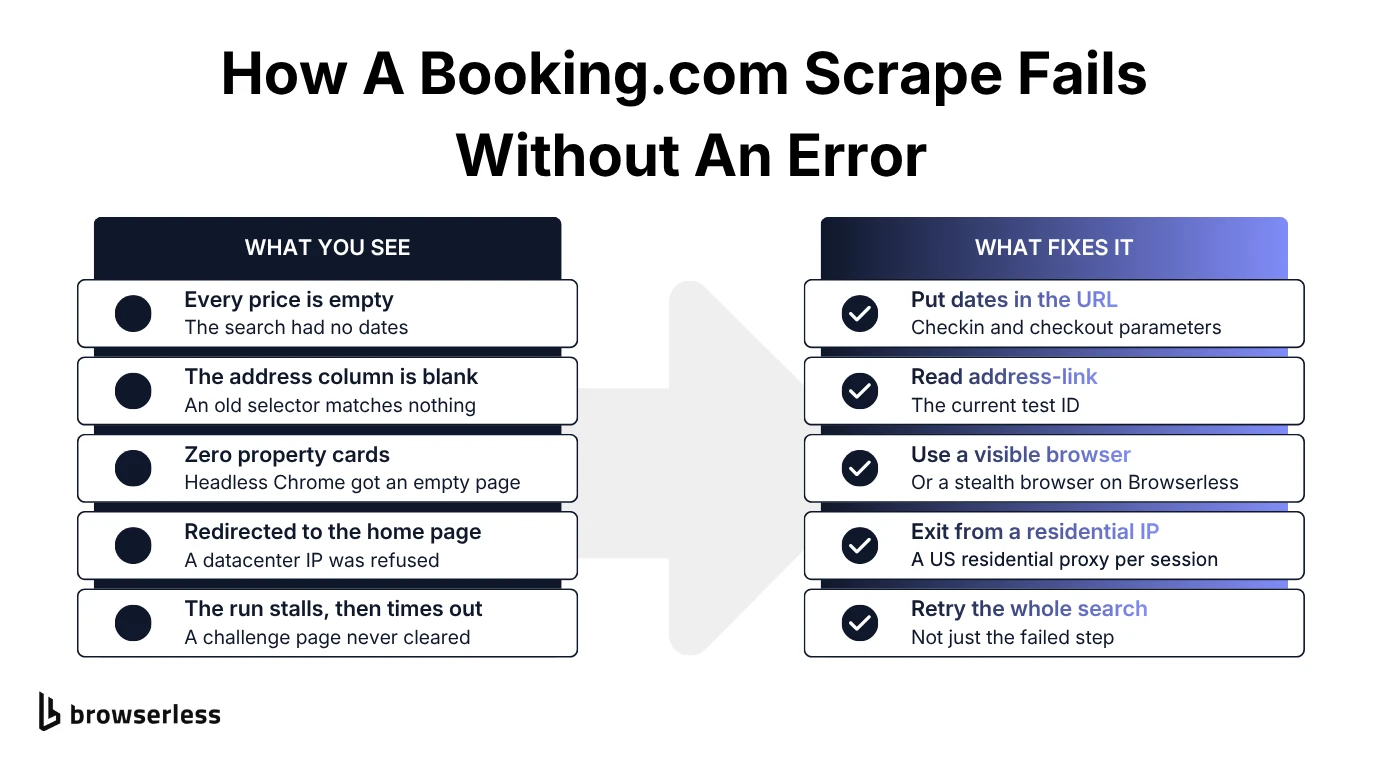
Both scripts work for scraping Booking.com while they run a few searches, from a home connection, in a visible browser. Change any of those three and Booking.com starts pushing back.
Its bot detection looks at browser fingerprints, automation markers, and how often the same IP comes back. A handful of searches from home will go through. Repeat the search from one IP, or run it from a cloud server's datacenter IP, and you'll start getting redirected to the home page or served results pages with no cards.
Getting past that means web scraping work that has nothing to do with hotel data. You'd be running visible Chrome instances on servers, managing proxy rotation so requests exit from residential IPs, and retrying searches that fail halfway through. Stealth plugins hide the obvious automation signals, but they won't fix the IP problem or run the fleet for you.
Most of these failures don't throw an error. The script finishes, and the CSV comes back short or empty.
Scrape Booking.com with BAP and BrowserQL
Browserless runs the browsers for you, so the same dated search moves off your machine. The smallest change is to keep the Puppeteer script and swap puppeteer.launch() for puppeteer.connect() to wss://production-sfo.browserless.io/stealth?token=…&proxy=residential&proxyCountry=us. If you'd rather hand stealth, proxies, and CAPTCHAs to Browserless, use one of its two stealth-first interfaces.
BrowserQL is a GraphQL protocol for driving the browser. Browser Automation Protocol (BAP) is Browserless's SDK, in TypeScript with Python on the way, where each method sends a BrowserQL mutation under the hood. If you know Puppeteer, BAP will feel familiar, but it isn't a drop-in replacement and doesn't expose page.mouse, page.keyboard, frames, or browser contexts.
What the stealth route changes
Point either one at the stealth route, /stealth/bql, a hardened endpoint that applies browser fingerprint mitigations. For Booking.com you'll also want a residential IP in the market you're pricing. BAP's page.proxy() and BrowserQL's proxy mutation can route just page loads and API calls through it, which keeps images off residential traffic, billed at 6 units per MB. The IP stays fixed for the whole session by default, and it comes from Browserless's residential pool, so you don't write proxy rotation code yourself.
Tested on its own, the stealth route hit the same home-page redirect a datacenter IP gets, and adding the residential proxy is what got the results to load. Neither makes you invisible, just less obvious, so keep the pacing limits in place.
Run the search with the BAP SDK
Grab a Browserless API token from your account dashboard and export it as BROWSERLESS_TOKEN. Then install the BAP SDK, which needs npm 11.10 or later, and Cheerio, which parses the HTML that comes back.
npm install @browserless.io/bap-ts cheerio
The script connects to the stealth route, sets a US residential proxy, and loads a dated New York search. It waits for the cards, parses the HTML with Cheerio, checks that the addresses match the destination, and retries a failed attempt up to three times. Save it as scrape-booking.mts. The .mts extension lets Node.js run ES module imports and top-level await with no configuration.
import Browserless from "@browserless.io/bap-ts";
import * as cheerio from "cheerio";

function futureDate(daysFromNow: number) {
  const date = new Date();
  date.setUTCDate(date.getUTCDate() + daysFromNow);
  return date.toISOString().slice(0, 10);
}

const destination = "New York";
const checkIn = futureDate(30);
const checkOut = futureDate(33);
const searchUrl =
  `https://www.booking.com/searchresults.en-gb.html?ss=${encodeURIComponent(destination)}` +
  `&checkin=${checkIn}&checkout=${checkOut}` +
  "&group_adults=2&no_rooms=1&group_children=0&selected_currency=USD";

const browser = Browserless.connect({
  browserWSEndpoint: "wss://production-sfo.browserless.io/stealth/bql",
  token: process.env.BROWSERLESS_TOKEN,
  timeout: 60000,
});

async function scrapeOnce() {
  const page = await browser.newPage();

  try {
    // Page loads and API calls exit from one US residential IP, while
    // images, scripts, and styles skip the metered proxy.
    await page.proxy({
      country: "US",
      sticky: true,
      type: ["document", "xhr", "fetch"],
    });
    await page.goto(searchUrl, { waitUntil: "domContentLoaded" });
    await page
      .click("button[aria-label='Dismiss sign-in info.']", {
        visible: true,
        timeout: 5000,
      })
      .catch(() => {});
    await page.waitForSelector("div[data-testid='property-card']", {
      timeout: 45000,
    });

    const { html } = await page.html();
    const $ = cheerio.load(html || "");

    const hotels = $("div[data-testid='property-card']")
      .map((_, element) => {
        const card = $(element);
        return {
          checkIn,
          checkOut,
          adults: 2,
          name: card.find("[data-testid='title']").text().trim(),
          address: card.find("[data-testid='address-link']").text().trim(),
          price:
            card
              .find("[data-testid='price-and-discounted-price']")
              .last()
              .text()
              .trim() || null,
          priceFor:
            card.find("[data-testid='price-for-x-nights']").text().trim() || null,
        };
      })
      .get()
      .filter((hotel) => hotel.name);

    // Check the rows, not the title, which sometimes reads "New%20York"
    if (!hotels.some((hotel) => hotel.address.includes(destination))) {
      throw new Error(`No ${destination} addresses found`);
    }
    return hotels;
  } finally {
    await page.close();
  }
}

try {
  for (let attempt = 1; attempt <= 3; attempt++) {
    try {
      const hotels = await scrapeOnce();
      console.log(`Extracted ${hotels.length} hotels`);
      console.log(hotels[0]);
      break;
    } catch (error) {
      if (attempt === 3) throw error;
      console.warn(
        `Attempt ${attempt} failed, retrying: ${(error as Error).message}`,
      );
    }
  }
} finally {
  await browser.close();
}
Run it with node scrape-booking.mts and your token in the environment. Node.js 22.18 and later strip TypeScript types by default, and older 22.x releases need --experimental-strip-types. All eight test runs returned 15 to 25 New York hotels with three-night prices, two of them after a retry that cleared a stalled challenge page.
Run the same search as one BrowserQL mutation
Every BAP call is a separate round trip to the browser. If you'd rather send the whole job at once, or you're calling it from a language without an SDK, write it as one BrowserQL mutation. You also extract data as rows instead of raw HTML.
mutation ScrapeBooking($searchUrl: String!) {
  proxy(country: US, type: [document, xhr, fetch]) {
    time
  }

  goto(url: $searchUrl, waitUntil: domContentLoaded) {
    status
  }

  dismissModal: if(
    selector: "button[aria-label='Dismiss sign-in info.']"
    visible: true
  ) {
    click(selector: "button[aria-label='Dismiss sign-in info.']") {
      time
    }
  }

  waitForSelector(selector: "div[data-testid='property-card']", timeout: 45000) {
    time
  }

  hotels: mapSelector(selector: "div[data-testid='property-card']") {
    name: mapSelector(selector: "[data-testid='title']", wait: false) {
      innerText
    }
    address: mapSelector(selector: "[data-testid='address-link']", wait: false) {
      innerText
    }
    price: mapSelector(
      selector: "[data-testid='price-and-discounted-price']"
      wait: false
    ) {
      innerText
    }
    priceFor: mapSelector(
      selector: "[data-testid='price-for-x-nights']"
      wait: false
    ) {
      innerText
    }
    reviews: mapSelector(selector: "[data-testid='review-score']", wait: false) {
      innerText
    }
  }
}
The mutation works through five steps from top to bottom.
proxysends page loads and API calls through a US residential IP, which stays the same for the session by default.gotoloads the dated results URL passed in as$searchUrl.dismissModalclicks the sign-in modal away only if it's visible, so a missing modal doesn't fail the run.waitForSelectorholds until the property cards render.hotelsmaps over every card and reads each field inside it.wait: falsekeeps a missing field, such as the review score on a new property, from stalling the run for 30 seconds.
mapSelector returns every match as a list, so take the last price value per card, and split reviews on line breaks as in step 3.
Export the mutation to cURL
For cron jobs and shell scripts, the BrowserQL IDE can export a working mutation as a cURL command, or you can build the request yourself. Save the mutation above as booking.graphql, then let jq wrap it in a JSON body with the search URL and dates 30 and 33 days out.
jq -n \
  --rawfile query booking.graphql \
  --arg searchUrl "https://www.booking.com/searchresults.en-gb.html?ss=New+York&checkin=$(date -v+30d +%F)&checkout=$(date -v+33d +%F)&group_adults=2&no_rooms=1&group_children=0&selected_currency=USD" \
  '{query: $query, operationName: "ScrapeBooking", variables: {searchUrl: $searchUrl}}' > booking.json
If you're on Linux, swap the date -v calls for date -d '+30 days' +%F. With booking.json written, send it to the stealth route.
curl --request POST \
  --url "https://production-sfo.browserless.io/stealth/bql?token=$BROWSERLESS_TOKEN" \
  --header 'Content-Type: application/json' \
  --data @booking.json
All six test runs returned 14 to 25 hotels, each with a three-night price and its basis. An earlier run stalled behind a challenge page and timed out on waitForSelector, so if this runs from cron, give it a retry too.
Don't take the status codes at face value, either. goto reported a 202 on half the successful runs, which points to Booking.com answering first with a challenge that the browser then clears. A failed action also comes back inside an HTTP 200 response (see BrowserQL error handling), so check errors and the address values before you trust hotels.
Conclusion
Booking.com changes its markup often enough that your scraper will break eventually. The ones that break gracefully read fields by test ID, return null when a field disappears, and check the destination before saving, so a stale selector shows up as an empty column instead of rows that quietly go missing.
When yours does, you'd rather fix one selector than a fleet. Browserless runs the browsers and the residential proxies behind the stealth route, which leaves your BAP script or BrowserQL mutation as the only thing you maintain when scraping Booking.com. To run the search from this guide on managed browsers, sign up for Browserless.
Booking.com scraping FAQs
Is it legal to scrape data from Booking.com?
It depends on the data you collect and what you do with it, as well as where you're based. Pulling public hotel prices for internal analysis is a different case from republishing guest reviews or photos. Read Booking.com's terms for your use case, and get legal advice before anything commercial.
How does BrowserQL differ from Puppeteer and Playwright?
Puppeteer and Playwright are libraries that drive a browser you run yourself. BrowserQL is a GraphQL protocol for browsers that Browserless hosts, so the browser and its stealth and proxy settings live server-side, and your code just sends a mutation.
Can I use BrowserQL with my existing scraping projects?
Yes. A mutation is a plain HTTP POST that any language can send, and BAP wraps it for TypeScript. Existing Puppeteer or Playwright code can also connect to Browserless over WebSocket, and the only change is swapping the launch call for a connection.
What if a search still gets blocked?
Slow down first. Request rate and IP reuse matter more than any single setting. Then check that the proxy country matches the market you're pricing, and retry the whole search rather than the failed step. If you're hitting CAPTCHAs, BAP's page.solve() and BrowserQL's solve mutation detect and solve common types inside the same session.