
TL;DR
- Skip
/search. Google News scraping collects headlines and links, with the publisher for each story, from Google's news pages. Robots.txt disallows the/searchpaths, so scrape Google News through news.google.com topic pages, the RSS feed Google publishes for feed readers, or a managed scraper for the News tab. - RSS for headlines. The official feed returns titles, publishers, dates, and links in parseable XML with a few lines of Python, but its license limits it to personal, non-commercial use.
- Browsers resolve links. Google's story links only forward to the publisher after JavaScript runs, so resolving Google News articles to real publisher URLs takes a headless browser.
Introduction
If you've looked up how to scrape Google News, the first answer was probably a requests call to the Search News tab, and what came back was a page with no headlines on it. Send the same URL through an unmanaged headless browser and Google usually shows you its "unusual traffic" check instead. That isn't your script failing but Google's bot detection challenging automated traffic on /search, a path both Google Search and news.google.com disallow in robots.txt.
Google does leave two ways in, the official RSS feed and news.google.com's topic pages. You'll pull headlines, publishers, and dates from the feed with a short Python script, scrape a topic page with Puppeteer on a hosted browser, and turn Google's wrapped links into real publisher URLs. You'll also see what the feed's license allows, where a managed scraper fits for the News tab, and how to export the results to JSON or CSV.
What is Google News scraping?
Google News scraping is a narrow form of data scraping. You pull headlines, publishers, publish times, and links to news articles out of the Google News interface and the Search News tab. Google has already done the news aggregation, so you don't need a separate web scraping script for each outlet you follow.
Google serves that data in two places, and they behave differently.
- Search News tab. The News filter on Google search results, which you get by adding
tbm=nwsto a regular query. - news.google.com. A standalone aggregator with its own topics, top stories, and "Full Coverage" clusters that group related news coverage of one event. It also publishes an RSS feed for any search query.
It's handy for brand monitoring, tracking competitors' media coverage, sentiment on a ticker or sector, spotting emerging trends, or building an AI training set for artificial intelligence work.
Is scraping Google News legal?
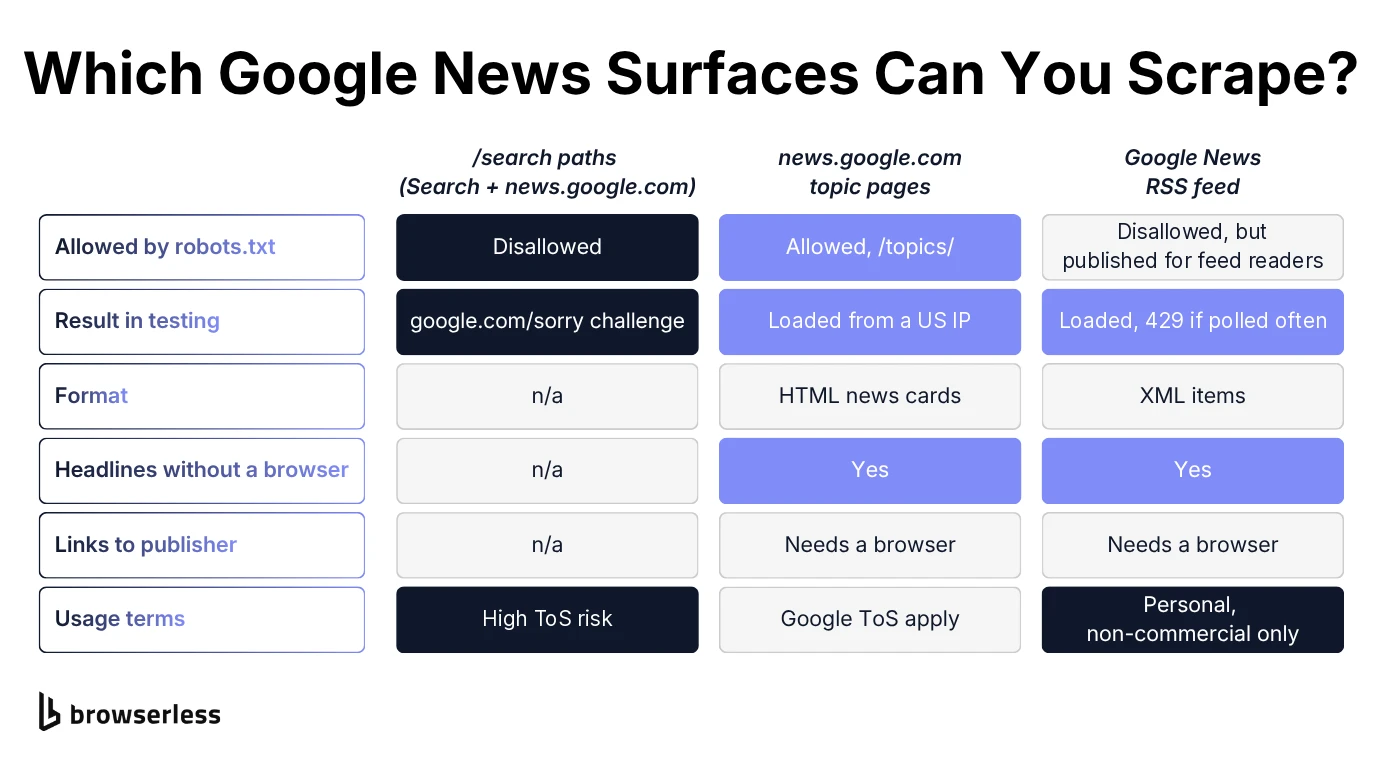
You're dealing with two sets of rights here, Google's and the publishers'. Google's Terms of Service prohibit "using automated means to access content from any of our services in violation of the machine-readable instructions on our web pages," and they name robots.txt as the example. They also rule out "bypassing our systems or protective measures."
Google Search's robots.txt disallows /search, which is where the News tab lives, and news.google.com's robots.txt disallows everything except a short allow-list, /search included. Scraping a disallowed path puts you at odds with Google's terms, a real ToS and legal risk and not a matter of etiquette.
The news articles themselves belong to the publishers, though storing a headline, source, and link works like an index entry, close to what a search engine shows. Republishing full article content without permission is where copyright trouble starts, wherever you got the text.
In practice, that comes down to three habits that keep you on the right side of both.
- Know the allow-list. news.google.com's robots.txt allows the home page,
/topics/,/stories/, and/publications/, and disallows everything else, including the RSS feed and the/read/links each story points to. Resolving a story link visits a disallowed path, so weigh it the way you'd weigh/search. - Don't impersonate crawlers. Spoofing
Googlebotor a publisher's own crawler to dodge a block takes you from gray area into deception. - Personal data. Bylines and comments carry names, and at volume that pulls the General Data Protection Regulation (GDPR) and similar privacy rules into scope.
Collecting public data isn't illegal outright, but none of this is legal advice, so run a commercial launch past a lawyer.
Choose a method by the data you need
How much machinery you need for accessing news data comes down to which fields you want and what you'll do with them.
- Headlines for a query. The RSS feed gives you titles, publishers, dates, and links with
requestsand a parser, without a browser. - Google's own sections. news.google.com topic pages carry the same fields for a section like Business or Technology.
- Publisher URLs. Google's story links only resolve in a browser, so you'll want Puppeteer or Playwright, ideally on a hosted headless browser service that handles JavaScript rendering and proxy management.
- News tab results. Browserless's Google search scraper takes a
tbm=nwssearch URL and returns the News tab's HTML, so you parse the results without running a browser yourself. - Commercial use. The feed's license rules this out, so look at a licensed news API or third-party APIs with their own terms, which also spares you maintaining a Google News scraper yourself.
The Python walkthrough handles the first case, and the headless-browser walkthrough handles the second and third, both with code examples you can run as written.
How to extract news data from Google News with Python
If you want to scrape news headlines yourself, start with the official RSS feed, the most reliable target you have. Its RSS feed URL, news.google.com/rss/search, takes the same query you'd type into the Search News tab and hands back structured news data as XML that's meant to be parsed.
The script fetches that feed for a query, turns each <item> into a dictionary, and writes the rows to a CSV file. You'll need two packages beyond the standard library, so run pip install requests beautifulsoup4 before you start.
import csv
import xml.etree.ElementTree as ET
from urllib.parse import quote

import requests
from bs4 import BeautifulSoup

def fetch_google_news_rss(query, country="US", language="en-US"):
    url = (
        f"https://news.google.com/rss/search?q={quote(query)}"
        f"&hl={language}&gl={country}&ceid={country}:{language.split('-')[0]}"
    )
    response = requests.get(url, timeout=10)
    response.raise_for_status()
    return ET.fromstring(response.content)

def parse_items(root):
    rows = []
    for item in root.iter("item"):
        description_html = item.findtext("description") or ""
        # The description field is HTML-escaped markup, so it needs its own parser.
        snippet = BeautifulSoup(description_html, "html.parser").get_text()
        rows.append({
            "id": item.findtext("guid"),
            "title": item.findtext("title"),
            "source": item.findtext("source"),
            "link": item.findtext("link"),
            "published": item.findtext("pubDate"),
            "snippet": snippet,
        })
    return rows

root = fetch_google_news_rss("stock market")
articles = parse_items(root)

fields = ["id", "title", "source", "link", "published", "snippet"]
with open("google_news_results.csv", "w", newline="", encoding="utf-8") as f:
    writer = csv.DictWriter(f, fieldnames=fields)
    writer.writeheader()
    writer.writerows(articles)
Run it and you get google_news_results.csv with one row per story, roughly 100 rows for "stock market" in testing. The hl, gl, and ceid parameters in fetch_google_news_rss pick the language and the geographic location of the edition, so change those to pull a different region. Poll too often and the feed answers with a 429, which raise_for_status() turns into an exception instead of an empty file.
Each <item> gives you a title, the publisher in its <source> element, a link that redirects through Google, a publication date, and a guid that identifies the story. The description field is escaped HTML that needs its own HTML parsing step, which is why BeautifulSoup is still in the script even though the fetch is a single requests call. On a search feed, that HTML mostly repeats the headline and publisher, so don't expect a real snippet.
The built-in csv module keeps the export dependency-free, and if the rows are headed into analysis, pandas.DataFrame(articles).to_csv("google_news_results.csv", index=False) gets you the same file from a dataframe.
The RSS feed's license and limits
Before you build anything commercial on the feed, read its own copyright notice. It says the feed is "made available solely for the purpose of rendering Google News results within a personal feed reader for personal, non-commercial use." Any other use "is expressly prohibited."
So an internal team dashboard is a gray area at most, and a product you sell subscriptions to is clearly outside it.
How to scrape Google News with a headless browser
Topic pages are the allowed way into news.google.com, and they loaded cleanly from a US cloud IP in testing.
Topic pages ship their news cards in the raw HTML of the first response, so the headlines don't need a browser, but the links do. Every story points to a ./read/ URL that only forwards to the publisher after JavaScript runs, so a plain HTTP request gets you Google's JavaScript page and no article. That publisher URL is what lets you dedupe the same story across feeds and fetch the article itself.
A CSS selector built on class names won't hold up here, since the title link carries an auto-generated class like JtKRv and the timestamp one like hvbAAd. Those hashed names can change whenever Google rebuilds the page, so anchor on structure instead, where every story link starts with ./read/ and every timestamp sits in a <time> element with a real datetime attribute.
There's no <article> wrapper to lean on, and each story renders two ./read/ links, one around the thumbnail with no text and one around the title. So filter to the links with text, which carry the news article title. The nesting depth varies by card type, so walk up each link's ancestors until one contains a time[datetime].
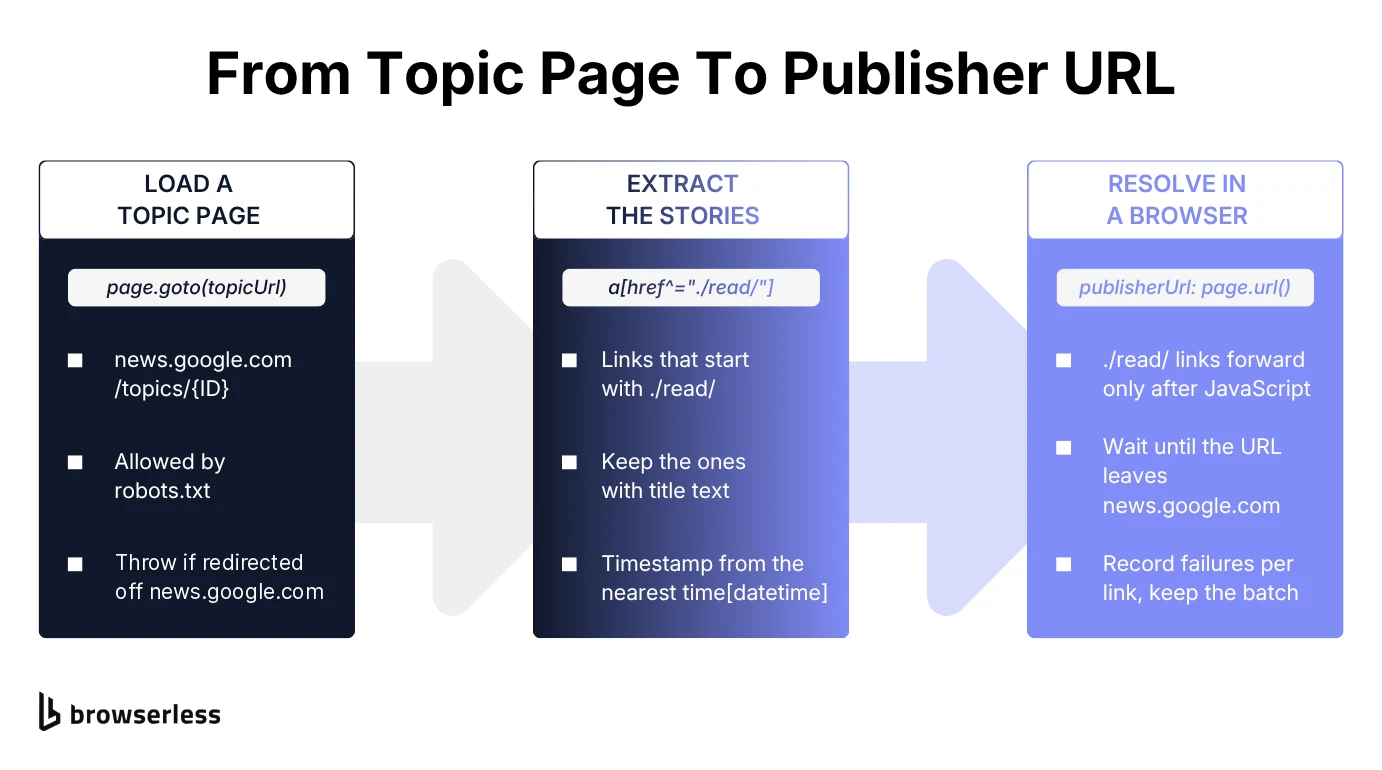
The Puppeteer script does all of that in three steps, in one session. It loads the topic page and bails if Google redirects it off news.google.com, collects each titled ./read/ link with its timestamp, then visits the first few links and waits for the browser to land on the publisher's domain. Those visits go through the /read/ path robots.txt disallows, so keep limit low and skip it when headlines are enough.
Browserless's Function API is a web API that runs this kind of Puppeteer code in a hosted Chrome, so there's no browser for you to manage. Your function gets a ready page plus whatever you send as context. Save the script as google-news-topic.js so the Python caller can read it later.
export default async ({ page, context }) => {
  const { topicUrl, limit = 5, budgetMs = 50000 } = context;
  // Stay inside the hosted session's 60-second default timeout.
  const deadline = Date.now() + budgetMs;
  await page.goto(topicUrl, { waitUntil: "networkidle2", timeout: 30000 });

  // A redirect off news.google.com means a challenge (google.com/sorry) or a consent wall.
  if (!page.url().startsWith("https://news.google.com/")) {
    throw new Error(`Google redirected the request: ${page.url()}`);
  }

  const stories = await page.$$eval('a[href^="./read/"]', (links) =>
    links
      .filter((link) => link.textContent.trim().length > 0)
      .map((link) => {
        let node = link;
        let time = null;
        for (let depth = 0; depth < 8 && node.parentElement; depth++) {
          node = node.parentElement;
          time = node.querySelector("time[datetime]");
          if (time) break;
        }
        // The publisher name sits next to its favicon in the same card.
        const favicon = node.querySelector('img[src*="faviconV2"]');
        return {
          title: link.textContent.trim(),
          source: favicon?.nextElementSibling?.textContent.trim() || null,
          googleLink: new URL(link.getAttribute("href"), "https://news.google.com")
            .href,
          published: time ? time.getAttribute("datetime") : null,
        };
      }),
  );

  // Google's links only resolve to the publisher after JavaScript runs.
  const articles = [];
  for (const story of stories.slice(0, limit)) {
    // Each visit can take up to 30 seconds, so stop while there's time to return.
    if (Date.now() + 30000 > deadline) {
      articles.push({ ...story, publisherUrl: null, error: "Out of time" });
      continue;
    }
    try {
      await page.goto(story.googleLink, {
        waitUntil: "domcontentloaded",
        timeout: 20000,
      });
      await page.waitForFunction(
        // Google's consent and challenge pages don't count as a publisher.
        () =>
          location.protocol === "https:" &&
          !/(^|\.)google\.com$/.test(location.hostname),
        { timeout: 10000 },
      );
      articles.push({ ...story, publisherUrl: page.url() });
    } catch (error) {
      articles.push({ ...story, publisherUrl: null, error: error.message });
    }
  }

  return { data: { articles }, type: "application/json" };
};
If Google redirects to its challenge page or a cookie consent wall, the script throws, so you see the block as an error and not as an empty result. Some publishers refuse automated visits, so each link gets its own try/catch and one refusal doesn't sink the batch. Each resolved link is another page load, so limit keeps runs short, and budgetMs stops resolving links before the session's 60-second default timeout. Stories it skips come back with their headline and a null publisher URL.
To run it, send the script to the Function API as a string, along with the context object. This Python caller reads the file, sends both, and prints the results, with your token in an environment variable.
import os

import requests

TOKEN = os.environ["BROWSERLESS_TOKEN"]
TOPIC_URL = (
    "https://news.google.com/topics/"
    "CAAqJggKIiBDQkFTRWdvSUwyMHZNRGx6TVdZU0FtVnVHZ0pWVXlnQVAB"
    "?hl=en-US&gl=US&ceid=US:en"
)

with open("google-news-topic.js", encoding="utf-8") as f:
    code = f.read()

response = requests.post(
    f"https://production-sfo.browserless.io/function?token={TOKEN}",
    json={"code": code, "context": {"topicUrl": TOPIC_URL, "limit": 5}},
    timeout=120,
)
response.raise_for_status()
articles = response.json()["data"]["articles"]
for article in articles:
    print(article["published"], article["source"], article["title"],
          article["publisherUrl"])
Because topicUrl and limit travel in context, you can point it somewhere else without touching the JavaScript. The ID in TOPIC_URL is the Business section, and for any other topic, copy the ID from the address bar on news.google.com.
Once you go after the articles themselves, you're up against each publisher's bot protection, which is the step Browserless's Smart Scrape API is built for. It starts with a fast HTTP fetch that mimics a real browser's network fingerprint and escalates to a proxied fetch, a stealth browser, and CAPTCHA solving only when the cheaper step fails.
Common challenges when scraping Google News safely
No approach to web scraping Google News makes you invisible to bot detection, but you can get blocked less often and recover cleanly.
- Rate limits. Hammering Google from one IP is a quick way to land on
google.com/sorry, or on a 429 from the RSS feed. A 429 means slow down, while the challenge page means stop and rethink. - Proxies. Rotating proxies, such as Browserless's residential proxies, make your traffic look less concentrated, but they don't change what robots.txt allows. In testing, a residential IP got challenged on
/searchjust like a cloud one. - Browser fingerprinting. An unmanaged headless browser leaves tells, like
navigator.webdriverreportingtrue, and fingerprinting scripts look for exactly those. Browserless's stealth route masks them, and in testingnavigator.webdrivercame backfalseon/stealth. - Consent walls. From an IP in the UK or EU, Google can redirect news.google.com to its
consent.google.comcookie page first, which is why the script checks that it's still on news.google.com. Adding&proxy=residential&proxyCountry=usto the Function API URL keeps the request on a US exit IP.
Exporting news data to JSON or a CSV file
Both scripts already export data, with the Function API's JSON response carrying parsed data for another service and the RSS script's CSV file suiting a person or a spreadsheet.
For a small team, Google Sheets is a fine spreadsheet for this. Import the CSV, or push rows through the Sheets API so the dashboard updates after every run. Keep each run's raw data too, so you can reprocess it later.
How to build a Google News scraping pipeline
A one-off web scraper answers one question, while a pipeline has to keep answering it every day, which raises new problems.
- Scheduling. Run it from a cron job or scheduled cloud function as often as the use case needs. Hourly can be overkill for brand monitoring and still too slow if you need real-time data on breaking news.
- Deduplication. The same story shows up across queries, topics, and multiple pages. Dedupe on the article's ID or publisher URL. Two outlets can run the same headline on different stories.
- Monitoring for breakage. Google can change markup and feed fields without notice, so log failures and alert when a known query's row count drops to zero, since a silent empty result is the easiest failure to miss.
- A downstream step. Structured data is what lets sentiment analysis, a trend dashboard, or an alert turn news headlines into actionable insights before anyone reads them. The daily news scraper with Claude and Slack blog post walks through one end to end.
Conclusion
The blocks you hit when scraping Google News come from /search, where Google challenges automated traffic. Use the RSS feed for headlines and dates, topic pages for news.google.com's own sections, and a browser only when you need publisher URLs. If you plan to sell what you build, get a licensed news source.
Browserless runs that browser step for you, so you aren't keeping Chrome alive yourself. The Function API script works as written with your token, and Smart Scrape takes over once you move on to the publishers' own pages. Grab a token, drop in the topic URL for the section you follow, and start scraping Google News with Browserless.
How to scrape Google News FAQs
Is there a free Google News API?
There isn't an official one, and the closest thing Google offers is the RSS feed, a free tool that needs no API key but is licensed for personal use only. Products marketed as a "Google News API" are third-party services, usually built to scrape Google News data, with their own pricing.
How do I scrape the full text of Google News articles?
Google News gives you the headline, publisher, and link but not the article text, so that has to come from each publisher's site. Use the publisher's own RSS feed if it has one, a headless browser for JavaScript-heavy news pages, or a web scraping tool to extract data from the page. Every publisher has its own markup and anti-bot measures, so plan a strategy per site and check their terms before storing article content.
Can I scrape Google News by geographic location?
Set gl, ceid, and hl on the RSS or topic URL to pick the country edition and language. A UK or EU IP can still land on Google's cookie consent page first.
Do I need rotating proxies to scrape Google News?
Not for the RSS feed or topic pages at a modest polling rate, which loaded fine from one cloud IP in testing. They help once you fetch publisher pages at volume, but they won't make the /search paths safe to scrape.
How do I get news off my Google homepage?
Not in any repeatable way, because that feed is personalized to your Google account and history. To track relevant news programmatically, set up an RSS search feed for each topic or query you care about.