
TL;DR
- AI scraping uses machine learning and large language models to extract structured data from web pages, including dynamic, JavaScript-heavy ones that break traditional web scrapers.
- Traditional web scraping relies on rigid CSS selectors that snap when a site updates its layout; AI-powered scrapers infer structure from context and adapt automatically.
- For developers, the right AI web scraper is about extraction quality and the browser infrastructure underneath: stealth rendering, CAPTCHA handling, persistent session state, and the ability to scale.
- This guide covers the best AI web scraping tools for developers, with code examples for one-call scraping APIs, stealth browser automation, and stateful AI agent workflows.
Introduction
AI scraping is no longer a side project. As large language models get trained on web data, as AI agents navigate the open web, and as businesses discover that live web data powers competitive intelligence at a speed manual methods can't match, the ability to extract structured data reliably has become a key engineering concern.
This article explains what AI scraping is and how it works, then walks through the best AI web scraping tools available to developers today – from one-call scraping APIs to full browser infrastructure for LLM-based agents.
You'll also find practical code examples and a breakdown of how to build a basic AI web scraper.
What is AI scraping?
AI scraping is the use of machine learning, natural language processing, or large language models to automatically identify and extract structured data from unstructured web pages.
Traditional web scraping works by targeting specific HTML elements with CSS selectors or XPath rules – effectively telling the scraper exactly where to look in a page's markup.
It works well when sites are stable, but sites change frequently. A class name rename, a layout redesign, or a switch to a JavaScript-rendered frontend can break a scraper that took days to write.
AI-powered web scraping changes the approach.
Instead of hardcoding rules about where data lives in a document, an AI web scraper is told what data it wants – in natural language or via a trained model – and it figures out the structure itself.
Prompting an LLM to extract the product name, price, and availability from a page works without prior knowledge of the page's markup.
The term covers a spectrum of approaches:
- Prompt-driven extraction – you describe the desired data in natural language, and the scraper uses an LLM to identify and return it as structured data (usually JSON).
- ML-trained extraction – a model is trained on labeled examples of pages and desired outputs, then applied at scale across similar sites.
- AI-native browser agents – LLM-based agents that navigate multiple pages, handle authentication, fill forms, and extract desired data across entire workflows, not just single pages.
What they share is adaptability.
Where traditional web scrapers need to be rebuilt when a site changes, AI scrapers can often handle layout variation without manual intervention.
That resilience is a large part of why AI scraping tools have become key parts of the process for teams that collect web data at scale.
How AI web scraping works
The mechanics depend on which approach you're using, but the general flow is consistent.
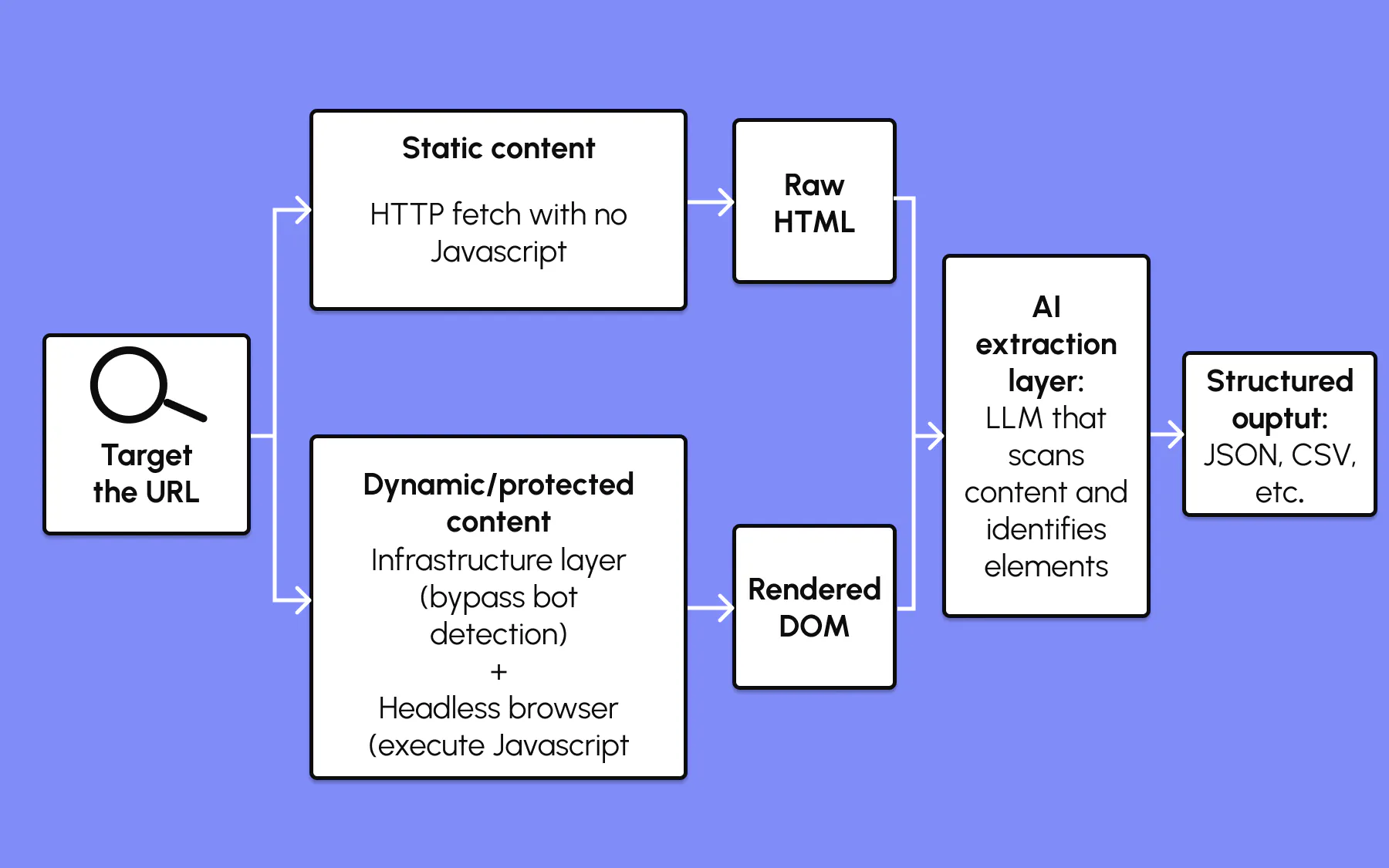
A request is sent to a target URL – either an HTTP fetch (fast, no JavaScript) or via a headless browser (slower, but sees the fully rendered page).
The raw HTML or rendered DOM is passed to the AI layer. The model – whether a general LLM prompted with a description of the desired data, or a fine-tuned extraction model – scans the content, identifies the relevant elements, and returns structured output: JSON, CSV, or directly into a downstream pipeline.
The headless browser step is where things get complicated.
A large portion of the web is dynamically loaded: the content you want is injected by JavaScript after the page loads, rather than being in the initial HTML response.
AI scrapers that operate on raw HTML alone will miss it. An AI web scraping tool that handles dynamically loaded content needs to spin up a real browser, wait for JavaScript to execute, and then process the rendered DOM.
Add bot detection to the picture, and the complexity increases further. Sites running Cloudflare, Datadome, or similar systems look for the fingerprints of automated browsers – specific header patterns, navigator properties, missing browser behaviors – and block requests that match.
A production-ready AI web scraper needs to handle this at the infrastructure level, not just in the extraction logic.
How web scraping powers AI training
If you've ever wondered where the training data for large language models comes from, a significant portion of it is web-scraped.
Common Crawl, one of the primary training sources for models like GPT and Llama, is a multi-petabyte archive of the web built by automated crawlers. The C4 dataset, used in Google's T5, was filtered directly from a Common Crawl snapshot.
Beyond static training sets, live web data powers retrieval-augmented generation (RAG) pipelines, where a model is given fresh web content alongside a query to improve response accuracy.
It powers AI agents that browse to answer questions in real time, and underpins the entire category of "grounded" AI responses that cite current sources.
Responsible crawlers respect robots.txt directives and site terms of service. Most large-scale AI training datasets now include clauses about web scraping protocols. If you're using AI web scraping to train AI models, make sure your data collection practices align with the sites you're pulling from.
What can you use AI scraping for?
AI scraping tools are used across industries for a wide range of data collection tasks:
- Lead generation – automatically collecting contact info, company names, and job titles from directories, LinkedIn profiles, or business listings (including Google Maps).
- Price monitoring – tracking pricing data across competitor websites and e-commerce platforms, alerting on changes in real time.
- Market research – aggregating product data, reviews, and news articles to map a competitive landscape or monitor brand mentions.
- Job postings – pulling job listings from multiple sources into a unified feed for analysis or redistribution.
- Property listings – collecting address, price, and feature data from real estate sites for investment analysis.
- Content aggregation – gathering news articles, blog posts, or social media platform content for summarization or analysis.
- Change detection – monitoring web pages for updates and triggering alerts or automated workflows when content changes.
- Training AI models – building labeled datasets from structured web content for model fine-tuning or evaluation.
Most of these use cases benefit directly from an AI layer. A price monitoring scraper that can infer a product's price from any page layout, rather than targeting a specific CSS class, is far more resilient than a traditional one.
What is the best AI web scraper for developers?
Choosing the right AI web scraping tool comes down to a few questions:
- Can it handle JavaScript rendering and dynamic content?
- Does it manage proxy rotation and bot detection for you?
- What does the output look like – is it clean structured data ready for downstream use, or raw HTML you still have to parse?
- What happens when you scale from 10 pages to 10,000?
For developers, the infrastructure question is as important as the features. Here's a breakdown of the best AI web scraping tools.
Browserless
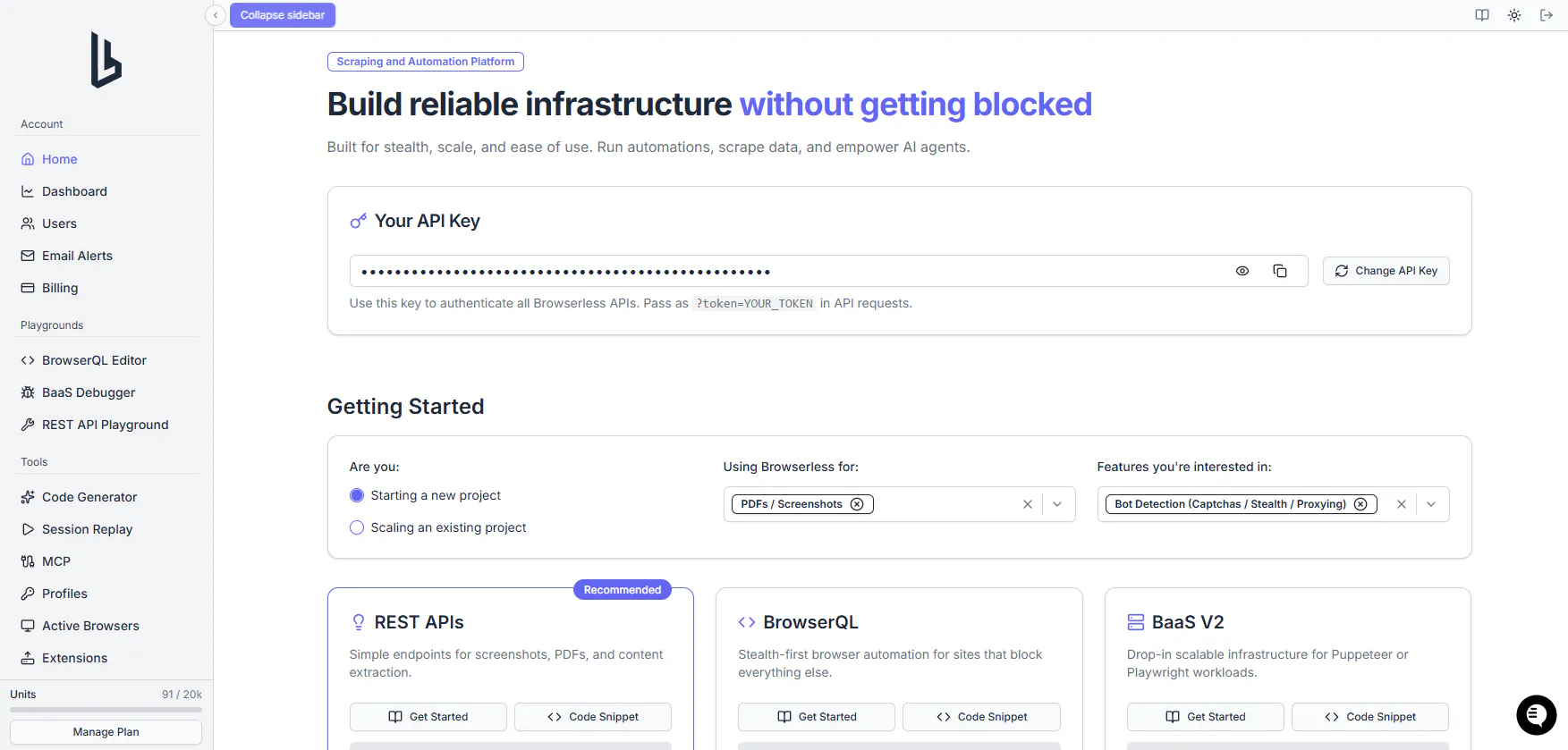
Browserless is browser infrastructure built for teams who scrape and automate at scale. Where most AI scraping tools are single-purpose, Browserless is a platform – a managed, stealth-enabled cloud browser that your scraping and AI agent code connects to, replacing the local headless Chrome setup that inevitably breaks in production.
It's been in production for eight years, has 173M+ Docker pulls across engineering teams worldwide, and runs at 99.9% uptime. It's SOC 2 Type II and GDPR compliant, with HIPAA-compatible deployments available via a BAA for enterprise and self-hosted environments. That matters for teams handling sensitive data.
Smart Scraper
The easiest entry point is the Smart Scraper API. You send a URL and specify your output format – markdown, HTML, extracted links, screenshots, or PDF – and it returns structured data. The cascade handles everything in between.
Under the hood, it runs a cascading escalation strategy: first an HTTP fetch (fast, no browser overhead), then a proxy-routed request if the first is blocked, then a full headless browser render, then automatic CAPTCHA solving if that's what stands between you and the data.
You don't configure any of this – it selects the right approach automatically.
curl -X POST \
  'https://production-sfo.browserless.io/smart-scrape?token=YOUR_API_TOKEN' \
  -H 'Content-Type: application/json' \
  -d '{
    "url": "https://news.ycombinator.com/",
    "formats": ["markdown"]
  }'
One API call, structured output, no browser management required.
BrowserQL
For sites that actively fight automation – Cloudflare, Datadome, PerimeterX – BrowserQL is the next step.
It's a stealth query language and runtime with fingerprint randomization and entropy injection, human-like mouse movement and scroll behavior, and the ability to solve CAPTCHAs nested inside iframes and shadow DOMs.
BrowserQL also includes a web-based IDE with a live browser preview, response panel, and autocomplete, so you can build and test stealth queries visually before running them in production.
Session reconnect lets you reuse a running browser across multiple queries, preserving cookies, cache, and page state between requests to eliminate redundant page loads and reduce proxy bandwidth.
Browser Agent for AI workflows
The most important differentiator for AI-native workflows is the Browser Agent.
Most scraping tools are stateless: one request, one response. That's fine for a single-page scrape, but an LLM-based agent that needs to log into a site, navigate through multiple pages, paginate results, and extract data across an entire session needs persistent browser state.
The Browser Agent keeps cookies, local storage, and page state alive across tool calls. It runs on the ReAct loop (Reason, Act, Observe), so the AI model can navigate to a URL, take a snapshot of what's on the page, decide what to do next, and act on it.
Fill a form, click a button, handle a redirect, extract the result – all without the browser resetting between steps.
For teams building AI agents, this changes what's possible. A research agent can log in once and retrieve data from authenticated dashboards. A lead generation agent can navigate paginated search results and pull structured contact info without re-authenticating on every call.
MCP integration
Browserless's MCP server exposes multiple browser tools to any MCP-compatible AI client – Claude Desktop, Cursor, VS Code, Windsurf, and any custom agent framework that supports the Model Context Protocol. Add it in a single config block:
{
  "mcpServers": {
    "browserless": {
      "type": "http",
      "url": "https://mcp.browserless.io/mcp",
      "headers": {
        "Authorization": "Bearer YOUR_API_TOKEN_HERE",
        "x-browserless-api-url": "https://production-sfo.browserless.io"
      }
    }
  }
}
Your agent then has access to Smart Scraper, Browser Agent, web search, crawling, site mapping, Lighthouse performance audits, file downloads, page exports, and custom Puppeteer code execution – all running on the same managed, stealth-enabled infrastructure.
Deployment and pricing
Browserless runs as cloud (fully managed), managed cloud (dedicated infrastructure in your region), or self-hosted on your own infrastructure – with the same API across all three.
A free plan is available with no credit card required. Paid plans start from a transparent pricing page, with custom pricing available for enterprise customers.
Key features at a glance
- Smart Scraper with automatic escalation (HTTP → proxy → headless → CAPTCHA).
- BrowserQL for bot-protected sites.
- Stateful Browser Agent for multi-step AI workflows.
- MCP server with multiple browser tools.
- Puppeteer and Playwright compatible via connection string.
- Proxy management for web scraping built in.
- Cloud, managed cloud, or self-hosted.
- SOC 2 Type II and GDPR compliant; HIPAA-compatible via BAA (enterprise/self-hosted).
- 173M+ Docker pulls, 99.9% uptime, eight years in production.
Browse AI
Browse AI is a no-code platform for monitoring websites and extracting data without writing code.
You train a robot by demonstrating what to click and what to extract on a target site; it then runs on a schedule and can alert you when values change.
It has a change detection system, a desktop app, and a simple Google Sheets export.
It's useful for non-technical users doing price monitoring or change detection on a small number of sites.
The limitation for developers is the no-code constraint: you can't control the scraping logic programmatically, there's no API for dynamic extraction, and handling complex websites with authentication or dynamic content requires workarounds.
Firecrawl
Firecrawl is an API that takes a URL and returns clean, LLM-ready markdown.
The output format makes it well-suited to RAG pipelines and AI contexts where you want web content in a format a language model can process directly, rather than raw HTML.
It handles JavaScript rendering and has a crawl endpoint for scraping entire websites.
The main limitation for complex AI workflows is that it's a stateless extraction tool – there's no equivalent of a browser agent for multi-step authenticated flows, and proxy management and bot detection bypass are less configurable than infrastructure-level tools.
Apify
Apify is a cloud platform for large-scale data extraction, with a marketplace of pre-built actors (scraping scripts) covering common targets like Amazon, LinkedIn, and Google Maps.
It's well-suited to enterprise customers who want to collect data from known sources without building extractors from scratch. Actors are built in Node.js and can be run on a schedule or via API. Custom pricing is available.
For teams with custom extraction logic or AI agent use cases requiring stateful browsing, Apify's actor model can require significant setup, and the platform is broader in scope than a focused browser infrastructure provider.
What is the best web scraper for AI automation?
The answer depends on what "AI automation" means in practice.
For prompt-driven extraction from single pages, a stateless API like Smart Scraper or Firecrawl's markdown output works well. For LLM-based agents that navigate authenticated sessions and execute multi-step tasks, you need persistent browser state – cookies, local storage, and page context that survive between tool calls.
Most AI automation frameworks, such as LangChain, Anthropic's tool-use API, and the Vercel AI SDK, need a browser tool they can call as part of a tool-calling loop. The Browserless MCP integration provides this: your agent calls browser tools directly, and the infrastructure handles stealth, proxies, and session management behind the scenes.
That's exactly what Browserless's AI agent browser automation platform is designed for.
The MCP integration means you can wire this up without writing a single line of browser management code. Your AI agent calls the browser tools it needs, Browserless handles the infrastructure, and you stay focused on the agent logic.
How to use AI for web scraping
Three approaches in increasing complexity:
1. One-call scrape with the Smart Scraper API
The fastest way to extract structured data. Pass a URL and choose your output formats – markdown, HTML, extracted links, screenshots, or PDF – in a single call:
curl -X POST \
  'https://production-sfo.browserless.io/smart-scrape?token=YOUR_API_TOKEN' \
  -H 'Content-Type: application/json' \
  -d '{
    "url": "https://example.com/products",
    "formats": ["markdown", "links"]
  }'
2. Puppeteer or Playwright with a Browserless connection string
If you have existing Puppeteer or Playwright code, route it through Browserless by swapping your local browser launch for a remote connection. No Docker, no Chrome binaries, no version management:
import puppeteer from "puppeteer-core";

const browser = await puppeteer.connect({
  browserWSEndpoint: "wss://production-sfo.browserless.io?token=YOUR_API_TOKEN_HERE",
});

const page = await browser.newPage();
await page.goto("https://example.com");

const data = await page.evaluate(() => {
  return Array.from(document.querySelectorAll(".product-title")).map((el) =>
    el.textContent.trim(),
  );
});

console.log(data);
await browser.close();
3. MCP setup for an AI agent
Add Browserless to your AI agent's MCP configuration so your agent can call browser tools directly.
Add the following to your MCP client config (Claude Desktop, Cursor, VS Code, or Windsurf):
{
  "mcpServers": {
    "browserless": {
      "type": "http",
      "url": "https://mcp.browserless.io/mcp",
      "headers": {
        "Authorization": "Bearer YOUR_API_TOKEN_HERE",
        "x-browserless-api-url": "https://production-sfo.browserless.io"
      }
    }
  }
}
Your agent can then call browserless_smartscraper for simple pages, browserless_agent for stateful flows, browserless_map to discover all URLs on a site, or browserless_crawl to scrape every discovered page.
Start with approach 1 for one-off data extraction, move to approach 2 when you need full browser control, and move to approach 3 when you're building an AI agent that needs to interact with web pages as part of its workflow.
How to make an AI web scraper
You don't need to build browser infrastructure from scratch – the work is in the extraction logic and what you do with the data. Here's the practical path from target to structured output:
- Choose your extraction approach. For simple, public, non-JavaScript pages, a basic HTTP fetch and HTML parser will work. For dynamically loaded content, you need a headless browser. For bot-protected sites, you need stealth infrastructure. For multi-step flows or authenticated content, you need a stateful browser session. Map your target to the right approach before writing code.
- Connect to browser infrastructure. Rather than managing headless Chrome yourself – memory leaks, crash recovery, version management, proxy rotation – connect to a managed browser service. With Browserless, this is a single connection string or an API key – zero coding required for the infrastructure layer.
- Write your extraction logic. Use CSS selectors, a natural language prompt, or a combination. Test against your target pages using the Browserless docs as a reference for available methods.
- Export your data. Browserless returns JSON by default. Pipe it to Google Sheets, a database, a data transformation pipeline, or directly into an LLM context window for downstream analysis.
For zero coding required on simple tasks, the MCP tools via Claude Desktop or Cursor enable you to extract data from web pages by describing what you want in plain language, with no code at all.
Conclusion
AI scraping has moved from an edge case to core infrastructure. LLMs need training data. AI agents need to browse the web. Businesses need live web data to power price monitoring, lead generation, and market research at the speed that manual methods can't support.
The right tool for the job depends on your use case.
For a one-off page extraction, the Smart Scraper API takes one minute to get running. For AI agents that need to navigate, authenticate, and extract across complex workflows, you need browser infrastructure with persistent session state and a tool interface your agent can call.
Browserless gives you both.
You can start on the free plan without needing a credit card, and make your first scrape in minutes.
If you're building AI agents that need to interact with the real web, it's the infrastructure layer that handles the hard parts so you can focus on what you're actually building.
AI scraping FAQs
How do I use an AI web scraper to find company owner contact details?
Most contact info lookup workflows combine a browser scraper with a data source like a company website, LinkedIn, or a business directory such as Google Maps.
You point the AI web scraper at the target page – a company's "About" or "Team" page, or a directory listing – and prompt it to extract names, roles, and contact info as structured data.
For pages requiring login, a stateful browser agent (like Browserless's Browser Agent) can handle the authentication step before extracting the data.
For large-scale lead generation across multiple pages, an automated workflow using the Browserless crawl tool can collect data across entire websites and return it as structured JSON, ready to export to a CRM or spreadsheet.
What is the difference between AI scraping and traditional web scraping?
Traditional web scraping uses CSS selectors, XPath rules, or regular expressions to target specific elements in a page's HTML. It works well when page structure is predictable and stable, but breaks when sites change their markup – which happens frequently.
AI web scraping uses machine learning or large language models to infer what data to extract based on meaning rather than structure.
A prompt describing what you want – product names and prices, for example – works across different site layouts without needing to know the HTML in advance.
AI scrapers are also better at handling unstructured content – extracting a summary from an article, identifying the key facts from a news story, or normalizing inconsistently formatted data.
However, there are downsides when it comes to cost and latency: running an LLM over every page is slower and more expensive than a CSS selector match.
For large-scale data extraction where you're hitting the same site repeatedly, a trained or structured approach is usually more efficient; for heterogeneous sources where layouts vary, the AI layer earns its place.