
TL;DR
- Bypassing PerimeterX bot protection requires you to work past HUMAN Bot Defender's fingerprint, behavior, and network-reputation checks.
- PerimeterX was acquired by HUMAN Security in 2022, but the cookies, the collector calls, and the press-and-hold challenge still carry the old name.
- Four layers decide whether you get through: browser fingerprint, behavioral signals, session graph, and network reputation – which are evaluated together.
- Stealth routes, sticky residential proxies, and BrowserQL's
perimeterxsolve type cover the fingerprint, network, and challenge layers – how your session navigates is still up to you, and the code example below shows how the pieces fit together.
Introduction
HUMAN Security acquired PerimeterX in 2022, and the bot-defense product now ships as HUMAN Bot Defender.
The rename hasn't affected what a developer actually sees: the _px3, _pxvid, and _pxhd cookies, the collector calls to perimeterx.net, and the press-and-hold challenge all still carry the old name.
This guide covers what PerimeterX, now called HUMAN Bot Defender, actually looks for, why headless scrapers and AI agents trip it even when nothing is obviously automated, and a way through the one layer that tooling can solve deterministically.
It also covers where that stops working: a system that scores continuously across a session doesn't have a single point of failure you can patch once and forget.
What is PerimeterX, now HUMAN Bot Defender?
PerimeterX started as a standalone anti-bot vendor before HUMAN Security folded it into the HUMAN Defense Platform.
Its architecture is a familiar one for bot detection: a JavaScript sensor collecting device and behavioral telemetry, a cloud-side detector scoring that telemetry in real time, and an enforcer that decides whether a session passes or gets challenged.
Instead of running as single gates, these run continuously, for as long as the session lasts.
That scoring splits across four layers:
- Browser fingerprint. Canvas rendering, WebGL renderer strings, audio context output, font enumeration, and operating system details all combine into a device signature. Stealth tooling targets this layer most often, since it's the most static signal and the easiest to spoof convincingly.
- Behavioral signals. Mouse paths and keystroke timing get compared against how real users behave on the site you're targeting, so a pattern that passes on one domain can still stand out on another.
- Session graph. Which pages got visited, in what order, and with what dwell time between them. A session that jumps straight from a category page to five product pages with no pause doesn't match a shopping pattern, regardless of how clean the browser fingerprint is.
- Network reputation. Also called IP reputation: whether the requesting IP's behavior, across sessions and over time, matches how legitimate users behave. Datacenter proxies start with a weaker baseline than residential proxies or mobile-carrier IPs, and that reputation compounds the longer an IP keeps showing up.
When the combined score crosses a threshold, PerimeterX escalates to its human challenge: a press-and-hold button rather than a checkbox or an image grid.
The hold isn't a simple click target. The challenge watches the timing and pointer events around the hold, so it needs a rendered page and a real input sequence – a plain HTTP client has no button to hold at all.
How to recognize PerimeterX before you try to bypass it
Debugging a bypass against the wrong detection model wastes real engineering time, as a Cloudflare fix and a PerimeterX fix share almost no code between them.
A handful of signals confirm you're actually looking at PerimeterX: _px3, _pxvid, and _pxhd cookies (often alongside _pxde) set on the first page load, telemetry requests posting back to a PerimeterX or HUMAN collector domain during the session, and the press-and-hold interstitial itself (its container is #px-captcha).
By comparison, a cf-ray response header points to Cloudflare instead, and a datadome cookie points to DataDome. Neither the proxy setup nor the challenge-solving approach below can be transferred cleanly to either of those.
Why headless scrapers and AI agents trip PerimeterX
Your web scraping setup or AI agent doesn't need to match a known bot signature to get flagged. It only needs to behave in a way PerimeterX hasn't seen real visitors on that site behave – and that's easier to trigger than you might expect.
Start with the plain HTTP client. A requests or curl call never executes the JavaScript sensor at all, and since PerimeterX's telemetry model expects that sensor to report in continuously, a client that never phones home is itself the anomaly.
The gap is widest at this layer. Matching TLS fingerprints can get an HTTP client past some network-level checks, but it does nothing for PerimeterX's sensor – if the script never runs and reports back, the session gets flagged.
A default headless browser closes some of that gap and opens others. navigator.webdriver reporting true, a generic or empty plugin and font list, and a User-Agent string that doesn't match the rendering engine underneath it are all mismatches the fingerprint layer is built to catch. Stacking a datacenter IP address on top compounds the problem on the network-reputation layer, as that signal weighs IP history, not just the request sitting in front of it right now.
Even a well-disguised browser on a clean residential IP can still fail the session graph. If your scraper logs in and then hits ten product pages in six seconds, it produces a navigation shape no real shopper would, regardless of how convincing the fingerprint looks.
That's the layer most DIY bypass guides skip, as it's the hardest to fake with a static configuration: it's about the shape of an entire session, not any single request in it.
A naive automation script makes the gap concrete:
from playwright.sync_api import sync_playwright

with sync_playwright() as p:
    browser = p.chromium.launch(headless=True)
    context = browser.new_context(
        user_agent=(
            "Mozilla/5.0 (Windows NT 10.0; Win64; x64) AppleWebKit/537.36 "
            "(KHTML, like Gecko) Chrome/124.0.0.0 Safari/537.36"
        ),
    )
    page = context.new_page()
    page.goto("https://www.zillow.com/")
    page.goto("https://www.zillow.com/homes/for_sale/")
    page.goto("https://www.zillow.com/homes/for_rent/")
    print(page.title())
    browser.close()
Walk through what each line gets wrong.
headless=Trueadds headless-specific tells, but it isn't the only giveaway: any Chromium launched by Playwright without stealth patches reportsnavigator.webdriverastrue, headless or not.- Hardcoding
Chrome/124causes theUser-Agentto drift away from the Chromium build actually rendering the page, while UA Client Hints keep reporting the real engine version. A rotating pool of UA strings has the same problem unless you keep it in sync. - There's no proxy configuration at all, which means the request goes out on whatever datacenter IP the automation happens to run on.
- Three clicks fired back-to-back, with no reading time or scroll in between, build a session graph that looks nothing like a real shopper's.
Every one of those can be fixed individually. Keeping all four fixed at once, and current as PerimeterX updates what it checks, is what turns bypassing PerimeterX into a standing maintenance job rather than a script you write once.
The Browserless approach to bypassing PerimeterX
The DIY version of a PerimeterX bypass touches all four layers by hand, using the same tools familiar to most scraping stacks: patch the fingerprint, rotate through residential or mobile proxies instead of datacenter proxies, script realistic delays, and write custom logic for the press-and-hold challenge.
Browserless runs the same playbook as managed infrastructure, so the fingerprint patches, proxy pool, and challenge solver stay current without becoming your maintenance backlog.
Stealth routes and humanlike mode for the fingerprint and behavior layers
Browserless's stealth route applies fingerprint mitigations and entropy injection at the connection level, before your automation code runs at all.
It handles the canvas, WebGL, and navigator.webdriver giveaways that a default headless setup leaves behind, so you don't have to maintain a patch for each one. Add emulationOs=windows or emulationOs=macos to present a coherent OS identity instead of the default Linux one. If you're on Puppeteer or Playwright rather than BQL, the /chromium/stealth and /chrome/stealth routes give you the same protections.
The stealth route narrows the fingerprint gap, but it doesn't change how your automation behaves. For the behavior layer on BrowserQL, add humanlike=true to the endpoint URL so mouse movement and typing follow natural paths with randomized delays. Neither one builds a realistic session graph for you, as that still depends on how your automation navigates and paces itself.
Residential proxies for network reputation
The network-reputation layer is where IP type carries the most weight and where the terminology gets murky.
Proxy vendors market datacenter proxies, residential proxies, and mobile proxies as though they are interchangeable inputs to the same problem.
In practice, what actually moves PerimeterX's network-reputation score is whether the IP's history looks like a real person's connection: a residential or mobile-carrier address with organic usage patterns scores far better than a datacenter range that reuses fast and clusters predictably.
Automated traffic overtook human traffic in 2024, reaching 51% of all web traffic, up from 42.3% in 2021, according to Imperva's 2025 Bad Bot Report. That gives bot-defense vendors like HUMAN every reason to tighten their checks.
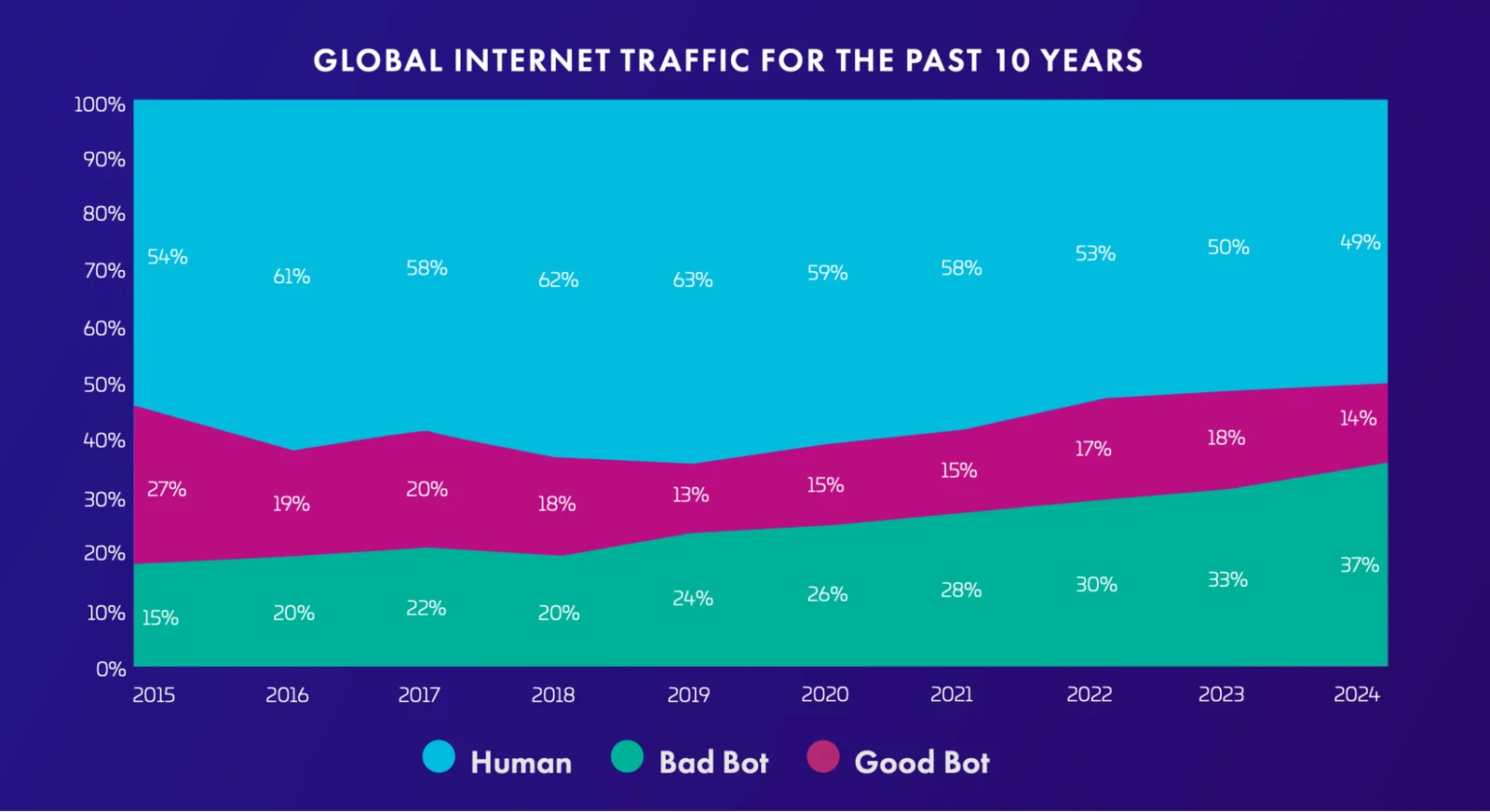
Browserless's residential proxy layer routes requests through real residential IP space, and on stealth routes, BrowserQL, and /unblock it keeps one exit IP for the whole session by default (proxySticky), the way a real device would. Add proxyCountry to match the audience of the site you're targeting.
It's a proxy service, not an IP-reputation guarantee, since a residential IP with a reused, over-scraped history can still degrade over time, just as a datacenter one does from the start.
Whether that IP rotates or stays sticky is as important as the IP type itself. A fresh exit IP on every single request is its own tell, as a real visitor's connection doesn't change mid-session, so pairing residential IPs with session-length stickiness gets closer to how an actual device behaves than rotating proxies on every request can.
Solving the press-and-hold challenge natively
BrowserQL's solve mutation supports PerimeterX's press-and-hold as a named CAPTCHA type (perimeterx), so you don't have to script the hold-and-release interaction yourself.
The type argument is optional – solve auto-detects supported challenges – but naming it skips detection when you already know what you're facing. It returns found, solved, time, and a token when the provider issues one.
It only clears that one layer, however. It doesn't retroactively fix a fingerprint mismatch or a session graph that already looked automated going in, which is why it should be used alongside the stealth route and residential proxies above, not instead of them.
How to bypass PerimeterX with BrowserQL
Here's a BrowserQL (BQL) query that combines all three pieces in one call. Send it as the query field of a POST request to https://production-sfo.browserless.io/stealth/bql?token=YOUR_API_TOKEN_HERE&proxy=residential – the endpoint applies the stealth route and a residential proxy before the query runs.
If you'd rather not hand-write GraphQL, the Browser Automation Protocol wraps BrowserQL in typed TypeScript and Python SDKs, with the same stealth, proxy, and CAPTCHA-solving features.
mutation BypassPerimeterX {
  goto(url: "https://www.zillow.com/", waitUntil: networkIdle) {
    status
  }
  solve(type: perimeterx) {
    found
    solved
    time
  }
  text(selector: "body") {
    text
  }
}
What each part does:
gotonavigates through the stealth route already in effect from the endpoint URL, so fingerprint mitigations apply before the page even loads.solve(type: perimeterx)looks specifically for PerimeterX's press-and-hold challenge and drives the interaction it measures.foundtells you whether a challenge was present,solvedwhether it cleared, andtimehow long it took; useful for catching a challenge that's taking unusually long because something upstream in your fingerprint degraded.textpulls the resulting page content once the challenge clears, so you can confirm you got real content rather than another interstitial.
Alternatively, the Unblock API wraps the same stealth-plus-proxy-plus-challenge-solving path into a single REST call:
curl --request POST \
  --url 'https://production-sfo.browserless.io/unblock?token=YOUR_API_TOKEN_HERE&proxy=residential' \
  --header 'Content-Type: application/json' \
  --data '{
    "url": "https://www.zillow.com/",
    "content": true,
    "cookies": true,
    "screenshot": false,
    "browserWSEndpoint": false
  }'
The response includes the fully rendered HTML and cookies for the page in one request, with the residential proxy and challenge-solving already applied server-side.
The browserWSEndpoint flag is worth knowing about even when you leave it false here: set it true and add a ttl in milliseconds (e.g. "ttl": 30000), and the response hands back a WebSocket endpoint that stays open for that long, so you can keep automating the already-unblocked session with Puppeteer or Playwright.
When bypassing PerimeterX isn't enough
Everything is limited by how PerimeterX scores traffic: each protected site gets compared against its own real visitors, not just a shared list of known bot signatures.
A configuration that clears the challenge on one PerimeterX-protected site can still get flagged on the next one, as the underlying comparison is against a different site's real visitors, not a shared fingerprint list. There's no single setup to find once and reuse everywhere.
That counts most on high-value flows, like a checkout path or a one-off task that has to succeed rather than get retried in bulk.
Automation that keeps retrying a session PerimeterX has already flagged tends to make the network-reputation and session-graph signals worse, not better, as repeated failed attempts from the same IP show up as a pattern.
The realistic next step is a hybrid handoff rather than another retry loop. Browserless's liveURL mutation hands a person a live, already-warmed browser session at the exact point automation stalled, with the session state built up so far intact. The default interaction window is 30 seconds, so set a liveURL timeout long enough for someone to clear the challenge, and raise the session's own timeout query parameter (60 seconds by default) above it, since the live URL can't outlive the session. Add a reconnect mutation to the same query if you want to hand the session back to Puppeteer or Playwright afterwards:
mutation HandoffToHuman {
  goto(url: "https://www.zillow.com/") {
    status
  }
  liveURL(timeout: 120000) {
    liveURL
  }
}
That trade is one every bot-defense vendor is explicitly built to force: past a certain point, proving you're a real person is easier for an actual real person than for anything scripted to fake convincingly.
Conclusion
A successful PerimeterX bypass for web scraping and AI agents comes down to knowing which of the four layers is stopping you. Stealth routes and humanlike mode narrow the fingerprint and behavior gaps, sticky residential proxies handle network reputation, and BrowserQL's perimeterx solve type clears the press-and-hold challenge without you scripting the interaction by hand.
You won't ever be invisible, however. PerimeterX, now HUMAN Bot Defender, keeps retraining against real traffic on every site it protects, so you're reducing how often you get flagged, not switching the system off.
If you'd rather run that combination through infrastructure that gets maintained for you instead of a script you own alone, sign up for a free Browserless plan and point it at your first protected target.
Bypass PerimeterX FAQs
Is PerimeterX the same as HUMAN Security?
PerimeterX is the previous name of the product; HUMAN Security is the company that acquired it in 2022 and now ships it as HUMAN Bot Defender. The rename applies to the brand and the platform it sits inside, not to the cookies, collector endpoints, or challenge UI a developer actually encounters, which is why "PerimeterX" is still the accurate, specific term for what you're looking at on the wire.
Is it legal to bypass PerimeterX or CAPTCHA challenges?
There's no blanket answer. It depends on what you're accessing and how you're using it. Data extraction from scraping publicly available data is generally treated differently from anything that requires bypassing authentication or violates a site's terms of service, and neither this guide nor Browserless is offering legal advice specific to your use case. Reviewing the target site's terms and staying inside publicly accessible, non-authenticated data is the safer default for any automation project.
Does bypassing PerimeterX guarantee access?
No. Every technique here reduces how often a given layer flags a session during scraping; none of them make a session invisible to a system that scores continuously and retrains against each protected site's real traffic. You're reducing your detection surface, not eliminating it, and that's about as far as any bypass approach against an actively maintained system goes.
Can a CAPTCHA solver alone bypass PerimeterX?
No. Solving the press-and-hold challenge clears one layer out of four. A session with a solved challenge but a fingerprint that still reports navigator.webdriver as true, or a datacenter IP with no browsing history behind it, can still get blocked on a later request in the same session, since PerimeterX scores continuously rather than granting a one-time pass at the challenge screen.