
TL;DR
- Extraction gives messy input a fixed shape. To extract structured data is to turn an HTML page, a PDF, a search result, or a social profile into fields your code can query.
- Work in two layers. Get the complete content first by parsing HTML, rendering JavaScript, or running OCR. Then map it into your schema.
- Use rules first, an LLM for variation. Selectors are cheaper and easier to debug. A model earns its cost when layouts differ between sources.
Introduction
You've got four sources to pull from and one schema to fill, and every attempt to extract structured data from them behaves differently. A product page gives up its fields to a selector, a search results page fights back, a social feed hasn't loaded yet, and a scanned invoice has no text in it at all.
What they share is the shape you want at the end, a fixed set of fields your code can query and hand off for analysis. What differs is how you get the content in the first place. The guide covers that acquisition step source by source, then shows how to map whatever you collect into your schema.
What does it mean to extract structured data?
Structured data has a predictable shape, a defined set of fields with expected types or formats. Spreadsheet rows, JSON objects, and database records all qualify. A rendered page, scanned PDF, or free-form social post gives you no such promise. The information is in there somewhere, but its shape isn't.
Common structured output formats
Most extraction pipelines eventually produce one of three formats:
- Objects. JSON returned by an API or embedded in a page as JSON-LD, with named properties and, sometimes, typed values.
- Tables. Rows and columns in a CSV or spreadsheet.
- Records. Entries stored in a database according to a defined schema.
Structured data extraction turns everything that doesn't already arrive in one of those formats into something that does. Sometimes the extraction process is just reading a JSON object the source already embedded for you. Other times you're inferring fields from content that was never meant to be parsed.
How to extract structured data from websites
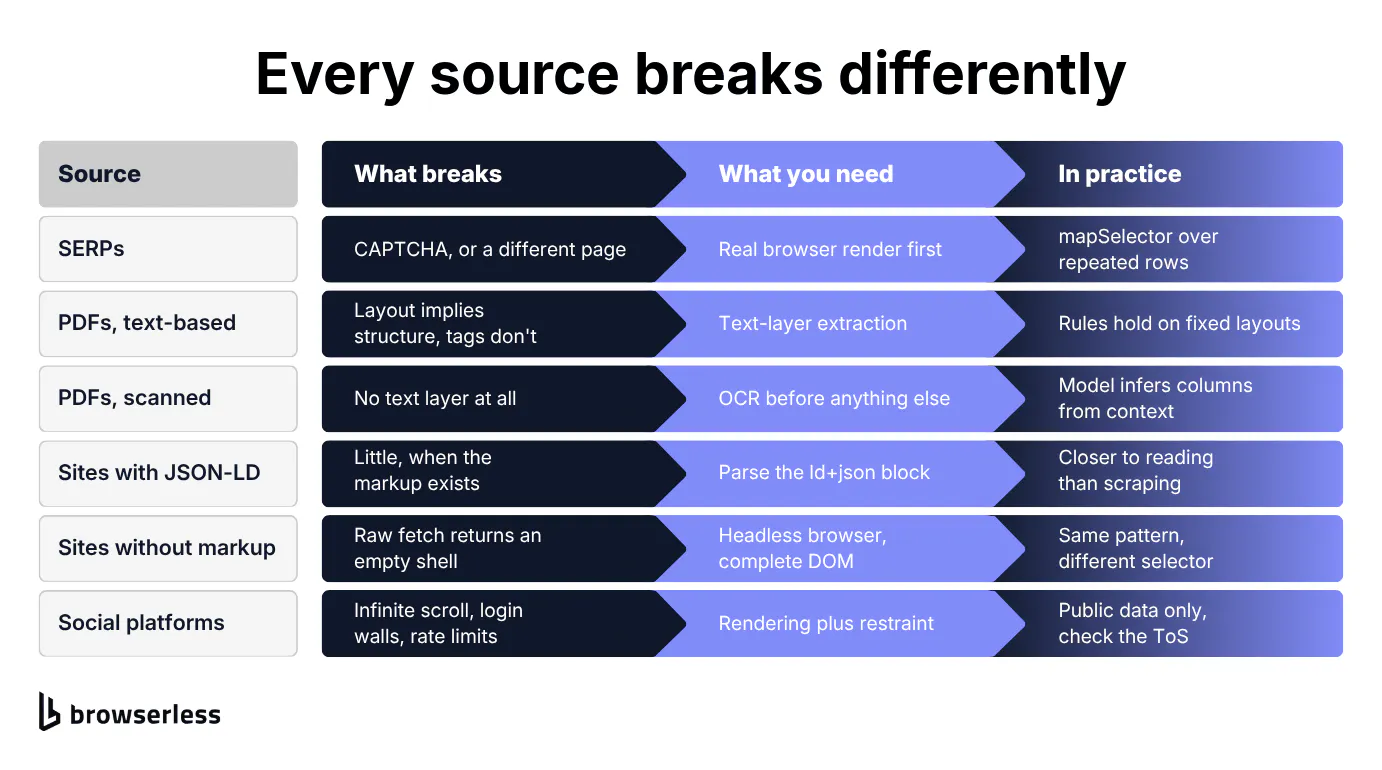
Before you write a single selector, check whether the page has already done the work for you. Product pages, news articles, recipes, and event listings often ship schema.org data in a <script type="application/ld+json"> block. If it carries the fields you need, parse that JSON and move on.
If the markup isn't there, you're extracting from the Document Object Model (DOM), the browser's live tree of page elements, where the fields you want sit in <div> and <span> tags carrying no semantic attributes to guide you. For server-rendered HTML, a plain HTTP request is often all you need.
Client-rendered frameworks like React and Vue are where that stops working. The response can be little more than an empty shell. Use the page's backing API when you're permitted to call it, and otherwise render the page in a browser, wait for the content, and query the completed DOM.
Here's that pattern in BrowserQL. The mutation below loads Hacker News, finds each repeated metadata row, and turns its author and score into named fields.
mutation ScrapeHackerNewsMetadata {
  goto(url: "https://news.ycombinator.com") {
    status
  }
  posts: mapSelector(selector: ".subtext .subline") {
    author: mapSelector(selector: ".hnuser") {
      authorName: innerText
    }
    score: mapSelector(selector: ".score") {
      score: innerText
    }
  }
}
Instead of a block of page HTML, data.posts contains a list of consistently shaped records. mapSelector walks every match of the outer CSS selector and preserves the hierarchy of nested matches.
That means author and score are lists too, even when each contains only one object, and null when the selector matches nothing; authorName and the inner score are GraphQL aliases for the returned innerText fields. For another site, swap in its selectors and the field names your application expects. The web scraping guide goes deeper on when a request beats a browser.
How to extract structured data from SERPs
A search engine results page (SERP) is the same problem with more defenses in the way. Titles, descriptions, ratings, People Also Ask boxes, and local results all appear as repeated page elements, but none of it arrives as an API response by default. Automated search traffic can trigger blocks or CAPTCHAs, and some result features load through JavaScript or only appear after an interaction.
The BrowserQL pattern above still applies. Render the page, then select each result's title, URL, and snippet. Rendering solves the JavaScript problem, but it doesn't guarantee you access to a protected page.
The harder work here is operational, and it means handling pagination, request pacing, blocks, and result types that don't share the standard organic-result markup. Browserless documents a layered approach for protected sites using its Stealth Routes, residential proxies and in-session CAPTCHA solving, with no claim that any one layer will unblock every target.
For Google specifically, see the guide to scraping Google search results.
How to extract structured data from social media
Social platforms stack infinite scroll, rate limits, and login walls on top of every rendering problem you've already seen. Most of a feed arrives well after the first response, and bot detection here is tuned for exactly the request patterns a scraper produces.
The terms matter more than anywhere else in this guide. Many major platforms prohibit automated collection outright in their user agreements, and several also prohibit working around access controls or rate limits, so a page being publicly viewable settles nothing. Read the target's terms, check what its approved APIs offer, and treat whether web scraping is legal as a separate question from whether it's technically possible.
Where a platform does permit your use case, loading a feed takes a browser session that can scroll, wait for network activity, and preserve state between requests. Make a note of which fields you need and how often they must be refreshed, because a narrower target means less infrastructure and less unnecessary data collection.
Loading a feed that only exists after scrolling
Mastodon works as the example because its public timelines are open by design. The mutation below loads the explore feed, scrolls to the last post twice, and waits for each batch to settle. Where a page lazy-loads all the way down, scroll(throughPage: true) walks the whole document in viewport-sized steps instead of stepping through by hand.
mutation LoadMoreOfTheFeed {
  goto(url: "https://mastodon.social/explore", waitUntil: networkIdle) {
    status
  }
  firstScroll: scroll(selector: "article:last-of-type", wait: true) {
    time
  }
  settle: waitForTimeout(time: 2500) {
    time
  }
  secondScroll: scroll(selector: "article:last-of-type", wait: true) {
    time
  }
  posts: mapSelector(selector: "article") {
    body: innerText
  }
}
The first render returns about 20 posts. After those two scrolls, posts comes back with roughly double or triple that, none of which existed in the initial response. The exact count moves between runs, since each batch arrives when the network gives it up, so decide how many records you need and keep scrolling until you have them.
How to extract structured data from PDFs
Work out which kind of PDF you have first, since document processing needs different tooling for each. Digitally generated PDFs often contain selectable text you can extract directly. Scanned documents, faxed forms, and other documents that reach you as images need optical character recognition (OCR) first, unless OCR has already added a searchable text layer.
A text-layer PDF may give you more than page coordinates. A tagged PDF carries a logical structure tree, naming headings, tables and reading order alongside the content, so check whether those tags are present and accurate before you start inferring structure from layout.
Tables and line items
Getting the text out is only half the job. In either document type you still have to reconstruct the structure, and that gets messy fast when a table in bank statements or medical records runs across several pages, columns shift, or headers don't repeat.
Fixed coordinates and table rules carry a stable template from a single issuer. Once input documents get more complex and layouts vary across vendors, a schema-constrained LLM (covered below) can lean on labels and surrounding context to pull fields like invoice number, line items, billing address, and total.
Reaching a PDF that sits behind a page
When the PDF sits at a URL you can reach, /smart-scrape is the short path. It recognizes an application/pdf response and returns the extracted text in content, or as markdown when you ask for it, for files up to 25 MiB and 10,000 pages. Password-protected files, and requests that force a browser strategy, fall outside that.
Plenty of the PDFs worth extracting aren't reachable that way. They sit behind a login, a portal that renders its file list in JavaScript, or bot protection, and the URL alone won't get you in.
Pointing /content or /scrape at a PDF URL looks like the shortcut. It returns HTTP 200 and an HTML shell with no text in it, since Chrome renders PDFs in a plugin rather than the DOM. There's nothing there to select.
So the job becomes getting the file. For a plain link whose content type you don't know ahead of time, the /export API fetches the URL and streams it back in its native format. When you need the session's cookies to travel with the request, the /function script below loads the page that links the PDF, finds that link in the rendered DOM, and fetches it from inside the page.
export default async function ({ page }) {
  await page.goto("https://www.irs.gov/forms-pubs/about-form-w-9", {
    waitUntil: "domcontentloaded",
  });

  const href = await page.evaluate(
    () => document.querySelector('a[href$=".pdf"]')?.href ?? null,
  );
  if (!href) throw new Error("No PDF link on the page.");

  const file = await page.evaluate(async (url) => {
    const response = await fetch(url, { credentials: "include" });
    const buffer = await response.arrayBuffer();
    const view = new Uint8Array(buffer);
    let binary = "";
    for (let i = 0; i < view.length; i += 0x8000) {
      binary += String.fromCharCode(...view.subarray(i, i + 0x8000));
    }
    return {
      url,
      status: response.status,
      contentType: response.headers.get("content-type"),
      bytes: view.length,
      base64: btoa(binary),
    };
  }, href);

  return { data: file, type: "application/json" };
}
Against the IRS W-9 page that returns application/pdf, about 140 KB, in a couple of seconds. Decode the base64 on your side and you have the original file, byte for byte, starting with the %PDF- header.
From there it's an ordinary extraction job, so hand those bytes to whichever PDF library you already use, or to OCR if the file turns out to be a scan. For a deeper walkthrough of text extraction, table tools, and OCR workflows, see the PDF scraper guide.
How to extract structured data using LLMs
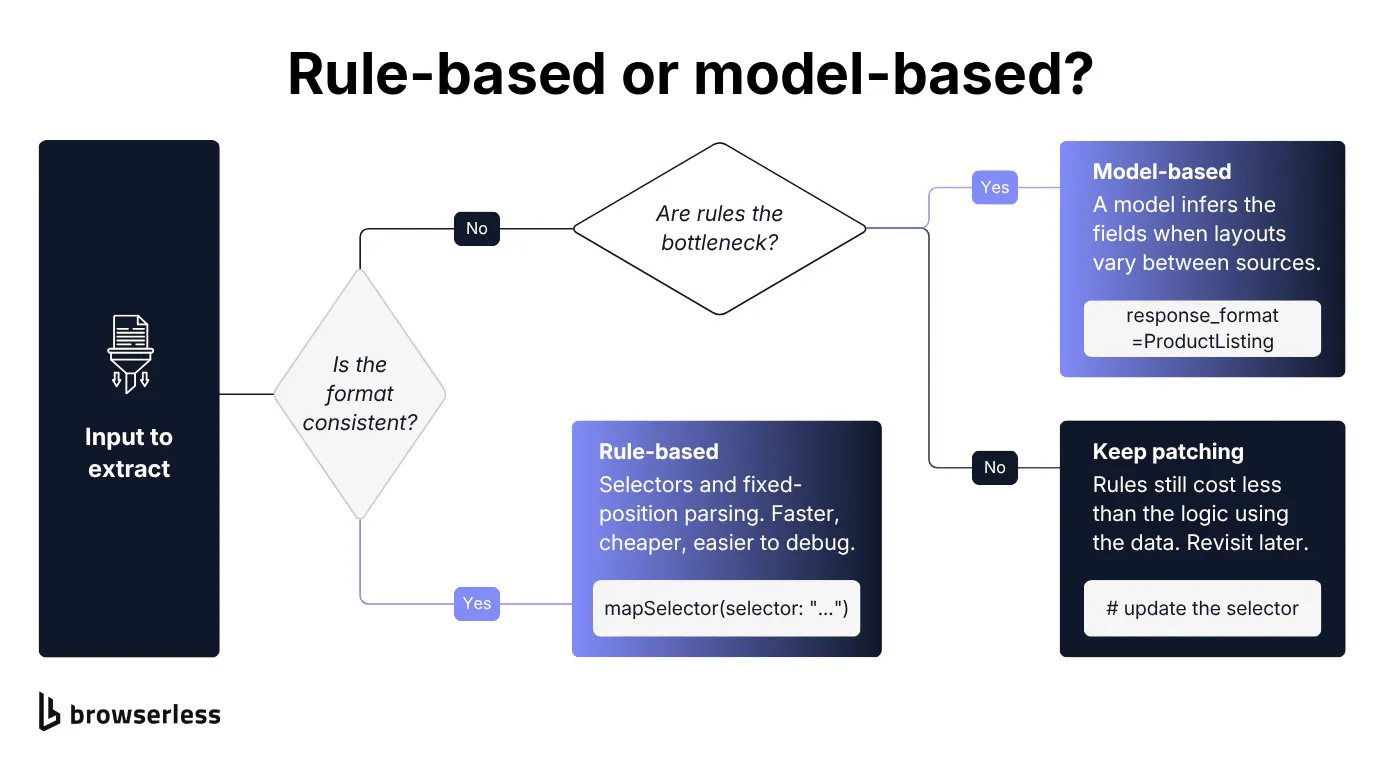
Rule-based extractors hold up while the input stays consistent, and turn brittle the moment PDF layouts vary by vendor or HTML changes between templates. An LLM-based extractor matches meaning in natural language rather than position alone, and returns structured JSON shaped to whatever extraction schemas you define, however the input text happens to be laid out. Still evaluate it against representative examples, since a schema constrains the response format, not the factual correctness of every value.
The structured extraction workflow
The same two layers apply, so capture the raw content first, whether that's a rendered page, an OCR'd PDF or an extracted post. /smart-scrape with the markdown format is built for exactly this handoff. Then create a system prompt and a target JSON schema and ask the model to populate it.
The second step is mostly prompt engineering. Be explicit about what each field means and let the schema do the enforcing. No amount of prompt polish will recover text the acquisition step never got.
Getting structured JSON out of a model
This example picks up after the fetch or render step. It needs Python 3.10 or newer, a current openai Python package alongside pydantic, and an OPENAI_API_KEY environment variable. OpenAI's Structured Outputs helper parses a product listing straight into the Pydantic schema.
from pydantic import BaseModel
from openai import OpenAI

# Whatever came back from the fetch or render step.
rendered_page_text = "Acme Widget Pro - $24.99 - In stock"

client = OpenAI()

class ProductListing(BaseModel):
    product_name: str | None
    price: float | None
    in_stock: bool | None

completion = client.chat.completions.parse(
    model="gpt-4o",
    messages=[
        {"role": "system", "content": "Extract the product listing fields. Use null when a field is missing."},
        {"role": "user", "content": rendered_page_text},
    ],
    response_format=ProductListing,
)

listing = completion.choices[0].message.parsed
print(listing.product_name, listing.price, listing.in_stock)
In your pipeline, rendered_page_text comes from the rendered DOM, an OCR'd PDF, or an extracted social post. listing comes back as a parsed ProductListing object rather than free-form LLM output, with a string for the name, a float for the price, and a boolean for stock status, or None where the source provides nothing.
Structured Outputs requires the model to return the schema's fields, which is why those nulls matter. Without a missing-value option, an absent field can push the model into a confidently wrong answer. Extend the same schema with nested objects or an array of line items, and you still won't need a separate parser for every source layout.
The first catch is cost, since API usage is billed and paying a model to handle a stable template a selector already covers rarely adds up. The second is that schema-valid output can still be wrong, so validate the extracted fields against allowed values, numeric ranges, and your own business rules before you trust the JSON output.
Fine tuning versus prompting
Fine tuning a model on your own labeled examples can push accuracy past what prompting alone reaches, though it rarely earns back the setup cost below very high volume. Measure a clear schema and a precise prompt against your own labeled sample first, and only fine tune if the remaining gap is worth the training work.
For the mechanics of running this at scale, including model selection and error handling in production, see the guide to LLM web scraping.
Choosing the right structured data extraction method
For a new source, work through these in order:
- Take the lightest reliable route to the content. A direct request or PDF text layer where you can, browser rendering or OCR only when the source requires it.
- Reuse structure that's already there. An API response or JSON-LD block beats rebuilding the same fields from visible text.
- Use rules while the layout is stable. CSS selectors, regular expressions, and fixed-position parsing are faster, cheaper, and easier to debug than a model call.
- Bring in an LLM when variation is the bottleneck. The model earns its cost once maintaining separate rules across layouts gets slower or less reliable.
You're not locked into one method for the whole pipeline. Let rules handle the common template, an LLM pick up the exceptions, and ordinary application code validate both. This roundup of web scraping tools explains where different tools fit.
No parser will solve your acquisition problems. For browser-dependent sources, you're still the one managing browser processes, page loading, blocks, and session state in production.
Conclusion
Treat acquisition and extraction as separate decisions. Get the complete source content first, with HTML parsing, browser rendering, or OCR. Then reach for the simplest thing that maps it reliably into your schema, and let the variation in your input decide when a model is worth the cost.
When a source needs a browser, that's the part Browserless takes off your plate, with managed Chrome and Chromium endpoints, session-persistence options, and separate tooling for protected sites. It's less infrastructure to run, though it won't guarantee access to every target. Sign up for free to try it against your own permitted targets.
Extract structured data FAQs
What are the two types of data extraction?
Structured extraction splits into rule-based and model-based. Rules use CSS selectors, regular expressions, or fixed positions and work best when the input stays consistent. Model-based extraction uses an LLM to infer fields from context and copes better with structural variation and complexity, though you still need to measure it against your own data. Most pipelines use both, and Browserless's guide to data extraction goes deeper on the rule-based side.
How do you extract information from unstructured data?
Capture the complete input first, whether that's a rendered page, OCR'd PDF, review, or support ticket. Define the fields you need, then populate them with rules when the language is predictable, or an LLM when meaning and layout vary. Validate the extraction results before you store or act on them.
Which LLM is best for data extraction?
There's no universal winner. The right model depends on your accuracy target, latency budget, and cost per call. What matters more than the model name is reliable schema-constrained output, so you receive your defined fields instead of more text to parse. Check the provider's current documentation for structured-output support, then test candidates against a representative labeled sample.
What field types should extraction schemas define?
Start with the types your application already expects. Strings cover names and free text, floats cover prices and measurements, whole numbers cover counts and quantities, and booleans cover flags like stock status. Allow null on any field the source legitimately omits, whatever the content type you're working from, so a missing value reads as missing rather than as a confident guess.