
TL;DR
- Every client gets scored. An Imperva bypass means getting the real page from a site behind Imperva (formerly Incapsula) instead of its block page. Imperva keeps scoring every signal it can read across the whole session, so a single trick rarely holds.
- One identity, held steady. Copied cookies and per-request proxy rotation each fix one signal and break another. A stealth browser on one sticky residential IP keeps the whole identity consistent, and the Browser Automation Protocol (BAP) SDK sets that up in a few lines.
- Escalate only when blocked. If the stealth route still fails, the Unblock API is the next tier. For the rare checkpoint nothing automated clears, hybrid automation hands that one step to a person and keeps the rest of the run automated.
Introduction
A Python requests call to a site behind Imperva can get back a JavaScript challenge it can't execute, which is the first wall any Imperva bypass has to clear. Switch to a headless browser and the challenge passes, then the session gets re-challenged a few pages later once its behavior stops resembling a person's.
Each of Imperva's checks reads a different signal, and a setup has to satisfy all of them for the length of the session. That takes a real browser, one residential IP held steady, and a fallback for the targets automation can't finish. In this guide, you'll learn how Imperva decides who gets through and how to build a session that keeps getting through.
What is Imperva (Incapsula) and how does its bot detection work?
Imperva is a web security and bot-management platform, and its Imperva Cloud WAF is the cloud web application firewall (WAF) companies use to protect websites from attacks and automated abuse. It sits in front of a site, usually through its own content delivery network, and looks at incoming requests before they ever reach the origin server.
Incapsula started as an Imperva spin-off that Imperva later bought outright, and the platform now ships as Imperva, which is why you'll still see the old name around. The block page still carries the Incapsula name, so an "Incapsula block" and an "Imperva block" are the same problem.
The WAF side also screens for attacks like SQL injection and cross-site scripting (XSS), and that's a separate detection layer from bot detection. An odd query string can trip one of those generic rules, so if you're blocked on a URL pattern you didn't expect, look at the request itself before you start tuning your browser.
Identifying Imperva bot protection and its block page
You'll usually know you've hit the Imperva block page when it reads "Request unsuccessful" followed by an Incapsula incident ID. The ID maps to your block in Imperva's logs, which helps if you talk to the site owner, but resending the same request won't change anything.
To check from code, look at the response headers and cookies. Imperva-protected sites send an Imperva header called x-iinfo, often alongside an x-cdn header set to Imperva, and set cookies named visid_incap_* and incap_ses_*. None of them need decoding, and their only job here is to confirm Imperva and rule out a different WAF.
HTTP status codes then tell you what kind of blocked request you're dealing with. A 403 usually means you've been classified as a bad bot or your IP is blocked. A 429 points to rate limiting, and if the response carries a Retry-After header, wait at least that long rather than hammering the endpoint, which Imperva reads as one more behavioral signal.
How Imperva classifies a client
Every client that reaches a site with Imperva protection gets put in a bucket, and the bucket decides what comes back.
- Verified human. A session that passed its challenge and still behaves like the site's legitimate users gets the page, plus a session cookie.
- Known good bot. Search engine crawlers and other bots Imperva recognizes as legitimate get the page too.
- Unclassified or suspicious. A new session with mixed signals or an incomplete header set gets a JavaScript challenge first.
- Known bad bot. A client that looks like a known scraping tool or attack pattern gets a 403 or a CAPTCHA.
- Blocked IP or autonomous system number (ASN). Malicious IP addresses on Imperva's threat-intelligence blocklist get the block page no matter what they send.
New web scrapers start in the unclassified bucket, and their subsequent requests decide whether they move up to verified human or down to bad bot.
The challenge flow from JavaScript to CAPTCHA to cookie
The first challenge is a page with a bit of JavaScript code that computes a value, sets a cookie, and redirects you back to the URL you asked for. A client without JavaScript execution stops right there, which is why a Python scraper that starts with import requests never gets past it on its own.
Fail that challenge, or look risky enough to begin with, and Imperva serves a CAPTCHA. Pass it and you get a session cookie with verified status, though Imperva can still challenge the session again later.
Headers, IP reputation, and behavioral analysis
Imperva detects bots by reading three groups of signals at once, and a clean result on one doesn't make up for a bad result on another.
Header fingerprinting checks whether your request headers and the rest of your browser environment line up with the user agent you're claiming, from header order and accept headers to the screen resolution the browser reports. Sparse headers, or headers in the order a scripting library sends them, stand out on the very first request.
IP and ASN reputation scores the network you're coming from, using traffic data Imperva collects across every site it protects. Datacenter ranges and known proxy providers start out under suspicion, while a residential IP in a consumer ASN looks like someone's home connection and starts with a much lower threat score.
Behavioral analysis watches request timing and user behavior for the whole session, not just the first page. Real visitors pause, scroll, and wander between pages, so a session that fires automated requests at a near-identical interval with no mouse movement gets challenged again, even after it passed the first time.
How Imperva compares with other anti-bot systems
Cloudflare, Akamai, and DataDome use the same advanced bot detection techniques, reading browser fingerprints, behavior, and IP reputation under different header and cookie names, so keeping fingerprint, IP, and behavior consistent works against all of them.
Why headless browsers still read as automated traffic
A headless browser gets you past the JavaScript challenge, but a default Puppeteer or Selenium setup leaves exactly the markers Imperva's fingerprinting is looking for, like navigator.webdriver set to true and missing internals a real Chrome instance would have.
Nothing is driving the page the way a person would, so it never moves a mouse or scrolls either. Browser automation tools without fingerprint mitigation clear the challenge and then fail the header and behavioral checks sitting right behind it.
Why common Imperva bypass tricks stop working
If you've searched forum threads for an Imperva fix, you've seen copied cookies, a swapped user agent, rotating proxies, and patched browser forks. Each one handles a smaller slice of Imperva's anti-bot measures than it seems to.
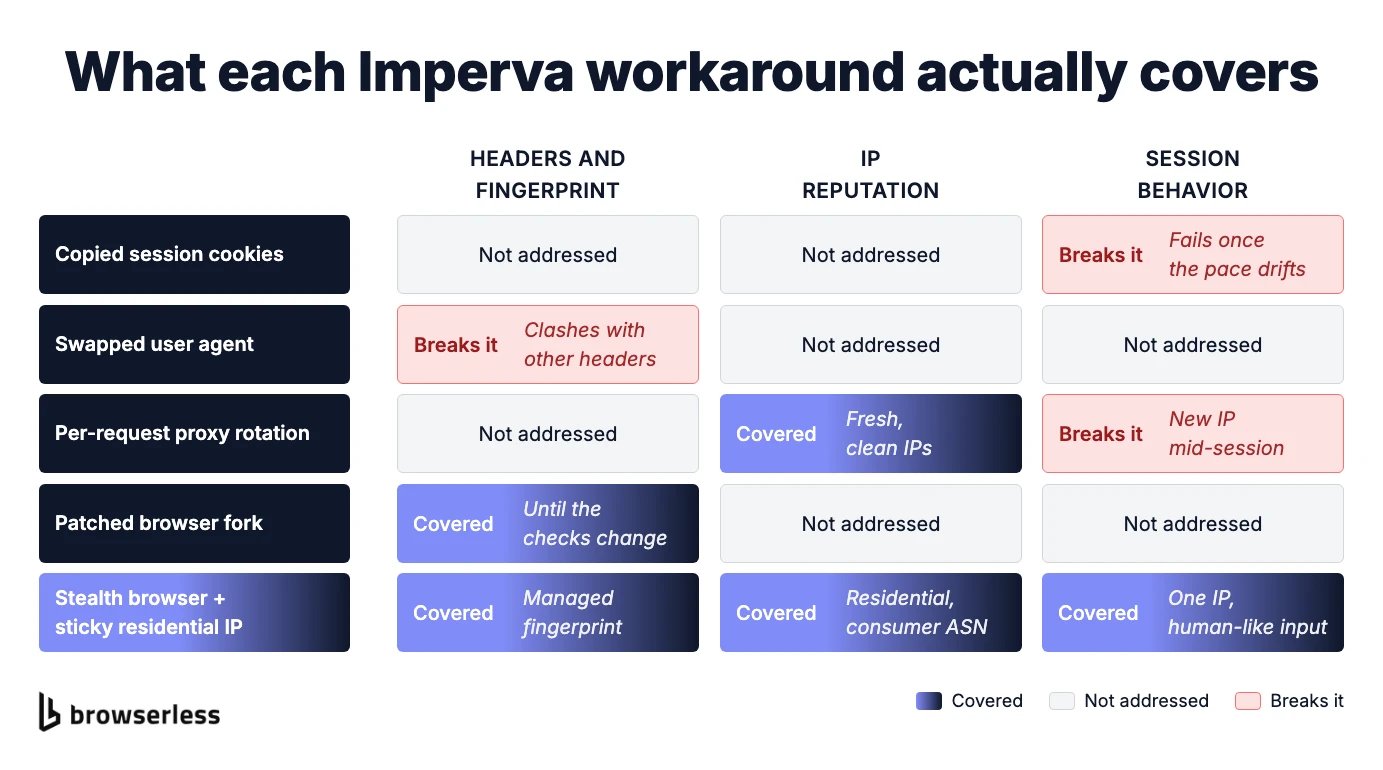
Copying session cookies from a browser that passed the challenge and replaying them in a script works for a while. It stops working once your script sends requests at a pace no real browser would, and Imperva notices that the cookie and the behavior don't match.
Swapping the user agent string changes one header and leaves the rest of the fingerprint describing a different browser, so the new value clashes with the other headers Imperva reads and makes the mismatch easier to spot.
Rotating residential proxies helps with IP reputation and nothing else. Imperva's session management expects one client to keep one identity for a whole session, so changing IP on every request can actually make things worse. Proxy rotation across a proxy pool is great for spreading load over separate sessions, but it won't make any single session look more legitimate.
Patched browser forks that strip automation markers can work well for a while, but Imperva keeps changing its detection, and a fork tuned to last month's checks slowly stops working as those checks move. That's a fair bet for a one-off job, while in production it means maintenance with no end date.
Check the site's terms before you bypass Imperva Incapsula
Imperva's whole job is to block web scraping attempts and other automated traffic the site owner doesn't want, so read the target website's terms of service and robots.txt before you build anything. Some sites allow automated collection of publicly available data for specific purposes, and others rule it out entirely. Where that line sits is the site owner's decision, and no bypass technique changes it.
From here on, the guide assumes you have a legitimate reason to reach the target, such as testing your own Imperva-protected web apps or running automation the site owner has signed off on.
An anti-bot bypass stack that holds up against Imperva
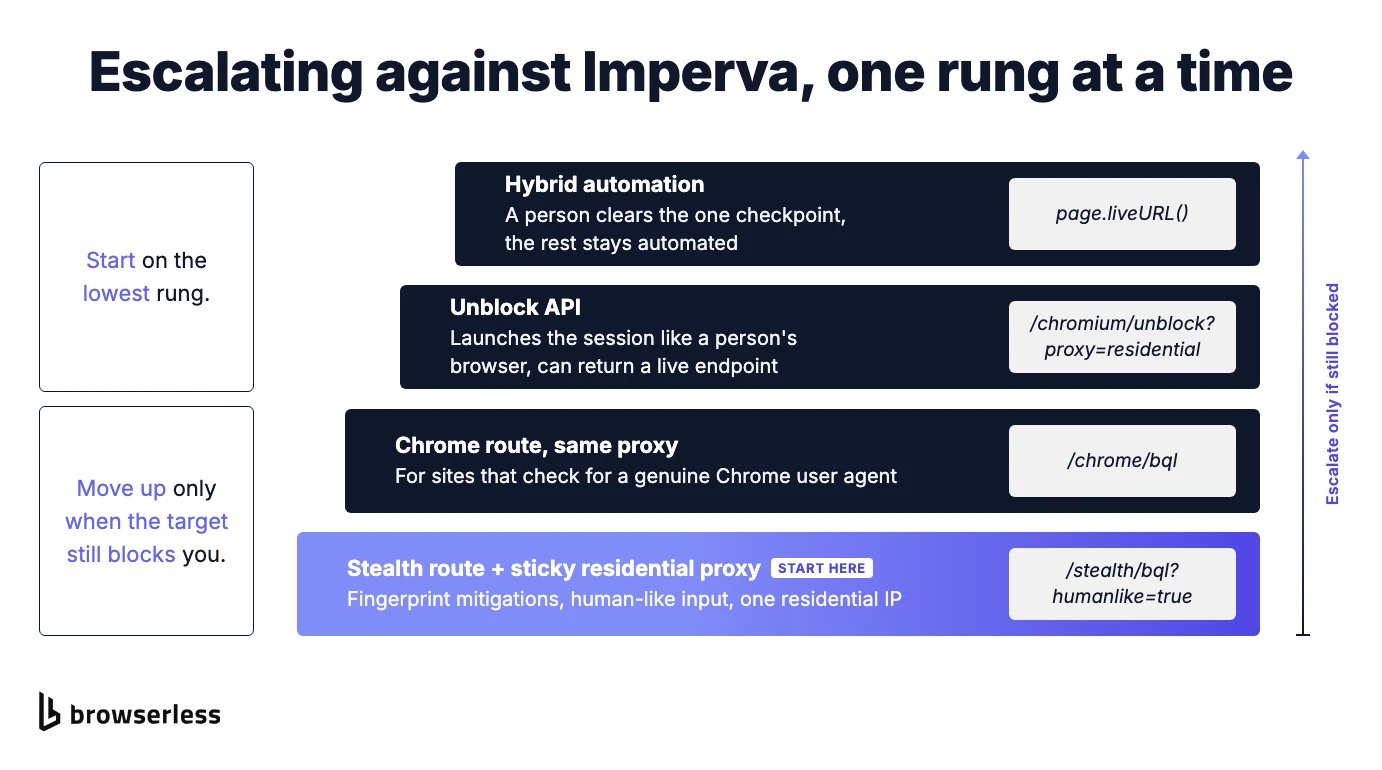
Browserless builds its Imperva bypass stack from the same layers it uses to get past bot detection elsewhere, starting with a stealth browser and going all the way up to a person taking over. Start at the bottom and only climb when the target still blocks you, which keeps most of your traffic on the simplest setup that works.
Stealth route, residential proxy, and session consistency
The examples use BAP (Browser Automation Protocol), Browserless's Puppeteer-style SDK, which turns every call into BrowserQL under the hood. Switching to the stealth browser is just an endpoint change to /stealth/bql, and the fingerprint work happens in the browser build, so there's nothing to configure in your script. Stealth sessions use more units than the standard /chromium/bql route, which is worth it against Imperva but not on sites that don't check for bots.
BAP's type() and click() already add randomized keystroke delays and scroll elements into view by default, and adding humanlike=true to the endpoint switches on human-like behavior such as mouse movement for the whole session.
Then call page.proxy() to route the session through a residential IP instead of a datacenter address, with sticky: true so the same IP stays with you for the whole session. Sticky is already the default on stealth sessions, and setting it explicitly keeps that intent visible in your code.
A working code example
The whole setup fits in one short script that needs a current Node.js release with npm 11.10 or later, plus the SDK (npm install @browserless.io/bap-ts). Set BROWSERLESS_TOKEN in your environment. The script defaults to Imperva's own homepage, https://www.imperva.com/, which sits behind Imperva and makes a harmless first target, and setting TARGET_URL points it at any other Imperva-protected page you're allowed to test.
The script connects to the stealth browser, pins a US residential IP, loads the page, and prints what came back.
// npm 11.10+ and `npm install @browserless.io/bap-ts`. Needs BROWSERLESS_TOKEN.
// Set TARGET_URL to another Imperva-protected page you're authorized to test.
import Browserless from "@browserless.io/bap-ts";

const { BROWSERLESS_TOKEN } = process.env;
const TARGET_URL = process.env.TARGET_URL ?? "https://www.imperva.com/";
if (!BROWSERLESS_TOKEN) {
  throw new Error("Set BROWSERLESS_TOKEN before running.");
}

const browser = Browserless.connect({
  // The stealth browser, with human-like input switched on.
  browserWSEndpoint:
    "wss://production-sfo.browserless.io/stealth/bql?humanlike=true",
  token: BROWSERLESS_TOKEN,
  timeout: 60_000,
});

try {
  const page = await browser.newPage();

  // One US residential IP for every request in the session, set before navigating.
  await page.proxy({ country: "US", sticky: true });

  const response = await page.goto(TARGET_URL, { waitUntil: "load" });
  await page.waitForTimeout(8_000); // time for any Imperva challenge to resolve

  const title = await page.title();
  const { text } = await page.text();

  console.log("First response status:", response?.status ?? "(none)");
  console.log("Final title:", title);
  console.log("Page text:", text?.trim().slice(0, 200) || "(empty)");
} finally {
  await browser.close();
}
Proxy rules only apply to requests made after you set them, so page.proxy() runs before page.goto() and the very first request Imperva sees already comes from the residential IP. The eight-second waitForTimeout gives the JavaScript challenge time to run and redirect you back to the real page, which is also why the title and text get read after the wait rather than straight after goto().
Save the file as imperva-session.mjs and run node imperva-session.mjs. The finally block closes the browser whether the run works or throws, so a failed navigation won't leave a session hanging open.
If the title matches the real page and the text looks like the content you expected, you're through, even if the first response status was a challenge. A real title with empty text usually means the page hadn't finished rendering, so bump the wait, while a generic title or a browser error page means you're still blocked.
If the stealth route still gets blocked
If a CAPTCHA appears, solve it in the same session instead of starting over. Imperva's CAPTCHA tier serves an hCaptcha widget (older setups still use reCAPTCHA), and both are supported CAPTCHA types for BAP's page.solve(). Pass type: "hcaptcha" if auto-detection doesn't pick it up, and note that solve() is still marked experimental in the SDK.
Imperva's JavaScript challenge itself isn't something solve() handles. Some sites also check specifically for a genuine Chrome user agent, so if the stealth route still gets blocked on one of those, point the same code at /chrome/bql before you reach for anything heavier.
If neither of those clears the block, the next step up is the Unblock API (/chromium/unblock). It drives the browser through its native remote interfaces and launches the session the way a person's browser would. You can have it return rendered HTML and cookies, the way a web scraping API would, or ask for a browserWSEndpoint and get a live session that's already past the block.
Keep proxy=residential (the Unblock API holds one exit IP for the session by default), connect Puppeteer or Playwright to that endpoint, and keep automating for the ttl you set.
When an Imperva challenge needs a human in the loop
Some Imperva-protected targets, often ones guarding checkouts or limited inventory, are tuned so tightly that nothing automated gets through every time. For those, hybrid automation lets a person step in through a secure live URL and clear the one checkpoint before handing the session back to your script.
In BAP, you create the handoff with page.liveURL() and wait on page.waitForLiveComplete() while the person works in the same session. Pass a non-empty instructions string to page.liveURL() (for example, 'Clear the check, then click Done.') so the viewer shows the Done and Couldn't-do-it buttons. If your code is Puppeteer or Playwright, Browserless.liveURL over the Chrome DevTools Protocol (CDP) gives you the same flow.
The completion reason comes back as userDone or userFailed when the person responds, or as timeout, closed, or viewerDisconnected otherwise. Whatever the reason, check that the page you expected actually loaded before your script moves on. A live URL doesn't extend the session's time limit, which your plan's maximum session length also caps, so leave room for the handoff in your timeout.
Conclusion
Imperva scores a session as a whole, which is why a copied cookie or a fresh IP buys a few requests and then fails. What lasts is consistency, with a real browser on one residential IP behaving like a visitor from the first request to the last.
Browserless runs the stealth browser and residential proxies as a managed service, with the Unblock API as the next tier, so you don't have to maintain browser patches or a proxy pool yourself. Point the example script at a page you're authorized to test and sign up for Browserless.
Imperva bypass FAQs
What is an Incapsula block?
It's the page Imperva shows you in place of the one you asked for. The Incapsula name is left over from the product's original brand, so a site showing it is running Imperva's current platform, and the same fixes apply whichever name is on the page.
How long does an Imperva block last?
A failed JavaScript challenge can clear on your next request once you show up with a valid session. A block tied to your IP or ASN lasts much longer, and retrying failed requests from the same address won't shorten it.
Why is Imperva blocking my IP address?
It's usually the reputation of your IP or its network, not anything in the same request you just sent. If your traffic comes from a datacenter or a known proxy provider, moving the same code to a sticky residential IP is often all it takes to change the result.
How do I go about troubleshooting common Imperva blocks?
Confirm it's Imperva first by checking for the x-iinfo response header and an incap_ses_* cookie, then use the status code to separate a bot or IP block (403) from rate limiting (429). If you were let in and then challenged a few pages later, compare your request headers and request timing with a real browser session. Those common Imperva blocks usually come from behavior that drifted mid-session rather than from the first request.