
TL;DR
- Logging in is easy. Staying logged in is where eng spends a whole quarter
- Everyone was keeping their state inside something running. Great inside a job; awkward between jobs
- One saved Persisting Profile, a hundred parallel sessions, and none of them able to ruin it for the others
We've written before about the things you shouldn't have to build yourself. Actually, Browserless itself was created because you shouldn't have to build a whole infrastructure with load balancing and proxying and resource management.
But if you ask me personally, I'd say that staying logged in is one of the oldest challenges in the book. I know it because we've written API after API to tackle this, until we struck gold.
What we already had
The first solution was for you to hold onto the cookies yourself, which is what I wrote about back in 2022: log in, JSON.stringify(await page.cookies()), write the file, write the loader that puts it back. It works, and half of the browser automation rigs still run on it. It also came with a warning we carefully tucked into the paragraph:
"If you have multiple instances, you also need to implement a logic for synchronizing the data among instances. Not to mention that there's no way to save HTTP-only cookies."
Turns out that paragraph was the whole ballgame. But more on that in a minute.
The much better answer was to not stop the session.
Reconnects hand you an endpoint instead of just data. An honest-to-god session, because we never destroyed the browser, so your cookies, localStorage, cache, warm TLS, and server-side sessions all survive.
As a bonus, that solution turned out to cut proxy bandwidth by up to 90%, since a warm cache doesn't re-download the same 4MB hero image every time it opens the browser. And the Session API gave the whole pattern a proper front door: create over REST, set a TTL, connect, DELETE when necessary.
And we actually still recommend these last two. They're the right tools for the job they do, which is keeping this run going. Within a single run, the state's lifetime and the browser's lifetime are the same thing, so putting the state inside the browser costs you nothing.
The trouble starts when the login has to outlive the run.
Then, the state's lifetime is months and the browser's lifetime is minutes. Or, when you need to run a lot of the same parallel sessions and keep them synchronized. Because – and this is a big headache even for very competent automation engineers – you cannot fork a live process's login into twelve. You either serialise, or you log in twelve times.
So, we serialize the whole browser for you
Here's a fun one: being logged in doesn't actually need a browser to stay up; it just needs to be written down.
When you restart your computer (which is always nice, to free up some RAM... but do it after you finish reading), you don't have to re-log in to every single service. No, the logins are already written on your hard drive. And all logins in your browser are actually a small, boring pile of cookies and origin storage, which once it's written down, can outlive any process.
Save that pile once, give it the name vendor-dashboard, and any session can ask for it:
curl -X POST "https://production-sfo.browserless.io/screenshot?token=$TOKEN&profile=vendor-dashboard" \
  -H "Content-Type: application/json" \
  -d '{"url": "https://vendor.example.com/reports"}'
That's the feature.
?profile=vendor-dashboard, and the browser comes up already signed in – on a WebSocket CDP connection, on /screenshot, on /pdf, on a BQL mutation, on a crawl, from the MCP server – anywhere a Chromium-family browser gets launched.
No TTL racing your job, no orphan processes, no overages!
The parallel problem
Here's what's actually pretty sweet.
Since a profile is stored once, encrypted, and at launch each session gets its own hydrated copy of it, twenty sessions can start from vendor-dashboard simultaneously. They don't queue or fight for who gets first, and (the part that matters) they can't corrupt each other.
Session 7 can misclick something, get itself logged out, and set fire to its own cookie jar. Sessions 1 through 20 never notice, and the saved OG profile never notices. There's nothing to poison, because nobody is writing back to the original.
If you are thinking to yourself, "Is this not kind of how photocopy machines work?" Yes. Yes, it is.
That was our entire reference while building this: create an untouched master, hand over (isolated) copies of it, and the session never touches the source of truth. And just like claiming a luggage ticket, the thing you were tempted to pass around by value gets passed around by name, and an entire category of pain evaporates.
However, a profile is a snapshot, not a live sync. Nothing a session does flows back, which is precisely what makes parallel safe, and it's why refreshing is a deliberate act rather than an accident.
Which means the two halves finally stack. Profiles get you into the run already authenticated; reconnects keep the run cheap once you're in. Attach a profile, reconnect your way through 40 pages on a warm cache, then drop everything: nothing left running overnight, and tomorrow's job starts logged in all the same.
You can read in detail about Persisting Profiles in our dedicated blog post.
But somebody, somewhere, still has to log in once
You've got us; there's the hole in everything I've said so far.
A profile is a photocopy, which is great, but it means someone had to put an original on the glass. Logged in inside a session and snapshotted. Both work. Both need you... or at least the actual photocopy machine does.
Because you can actually go fully hands-off. Autologin runs the entire sign-in server-side and hands back a profile at the end of it, from a reference to a 1Password service account. Same fix here: send a reference, not the thing.
Connect a 1Password service account once, and op://Vault/Item/password is what your code holds: not the secret, but the pointer to the secret.
You get your code to
curl -X POST "https://production-sfo.browserless.io/integrations/onepassword/profile?token=$TOKEN" \
  -H "Content-Type: application/json" \
  -d '{
    "name": "vendor-dashboard",
    "integrationId": "op_int_0a1b2c3d4e5f",
    "allowedDomains": ["https://vendor.example.com"]
  }'
# { "taskId": "autologin_eef23c512148" }
poll that taskId through pending → running → success, and what lands is an ordinary profile. Same name, same ?profile=, and the same photocopies. Nothing downstream knows or cares that it was born without a human.
And when you do need programmatic/manual control of the login, you still can do it without seeing any secret.
mutation Login {
  goto(url: "https://vendor.example.com/login") {
    status
  }
  username: loadSecret(ref: "op://Vault/Vendor/username", selector: "#email") {
    ok
  }
  password: loadSecret(ref: "op://Vault/Vendor/password", selector: "#password") {
    ok
  }
  click(selector: "button[type=submit]") {
    time
  }
}
The value is resolved just-in-time inside the session and typed straight into the input, typed being the operative word, with real per-character keydown/keyup events instead of pasting the string in one go.
Or just click the autologin button and sit
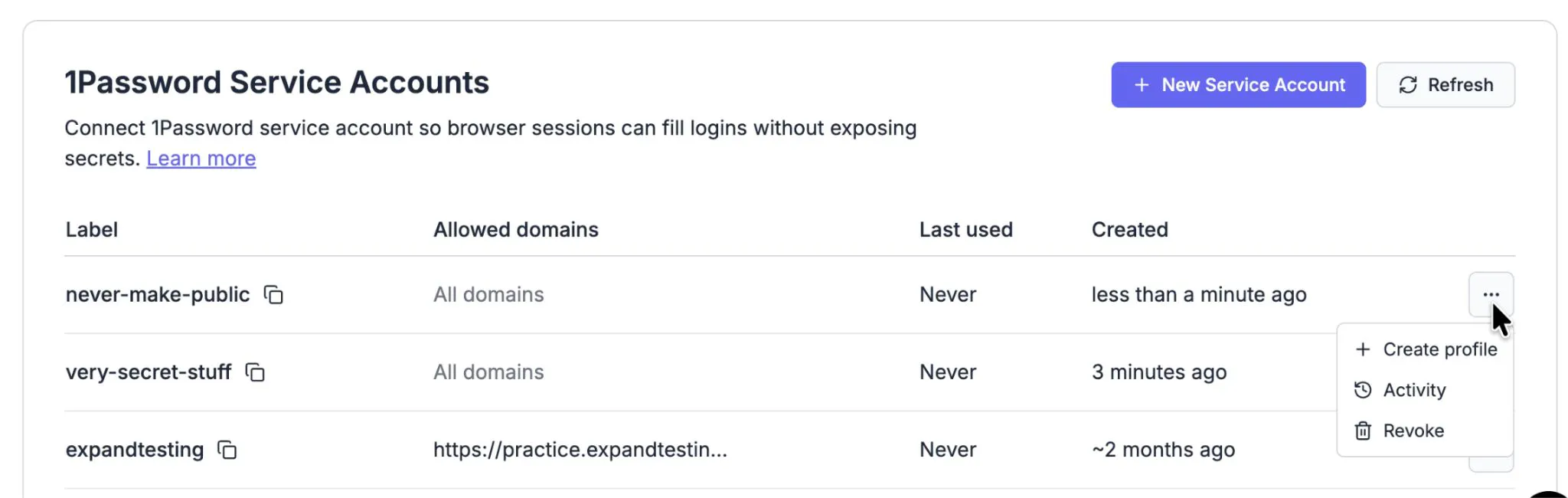
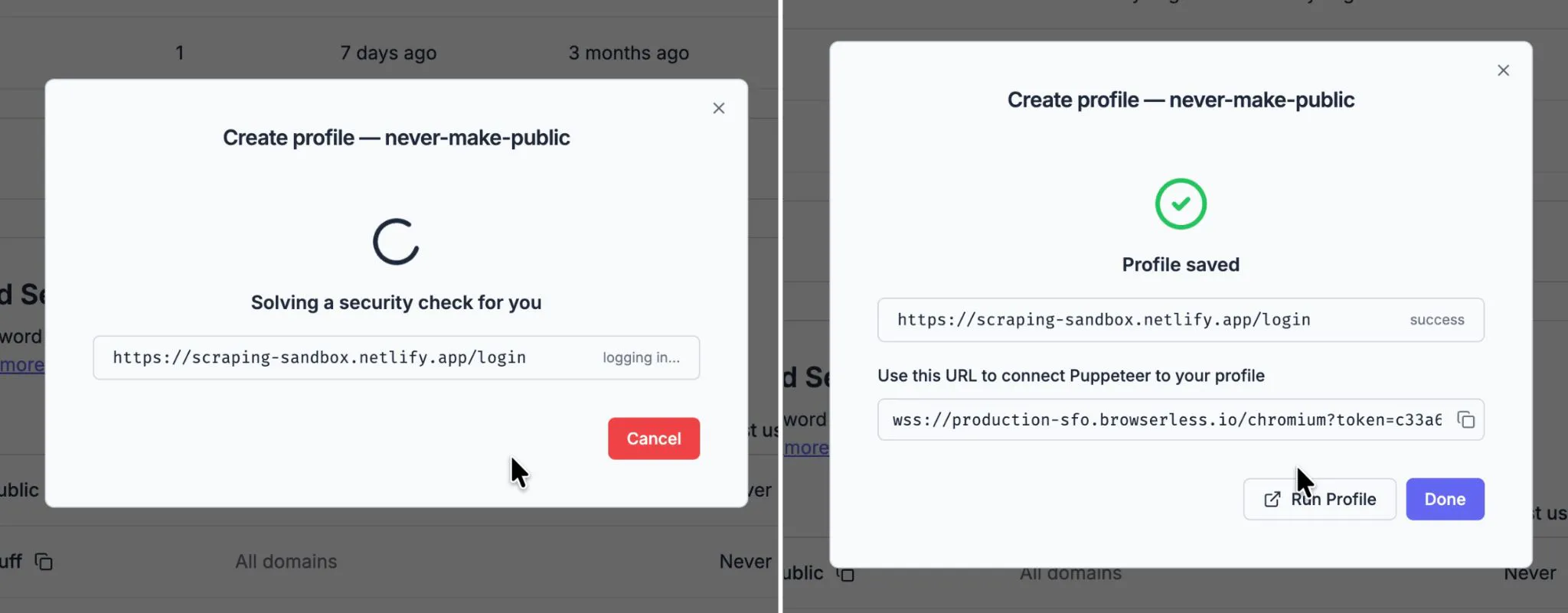
Did we mention you can do this on the account page? Go to your Profiles page, pick the 1Password integration you need, click Create profile, and give it a name. Then go get a coffee.
What's behind that button is the same autologin as the REST call, except the modal narrates itself while it works, so you get to watch an agent open the site, find the real sign-in form, fill it from the vault, and get you in. And yes, it solves CAPTCHAs.
No half measures
- Encrypted to the core. Profiles are encrypted before they touch the DB, and we cannot see anything inside them.
- Chromium-family only. We haven't quite figured out how to offer the same experience with Firefox and WebKit just yet.
And, for security reasons, the second any secret touches a page, the session bolts the doors for the rest of its lifecycle:
- Screenshots, PDFs, screencasts, Live URLs, and recording are off. Anything already recording is thrown away rather than stored.
- Content readback –
evaluate,html,text,querySelector, andcookies– are off as well, because "screenshot the password field" and "read the password field" are the same exploit wearing different hats. - The fill is refused outright if the page's origin isn't on that integration's allowed-domain list. There's no code path whatsoever where the value is somehow leaked.
It's all plug-and-play
Nothing to install and nothing to host. There's a Profiles page in your Browserless account that creates, renames, refreshes, and deletes them, hands you the CLI command pre-filled, and lets you run one to check it still works. The original announcement post has the full API surface.
Because it's just a query parameter, everything you've already written keeps working. Add &profile=, delete the login script, delete the cleanup cron, and delete the table where you were storing WebSocket endpoints. Go do something else.