
TL;DR
- A proxy is an intermediary server that sits between you and the internet, forwarding your requests and hiding your real IP address from the sites you visit.
- Proxies come in several forms, such as forward, reverse, transparent, and anonymous, each suited to a different job, from privacy to access control to load balancing.
- Businesses use proxies for security, content filtering, caching, and bypassing restrictions, while developers increasingly use them for web scraping and automation.
- Browserless builds proxy support directly into browser automation, so you can target a country (and, on the Scale plan, a specific city) per request without configuring a separate proxy service.
Introduction
Most people first encounter proxies in a support ticket, a blocked website at work, or a "configure proxy settings" screen buried in their operating system's network preferences. In reality, proxies quietly sit behind a lot of what makes the internet work the way it does.
Here's a straightforward answer to what a proxy is, how a proxy server actually handles a request, and the main types you'll run into.
You'll also see why businesses and developers use proxies, how a proxy protects your identity (including where that protection runs out), how to choose a proxy solution for your own needs, and where proxies fit into modern web scraping and automation.
What is a proxy?
A proxy, or proxy server, is an intermediary server that sits between a client and the destination server, forwarding web requests on the client's behalf.
Instead of your device talking directly to a website, your request goes to the proxy first. The proxy server acts as that stand-in – it forwards the request to the target server, receives the response, and passes it back to you.
The destination server only ever sees the proxy server's IP address, not your own. That single substitution, one IP address standing in for another, is the basis for almost everything a proxy gets used for: privacy, access control, caching, and content filtering included.
A proxy isn't the same as a firewall, which decides whether traffic gets through at all rather than routing it somewhere else, and it isn't the same as a virtual private network (VPN), which encrypts your entire device's traffic through one tunnel rather than working at the level of an individual web request.
If you're wondering about the differences between a proxy and a VPN specifically, Browserless's proxy vs. VPN guide breaks down that comparison in detail.
What is a proxy server and how does it work?
A proxy server intercepts a request before it reaches its destination, substituting its own IP address for the client's, and managing the trip there and back.
Here's the sequence:
- You send a web request from whatever computer system you're on, whether that's loading a page from a web server in a browser or a script pinging an API.
- The proxy server receives that request instead of the destination server.
- The proxy forwards the request to the destination server, using its own IP address rather than your original IP address.
- The destination server processes the request and sends its response back to the proxy.
- The proxy relays that response back to you, exactly as if it had come directly from the destination.
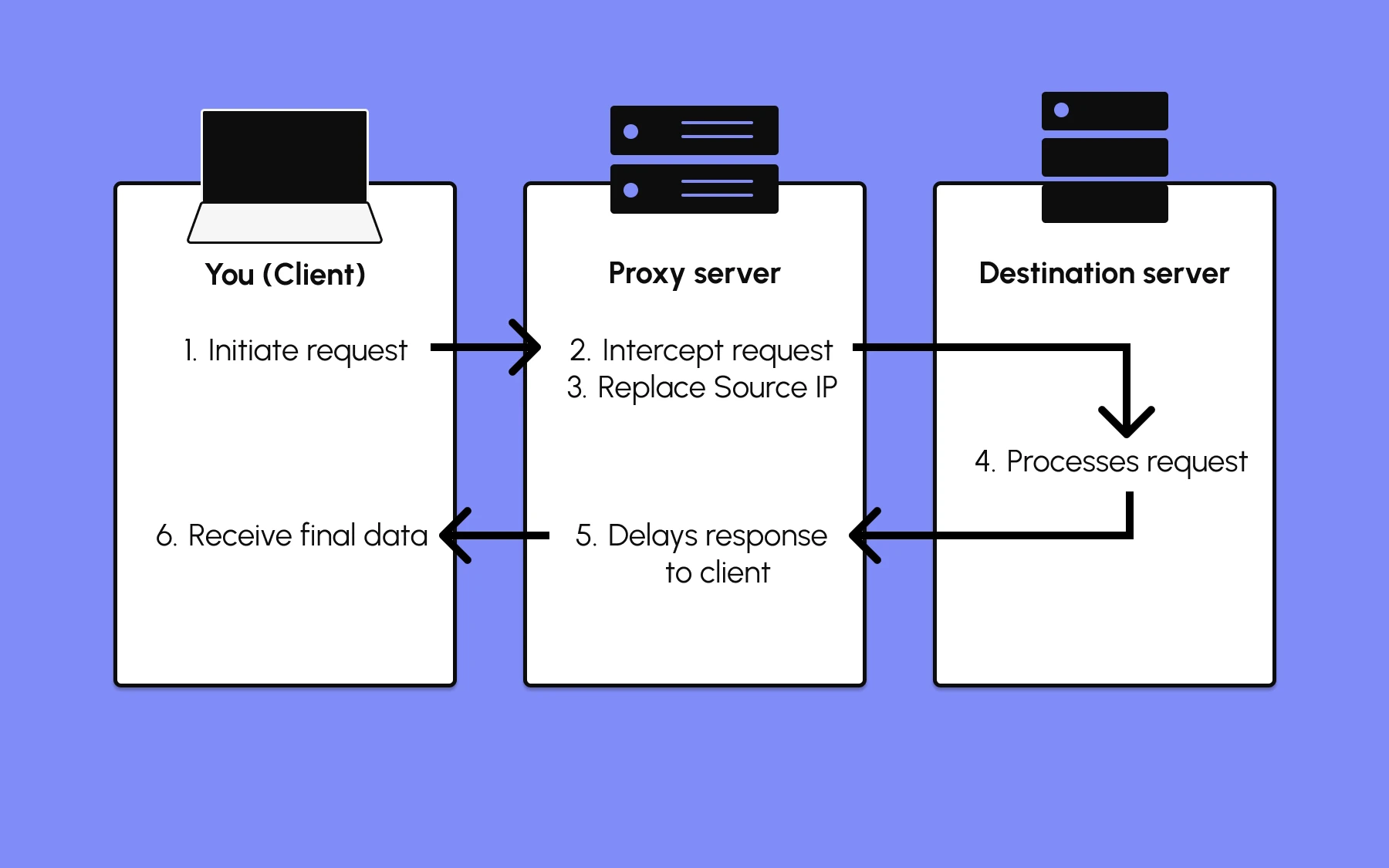
From the destination server's point of view, the request came from the proxy. It has no direct visibility into your original IP address unless the proxy is configured to reveal it, which is exactly what separates a transparent proxy from an anonymous one, covered in the next section.
Not every proxy handles a request the same way, either. Basic proxies just relay what they receive, but others modify requests, rewriting headers or blocking certain content before it reaches the destination server.
A basic proxy doesn't encrypt traffic by default, however.
For HTTPS connections, TLS still handles encryption end to end, so the content of your request stays protected regardless of the proxy in the middle.
For plain HTTP, though, the proxy adds no extra protection of its own. A proxy controls where your traffic appears to come from, but not necessarily whether that traffic is encrypted.
The most common types of proxy servers
Different proxy servers offer different levels of anonymity and speed, and the cost varies just as much. They differ by where they sit in the connection, how much they reveal about you, and where their IP addresses come from.
Here are the types you'll most often run into:
- Forward proxy – Sits between the client and the internet, forwarding outgoing requests on the client's behalf. It's the setup behind most privacy tools, corporate internet controls, and scraping or automation workflows.
- Reverse proxy – Sits in front of a destination server instead of a client, handling incoming requests for that server. It acts as the public-facing point for load balancing traffic across multiple backend servers, caching content, or hiding internal network details from the outside world.
- Transparent proxy – Passes your original IP address through without hiding it. Organizations use transparent proxies for caching web pages, content filtering, or monitoring internet usage on a network, often without the user configuring anything at all.
- Anonymous proxy – Hides your real IP address from the destination server, though the server may still be able to tell that a proxy is being used.
- High anonymity (elite) proxy – Goes a step further than a standard anonymous proxy by hiding both your IP address and the fact that a proxy is in use in the first place.
- Distorting proxy – Instead of hiding your IP address outright, passes along a different, incorrect one to the destination server.
- Rotating proxy – Assigns a new IP address from a pool for each request or session, which is central to scraping at scale. Browserless's proxy rotation guide covers rotation methods and when to use each one in more depth.
- Residential proxy – Uses real IP addresses assigned by internet service providers to home networks, making the traffic look like an ordinary internet user rather than a data center. Browserless's residential proxy announcement covers how that network is built and priced.
- Data center proxy – Uses IP addresses from cloud and hosting providers rather than home networks. It's faster and cheaper than residential, but easier for sites to spot and block, since the address clearly belongs to a data center.
- DNS proxy – Handles and can redirect DNS requests specifically, rather than general web traffic.
- CGI proxy and suffix proxy – Older, browser-based proxy forms that let a user reach a site through a web form or a URL suffix rather than a device-level configuration, hiding the user's real IP address in the process. These terms still appear in older documentation, though they're far less common than the types above today.
If you're choosing a proxy type based on where the IP address comes from, residential versus data center is usually the bigger decision than the list above.
Why use a proxy server? Common use cases
Proxies solve a handful of recurring problems for the average internet user and for businesses running much larger networks, across all kinds of internet connections. Most deployments map to one of these:
- Privacy – Hiding your real IP address from the sites and services you connect to, whether that's for personal browsing or for scraping public data without exposing your own infrastructure.
- Access control – A network administrator can restrict access to specific websites, deny access outright, or allow only a group of authorized users, a common setup on office and school networks.
- Content filtering – Blocking entire categories of sites, such as adult content or social media, through web filters applied to devices on an internal or private network.
- Caching – Proxies cache data from popular websites and other frequently requested pages so repeat requests get served faster. That saves bandwidth on busy networks and improves overall performance for everyone sharing the connection.
- Monitoring – Giving a network administrator visibility into and control over internet use across every device on a network, which helps with security and with spotting unusual outbound traffic.
- Bypassing restrictions – Letting you reach websites or content that are geo-blocked or otherwise unavailable from your actual location.
Automated traffic has become one of the biggest reasons proxies get deployed today.
According to Imperva's 2026 Bad Bot Report, automated traffic accounted for more than 53% of all web traffic in 2025, up from 51% the year before.
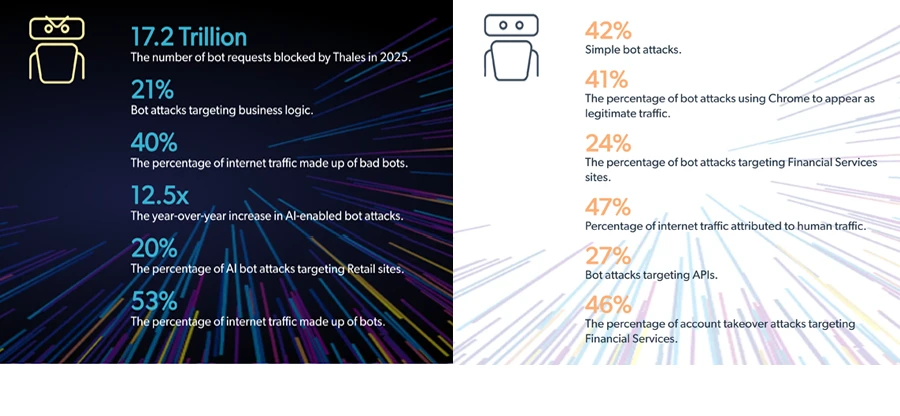
A growing share of that is legitimate: scrapers pulling public data, monitoring tools, and AI agents browsing on someone's behalf.
A human browsing manually rarely encounters the same problem that each of those workloads runs into: enough requests from one IP address get noticed, rate-limited, or blocked outright, which is exactly the problem a well-configured proxy solves.
Meanwhile, for businesses handling sensitive information, routing traffic through a controlled proxy is also a data security best practice.
How does a proxy server protect my identity?
A proxy protects your identity primarily through the same IP substitution covered earlier: the destination server and anyone monitoring the connection on that end sees the proxy's IP address instead of yours. It keeps your location and network identity private from the sites you visit.
However, that protection is limited. A proxy on its own doesn't encrypt your traffic, so it won't stop someone on your own network from seeing what you're sending, unless the connection is already using HTTPS.
As covered in the proxy types above, how much a proxy hides depends on the type – transparent proxies hide nothing, anonymous proxies hide your IP, and high-anonymity proxies hide the fact a proxy is used at all.
Hiding your IP address is different from making you fully anonymous online. Browser fingerprinting, cookies, and login sessions can all identify you regardless of which IP address a request came from.
A proxy adds one layer of identity protection, not a complete one, and treating it as complete protection will give you a false sense of security.
How to choose a proxy solution for your business
Use this short list of questions, rather than trying to find a single "best" option, when selecting a proxy:
- What's the primary goal? Privacy and access control call for a different setup than web scraping or automation, where request-level control matters more than blanket traffic routing.
- How much anonymity do you actually need? A transparent or basic anonymous proxy is enough for internal caching or filtering. Scraping a target site with active bot detection usually requires a residential proxy that doesn't look like a data center IP.
- Do you need rotation or a sticky session? High-volume scraping benefits from rotating through many IP addresses so no single one gets flagged. Workflows that need to stay logged in across multiple steps need the opposite: the same IP address held for the length of a session.
- Do you need control at the level of a network or a single request? A business blocking social media for its office needs one proxy configuration applied network-wide. A team scraping or automating browser sessions usually needs to set the proxy, country, and session behavior independently for each request.
Businesses that mainly require browser automation or scraping tend to land on that fourth question fastest, since general-purpose or free proxy services are rarely built for per-request control, geographic targeting, or session stickiness.
How Browserless handles proxies for automation and scraping
Browserless builds proxy support directly into its REST APIs and browser sessions, so you don't need to run a separate proxy service alongside your automation. You choose the network, the location, and whether the session should keep the same IP address, all as parameters on the request itself.
A single API call can route through a residential proxy in a specific country:
curl -X POST "https://production-sfo.browserless.io/screenshot?token=YOUR_API_KEY&proxy=residential&proxyCountry=de" \
  -H "Content-Type: application/json" \
  -d '{
    "url": "https://example.com",
    "options": { "fullPage": true }
  }'
Browserless offers two built-in networks: residential (6 units/MB, harder to detect) and datacenter (2 units/MB, cheaper but easier to detect). Set proxy=datacenter when you mainly need low-cost IP rotation.
For sessions that need to hold the same IP address throughout, add proxySticky=true.
You can also narrow targeting below the country level: on the Scale plan, proxyCity routes a request through a specific city rather than just a country.
On stealth routes, proxyLocaleMatch goes a step further and automatically sets the browser's language to match the proxy's location, so a session routed through Brazil renders pages in Portuguese instead of the default English (en-US).
If you'd rather use your own proxy service, the externalProxyServer parameter accepts a standard proxy URL with credentials included, and Browserless routes the session through it instead of its own network.
Note that externalProxyServer can't be combined with the built-in proxy=residential/datacenter (doing so returns a 400), requires a paid plan on cloud, and isn't billed as proxy units.
BrowserQL takes this further with a dedicated proxy mutation, which lets you route only specific request types through a proxy rather than an entire session:
mutation TargetedProxy {
  proxy(url: ["*"], country: DE, type: [document], sticky: true) {
    time
  }
  goto(url: "https://example.com", waitUntil: domContentLoaded) {
    status
  }
}
You need that level of control because proxying every request, including images, scripts, fonts, and analytics calls, costs more bandwidth than proxying just the ones that need it.
Combined with Browserless's bot detection handling, your scraping or automation workflow will present a consistent, realistic identity to the sites it visits, without the extra infrastructure of running and rotating a separate proxy fleet by hand.
Conclusion
A proxy is ultimately a stand-in IP address between you and the internet. Everything else – privacy, access control, caching, or scraping at scale – builds on that one substitution.
Which type and setup you choose depends entirely on what you're trying to achieve, whether that's keeping a home network's traffic private or running thousands of scraping requests without getting blocked.
If your use case leans toward automation, the fastest way to see how a request-level proxy behaves is to try one.
Sign up for a free Browserless account and send a request with a proxy parameter attached. You'll get a real response back in seconds, routed wherever you told it to go.
Proxy FAQs
What's the difference between a forward proxy and a reverse proxy?
A forward proxy sits between a client and the internet, forwarding outgoing requests on the client's behalf – the setup you'll see most often in privacy tools and scraping workflows.
A reverse proxy sits in front of a server instead, handling incoming requests for load balancing, caching, or hiding backend infrastructure from the public internet.
Is a proxy server safe to use?
It depends on the proxy. A private, dedicated proxy from a reputable provider is generally safe, since nobody else routes traffic through the same IP address. Free or public proxies carry more risk: some log or modify the traffic passing through them, and a shared IP address can get flagged because of what other users on it are doing, not anything you did yourself.
Does a proxy encrypt my internet traffic?
Not by default. A proxy changes which IP address your traffic appears to come from, but encryption is a separate layer handled by TLS on HTTPS connections. If you need your traffic encrypted end to end regardless of the destination, that's what a VPN is built for.
Can a website tell I'm using a proxy?
Sometimes. A transparent proxy doesn't hide anything, so it's obvious.
A basic anonymous proxy hides your IP address but can still leave signs that a proxy is in use, often through response headers. A high-anonymity proxy is built specifically to avoid revealing either one.