
TL;DR
- Python crawler. A script that starts at one URL, follows the links it finds, and repeats, deciding where to go next from what it just read.
- The stack. Requests fetches the page, BeautifulSoup parses the HTML that comes back, and
urljoin()turns relative links into ones you can actually request, or the/contentAPI fetches it pre-rendered when the page needs JavaScript. - JavaScript pages.
requests.get()returns a mostly empty shell when content renders client-side, so those pages need a headless browser such as Playwright. - At scale. Concurrency limits and IP blocking are infrastructure problems rather than Python ones, as is Chromium leaking memory over long runs, which is where a hosted browser earns its place.
Introduction
Every crawler in Python starts as twenty lines that fetch one URL and print what comes back. That version holds up right until the target page renders its content with JavaScript, the site blocks you a few dozen requests in, or the output outgrows the terminal you were printing it to.
In this guide you'll build a crawler in the order those problems actually show up. You'll start with a plain HTTP crawler using Requests and BeautifulSoup, move to a headless-browser crawler for JavaScript-heavy websites, then finally cover what changes once you need to save real output, scale past a handful of concurrent requests, and stay on the right side of a site's rules.
What is a web crawler in Python?
A web crawler is a program that starts at a given URL, follows the links found on the page, and repeats that process across many web pages. That's the part that separates it from a one-off script, since a crawler decides where to go next based on what it just read.
Three pieces usually make up a crawler in Python:
- Something to fetch a webpage: an HTTP client or a browser.
- Something to parse the HTML it gets back.
- Somewhere to put the data you pull out.
If URL discovery is all you need, the /map API returns a deduplicated list of a site's pages from a single POST, no crawl loop required.
The first step is the simplest version that works, and the rest of this article walks through each piece from there.
Web crawling vs. web scraping
Web crawling is about discovery, following links from page to page to build up a list of URLs or content. Web scraping is about extraction, pulling specific fields, a price or a stock table, out of a webpage you already have. The difference between scraping and crawling matters most when you're deciding which half is actually breaking.
In practice, most real projects need both. A crawler usually contains a scraper inside its request handler, since finding a page and pulling data out of it are two separate jobs that happen to run back to back.
Is web crawling with Python legal?
Web crawling itself isn't illegal, but plenty of specific things you can do with it can put you on shaky ground, and the details depend on the site and the data as much as your jurisdiction. Settle this before you write the crawler, since it shapes how fast you run it and what you keep. A few checks apply almost everywhere:
- Check
robots.txt. Most sites publish one at/robots.txtlisting paths they don't want automated tools to hit. It isn't legally binding by itself, but ignoring it is the first thing a site operator will point to if there's a dispute. - Read the terms. Many sites explicitly prohibit automated access in their terms of service, and using the site can count as accepting those terms in a way
robots.txtalone doesn't. - Rate-limit requests. Hammering a site fast enough to affect its performance moves you from scraping toward something closer to a denial-of-service complaint, regardless of what you're extracting.
- Don't impersonate a known crawler. Passing yourself off as Googlebot in the user agent misrepresents who you are to the site operator, and it's the kind of detail that turns a technical dispute into an ugly one.
- Mind personal data. Names, emails, or anything else tied to an identifiable person carry real regulatory weight under laws like the General Data Protection Regulation (GDPR) in the EU or the California Consumer Privacy Act (CCPA), even if the page itself is public.
Nothing here is legal advice. It hinges on what you scrape and what you do with it afterward, so ask a lawyer instead of a blog post if there's real money or risk on the line.
What you need before you start
You'll need Python 3.10 or later and a virtual environment, so the packages below don't collide with anything else on your machine. Create one, activate it, and pull in the libraries this article uses:
python3 -m venv crawler-env
source crawler-env/bin/activate
pip install requests beautifulsoup4 lxml pandas
Requests handles the HTTP requests, BeautifulSoup is the HTML parser for what comes back, and pandas plus lxml covers pages that keep their data in tables. That set is where most crawlers start, and it's enough until you hit something that needs a full browser.
Choosing a library or a framework
Requests and BeautifulSoup, plus Playwright later on for anything JavaScript-heavy, cover most crawlers you'll build. One other name is worth knowing before you commit to a starting point.
Scrapy is a full crawling framework rather than a single library. It gives you a project structure, a request scheduler, and a pipeline system for cleaning and storing items, which pays off once a crawler grows past a single script, and it keeps working on JavaScript-heavy pages if start_requests() posts to the /content API instead of fetching the URL directly.
Reach for a framework once you're maintaining more than a couple of crawlers, or once retry logic, storage, and queueing start eating more of your time than extraction itself. For a single crawler like the one in this article, Requests, BeautifulSoup, and Playwright are enough on their own.
Building a simple Python crawler with Requests and BeautifulSoup
Here's a crawler that starts at one page, follows internal links, and stops once it hits a request limit. It uses quotes.toscrape.com, a public sandbox site built for exactly this kind of practice, so you can run it as-is:
import json
from collections import deque
from urllib.parse import urljoin

import requests
from bs4 import BeautifulSoup

BASE_URL = "https://quotes.toscrape.com"
MAX_REQUESTS = 10


def crawl(start_url: str, max_requests: int = MAX_REQUESTS) -> list[dict]:
    queue = deque([start_url])
    visited = set()
    extracted_data = []

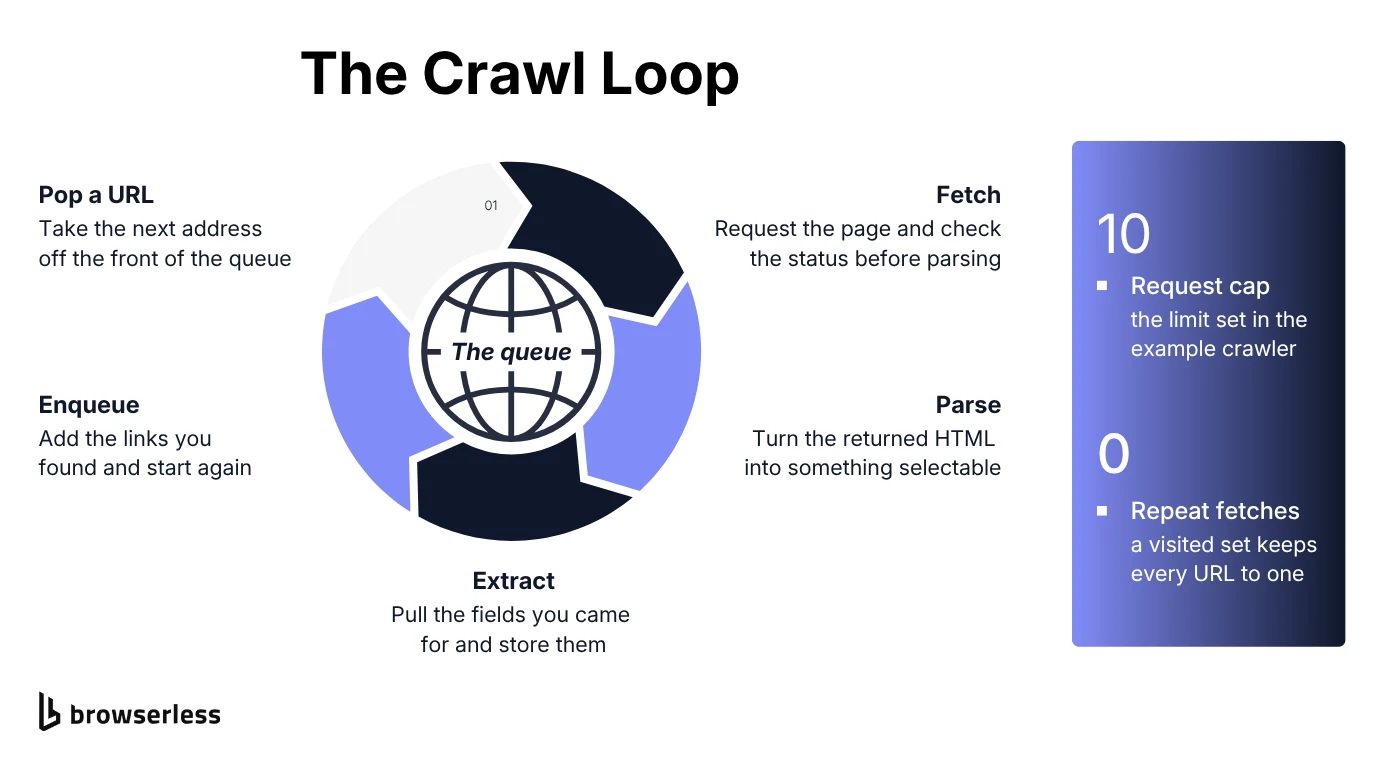
    while queue and len(visited) < max_requests:
        url = queue.popleft()
        if url in visited:
            continue
        visited.add(url)

        response = requests.get(url, timeout=10)
        if response.status_code != 200:
            print(f"Skipping {url}, got status code {response.status_code}")
            continue

        soup = BeautifulSoup(response.text, "html.parser")
        for quote in soup.select("div.quote"):
            extracted_data.append({
                "text": quote.select_one("span.text").get_text(strip=True),
                "author": quote.select_one("small.author").get_text(strip=True),
                "url": url,
            })

        next_link = soup.select_one("li.next a")
        if next_link:
            queue.append(urljoin(url, next_link["href"]))

    return extracted_data


if __name__ == "__main__":
    data = crawl(BASE_URL)
    print(f"Extracted {len(data)} quotes")
A queue holds the initial list of pages to visit, and a visited set stops the crawler from requesting the same page twice. Each quote it finds becomes a Python dictionary appended to the results, and the crawler checks for a 200 before it parses anything, since an error response carries no HTML content worth extracting.
The type hints on crawl() are worth keeping as the script grows, since they give you IDE autocompletion on the return value and let static type checking catch a whole class of bugs before you run anything.
Extracting links with an HTML parser
The same BeautifulSoup object pulls out any other field the page carries, not just the quote-and-author pair above. Point a CSS selector at what you want:
title = soup.select_one("title").get_text(strip=True)
all_links = [urljoin(url, a["href"]) for a in soup.select("a[href]")]
select_one() returns the first match or None, so it's worth checking before calling .get_text() on a page where the element might not exist. urljoin() turns a relative link like /page/2/ into a full URL you can actually request next.
Saving crawled data to a file
Printing to the console works for a quick test, but you'll want the extracted data somewhere durable once the crawl runs unattended. Dumping the list to JSON is the shortest route, so add it inside crawl() just before return extracted_data:
    with open("quotes.json", "w", encoding="utf-8") as f:
        json.dump(extracted_data, f, indent=2)

    return extracted_data
A file is fine for a one-off crawl, but once you're running this on a schedule, writing the same structured data into a database instead makes it much easier to query and deduplicate later. Once the extraction itself is the bottleneck rather than the storage, the /scrape API takes a URL and a list of CSS selectors and hands back the matching text and attributes as JSON, so there's no parser of your own to maintain.
Crawlers also commonly pull down images or other binary files alongside the structured data. Open a downloaded file in binary write mode rather than the default text mode when you're saving something other than text, such as an image or a PDF:
import requests
from urllib.parse import urljoin, urlparse

page_url = "https://books.toscrape.com/"
image_url = urljoin(page_url, "media/cache/2c/da/2cdad67c44b002e7ead0cc35693c0e8b.jpg")

image_response = requests.get(image_url, timeout=10)
image_response.raise_for_status()

filename = urlparse(image_url).path.rsplit("/", 1)[-1]
with open(filename, "wb") as f:
    f.write(image_response.content)

print(f"Saved {filename}, {len(image_response.content)} bytes")
The "wb" flag matters here, because writing binary content in text mode corrupts the file on most platforms.
Extracting tables from a webpage
Some pages hold their most useful data in an HTML table rather than scattered across <div> tags, and hand-writing selectors for a table is wasted effort. pandas.read_html() finds every table in the HTML you give it and turns each one into a DataFrame. Fetch the page with Requests first, since plenty of sites reject the default client that read_html() uses when you hand it a bare URL:
from io import StringIO

import pandas as pd
import requests

# w3schools rejects default client user agents, so fetch it with Requests first.
headers = {"User-Agent": "Mozilla/5.0 (Macintosh; Intel Mac OS X 10_15_7) AppleWebKit/537.36 (KHTML, like Gecko) Chrome/151.0.0.0 Safari/537.36"}
response = requests.get("https://www.w3schools.com/html/html_tables.asp", headers=headers, timeout=10)

tables = pd.read_html(StringIO(response.text), flavor="lxml")
print(f"Found {len(tables)} table(s) on that webpage")

if tables:
    print(tables[0].head())
Slot this into the crawl loop wherever a page turns out to hold tabular data. read_html() only parses the HTML you hand it, so it has no idea how to reach page two on its own.
Crawling JavaScript-heavy sites
Requests only ever sees the HTML a server sends back on the first response. If a page builds its content with JavaScript after that – a common pattern on single-page applications, or SPAs – requests.get() returns a mostly empty shell, and BeautifulSoup has nothing useful to select.
The tell is simple enough to check by hand. Open the page, view source rather than inspect element, and search for a value you can see on screen. If it isn't in the raw HTML, no HTTP client is going to find it either.
Crawling with Playwright, a browser automation library
A headless browser runs a real browser engine without a visible window, and running in headless mode still executes a page's JavaScript the same way Chrome would before handing you the finished HTML. That is the difference between a headless browser and a real one: same engine, no window. Playwright gives you that behavior from Python, driving Chromium, Firefox, or WebKit through one API, with a single await per action rather than a callback chain. Install the library and a Chromium build to drive:
pip install playwright
playwright install chromium
Headless browser crawling keeps the same shape as the Requests version. Only the fetch step changes, swapping an HTTP call for a browser that renders the page first:
import asyncio

from playwright.async_api import async_playwright


async def crawl_js_page(url: str) -> list[dict]:
    async with async_playwright() as p:
        browser = await p.chromium.launch(headless=True)
        page = await browser.new_page()

        await page.goto(url)
        await page.locator("div.quote").first.wait_for()

        quotes = await page.locator("div.quote").evaluate_all(
            "els => els.map(el => ({"
            "text: el.querySelector('span.text').innerText,"
            "author: el.querySelector('small.author').innerText"
            "}))",
        )

        await browser.close()
        return quotes


if __name__ == "__main__":
    results = asyncio.run(crawl_js_page("https://quotes.toscrape.com/js/"))
    print(f"Extracted {len(results)} quotes")
The script above runs against quotes.toscrape.com/js/, the same site as before, rendered with JavaScript instead of plain HTML. Waiting on the selector you're about to read is what makes this reliable. Playwright discourages wait_until="networkidle" for exactly that reason, since waiting for the element you actually need beats guessing at when the page has settled.
What breaks when your crawler scales
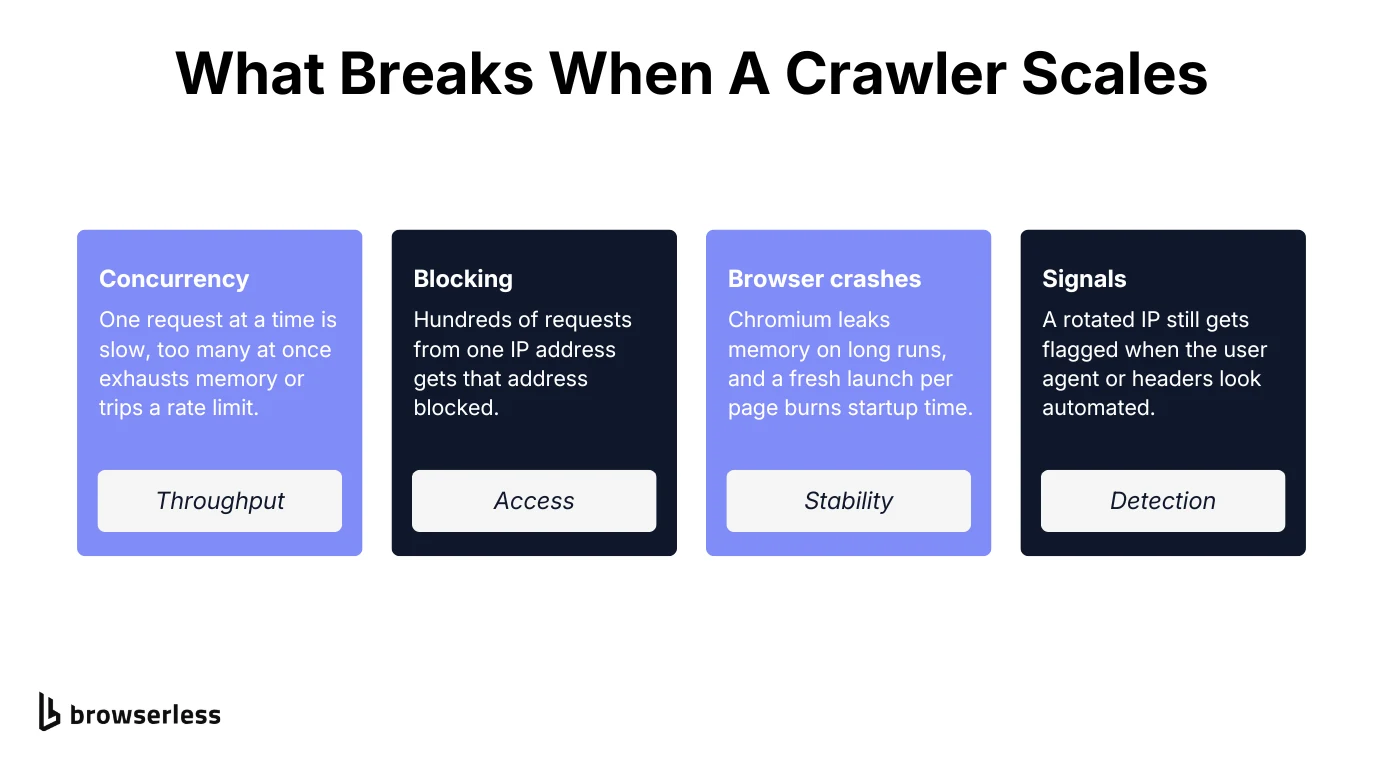
A crawler that works cleanly against one sandbox site behaves differently once it runs against dozens of real ones at once. Four things tend to break first: concurrency against the available system resources, IP blocking, Chromium leaking memory over long runs, and the request signals that give an automated client away even behind a rotated IP.
Two habits absorb most of it. Keep a persistent queue on disk rather than in memory, so a crash resumes where it stopped instead of starting the crawl over, and put robust error handling around every fetch with automatic retries on timeouts and 5xx responses. On Browserless the rest is mostly configuration: proxy=residential and solveCaptchas=true go on the connection URL, stealth is a path change to /stealth rather than a parameter, and the browser lifecycle is handled for you. Concurrency is the exception you still cap in your own code, under the ceiling your plan sets.
If you'd rather not own the loop at all, Browserless's /crawl API takes a start URL with depth, path filters, delay, and retry settings and walks the site for you.
Once the crawl outgrows a single script, see web crawling in Python at scale for the architecture side of this.
Running your headless browser on Browserless instead of locally
Once the Playwright crawler from the last section runs at real volume, keeping a fleet of local Chromium processes alive becomes the expensive part. Browserless runs those browsers for you and hands your script a WebSocket endpoint instead of a local process.
The fetch step is the only part that changes. Connect over Chrome DevTools Protocol (CDP) instead of calling launch(), then reuse the default context, since new_context() starts a fresh one that doesn't inherit proxy, profile, or launch settings. The rest of the crawling code, selectors included, stays the same, and there's no local playwright install step because the browser runs on Browserless:
import asyncio
import os

from playwright.async_api import async_playwright

BROWSERLESS_TOKEN = os.environ["BROWSERLESS_TOKEN"]


async def crawl_js_page(url: str) -> list[dict]:
    async with async_playwright() as p:
        browser = await p.chromium.connect_over_cdp(
            f"wss://production-sfo.browserless.io?token={BROWSERLESS_TOKEN}"
        )

        context = browser.contexts[0]
        page = await context.new_page()

        await page.goto(url)
        await page.locator("div.quote").first.wait_for()

        quotes = await page.locator("div.quote").evaluate_all(
            "els => els.map(el => ({"
            "text: el.querySelector('span.text').innerText,"
            "author: el.querySelector('small.author').innerText"
            "}))",
        )

        await browser.close()
        return quotes


if __name__ == "__main__":
    results = asyncio.run(crawl_js_page("https://quotes.toscrape.com/js/"))
    print(f"Extracted {len(results)} quotes")
Grab a token from the Browserless dashboard and export it as BROWSERLESS_TOKEN before running this.
When a target site's bot detection actually kicks in, swapping in the dedicated stealth route (wss://production-sfo.browserless.io/stealth?token=...) is a one-line change to the connection string rather than a new library to learn. It won't clear every setup, and the docs are clear that fingerprint mitigation is one layer alongside proxies and CAPTCHA solving.
Conclusion
You've now built a Python crawler twice, once with Requests and BeautifulSoup for static pages and once with Playwright for pages that need JavaScript to render, and from here crawlers change in scale rather than in kind. Sign up for free and swap in your own token to try it against your next crawl.
Python Crawler FAQs
What is the difference between an API and a crawler?
An API is an interface a site's owner builds and documents on purpose, meant to hand out data in a structured, permitted way. A crawler works around the absence of one, reading the same HTML a browser would and extracting what it needs from the markup itself. If a site offers an API for the data you want then use it, and reach for a crawler when no API exists or when the one on offer doesn't expose the specific data you're after.
How fast should a Python crawler run?
Run it slower than you can make it go, adding a delay between requests and capping concurrency so you stay well under whatever the site can absorb, and honor any Crawl-delay in robots.txt. A crawler that degrades a site's performance turns a technical question into a legal one.
Can you crawl a site that needs a login?
You can, though the login itself is the hard part rather than the crawling. Requests handles the simple case, posting credentials to a form and leaving session management to a Session object that carries the cookie for you. Anything with multi-factor authentication or a JavaScript challenge needs a real browser to complete the login once, after which you reuse the resulting session state rather than logging in on every run.
What do people build Python crawlers for?
Price monitoring and market research are the common ones, tracking how listings or competitor pages change across web pages over time. Content aggregation is the other big category, pulling articles or listings from many sources into one index. The crawling half is identical in each case, and only the fields you extract and where you store them differ.