
TL;DR
- BeautifulSoup is a Python library that turns a messy HTML document into a nested data structure, or parse tree, you can search and loop over.
- You'll install beautifulsoup4, make the soup, then navigate and search the tree using tag names and attribute values – or CSS selectors if you prefer them.
- Real examples include pulling HTML tables into structured data, as well as trickier cases like scraping Google search results and ecommerce product pages.
- You'll see at exactly which point BeautifulSoup starts needing a fully rendered page before it can do its job.
Introduction
BeautifulSoup is usually the first tool in Python you reach for once downloading a page's HTML is no longer enough, and pulling the data out of that HTML becomes the actual job.
It parses HTML and XML documents into a parse tree you can search with ordinary loops and conditionals instead of regular expressions.
This guide covers what BeautifulSoup is and how it fits into a typical Python scraping setup, then walks through installing it and parsing a page, before getting into searching and extracting data from the resulting tree.
BeautifulSoup also has clear limits. You'll work through two cases that break a plain BeautifulSoup script – scraping Google search results and pulling live prices off ecommerce pages – and see what it takes to get a complete, rendered page in front of it before parsing even starts.
What is BeautifulSoup?
BeautifulSoup is a Python library for parsing HTML and XML documents into a parse tree: a nested data structure that mirrors a page's tag structure, which you can search and loop over with ordinary Python code. Leonard Richardson started the project in 2004, naming it after the Lewis Carroll poem, itself a nod to "tag soup," the term for the poorly structured markup real web pages ship with.
Beautiful Soup 3 was the official release line from 2006 to 2012. Since then, BeautifulSoup 4, distributed as the beautifulsoup4 package on PyPI, has been the version most commonly used, which is licensed under the MIT License.
The previous major release, Beautiful Soup 3, is no longer maintained, so this tutorial describes BS4 functionality.
BeautifulSoup is useful thanks to how forgiving it is.
Hand it a real HTML document instead of a textbook example, one full of unclosed tags and mismatched nesting, and it still builds a usable tree instead of throwing an error. It's a library that commonly saves programmers hours they'd otherwise have to spend writing brittle string matching or regular expression code against raw HTML.
How BeautifulSoup fits into Python web scraping
BeautifulSoup is a parser, not a fetcher. Give it an HTML string, whether that's a fixed snippet or the body of a requests response, and it turns that string into a searchable tree. It never makes a network request on its own, and it never fetches a single one of the URLs it finds inside a page.
You pair BeautifulSoup with something that handles the fetch. In Python web scraping that is almost always the requests library, which downloads a page's source before handing it to BeautifulSoup.
The most common pairing takes the form of requests, Python's standard HTTP library, which downloads a page's source before handing it to BeautifulSoup for parsing:
import requests
from bs4 import BeautifulSoup

url = "https://books.toscrape.com/"
response = requests.get(url)
response.encoding = "utf-8"
soup = BeautifulSoup(response.text, "html.parser")

books = []
for article in soup.select("article.product_pod"):
    title = article.h3.a["title"]
    price = article.select_one("p.price_color").text.strip()
    books.append({"title": title, "price": price})

for book in books[:5]:
    print(book)
This fetch-then-parse pattern works well for static pages, but falls apart the moment a page needs JavaScript or a login to show the content you actually want. More on that shortly.
Installing BeautifulSoup
You can install BeautifulSoup using a single pip command and run it inside a virtual environment so the package and its dependencies stay isolated from your system Python:
python3 -m venv venv
source venv/bin/activate
pip install beautifulsoup4
You'll also need a parser library alongside it.
BeautifulSoup doesn't parse HTML itself; it delegates that job to one of several parser libraries and just gives you a consistent interface on top. Python's built-in html.parser works out of the box and needs no separate install, but installing lxml gets you a noticeably faster parser for larger documents:
pip install beautifulsoup4 lxml
If you're installing outside a virtual environment on a Debian or Ubuntu Linux system, you can use your system package manager instead of pip:
sudo apt-get install python3-bs4
Either route installs the same package. Default to the virtual environment approach as that option keeps a project's dependencies, BeautifulSoup included, separate from whatever else is installed system-wide.
Making the soup: parsing your first HTML document
Once beautifulsoup4 is installed, you import it with this:
from bs4 import BeautifulSoup
A soup object is what you get when you pass an HTML or XML document, plus the parser you want to use, into the BeautifulSoup constructor. You can build one from a plain string:
html_doc = "<html><body><h1>Hello</h1></body></html>"

soup = BeautifulSoup(html_doc, "html.parser")
Or, far more commonly, from the text of a requests response, as shown in the previous section.
Either way, the soup object represents the entire document as a tree-like structure of nested tags, and every tag in that document, from the root <html> tag down to a single <span>, becomes an object you can inspect and search.
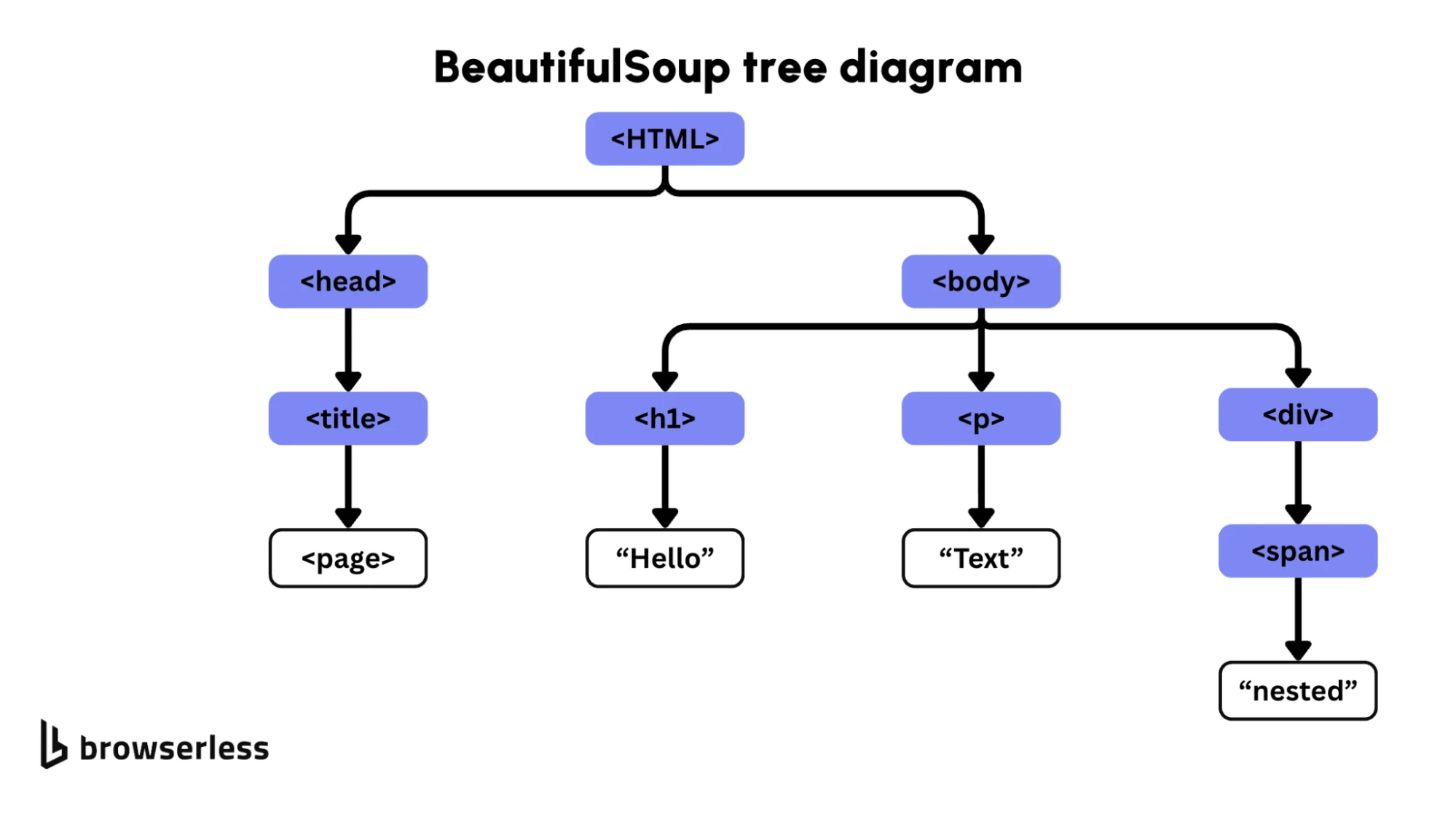
Print the soup object directly, and you'll get back the full HTML document as a formatted string – a useful sanity check the first time you're parsing a new page. Confirm the HTML structure you're expecting is actually in there before you start writing search methods against it.
Navigating the parse tree
BeautifulSoup enables you to move through a parsed document in the same way you'd navigate nested Python objects: with dot notation. soup.head gets you the document's <head> tag, and soup.title gets you its <title> tag directly, without a separate search call:
print(soup.title)
# <title>
# All products | Books to Scrape - Sandbox
# </title>

print(soup.title.text.strip())
# All products | Books to Scrape - Sandbox
Every tag object exposes its own tag name through .name, and its attribute values through dictionary-style access, so soup.a["href"] returns the value of an anchor tag's href attribute directly.
Every tag also carries a reference to its place in the tree.
.parentgets you a tag's parent tag..contentsreturns a list of a tag's direct children, letting you step down through nested elements one level at a time instead of jumping straight to a deeply nested tag..next_siblingand.previous_siblingmove sideways to other tags at the same level, which can be helpful when the data you want sits right next to a tag you can reliably identify, like a label next to a value in a table row.
Dot notation is fast for a document's fixed structure, like grabbing the page title, but when you need every matching tag on a page, or a tag several layers deep with no easy path down to it, you will see its limitations.
Searching the tree with find, find_all, and CSS selectors
find() and find_all() are the two methods you'll use the most. find() returns the first matching tag, and find_all() returns every tag that matches as a Python list you can loop over:
first_price = soup.find("p", class_="price_color")
all_prices = soup.find_all("p", class_="price_color")
for price in all_prices:
    print(price.text.strip())
Both methods accept a tag name as the first argument and can filter further by attributes, like the class_ argument above, or by string matches against a tag's own text.
You can also pass a regular expression object instead of an exact string, which matches any tag whose name or attribute value fits the pattern rather than one fixed value:
import re

headings = soup.find_all(re.compile("^h[1-6]$"))
If you'd rather write CSS selectors than chain search method arguments, select() is the one for you, which returns every tag that matches the selector:
prices = soup.select("p.price_color")

titles = soup.select("article.product_pod h3 a")
Both approaches reach the same tags. find_all() reads more naturally when you're filtering on one or two specific attributes, while select() tends to be quicker to write once a page's HTML structure calls for combining several selectors at once, like a class name nested inside a specific parent tag.
If you'd rather avoid writing a Python parsing script, Browserless's /scrape API takes the same CSS selectors and returns structured JSON directly.
Extracting and cleaning data
Once you've found the tags you want, .text returns a tag's own visible text, stripped of the surrounding markup, while .get("attribute_name") returns a specific attribute's value, like a link's href or an image's src.
Calling .strip() on the result trims the whitespace that HTML formatting tends to leave behind.
You may want to target HTML tables, since they already hold structured data you'd otherwise have to piece together by hand. Looping over table rows and pulling out each cell's text turns a table straight into a list of dictionaries:
table = soup.find("table")
rows = table.find_all("tr")
data = []
for row in rows[1:]:
    cells = row.find_all("td")
    data.append({
        "name": cells[0].text.strip(),
        "value": cells[1].text.strip(),
    })
Watch for HTML entities and other Unicode characters in extracted text, like & or curly quotation marks.
BeautifulSoup decodes standard HTML entities automatically as part of parsing, so .text generally hands you back a clean Unicode string rather than raw entity codes, but it's worth printing a sample of your extracted data for review, especially on pages with non-English source content.
Modifying the parse tree
BeautifulSoup isn't limited to reading a document. You can change a tag's text or attribute values, delete a tag entirely, or insert a new one, then call .prettify() on the soup object to get the modified document back out as a formatted string:
tag = soup.find("h1")
tag.string = "Updated heading"
tag["class"] = "highlighted"
This function is not that relevant if you're running a typical scraping job, such as pulling data out rather than putting a document back together, but it's genuinely useful if you need to clean up a document before re-serializing it – like stripping out script tags and ads before saving a readable copy of an article.
How to scrape a website with BeautifulSoup: a step-by-step example
Here's a complete, runnable Python-BeautifulSoup script that scrapes book titles and prices from a public scraping sandbox site and writes them to a list:
import requests
from bs4 import BeautifulSoup
url = "https://books.toscrape.com/"
response = requests.get(url)
response.encoding = "utf-8"
soup = BeautifulSoup(response.text, "html.parser")
books = []
for article in soup.select("article.product_pod"):
    title = article.h3.a["title"]
    price = article.select_one("p.price_color").text.strip()
    books.append({"title": title, "price": price})
for book in books[:5]:
    print(book)
Run it, and you'll get back a Python list of dictionaries, one per book on the page.
It is what most BeautifulSoup+Python scraping looks like: fetching a page, selecting the repeating element that wraps each item you care about, then pulling the specific fields out of each one.
Scaling this to multiple pages involves the "next page" link, usually with soup.select_one("li.next a"), following it, and repeating the loop until that link stops appearing. You use the same pattern, running it multiple times.
How to scrape Google search results with BeautifulSoup in Python
To scrape Google search results with BeautifulSoup, you will follow a similar process to parsing: fetch the page, then search the tree for the result blocks and pull out each one's title and link. The issue is the fetch you use.
A plain requests.get() against a Google search URL rarely gets you the same HTML a browser sees. Google serves different markup depending on signals in the request, and it blocks or serves a CAPTCHA to traffic it determines to be scripted well before BeautifulSoup ever gets a document to parse.
You can set a realistic user agent, and it'll buy you some time, but it isn't a fix, just a smaller target:
import requests
headers = {"User-Agent": "Mozilla/5.0"}
response = requests.get("https://www.google.com/search?q=beautifulsoup", headers=headers)
# Often returns a CAPTCHA page or incomplete results instead of real search results
The fetch problem, not the parse problem, is why this specific search is so common. What actually solves it is getting a complete, real search results page back before BeautifulSoup starts working, which is what Browserless's /unblock API is built for.
This API renders the page in a real browser and applies bot-detection bypass techniques automatically, then hands back the HTML for BeautifulSoup to parse like any other page:
import requests
from bs4 import BeautifulSoup

token = "YOUR_API_TOKEN_HERE"
endpoint = f"https://production-sfo.browserless.io/unblock?token={token}&proxy=residential"

response = requests.post(
    endpoint,
    headers={"Content-Type": "application/json"},
    json={
        "url": "https://www.google.com/search?q=beautifulsoup",
        "content": True,
        "cookies": False,
        "screenshot": False,
        "browserWSEndpoint": False,
    },
)

html_content = response.json()["content"]
soup = BeautifulSoup(html_content, "html.parser")

# Google changes its result markup often, so target the stable pattern
# (each organic result is an <a> that wraps an <h3> title) rather than a
# brittle class like div.g. Inspect the returned HTML and adjust if needed.
results = soup.select("a:has(h3)")
for result in results:
    title = result.select_one("h3").get_text(strip=True)
    link = result.get("href")
    print(title, link)
Nothing about the parsing changes. The only difference is that BeautifulSoup is now working on a real page actually rendered from HTML, instead of whatever a bare requests call managed to pull down.
Bear in mind that scraping Google search results sits outside Google's terms of service, so treat this as a technique to understand rather than one to run against Google at volume.
Scraping product data and prices with BeautifulSoup
The same fetch problem shows up with product and pricing data.
Ecommerce pages, Amazon product pages included, routinely render prices and stock status with client-side JavaScript after the initial page load, so a requests call captures a page shell without the numbers you're actually there for.
Sites in this space also tend to run active bot detection, since scraped pricing data feeds directly into competitor monitoring and market research.
Browserless's /content API solves the rendering half of that problem: it loads a URL in a real browser, waits for the page to finish rendering, and returns the completed HTML.
The example below needs a click first (to reach the pricing page), so it uses BrowserQL (BQL), but for a page that renders on load, the same flow works with a single /content call.
import requests
from bs4 import BeautifulSoup
url = "https://browserless.io/"
token = "YOUR_API_TOKEN_HERE"
query = """
mutation Retrievehtml($url: String!) {
    goto(url: $url) {
        status
    }
    click(selector: "a[href=\\"/pricing\\"]") {
        time
    }
    waitForSelector(selector: "span.text-5xl.font-bold.tracking-tight.text-foreground") {
        time
    }
    html {
        html
    }
}
"""
endpoint = f"https://production-sfo.browserless.io/chromium/bql?token={token}"
payload = {"query": query, "variables": {"url": url}}
response = requests.post(endpoint, json=payload, headers={"content-type": "application/json"})
html_content = response.json()["data"]["html"]["html"]
soup = BeautifulSoup(html_content, "html.parser")
prices = [tag.text.strip() for tag in soup.select("span.text-5xl.font-bold.tracking-tight.text-foreground")]
print(prices)
Swap the URL and the click target for the product page you're actually after, along with the CSS selectors for its price element, and the same shape works for a product listing or an Amazon search results page.
If BQL is new to you, Browserless's REST APIs quickstart walks through the request shape and authentication in more detail.
The find_all and select calls are exactly the ones from earlier sections. The only thing BQL changed is that the HTML now includes the rendered prices.
Bear in mind that scraping pricing pages, Amazon's included, means working within what the site's terms of service and rate limits allow.
Aggressive, high-volume requests against any single site are a good way to get an IP address blocked regardless of how well-rendered your HTML is, so pace requests and respect what a site's terms allow.
Where BeautifulSoup needs help
BeautifulSoup is, by design, a small, focused library, so, as mentioned, plenty falls outside its scope.
- No JavaScript – it doesn't execute a single line of JavaScript, so any content that appears after a page's own scripts run stays invisible to it.
- No fetching – it has no concept of a network request, a session, a retry, or a proxy; those live in whatever tool fetches the HTML BeautifulSoup parses.
- No bot handling – it can't do anything about a CAPTCHA or bot detection, because by the time BeautifulSoup runs, the fetch has already succeeded or failed.
BeautifulSoup does one job well: parsing HTML and XML into something you can search.
Fetching and parsing are two separate problems with two separate tools, so use requests for simple static pages and Browserless's REST APIs or BrowserQL for anything that needs a real browser first.
Conclusion
BeautifulSoup turns an HTML or XML document into a nested, searchable tree. Once you've installed it and made the soup, most parsing challenges come down to picking the right tag or attribute to search for, or writing the right CSS selector.
The harder problem, more often than not, is getting a complete page in front of it in the first place, whether that's a page rendered with JavaScript or one sitting behind bot detection.
If you're already comfortable with BeautifulSoup and keep running into pages that a plain requests call can't fully load, sign up for a free Browserless account and try the /content or /unblock API against one of your own targets.
Feed the HTML it returns straight into the same BeautifulSoup() call you're already using, and the rest of your script doesn't need to change.
BeautifulSoup FAQs
What's the difference between find() and find_all() in BeautifulSoup?
find() returns the first tag that matches your search, or None if nothing matches. find_all() returns every matching tag as a list.
Use find() when you know a page has exactly one matching element, like a single <h1>, and find_all() for anything that repeats, like every product listing on a page.
Which parser should you use with BeautifulSoup?
html.parserships with Python and needs no extra install, making it a reasonable default for small scripts.lxmlis noticeably faster on large documents and is worth installing separately for anything beyond a quick, one-off scrape.html5libis the slowest of the three but parses HTML the same way a web browser does, so it may operate differently on pages with unusual or badly broken markup.
Can BeautifulSoup scrape Amazon product pages directly?
Not reliably on its own. A plain requests.get() against an Amazon product page frequently returns a page shell without the rendered price and stock data, since Amazon renders parts of the page client-side and applies bot detection to traffic that looks scripted.
Rendering the page first, with something like Browserless's /content API, then handing the resulting HTML to BeautifulSoup, makes that data reachable.
Does BeautifulSoup work with XML files, not just HTML?
Yes. BeautifulSoup parses XML documents the same way it parses HTML, provided you pass it a parser that understands XML, like lxml-xml or xml, instead of html.parser. The rest of the API – find, find_all, select, and tree navigation – works identically across both formats.