
TL;DR
- JavaScript crawling. The process of rendering a page's JavaScript before discovering its links and content, rather than reading only the raw HTML response.
- The build. You'll build a real, working crawler that renders JavaScript with a headless browser instead of a plain HTTP request.
- The cost. Rendering JavaScript at scale costs memory and CPU, so you need good infrastructure, not just reliable code.
- The agents. AI agents hit the same JavaScript rendering wall a human-built crawler does.
Introduction
There are two key, connected questions when it comes to effective JavaScript crawling: does Googlebot see the content your JavaScript generates, and how do you build something that crawls a JavaScript-heavy site yourself? A lot of the web doesn't exist as text you can fetch. It exists as a script that has to run first.
This guide answers both those questions. You'll see how a crawler, whether it's Google's, an AI agent's, or one you write yourself, has to handle JavaScript rendering, then you'll build a working crawler that does exactly that, seeing what it costs to run one in production instead of on a single test page.
What is JavaScript crawling?
JavaScript crawling is the process of discovering and following links on a page after its JavaScript has run, rather than reading only the initial HTML response.
A plain crawler follows <a href> tags it finds in raw HTML. A JavaScript-aware crawler renders the page first, in a real or headless browser, then works from whatever the DOM looks like once that execution finishes.
Even though people sometimes use the terms web crawling and web scraping interchangeably, there are important differences.
- Crawling focuses on discovery: following links across a site to find pages.
- Scraping focuses on extraction: pulling structured data from pages you've found.
The concepts are distinct, but a tool can combine them. For example, Browserless's Crawl API starts from a seed URL, follows discovered links, and scrapes each page it finds.
A JavaScript crawler figures out what pages exist on a JavaScript-heavy site; a scraper reads the ones it's pointed at. You often need both, but they solve different challenges.
Whether or not you need a JavaScript crawler or something simpler depends on whether you want raw HTML or rendered HTML. Raw HTML is what the server sends back on the first request. Rendered HTML is what exists in the DOM after the browser has executed every script on the page.
On a traditional server-rendered site, those two are close to identical. On a single-page application (SPA) built with a JavaScript framework like React, Vue, or Angular, the raw HTML response is often little more than a loading placeholder, and the actual content only exists after rendering.
The same applies to anything else JavaScript injects after the fact: structured data, a noindex tag, or a robots meta tag added client-side are all invisible to a plain HTTP fetch, meaning a crawler working from raw HTML alone can index, or skip, a page based on an incomplete picture.
How Google handles JavaScript crawling
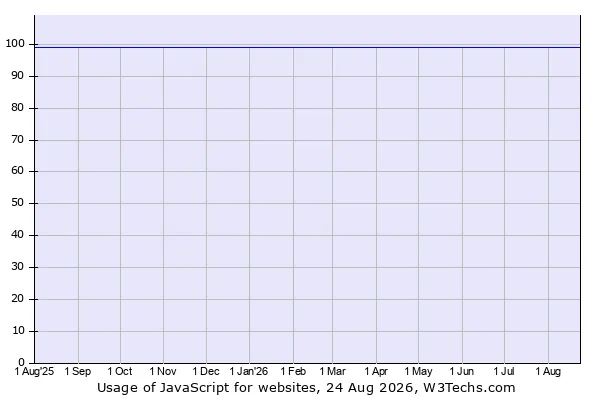
JavaScript is used as the client-side language on 98.9% of all websites
, so crawling it is a challenge many tools face, including Google.
Googlebot's process for JavaScript is a useful reference model: it's the same challenge you're solving, just running at Google's scale.
Google crawls a URL, checks whether rendering is even allowed, queues the page for rendering, then executes the JavaScript in a headless Chromium instance. Once that render finishes, Googlebot re-parses the result for both content and new links to crawl. Crawl, render, index: three distinct phases, rather than one fetch.
Googlebot's renderer requirements aren't specific to the search engine. It's the same category of infrastructure you need if you're building your own crawler: a real browser engine, running headless, executing a page's script before anything downstream can read the result.
Google built it at enormous scale because every JavaScript-heavy page it wants to index requires it.
Your crawler needs a smaller version of the same thing. If you want to see this in action on your own site, Google Search Console's URL Inspection tool shows you the exact rendered HTML, title, and meta description that Googlebot ends up with for a given URL.
Why the render queue creates a lag
Crawling and rendering happen on separate queues, which means a page can be fetched well before its JavaScript actually runs, sometimes by a meaningful stretch rather than an instant handoff.
If you're building a crawler that needs fresh content rather than a stale snapshot, that lag can cause a crawl of a JavaScript page to return content that's out of date relative to what a visitor sees right now.
Why static crawlers miss content on JavaScript-heavy sites
Fetch a server-rendered page with a plain HTTP request, and the response contains everything: text, links, and metadata, all in the initial HTML response. Fetch a client-side-rendered SPA the same way, and you often get a near-empty shell: a <div id="root">, a script tag, and nothing resembling the page a visitor actually sees.
As a result, JavaScript crawling is a distinct challenge. The content a static crawler pulls back is the HTML source code before execution, whereas the content a user sees – and the content a JavaScript-aware crawler needs – only exists after the browser has run the page's scripts and updated the DOM with whatever those scripts fetched.
Skip that step, and you're crawling a placeholder, not the actual site.
How to crawl JavaScript websites with a headless browser
Solve this challenge by adding a real browser to the loop.
A headless browser is a browser engine running without a visible window, controllable entirely through code. Point it at a URL, let it load and execute the page's JavaScript exactly as a normal browser would, wait for the content to settle, then read the rendered DOM instead of the raw response.
Puppeteer, Playwright, and Selenium are the standard tools for this crawling process. All three launch and drive a real browser programmatically: navigate to a page, wait for a specific condition (an element appearing, or network activity going quiet), then hand you the fully rendered HTML to work with.
The rest of this guide builds a small JavaScript website crawler on top of Puppeteer, but the same approach applies with Playwright, as the API shapes are close enough to translate directly.
Build a JavaScript crawler, step by step
Start local: install puppeteer, which includes a compatible browser binary, then launch it on your machine:
import puppeteer from "puppeteer";

const browser = await puppeteer.launch();
const page = await browser.newPage();

await page.goto("https://example.com", {
  waitUntil: "networkidle2",
  timeout: 30_000,
});
When you are ready to move the same crawler to managed browsers, install puppeteer-core and set BROWSERLESS_TOKEN in your environment. The crawling logic stays the same; replace the package import and browser initialization with the following, connecting on the /stealth route so pages render with a less obviously automated fingerprint from the start:
import puppeteer from "puppeteer-core";

const browser = await puppeteer.connect({
  browserWSEndpoint: `wss://production-sfo.browserless.io/stealth?token=${encodeURIComponent(
    process.env.BROWSERLESS_TOKEN,
  )}`,
});
const page = await browser.newPage();

await page.goto("https://example.com", {
  waitUntil: "networkidle2",
  timeout: 30_000,
});
Whichever setup you choose, keep the resulting browser instance open for the crawler loop below, which closes it when the crawl finishes.
waitUntil: 'networkidle2' tells Puppeteer to consider navigation complete when there are no more than two network connections for at least 500 milliseconds.
It can work for SPAs with asynchronous data, but it does not prove that all JavaScript or data loading has finished; when possible, wait for the specific selector, response, or custom event that indicates the content you need is ready.
Read more on tuning this in the waitUntil guide if a page needs a longer or more specific wait condition.
From there, turn a single-page render into an actual crawler by extracting links from the rendered DOM and working through them in a queue:
const visited = new Set();
const queue = ["https://example.com"];
const results = [];

while (queue.length > 0) {
  const url = queue.shift();
  if (visited.has(url)) continue;
  visited.add(url);

  const page = await browser.newPage();
  await page.goto(url, { waitUntil: "networkidle2" });

  const title = await page.title();
  const links = await page.$$eval("a[href]", (anchors) =>
    anchors.map((a) => a.href.split("#")[0]),
  );

  results.push({ url, title });

  for (const link of links) {
    const sameOrigin = new URL(link).origin === new URL(url).origin;
    if (sameOrigin && !visited.has(link) && !queue.includes(link)) {
      queue.push(link);
    }
  }

  await page.close();
}

await browser.close();
console.log(results);
Notice that page.$$eval('a[href]', ...) reads links out of the rendered DOM, not the raw response. On a client-side-rendered page, most of those <a> tags don't exist until after the page has finished executing its JavaScript. A crawler built on a plain HTTP client would not find any of them.
A full-production version needs a few things this example skips for clarity:
- Check
robots.txtbefore queuing a URL. - Add a delay between requests instead of firing them as fast as the loop allows.
- Cap concurrent pages so you're not opening hundreds of browser tabs at once.
- Wrap each page visit in a
try/catch(with afinallythat closes the page) so one failed or timed-out URL doesn't crash the whole crawl. - Wrap the overall crawl in a
try/finallythat callsbrowser.close()so a navigation or parsing error cannot leave the Browserless session open and consume concurrency.
For more Puppeteer scraping patterns beyond crawling, see the Puppeteer web scraping guide.
Handling single-page apps and infinite scroll
In the crawler above, networkidle2 waits for a short period of low network activity, but doesn't guarantee that all automatically loaded content is present.
Depending on the site, wait for a specific selector, network response, custom event, or timeout instead. Content that appears only after a scroll, click, or hover still requires you to script that interaction.
For infinite-scroll pages or content behind a tab or dropdown, you need to script the interaction itself: scroll the page, wait again, then re-read the DOM.
If you skip this step, your JavaScript crawler may work in testing but come back with an incomplete page in production.
When crawling JavaScript sites gets expensive
A plain HTTP request to fetch raw HTML is cheap: one connection, one response, done in milliseconds, with no meaningful CPU or memory footprint.
A headless browser session is not.
Every page you crawl spins up a real browser process, or a tab inside one, that has to allocate memory, execute JavaScript, load every resource the page requests, and hold all of that in memory until you're done reading it.
Headless Chrome consumes material CPU and memory, and total resource use rises with the number of active sessions.
The breaking point depends on page complexity, workload, host capacity, timeouts, and configured concurrency. At higher concurrency, leaked or hung sessions can exhaust available slots or destabilize workers, so measure your workload and tune limits rather than relying on a fixed per-browser memory figure.
You're no longer parsing text; you're running hundreds of browser instances at once, each carrying its own memory footprint and its own risk of a leaked tab that never closes – there's a real chance one hung page crashes the whole batch.
At this point, crawling a JavaScript site is no longer a scripting exercise, instead becoming an infrastructure job: process management, concurrency limits, memory leaks, and monitoring for pages that hang instead of rendering.
Browserless runs that layer for you: the same Chrome processes you'd manage yourself, with concurrency limits, session timeouts, and health checks already configured. You keep the crawl loop, and the BaaS quickstart covers the connection.
When you don't need to render JavaScript at all
Not every crawler needs a browser. If a site is server-rendered, or the data you need shows up in a clean API endpoint you can call directly, a plain HTTP request is faster and cheaper than rendering a full page just to throw most of it away.
Open your browser's network tab on the target site first: if you can spot the actual data request behind the page, call that directly instead of rendering the whole page around it.
Reserve headless rendering for the cases that actually need it, such as:
- Single-page applications.
- Infinite scroll.
- Content behind interactive elements.
- Sites where the underlying API is too obfuscated to call directly.
Rendering everything by default will make your crawler slower and more expensive than the job requires.
JavaScript crawling and bot detection
The same sites that need JavaScript rendering to crawl are often the ones running the most aggressive bot detection.
They use interactive, JavaScript-heavy front ends and modern anti-bot systems, and both are signs of a team actively investing in the site's front end.
A crawler that renders perfectly against a test page can still get blocked when it hits a production site behind Cloudflare or a similar service, as headless browsers carry detectable signals of their own: a navigator.webdriver flag, missing browser plugins, an inconsistent user agent, unusual timing patterns, and a canvas or WebGL fingerprint that doesn't match a real device.
To bypass these anti-bot systems, your crawler needs stealth-mode rendering that patches those signals rather than hoping the target site doesn't check for them. You're not making the crawler invisible, just less obviously automated.
Start with a Browserless stealth route to mitigate fingerprint-level signals, but do not treat stealth as sufficient for every protected site. Instead, use a layered strategy: combine a human-like fingerprint with a high-reputation residential proxy, then use CAPTCHA solving or the Unblock API/BrowserQL when additional defenses remain.
Can AI agents crawl JavaScript-rendered content?
Search engines solved this at scale years ago; now AI agents are running into the same wall. An AI agent browsing the web hits it for the same reason a script does: if a page's content only exists after JavaScript runs, the agent needs something that executes that JavaScript before it can read the page – the same way Googlebot or your own crawler does.
Whether what is making the request is a person, a script, or a large language model doesn't change what the page requires to render.
Browser infrastructure built for AI browsing agents looks a lot like the crawler outlined above, just scaled up: an agent that needs to browse dozens of sites in a session needs the same rendering, concurrency, session management, and monitoring a high-volume crawler needs, just triggered by a model's decisions instead of a fixed queue.
Choose a JavaScript crawling approach
Choose the tool based on how often your crawl runs and how much control you need. Desktop tools like Screaming Frog's SEO Spider are built for one-off audits: point them at a site, get a rendered crawl back, done. They're not built to run continuously or to feed a pipeline.
Library-level tools (Puppeteer, Playwright, Selenium) give you full control and are the right starting point for building your own crawler.
Once that crawler needs to run continuously, at real concurrency, against sites that actively try to block it, you're back to the scaling and bot-detection challenges covered above.
Browserless offers several managed paths:
- BaaS v2. Connects existing Puppeteer or Playwright code over WebSocket.
- BAP (Browser Automation Protocol). Typed TypeScript and Python SDKs built on BrowserQL, Browserless's declarative, stealth-first automation language.
- REST APIs. Handle stateless browser tasks.
Browserless also offers a Cloud-only Crawl API that starts from a seed URL, follows links to a configurable depth, and scrapes each discovered page.
Conclusion
For JavaScript crawling to be successful, something has to execute a page's JavaScript before its real content exists to be crawled. Whether that something is Googlebot's renderer, an AI agent, or the crawler you just built, the mechanics are the same, and so are the failure points: rendering delays, resource cost at scale, bot detection, and the gap between a tidy test page and a messy production site.
If you'd rather skip managing the browser fleet yourself once your crawler grows past a handful of pages, sign up for Browserless's free tier and connect your existing Puppeteer or Playwright script with one line, no local Chrome installs or DevOps required.
JavaScript crawling FAQs
Does Google index JavaScript-rendered content?
Yes. Googlebot renders a page in headless Chromium before indexing, so client-side content can be indexed – but only after the render queue reaches that URL.
What is the difference between JavaScript crawling and JavaScript scraping?
JavaScript crawling discovers URLs on a rendered page. JavaScript scraping extracts structured data from a page you already have. Most pipelines need both.
Can you crawl a JavaScript site without a headless browser?
Sometimes. If the page's data comes from an API endpoint you can call directly, a plain HTTP request is cheaper. Only use a headless browser when the content exists after scripts run.
How much does JavaScript crawling cost compared with static crawling?
A static fetch is one request with a negligible footprint. A rendered crawl needs a browser session per page, so cost scales with concurrency, memory, and monitoring rather than with request count.