
TL;DR
- What it is. Job scraping is the automated collection of each job posting's title, company, location, salary and date posted from job boards, company career pages and the applicant tracking systems (ATS) behind them.
- Target the template. Workday, Greenhouse and other ATS platforms serve thousands of career pages from shared templates, so one scraper built for a template often works across every company that uses it.
- Cheapest source first. Check the network tab for a JSON endpoint, then look for
JobPostingstructured data, and render the page in a real browser only when neither is there.
Introduction
Writing a job scraping script that pulls postings from job boards and company career sites takes an afternoon. Keeping it alive is the real work. The same script that collected 50 clean postings on Monday can return an empty array on Tuesday, and the output won't say whether the listings moved behind JavaScript or the board started rate-limiting your IP.
This guide walks through where job data actually lives, the legal basics of scraping public postings, a step-by-step method with working code, and the tools that hold up as your volume grows.
What is job scraping?
Job scraping is the automated collection of job postings from publicly available data on the web, whether that's job boards, recruitment sites or company career sites. Instead of a page of HTML, you end up with job posting data in structured fields, with the title, company, job location, salary range, job type, posting date and the full job description each kept separate.
Recruiting platforms use that job listing data to power search and matching. Sales teams treat it as a buying signal, since a business posting five data engineering roles is likely investing in data infrastructure. Joined with firmographics like employee count, the same feed surfaces potential clients, new companies entering a market, and the decision makers worth contacting.
Market researchers use it to read the job market, tracking hiring trends across industries and regions, and AI agents now query job data directly. Technically it's web scraping like any other, just aimed at content that happens to be unusually well structured.
How does job scraping work?
A job scraper requests a page, or the API behind it, and pulls the fields it needs out of the response. The catch is that some job boards and ATS pages build their listings with JavaScript after the first response arrives. Hit those with a plain HTTP request and you get an empty container where the postings should be, so you have to render the page in a real browser first. The guide to scraping JavaScript-rendered pages goes deeper on that problem.
Once the content is there, extraction is usually easier than you'd expect. Job pages add schema.org JobPosting markup so Google can show them in its job search results, which means the title, hiring organization, location, salary and date posted are often sitting in the page as clean JSON.
Individual postings on Lever and Ashby embed that markup in the raw HTML, but Greenhouse's hosted job pages don't (as of November 2026), so don't count on it everywhere. Read the markup where it exists and fall back to CSS selectors where it doesn't.
Put request, render where needed, extract, de-duplicate and store on a schedule, and scattered postings become a dataset you can actually query.
Where job listing data comes from
Job postings come from three overlapping kinds of job sites, and which one you target decides how far a single scraper gets you.
Job boards that aggregate job ads
LinkedIn Jobs, Indeed and Glassdoor are job aggregators that collect job ads from thousands of employers, partly by importing jobs from ATS feeds, and pitch themselves as a one-stop shop for job seekers, with Glassdoor adding company reviews and salary reports on top. That data is the product, so expect IP blocks on addresses that send requests too fast, plus CAPTCHAs and other bot-detection checks in front of search results, with login walls on some.
Job board scraping at volume is doable, and Browserless has walkthroughs to scrape Indeed, scrape Glassdoor and scrape LinkedIn job listings, the last one routed through its stealth endpoint with a residential proxy. Even so, boards are still the hardest of the three sources.
Company career sites
A company's own career site only covers one employer, so you won't get much volume from it. What you do get is current postings on pages that are rarely defended as heavily as the big boards.
ATS platforms
At large employers, that career site is usually an applicant tracking system under the hood. Workday, Greenhouse, Lever, Ashby, SmartRecruiters and a handful of others host career pages for thousands of companies on shared templates. Write a scraper for one company on a given ATS and it'll usually work for every other company on that platform.
According to Jobscan's 2026 Applicant Tracking System Usage Report, 97.4% of Fortune 500 companies run a detectable ATS, and Workday alone serves over 40% of them. That concentration turns "scrape a thousand career pages" into "build scrapers for a handful of ATS templates."
Is it legal to scrape job postings?
In the US, scraping publicly available data, meaning content with no login or paywall in front of it, generally doesn't count as hacking under federal law. The case everyone points to is hiQ Labs v. LinkedIn, where the Ninth Circuit held, and reaffirmed on a second review in 2022, that scraping publicly accessible profile data doesn't violate the Computer Fraud and Abuse Act (CFAA), a law aimed at unauthorized computer access, not at reading pages anyone can see.
That ruling isn't a blanket permission, though. hiQ won on the CFAA question but lost a separate claim that it had breached LinkedIn's user agreement, and the two sides settled. A site's terms of service can still land you in contractual trouble even when the scraping itself breaks no anti-hacking law.
Scraping behind a login raises the risk, and so does data collection that touches personal data, like recruiter names and phone numbers on a posting or anything about applicants, which brings privacy obligations that depend on where you operate. None of this is legal advice, so use it as a starting point for your own review.
How to scrape job data step by step
To scrape job data that stays accurate, start with one company's career site, get it right, then work outward to other companies on the same ATS.
- Pick one target. One career site is far easier to debug than a whole board, since you can check every field you extract against the live page.
- Check the network tab before you write any scraping logic. Open developer tools, reload the page and watch the requests as the listings load. If a JSON endpoint is serving the data, call it directly and skip HTML parsing.
- Look for
JobPostingstructured data before writing selectors. When a page has it, it sits in a<script type="application/ld+json">tag and holds up far better than site-specific CSS selectors. - Only render the page when the data isn't in the raw HTML. If listings only show up after JavaScript runs, a raw HTTP client won't see them and you need a real browser.
- Extract, paginate and de-duplicate. Pull title, company, location, salary, employment type and date posted, walk every page of results, and check each new record against what you've already stored.
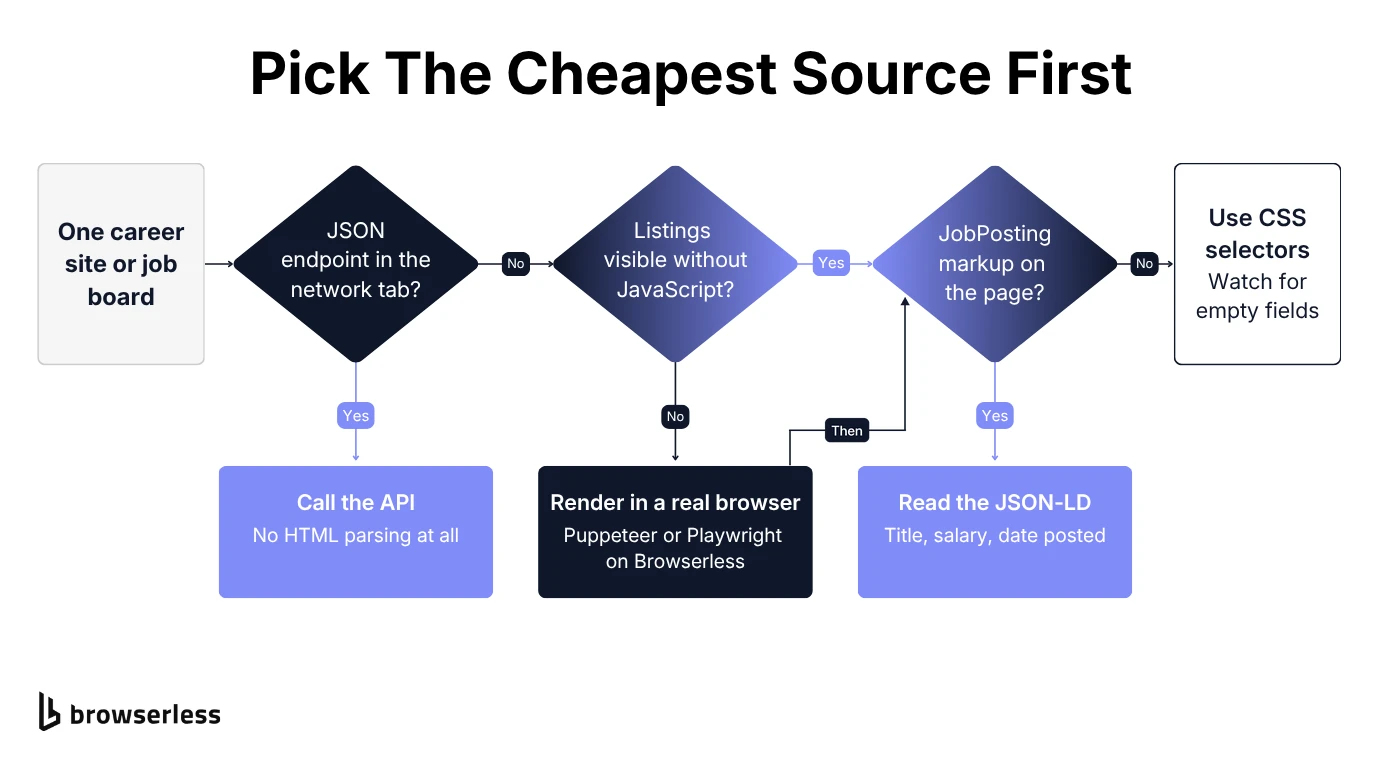
In practice, steps 2 to 4 usually end one of two ways. Either the platform hands you the listings as JSON, or you render what JavaScript hides and read the structured data on each posting. The next two examples cover one of each against real career sites. You'll need Node.js 18 or later, and save each file as .mjs so top-level await works.
Greenhouse is the easy case, with a public Job Board API for every board it hosts. You can pull a company's open roles with a single fetch call, with no browser and no HTML parsing, as in this request against GitLab's board.
const res = await fetch("https://boards-api.greenhouse.io/v1/boards/gitlab/jobs", {
  signal: AbortSignal.timeout(15000),
});
if (!res.ok) throw new Error(`Request failed with HTTP ${res.status}`);

const { jobs } = await res.json();
const listings = jobs.map((job) => ({
  title: job.title,
  location: job.location?.name,
  updatedAt: job.updated_at,
  url: job.absolute_url,
}));

console.log(`${listings.length} open roles`, listings.slice(0, 3));
You get back every open role on the board with its title, location, last-updated date and posting URL. Swap gitlab for another company's board name to pull its jobs instead, and if you need the full job description too, add ?content=true to the URL and content: job.content to the mapping.
Ashby's hosted boards make a good public example of the second path. JavaScript builds the job list after the page loads, so a raw HTTP request comes back with no job links at all, while each individual posting carries JobPosting markup. Ashby also has a public posting API you'd use in production, but this render-and-read pattern is what you'll reuse on in-house career sites with no endpoint.
This script uses Browserless to render the board in a hosted browser and grab the link to every posting. Then it opens the first five postings and reads the structured data from each. Install puppeteer-core and set BROWSERLESS_TOKEN in your environment before running it. Five postings finish well within a session's time limit, but to walk a full board, add &timeout= with a value in milliseconds to the connection URL so the session outlasts the loop.
import puppeteer from "puppeteer-core";

// Any company on Ashby works here, only the slug at the end changes
const BOARD_URL = process.argv[2] ?? "https://jobs.ashbyhq.com/ashby";
const boardPath = new URL(BOARD_URL).pathname.replace(/\/+$/, "");
const jobLinks = `a[href*="${boardPath}/"]`;

const browser = await puppeteer.connect({
  browserWSEndpoint: `wss://production-sfo.browserless.io?token=${process.env.BROWSERLESS_TOKEN}`,
});

try {
  const page = await browser.newPage();

  // The board's job list is built by JavaScript, so wait for the links to render
  await page.goto(BOARD_URL, { waitUntil: "domcontentloaded" });
  await page.waitForSelector(jobLinks, { timeout: 20000 });

  const jobUrls = await page.$$eval(jobLinks, (links) => [
    ...new Set(links.map((a) => a.href)),
  ]);
  console.log(`Found ${jobUrls.length} job links`);

  const jobs = [];
  for (const url of jobUrls.slice(0, 5)) {
    await page.goto(url, { waitUntil: "domcontentloaded" });

    // Read the schema.org JobPosting block before writing any selectors
    const posting = await page.$$eval(
      'script[type="application/ld+json"]',
      (scripts) => {
        for (const s of scripts) {
          try {
            const data = JSON.parse(s.textContent);
            if (data["@type"] === "JobPosting") return data;
          } catch {
            // Skip malformed JSON-LD blocks
          }
        }
        return null;
      },
    );

    if (!posting) {
      console.warn(`No JobPosting data on ${url}`);
      continue;
    }

    const address = [posting.jobLocation].flat()[0]?.address ?? {};
    const pay = posting.baseSalary?.value;

    jobs.push({
      title: posting.title,
      company: posting.hiringOrganization?.name,
      location: address.addressLocality || address.addressCountry || null,
      remote: posting.jobLocationType === "TELECOMMUTE",
      // Salaries come as a range (minValue/maxValue) or a single value
      salary: pay
        ? `${pay.value ?? `${pay.minValue}-${pay.maxValue}`} ${posting.baseSalary.currency}/${pay.unitText}`
        : null,
      employmentType: posting.employmentType,
      datePosted: posting.datePosted,
      url,
    });
  }

  console.log(jobs);
} finally {
  await browser.close();
}
Run it and you'll get 5 postings with title, location and date posted, plus the salary (a band or a single figure) with its pay period, like USD/YEAR, wherever the posting lists one. Now point it at a different board, say node scrape-ashby.mjs https://jobs.ashbyhq.com/ramp, and the same script returns Ramp's roles without a single change, which is the ATS template effect in practice. The try/finally block closes the remote browser even when a wait times out, so a failed run won't leave a session hanging open.
Once either script is running on a schedule, read the site's terms and robots.txt before you scrape at any real volume, and keep your request rate closer to a person browsing than to a crawler hammering every page.
Choosing the best job scraping tool at scale
The best job scraping tool comes down to how much of the pipeline you want to own. Most teams land on one of three approaches, and each comes with a real trade-off.
Build your own job scraping tool
Writing and hosting the scraper yourself gives you the most control and costs the least to start, whether you build on scripts like the two above or start from an open-source library. JobSpy, for example, lets you scrape job boards such as LinkedIn, Indeed and Glassdoor from one platform in Python. The trade-off is constant maintenance, since the browsers and proxies are yours to run too. JobSpy's own README warns that LinkedIn answers bursts of requests with HTTP 429 and Glassdoor rate-limits above about two requests a second, so bigger searches mean maintaining a proxy pool.
Run your scraper on managed browsers
The second option keeps your scraper code and moves the browsers off your machines, which is where Browserless fits. You point the same Puppeteer or Playwright code at hosted headless browsers that render JavaScript-heavy pages in parallel, the way the Ashby script above connects. For boards that block scrapers, you switch to the /stealth route and add proxy=residential to the same connection URL.
Browserless doesn't sell an off-the-shelf jobs dataset. If you'd rather have the data without running scrapers yourself, its managed data delivery service builds and maintains the scripts for you and delivers the job data as JSON, CSV or XLSX, or straight to an S3 bucket.
Buy a pre-aggregated jobs dataset
The third option skips scraping entirely, since you buy job postings a data provider has already collected and structured, trading control and custom fields for speed. That's worth it when the provider's sources and refresh rate already cover what you need and running your own pipeline isn't.
Common job scraping challenges and how to avoid them
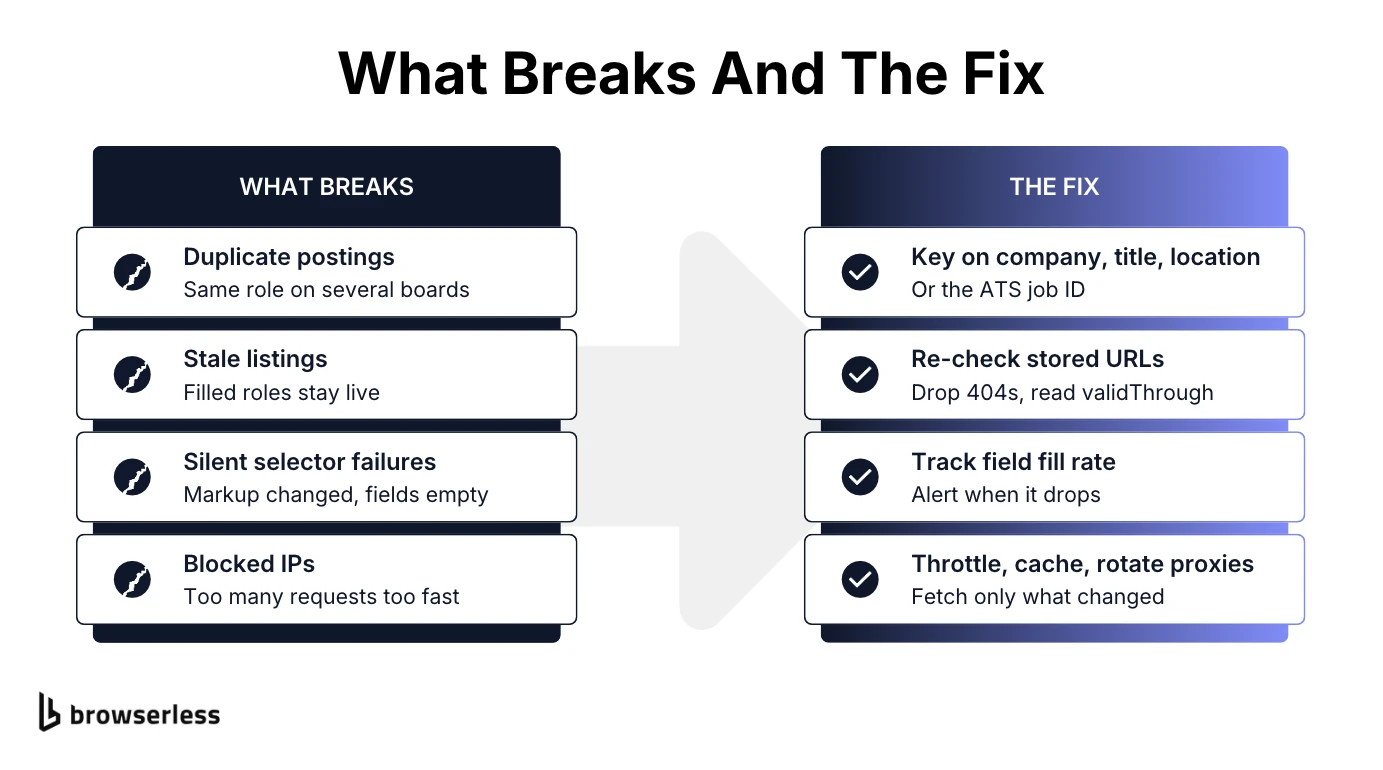
Blocking and rendering failures are at least loud, since the scraper stops. Duplicates, stale listings and selector drift do more damage by staying quiet, and the scraper keeps running while its output slowly stops matching what's actually posted.
Duplicates across multiple job boards
The same job often shows up on the company's career site, two job aggregators and a niche board. De-duplicate across multiple sources, not just within a single run, by matching on the ATS job ID when the URL carries one. Without an ID, treat a match on normalized company name, title and location as a likely duplicate rather than a sure one, since an employer can open several requisitions with the same title in the same city, and compare the description or posting date before you merge.
Stale listings
A position gets filled, the page stays live, and your dataset now overstates how much that company is hiring. Re-check stored URLs on a schedule and drop anything that returns a 404 or redirects to the board's home page. If the JobPosting markup includes validThrough, treat that as the expiry date.
Silent selector failures
Site redesigns change a career page's markup, your selectors stop matching, and the scraper happily keeps running with empty fields, often for days before anyone notices. Track how often each field is filled per run and alert when that rate drops.
Blocked IPs and rate limits
Boards answer a burst of requests from one address with HTTP 429 errors, CAPTCHA pages or an outright block. Throttle your requests, and cache what you've already collected so you're not re-fetching a company's listings more often than they actually change. Add proxy rotation only once a single IP address can't keep up with the volume you need.
Job scraping for AI agents and real-time vacancy aggregation
If an agent is answering "which companies are hiring backend engineers in Austin right now", a weekly export won't cut it, since the data needs to be hours old at most. That pushes teams toward a job scraping API, or a pipeline that can collect job listings from a wide set of sources continuously, the same shift covered in real-time web scraping.
Agent requests also tend to be narrower than a crawl, like one company's openings right now. The Ashby script already handles that case, and you can wrap it as a tool the agent calls with a board URL. An agent connected to the Browserless MCP server can also call its browserless_smartscraper tool on a careers page directly. Serving those calls around the clock means having browsers ready on demand, which is the layer Browserless provides, so you're not patching Chrome versions on your own servers.
Conclusion
Job data loses value by the day, so scraping it is an ongoing pipeline, not a one-off export. The pipeline that lasts reads the cheapest source each platform offers, from a public API to JobPosting markup, only renders the pages that need it, and checks its own output for duplicates and empty fields.
Browserless runs the browsers that pipeline depends on, whether a cron job or an AI agent kicks off each run, so your code can stay focused on the data. To try the examples above, get a Browserless API token.
Job scraping FAQs
What is a job board scraper?
A job board scraper is a script or service that collects listings from job sites like Indeed or LinkedIn and saves each posting as structured fields, such as title, company, location and posting date. Most also handle pagination and IP blocks, since job boards guard their data more closely than company career sites do.
How do you remove duplicate job postings?
A pipeline that removes duplicates matches on the ATS job ID first. Without one, it flags postings with the same normalized company, title and location as likely duplicates and checks the description or posting date before merging, so the same job counts once without collapsing separate openings that share a title.
Do you need a paid tool to scrape job postings?
Not for every source. The Greenhouse example above calls a public API with plain fetch, with no account, API key or credit card required. Paid infrastructure starts to matter once pages need a real browser to render, or a board blocks your IP at the volume you need.
Is JobSpy a legitimate job scraper?
Yes, JobSpy is an actively maintained, MIT-licensed Python library that pulls listings from LinkedIn, Indeed, Glassdoor, ZipRecruiter and other boards through a single function. It returns the combined results as a pandas DataFrame, so the output drops straight into analysis or a CSV export.
What are the top job portals in the US?
LinkedIn Jobs, Indeed, Glassdoor and ZipRecruiter are among the most widely used general job portals in the US, alongside sector boards for fields like healthcare and government work. Each one treats automated tools differently, so don't expect a scraper tuned for one to work on another.
Is job scraping hard to learn?
If you're comfortable writing code, the basics are approachable, and learning to scrape job data from a single career page and pull fields out of its HTML is a weekend project. Job data is a forgiving place to start, since ATS platforms like Greenhouse expose JSON endpoints with no HTML parsing at all. Once that clicks, browser automation with Puppeteer or Playwright is the next thing to learn, for pages that only render with JavaScript.