
TL;DR
- A web crawler starts from a few seed URLs, downloads each page, and queues the links it finds. Here's how to build a web crawler in Python with
requestsand BeautifulSoup, from your first request to a complete script you can run. - Crawler hygiene is what keeps it alive on a real site: a
seenset (or a bloom filter once memory gets tight), robots.txt and crawl-delay checks, and atry/exceptaround every page request. - Know the limits before you scale. Estimate storage and request volume up front, move to Scrapy when you're managing many spiders, and switch to a hosted browser when pages only render with JavaScript.
Introduction
Knowing how to build a web crawler lets you find every page on a site, check for broken links, or collect data from a few hundred pages, all with a short Python script. A crawler simply visits a page, collects its links, and then visits those too. The basic loop takes minutes to write, and getting it to behave on a real site is where most of the effort goes.
You'll build one step by step here with requests and BeautifulSoup, testing each piece against a practice site as you go. The finished version skips duplicate pages, follows robots.txt, waits between requests, and keeps going when something breaks. Along the way you'll also see how to size a crawl before you start it, when Scrapy is worth the switch, and what to do when a page only renders with JavaScript.
What is a web crawler?
A web crawler is a program that starts from a list of known URLs, downloads each page, and follows the links it finds to discover other pages. Google's crawlers (web spiders, if you prefer) are the famous ones. They're how a brand-new page on the internet ends up in search results at all.
People use "crawling" and "web scraping" as if they're the same thing, but they do different jobs. A crawler goes wide and tells you which pages exist. A scraper goes deep and pulls out the bits you care about, a price or a headline, from pages you already know.
Often you'll want both, a crawl to build the URL list and a scrape to pull data out of each page. The scrape vs. crawl comparison goes into where each one wins.
You'd build your own when no tool quite fits the job, say indexing a site for internal search, hunting broken links before a migration, building a dataset for data scientists, or pulling listings from a few popular websites into one feed.
How does web crawling work?
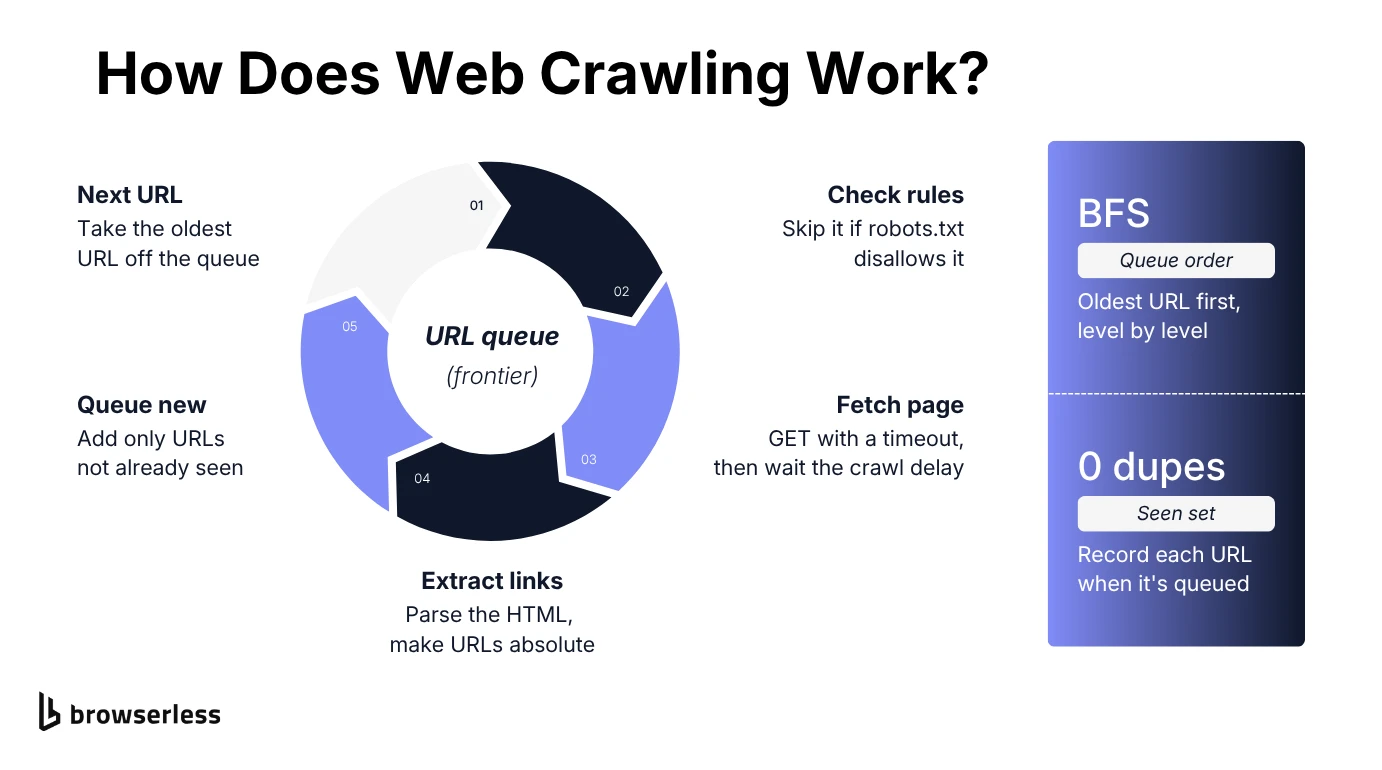
Whether it feeds a search index or checks a 50-page site, every crawling process comes down to the same five parts. You'll build each one below:
- Seed URLs. The known URLs you start from, usually a home page or the URLs in a sitemap.
- Frontier. The queue of URLs still to visit. Its order decides whether you crawl level by level or dive down one branch.
- Seen check. Every URL you've already queued, so you never download the same URL twice or bounce forever between pages that link to each other.
- Politeness rules. robots.txt and a crawl delay so you don't hammer the same host, plus timeouts so a slow one can't stall you.
- Scope. Which links are worth following at all, such as HTML pages on one domain.
What you need before you build your own web crawler
If you have a basic understanding of Python loops, functions and try/except, you're set. You'll also want pip handy for the two libraries in step one.
A little CSS selector knowledge helps too, since that's how you tell the crawler which parts of a page to read. If you can right-click a link and hit Inspect, you know enough.
Step-by-step guide: build a web crawler in Python
Everything below runs against quotes.toscrape.com, a sandbox built for scraping practice, so you can break things without annoying a real site. Steps one and two build a single file, the next three are standalone scripts, and the last combines everything into one crawler.
Install the libraries and fetch your first web page
Install requests for HTTP and BeautifulSoup for parsing:
pip install requests beautifulsoup4
Then create a .py file called crawler.py and make one request. Check it worked before you do anything with the response:
import requests

url = "https://quotes.toscrape.com/"
response = requests.get(url, timeout=30)  # never wait forever on a slow server
response.raise_for_status()

print(f"Fetched {url} -> HTTP {response.status_code}, {len(response.text)} bytes")
The raise_for_status() method turns any 4xx or 5xx status code into an exception. Without it, you'd happily parse a 404 page as if it were real content. Type the following command into your terminal and press Enter:
python crawler.py
If you see a 200 and a byte count, the request side works and you can move on to parsing.
Parse the HTML and extract links from web pages
Now hand the raw HTML to BeautifulSoup and pull out every link. This bit reuses url and response from above, so tack it onto the bottom of crawler.py:
from urllib.parse import urljoin

from bs4 import BeautifulSoup

soup = BeautifulSoup(response.text, "html.parser")
# urljoin turns relative hrefs like "/page/2/" into full, fetchable URLs
links = [urljoin(url, a["href"]) for a in soup.select("a[href]")]

print(f"Found {len(links)} links on {url}")
for link in links[:5]:
    print(f"  {link}")
soup.select("a[href]") grabs every anchor that has an href, and urljoin turns relative paths like /page/2/ into full URLs. Leave urljoin out and you'll end up queuing half-URLs that go nowhere.
Run crawler.py again and you should get 55 links from the home page, a mix of pagination, tag pages and internal links like /login. Python's built-in html.parser, which BeautifulSoup uses here, is fairly forgiving with bad HTML like unclosed tags, so one messy page won't take the crawl down.
Queue new URLs with a breadth-first search
At this point crawler.py reads exactly one page, which makes it a scraper. To turn it into a crawler, feed the links you just found back into a queue and keep going.
The script below stands on its own, so either replace crawler.py with it or save it as a new file. It stops after 10 pages:
from collections import deque
from urllib.parse import urljoin, urlparse

import requests
from bs4 import BeautifulSoup

START = "https://quotes.toscrape.com/"
MAX_PAGES = 10


def same_domain(link, root):
    return urlparse(link).netloc == urlparse(root).netloc


queue = deque([START])  # FIFO: the oldest discovered URL is crawled next
seen = {START}  # every URL ever queued, so nothing gets queued twice
crawled = 0

while queue and crawled < MAX_PAGES:
    page_url = queue.popleft()
    page_response = requests.get(page_url, timeout=30)
    crawled += 1

    page_soup = BeautifulSoup(page_response.text, "html.parser")
    for anchor in page_soup.select("a[href]"):
        link = urljoin(page_url, anchor["href"])
        if same_domain(link, START) and link not in seen:
            seen.add(link)
            queue.append(link)

print(f"Crawled {crawled} pages, {len(queue)} unique URLs still queued")
deque gives you a first-in, first-out queue, so the next URL you crawl is always the oldest one you've found. That's breadth-first search. It works through the site one level at a time instead of disappearing down a single branch.
The seen set is the easy part to get subtly wrong. Mark each URL as seen the moment you queue it, not when you crawl it. Check only against crawled pages and the queue fills up with the same page, queued again and again. In testing, that version had 113 entries queued after 10 pages, against 39 unique URLs here.
same_domain keeps you on the same website, and MAX_PAGES is a hard stop. Without it, a well-linked site will happily keep you crawling until your laptop fan gives up.
Avoid duplicate URLs with a bloom filter
Sets are great, right up until they aren't. In testing, a seen set holding a million URLs ate about 124MB. A bloom filter answers the same "have I seen this URL?" question in a fraction of that memory, in exchange for a small, tunable chance of false positives. Some crawlers, including the Internet Archive's early one, have made exactly that trade.
Here's a minimal one you can implement in pure Python, with a little demo loop underneath. The last URL in the demo is a repeat, so you can watch the filter catch it:
import hashlib


class BloomFilter:
    """A compact bit-array bloom filter for a URL 'seen?' check."""

    def __init__(self, size=100_000, num_hashes=4):
        self.size = size
        self.num_hashes = num_hashes
        self.bits = bytearray(size // 8 + 1)

    def _positions(self, item):
        # Salting one hash with the seed simulates num_hashes independent hashes
        for seed in range(self.num_hashes):
            digest = hashlib.md5(f"{seed}:{item}".encode()).hexdigest()
            yield int(digest, 16) % self.size

    def add(self, item):
        for index in self._positions(item):
            byte, bit = divmod(index, 8)
            self.bits[byte] |= 1 << bit

    def might_contain(self, item):
        for index in self._positions(item):
            byte, bit = divmod(index, 8)
            if not self.bits[byte] & (1 << bit):
                return False  # one unset bit proves the URL was never added
        return True


seen_urls = BloomFilter()

candidates = [
    "https://quotes.toscrape.com/",
    "https://quotes.toscrape.com/page/2/",
    "https://quotes.toscrape.com/",
]

for candidate in candidates:
    if seen_urls.might_contain(candidate):
        print(f"Skipping likely-duplicate URL: {candidate}")
        continue
    seen_urls.add(candidate)
    print(f"Queuing new URL: {candidate}")
Each URL flips a few bits instead of being stored in full. The filter can occasionally claim it's seen a URL it hasn't (a false positive), but it never forgets one it has. You'll never re-crawl a duplicate, and the worst case is skipping the odd new page.
Size the array for your crawl. With the defaults above (100,000 bits, four hashes), false positives sit around 1% at 10,000 URLs and climb past 9% at 20,000. To drop it into the crawler, create seen = BloomFilter(), call seen.add(START), and swap link not in seen for not seen.might_contain(link).
Honestly, though, keep the plain set until its memory starts to hurt. It's simpler, and it's exact.
Handle errors and rate limits like a real crawler
Ignore robots.txt or hammer a site as fast as you can and there's a fair chance your IP gets blocked. Read the site's terms of service before you start, too, and see whether web scraping is legal for the wider picture.
The snippet below reads the site's robots.txt and crawl delay with Python's built-in RobotFileParser, then fetches two pages politely, with a timeout, a try/except around each request and a pause in between:
import time
from urllib.robotparser import RobotFileParser

import requests

USER_AGENT = "MyCrawler/1.0"  # identify your crawler honestly
TARGETS = ["https://quotes.toscrape.com/", "https://quotes.toscrape.com/page/2/"]

robots = RobotFileParser()
robots.set_url("https://quotes.toscrape.com/robots.txt")
robots.read()

crawl_delay = robots.crawl_delay(USER_AGENT) or 1  # fall back to 1s if unset

for target_url in TARGETS:
    if not robots.can_fetch(USER_AGENT, target_url):
        print(f"robots.txt disallows {target_url}, skipping")
        continue

    try:
        target_response = requests.get(
            target_url, headers={"User-Agent": USER_AGENT}, timeout=30
        )
        target_response.raise_for_status()
    except requests.exceptions.RequestException as error:
        print(f"Request failed for {target_url}: {error}")
        continue

    print(f"{target_url} -> HTTP {target_response.status_code}")
    time.sleep(crawl_delay)
can_fetch checks each URL against the rules robots.txt sets for your user agent, and crawl_delay picks up a whole-second Crawl-delay if the site sets one. quotes.toscrape.com doesn't have a robots.txt (you get a 404), and RobotFileParser reads that as "fetch whatever you like", so the snippet falls back to one second.
The try/except handles the network edge cases. A timeout, a dropped connection or an error status gets logged and skipped while the crawl carries on.
Don't just log failures, though, read them. A run of 429s means you're going too fast. A run of 403s on pages that loaded fine earlier can mean the site has started treating you as a bot.
Combine the steps and save the results to a JSON file
Each snippet so far solves one problem on its own. Here's the whole thing in one loop, with the breadth-first queue, duplicate detection through the seen set, robots.txt checks, the crawl delay and error handling. It saves each page's URL, status and title (or the error) to a JSON file at the end:
import json
import time
from collections import deque
from urllib.parse import urldefrag, urljoin, urlparse
from urllib.robotparser import RobotFileParser

import requests
from bs4 import BeautifulSoup

START = "https://quotes.toscrape.com/"
START_HOST = urlparse(START).netloc
MAX_PAGES = 20
USER_AGENT = "MyCrawler/1.0"

robots = RobotFileParser()
robots.set_url(urljoin(START, "/robots.txt"))
robots.read()
crawl_delay = robots.crawl_delay(USER_AGENT) or 1

session = requests.Session()  # reuses one connection to the host
session.headers["User-Agent"] = USER_AGENT

queue = deque([START])
seen = {START}
records = []  # one dict per page, written to JSON at the end

while queue and len(records) < MAX_PAGES:
    page_url = queue.popleft()
    if not robots.can_fetch(USER_AGENT, page_url):
        print(f"robots.txt disallows {page_url}, skipping")
        continue

    try:
        response = session.get(page_url, timeout=30)
        response.raise_for_status()
    except requests.exceptions.RequestException as error:
        print(f"Request failed for {page_url}: {error}")
        records.append({"url": page_url, "error": str(error)})
        continue
    finally:
        time.sleep(crawl_delay)  # always wait, even after a failure

    if "text/html" not in response.headers.get("Content-Type", ""):
        continue  # skip images, PDFs and other non-HTML responses

    soup = BeautifulSoup(response.text, "html.parser")
    title = soup.title.get_text(strip=True) if soup.title else ""
    records.append(
        {"url": page_url, "status": response.status_code, "title": title}
    )

    for anchor in soup.select("a[href]"):
        # Drop "#section" fragments so /page/2/ and /page/2/#top dedupe together
        link, _fragment = urldefrag(urljoin(page_url, anchor["href"]))
        if urlparse(link).netloc == START_HOST and link not in seen:
            seen.add(link)  # mark it when queued, not when crawled
            queue.append(link)

with open("crawl_results.json", "w", encoding="utf-8") as output_file:
    json.dump(records, output_file, indent=2)

print(f"Saved {len(records)} pages, {len(queue)} URLs still queued")
A few things here are new. urldefrag strips #fragments, so /page/2/ and /page/2/#top count as the same URL. The Content-Type check stops images and PDFs from being parsed, and the finally block means you still wait out the delay after a request fails.
requests.Session also keeps the connection to the host open between requests. On a test run, it crawled 20 pages in under 30 seconds, most of it politely waiting, and left 97 URLs queued. For more detailed information from each page, add selectors next to the title extraction.
If your records look more like a table, csv.DictWriter writes a CSV instead. Once you want to query results, or save the crawl state (the queue and the seen set) so a stopped crawl can pick up where it left off, it's time for a database like SQLite.
Back-of-the-envelope estimation and speed optimization
Do the math before you crawl anything big. It's the cheapest bug fix you'll ever make.
Start with how many pages the site actually has. The sitemap, often at /sitemap.xml or listed on a Sitemap: line in robots.txt, can give you a rough count before you send a single crawl request. Browserless's cloud-only /map API gives you a head start too, returning a deduplicated list of URLs from the sitemap and on-page links in one request.
For storage, multiply pages by average page size. At 500KB a page, a million pages is about 500GB.
Time is the number that bites. At one request per second, a single worker makes 86,400 requests a day, so a million pages from one host takes just under 12 days. You don't want to find that out on day three.
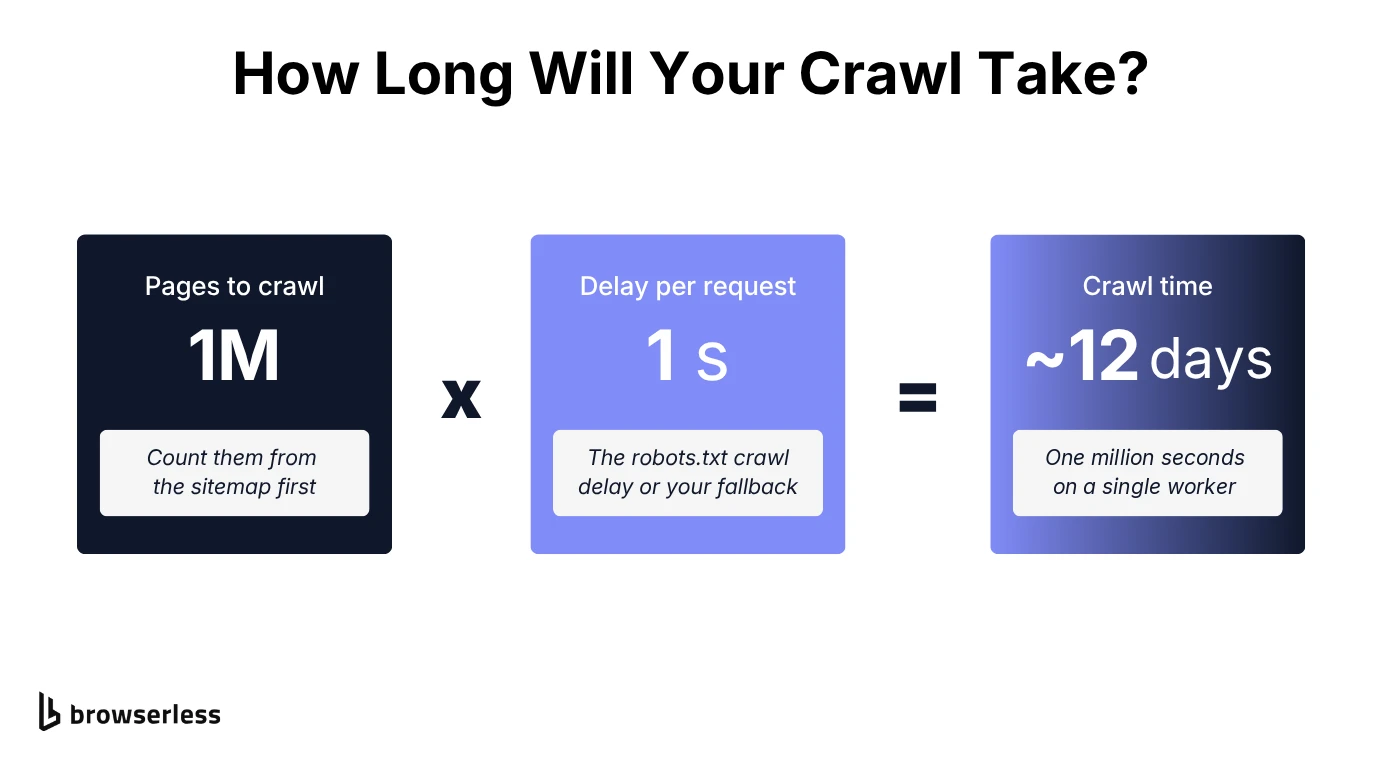
If the numbers blow your budget, a faster single-threaded loop won't save you. Split the URL space across worker processes or multiple machines, give each one its own slice of the domains, and forward each discovered URL to the worker that owns its host. Per-host delays still apply, though, so extra workers only really help when the crawl covers lots of domains.
On those multi-domain crawls, DNS caching is a cheap speed optimization to try first. Python leaves lookups to the OS resolver, so an in-process or local DNS cache removes the repeats before you spend anything on hardware.
When to reach for a Scrapy project instead
For a focused crawl, start with the script. One dependency-light file is easy to read and just as easy to throw away. Scrapy starts paying for itself once you're juggling dozens of spiders, want built-in retries and AutoThrottle, or need a pipeline to clean and store what you extract.
scrapy startproject sets the project up, and scrapy crawl quotes runs the spider named quotes. In return you get more moving parts, from settings files to a class hierarchy you'll learn before writing your first selector.
When a hand-rolled web crawler hits its limits
Your crawler will handle static sites just fine. Point it at quotes.toscrape.com/js/, the JavaScript version of the same sandbox, though, and you still get a 200 back with zero quote elements in the HTML. The quotes sit in a script that requests never runs.
Bot detection is the other wall, and slowing down won't get you past it. A requests client doesn't run JavaScript or carry a browser's fingerprint, so a site that's paying attention can spot it and block the IP addresses it comes from, no matter how politely you crawl.
Both problems live in the browser layer, and Browserless runs that layer for you. /content covers JavaScript rendering, and for sites that actively check for bots there are stealth routes, the /unblock API and CAPTCHA solving.
The quickest way to try it is to keep your crawler and swap out one function. The /content API loads a page in a real browser and returns the rendered HTML content once it loads (add waitForSelector for content that arrives late). You'll need a Browserless API token in the BROWSERLESS_TOKEN environment variable:
import os

import requests
from bs4 import BeautifulSoup

TOKEN = os.environ["BROWSERLESS_TOKEN"]
CONTENT_URL = f"https://production-sfo.browserless.io/content?token={TOKEN}"


def fetch_rendered(url):
    """Return (status, html) for a page after its JavaScript has run."""
    response = requests.post(CONTENT_URL, json={"url": url}, timeout=60)
    response.raise_for_status()
    # Browserless may answer 200; the target site's status is in this header
    status = int(response.headers.get("X-Response-Code", response.status_code))
    return status, response.text


target = "https://quotes.toscrape.com/js/"
plain_html = requests.get(target, timeout=30).text
status, rendered_html = fetch_rendered(target)

plain_quotes = BeautifulSoup(plain_html, "html.parser").select("div.quote")
rendered_quotes = BeautifulSoup(rendered_html, "html.parser").select("div.quote")
print(f"Plain requests:       {len(plain_quotes)} quotes")
print(f"Browserless /content: {len(rendered_quotes)} quotes (HTTP {status})")
The plain request finds 0 quote elements, and /content finds all 10. Watch the X-Response-Code header, though. Browserless can reply with its own 200 even when the site sent a 404, so the real status code lives there.
To use it in the combined crawler, point START at the /js/ page and replace the session.get() and raise_for_status() lines with status, html = fetch_rendered(page_url). Swap the Content-Type check for if status >= 400: continue, then use html and status wherever the loop read response.text and response.status_code. Run it and the crawler renders /js/page/2/ and its 10 quotes too.
If you'd rather not run the loop at all, the Crawl API (beta, cloud-only) takes the whole job with one POST /crawl request you poll for results.
The knobs from this guide become parameters. MAX_PAGES becomes limit, crawl_delay becomes delay (in milliseconds), and same_domain is the default allowExternalLinks: false. The docs don't say /crawl checks robots.txt, so check it yourself first.
Web crawling in Python covers scale and anti-bot handling, and the Python crawler guide runs this loop in a headless browser.
Conclusion
Build your crawler in the same order this article did. Get one page working, then the queue, then deduplication, then politeness and error handling, and only then worry about scale. Each layer fixes something the one before it would trip over on a real site, so skipping ahead just means debugging several problems at once.
Past static pages, a hand-rolled crawler stops being mostly your code. Rendering JavaScript and staying unblocked come down to the browser underneath, which Browserless runs as a hosted service your Python crawler can connect to. When you get there, sign up for a Browserless account.
How to build a web crawler FAQs
How do you make your own web crawler?
Start with a queue holding one seed URL. Take a URL off the queue, fetch the page, extract its links, and queue any you haven't seen before, then repeat until you hit a page limit. In Python, requests and BeautifulSoup handle the fetching and parsing, and a seen set, a robots.txt check and a crawl delay turn that loop into a crawler you can safely run on a real site.
How do I design a web crawler system?
Start by splitting the frontier by host, so each worker owns its own hosts and can respect their crawl delays without checking in with the others. Split the seen check by host as well, so each worker tracks only its own URLs and forwards the rest, and add URL prioritization so important pages go first, for example URLs with a recent lastmod in the sitemap. All this reuses the parts you built here, just spread across multiple servers.
Is it legal to build a web crawler?
Writing crawler code is fine. The legal questions come from what you crawl and how you crawl it. Read the site's terms of service, respect robots.txt, keep your request rate polite, and be careful with personal or copyrighted data. Rules differ by country, so get proper advice before you crawl at scale.